
spring boot 中使用spring security阶段小结
1 项目结构图
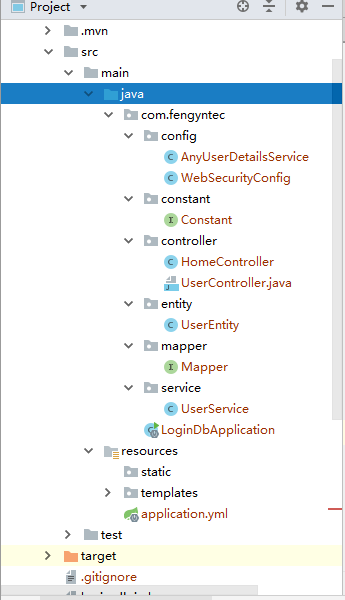
2 AnyUserDetailsService
package com.fengyntec.config;

import com.fengyntec.entity.UserEntity;

import com.fengyntec.service.UserService;

import org.springframework.beans.factory.annotation.Autowired;

import org.springframework.security.core.authority.SimpleGrantedAuthority;

import org.springframework.security.core.userdetails.User;

import org.springframework.security.core.userdetails.UserDetails;

import org.springframework.security.core.userdetails.UserDetailsService;

import org.springframework.security.core.userdetails.UsernameNotFoundException;

import org.springframework.stereotype.Service;

import java.util.ArrayList;

import java.util.List;

@Service

public class AnyUserDetailsService implements UserDetailsService {

    @Autowired

    private UserService userService;

    @Override

    public UserDetails loadUserByUsername(String username) throws UsernameNotFoundException {

        UserEntity userEntity = userService.getByUsername(username);

        if (userEntity == null){

            System.out.println("用户不存在");

        }

        List<SimpleGrantedAuthority> simpleGrantedAuthorities = createAuthorities(userEntity.getRoles());

        UserDetails userDetails = new User(userEntity.getUsername(),userEntity.getPassword(),simpleGrantedAuthorities);

        return userDetails;

    }

    private List<SimpleGrantedAuthority> createAuthorities(String roleStr){

        String[] roles = roleStr.split(",");

        List<SimpleGrantedAuthority> simpleGrantedAuthorities = new ArrayList<>();

        for (String role : roles) {

            simpleGrantedAuthorities.add(new SimpleGrantedAuthority(role));

        }

        return simpleGrantedAuthorities;

    }

}
3 WebSecurityConfig
package com.fengyntec.config;

import org.springframework.beans.factory.annotation.Autowired;

import org.springframework.context.annotation.Configuration;

import org.springframework.security.config.annotation.authentication.builders.AuthenticationManagerBuilder;

import org.springframework.security.config.annotation.web.builders.HttpSecurity;

import org.springframework.security.config.annotation.web.configuration.EnableWebSecurity;

import org.springframework.security.config.annotation.web.configuration.WebSecurityConfigurerAdapter;

import org.springframework.security.crypto.bcrypt.BCryptPasswordEncoder;

@EnableWebSecurity

@Configuration

public class WebSecurityConfig extends WebSecurityConfigurerAdapter {

    @Autowired

    private AnyUserDetailsService anyUserDetailsService;

    @Override

    protected void configure(HttpSecurity http) throws Exception {

        http

                .csrf().disable()

                .authorizeRequests()

                .antMatchers("/user/**").hasRole("USER")

                .antMatchers("/admin/**").hasRole("ADMIN")

                .anyRequest().authenticated()

                .and()

                .formLogin()

                .loginPage("/login.html")

                .permitAll()

               ;

    }

    /**

     * 添加 UserDetailsService, 实现自定义登录校验

     */

    @Override

    protected void configure(AuthenticationManagerBuilder builder) throws Exception{

        builder.userDetailsService(anyUserDetailsService).passwordEncoder(new BCryptPasswordEncoder());

    }

}
4 Constant
package com.fengyntec.constant;

public interface Constant {

    public static String ROLE_USER = "ROLE_USER";

}
5 HomeController
package com.fengyntec.controller;

import com.fengyntec.service.UserService;

import com.google.gson.Gson;

import org.springframework.beans.factory.annotation.Autowired;

import org.springframework.security.access.annotation.Secured;

import org.springframework.security.authentication.UsernamePasswordAuthenticationToken;

import org.springframework.security.config.annotation.method.configuration.EnableGlobalMethodSecurity;

import org.springframework.security.core.Authentication;

import org.springframework.security.core.GrantedAuthority;

import org.springframework.security.core.authority.SimpleGrantedAuthority;

import org.springframework.security.core.context.SecurityContextHolder;

import org.springframework.web.bind.annotation.GetMapping;

import org.springframework.web.bind.annotation.RestController;

import java.util.ArrayList;

import java.util.List;

@RestController

@EnableGlobalMethodSecurity(securedEnabled = true)

public class HomeController {

    @Autowired

    private UserService userService;

    @GetMapping("/hell")

    public String hello(SecurityContextHolder holder){

        System.out.println(holder.toString());

        return new Gson().toJson(holder);

    }

    @GetMapping("admin")

    public String admin(){

        return "admin";

    }

    @GetMapping("/vip")

    @Secured("ROLE_VIP")

    public String vip(){

        return "仅限于vip用户查看";

    }

    @GetMapping("/openVip")

    public boolean uodateVip(){

        Authentication auth = SecurityContextHolder.getContext().getAuthentication();

        List<GrantedAuthority> updateAuthority = new ArrayList<>(auth.getAuthorities());

        updateAuthority.add(new SimpleGrantedAuthority("ROLE_VIP"));

        Authentication newAuth = new UsernamePasswordAuthenticationToken(auth.getPrincipal(),auth.getCredentials(),updateAuthority);

        SecurityContextHolder.getContext().setAuthentication(newAuth);

        return true;

    }

}
6 UserEntity
package com.fengyntec.entity;

import lombok.Data;

@Data

public class UserEntity {

    private Long id;

    /**

     * 账号

     */

    private String username;

    /**

     * 密码

     */

    private String password;

    /**

     * 昵称

     */

    private String nickname;

    /**

     * 权限

     */

    private String roles;

}
7 Mapper
package com.fengyntec.mapper;

import com.fengyntec.entity.UserEntity;

import org.apache.ibatis.annotations.Insert;

import org.apache.ibatis.annotations.Param;

import org.apache.ibatis.annotations.Select;

import org.springframework.stereotype.Component;

@org.apache.ibatis.annotations.Mapper

@Component

public interface Mapper {

    @Insert("insert into user(username, password, nickname, roles) values(#{username}, #{password}, #{nickname}, #{roles})")

    int insert(UserEntity userEntity);

    @Select("select * from user where username = #{username}")

    UserEntity selectByUsername(@Param("username") String username);

}
8 UserService
package com.fengyntec.service;

import com.fengyntec.constant.Constant;

import com.fengyntec.entity.UserEntity;

import com.fengyntec.mapper.Mapper;

import org.springframework.beans.factory.annotation.Autowired;

import org.springframework.context.annotation.Primary;

@org.springframework.stereotype.Service

@Primary

public class UserService {

    @Autowired

    private Mapper mapper;

    public boolean insert(UserEntity userEntity){

        String username = userEntity.getUsername();

        if (exist(username)){

            return false;

        }

        userEntity.setRoles(Constant.ROLE_USER);

        int result = mapper.insert(userEntity);

        return result == 1 ;

    }

    private boolean exist(String username){

        UserEntity userEntity = mapper.selectByUsername(username);

        return userEntity != null;

    }

    public UserEntity getByUsername(String username) {

        return mapper.selectByUsername(username);

    }

}
spring boot 中使用spring security阶段小结的更多相关文章
- Spring Boot中使用 Spring Security 构建权限系统
Spring Security是一个能够为基于Spring的企业应用系统提供声明式的安全访问控制解决方案的安全框架.它提供了一组可以在Spring应用上下文中配置的Bean,为应用系统提供声明式的安全 ...
- Spring Boot中使用Spring Security进行安全控制
我们在编写Web应用时,经常需要对页面做一些安全控制,比如:对于没有访问权限的用户需要转到登录表单页面.要实现访问控制的方法多种多样,可以通过Aop.拦截器实现,也可以通过框架实现(如:Apache ...
- 【swagger】1.swagger提供开发者文档--简单集成到spring boot中【spring mvc】【spring boot】
swagger提供开发者文档 ======================================================== 作用:想使用swagger的同学,一定是想用它来做前后台 ...
- 在Spring Boot中使用Spring Security实现权限控制
丢代码地址 https://gitee.com/a247292980/spring-security 再丢pom.xml <properties> <project.build.so ...
- Spring Boot中集成Spring Security 专题
check to see if spring security is applied that the appropriate resources are permitted: @Configurat ...
- Spring Boot 中使用 Spring Security, OAuth2 跨域问题 (自己挖的坑)
使用 Spring Boot 开发 API 使用 Spring Security + OAuth2 + JWT 鉴权,已经在 Controller 配置允许跨域: @RestController @C ...
- Spring Boot 中应用Spring data mongdb
摘要 本文主要简单介绍下如何在Spring Boot 项目中使用Spring data mongdb.没有深入探究,仅供入门参考. 文末有代码链接 准备 安装mongodb 需要连接mongodb,所 ...
- spring boot中扩展spring mvc 源码分析
首先,确认你是对spring boot的自动配置相关机制是有了解的,如果不了解请看我spring boot相关的源码分析. 通常的使用方法是继承自org.springframework.boot.au ...
- spring-boot-starter-security Spring Boot中集成Spring Security
spring security是springboot支持的权限控制系统. security.basic.authorize-mode 要使用权限控制模式. security.basic.enabled ...
随机推荐
- flask 源码专题(三):请求上下文和应用上下文入栈与出栈
1.请求上下文和应用上下文入栈 # 将ctx入栈,但是内部也将应用上下文入栈 ctx.push() def push(self): # 获取到的 top == ctx top = _request_c ...
- 服务器创建tensorflow环境,nni自动调参记录
一.anaconda安装记录 1.1 下载安装脚本:wget https://repo.anaconda.com/archive/Anaconda3-5.2.0-Linux-x86_64.sh 1.2 ...
- ArcGIS 10.2安装及卸载教程
卸载 在控制面板中找到程序->卸载程序 找到ArcGIS的相关软件 这里以ArcGIS 10.2 Destop为例,选中,然后点击卸载,会出现如下界面 选择Remove,然后根据提示进行操作,即 ...
- java面试题jvm字节码的加载与卸载
虚拟机把描述类的数据从class文件加载到内存,并对数据进行校验,转换分析和初始化,最终形成可以被虚拟节直接使用的JAVA类型,这就是虚拟机的类加载机制. 类从被加载到虚拟机内存到卸载出内存的生命周期 ...
- P4017 最大食物链计数 (拓扑排序)
看到拓扑排序感觉非常遥远的复杂,不喜欢图.看了拓扑排序的原理,很像广搜. 以本题样例为例: 了解一下 出度 和 入度 5的出度为3 入度为 0 ,3的出度为2 入度为2…… for循环 找到秃头 5 ...
- vue :没有全局变量的计数器
created: created () { let num = null this.mFun(num) }, methods: methods:{ mFun(m){ if (m === null) { ...
- STL源码剖析:迭代器
准备知识 什么是迭代器? 迭代器是链接容器和算法的桥梁,所有的算法都通过迭代器操作容器中的数据 迭代器是一种智能指针,最重要的操作符重载就是operator*,operator-> 迭代器的实现 ...
- 高效C++:设计与声明
C++软件开发可以理解为设计一系列的类,让这些类相互使用,最终实现我们所需要的功能.类与类之间的相互关系可以很复杂,也可以很简单,如何简单高效的描述类与类之间的关系是设计的难点之一.遵循本文所提供的方 ...
- StringBuilder和 String的区别?
String在进行运算时(如赋值.拼接等)会产生一个新的实例,而 StringBuilder则不会.所以在大 量字符串拼接或频繁对某一字符串进行操作时最好使用 StringBuilder,不要使用 S ...
- Oracle11.2安装和完全卸载及卸载后重装等问题
官网:https://www.oracle.com/index.html 安装: 1.官网下载2.解压到同一个目录(database)3.运行安装4.如果提示系统版本低可在(database\stag ...