
SpringBoot 实现微信推送模板
导读
由于最近手头上需要做个Message Gateway,涉及到:邮件(点我直达)、短信、公众号等推送功能,网上学习下,整理下来以备以后使用。
添加依赖
在SpringBoot项目中添加依赖
        <!--微信模版消息推送三方sdk-->

        <dependency>

            <groupId>com.github.binarywang</groupId>

            <artifactId>weixin-java-mp</artifactId>

            <version>3.3.0</version>

        </dependency>
控制层代码
package com.ybchen.springbootwechart.controller;

import me.chanjar.weixin.mp.api.WxMpInMemoryConfigStorage;

import me.chanjar.weixin.mp.api.WxMpService;

import me.chanjar.weixin.mp.api.impl.WxMpServiceImpl;

import me.chanjar.weixin.mp.bean.template.WxMpTemplateData;

import me.chanjar.weixin.mp.bean.template.WxMpTemplateMessage;

import org.springframework.web.bind.annotation.GetMapping;

import org.springframework.web.bind.annotation.RestController;

/**

 * @ClassName:PushController

 * @Description:微信推送

 * @Author:chenyb

 * @Date:2020/11/27 10:33 上午

 * @Versiion:1.0

 */

@RestController

public class PushController {

    /*

     * 微信测试账号推送

     * */

    @GetMapping("/push")

    public String push() {

        //1,配置

        WxMpInMemoryConfigStorage wxStorage = new WxMpInMemoryConfigStorage();

        wxStorage.setAppId("AppId");

        wxStorage.setSecret("Secret");

        WxMpService wxMpService = new WxMpServiceImpl();

        wxMpService.setWxMpConfigStorage(wxStorage);

        //2,推送消息

        WxMpTemplateMessage templateMessage = WxMpTemplateMessage.builder()

                .toUser("ojPPk54RcFkCgGVP3m66v1RM2mvA")//要推送的用户openid

                .templateId("a7RPsASc7fw33zFo7zEfWKE0vrPnUo7VZ82fX3tTfMg")//模版id

                .url("https://www.cnblogs.com/chenyanbin/")//点击模版消息要访问的网址

                .build();

        //3,如果是正式版发送模版消息,这里需要配置你的信息

//                templateMessage.addData(new WxMpTemplateData("name", "value", "#FF00FF"));

//                templateMessage.addData(new WxMpTemplateData(name2, value2, color2));

        try {

            wxMpService.getTemplateMsgService().sendTemplateMsg(templateMessage);

            return "推送成功";

        } catch (Exception e) {

            System.out.println("推送失败:" + e.getMessage());

            e.printStackTrace();

            return "推送失败";

        }

    }

}
去微信公众平台注册一个开发测试账户
个人开发,我们可以去微信公众号平台注册个测试账户点我直达,微信扫码登录,会给我们一个免费的:appID、appsecret,微信扫码关注公众号,会显示关注测试公众号的用户列表。
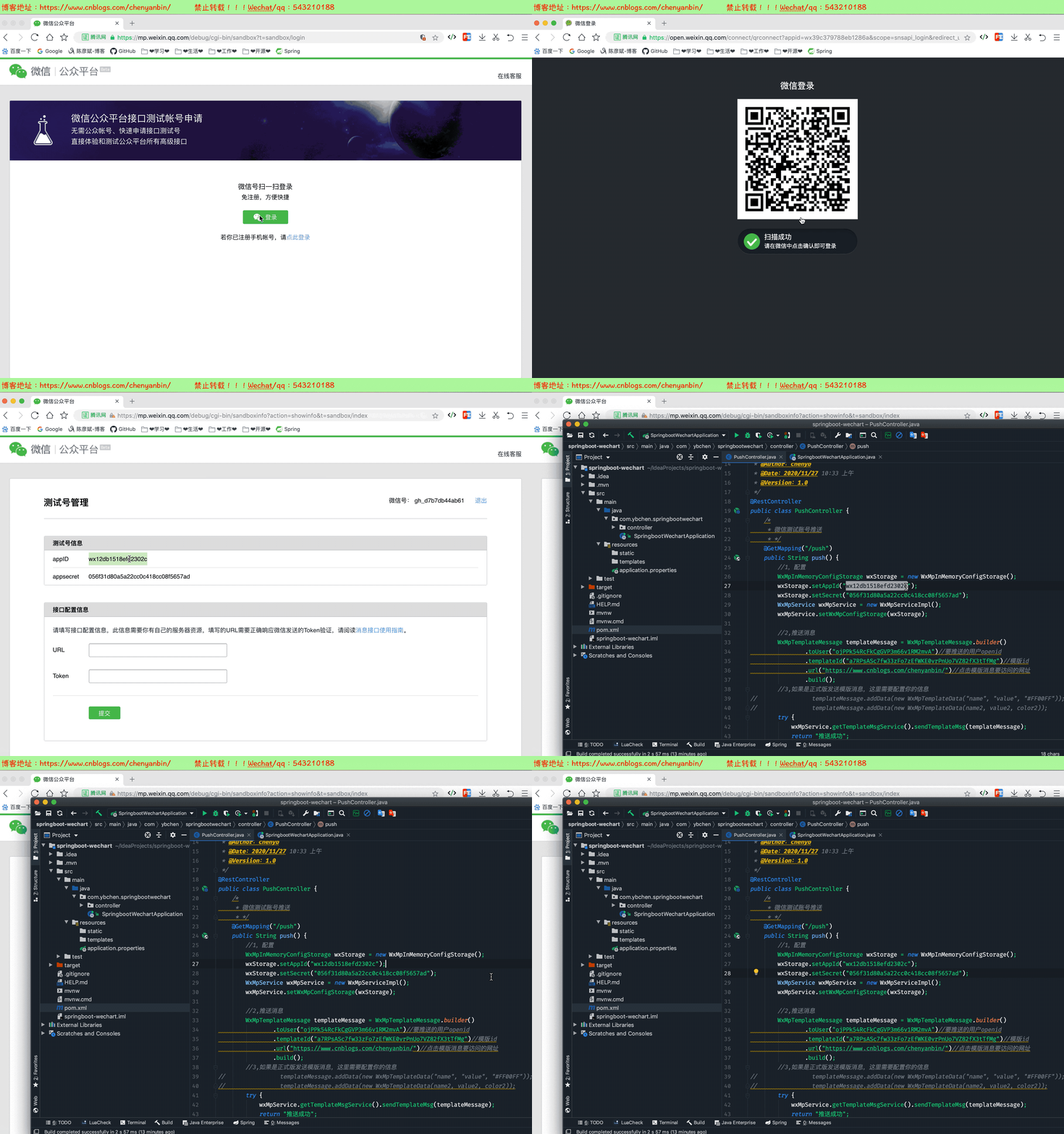
测试
关注测试公众号,创建模板,并发送指定模板内容
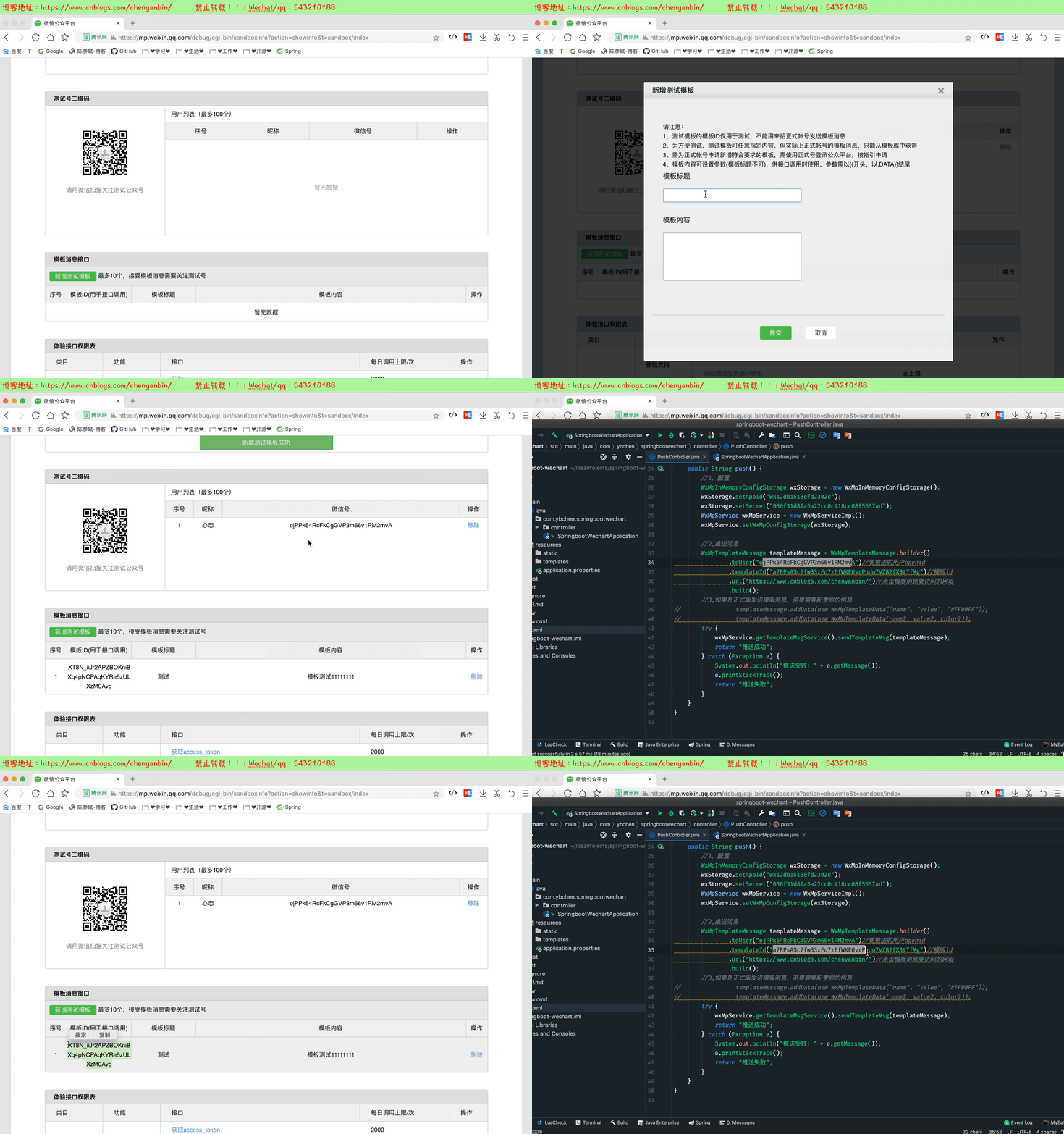

替换模板内容
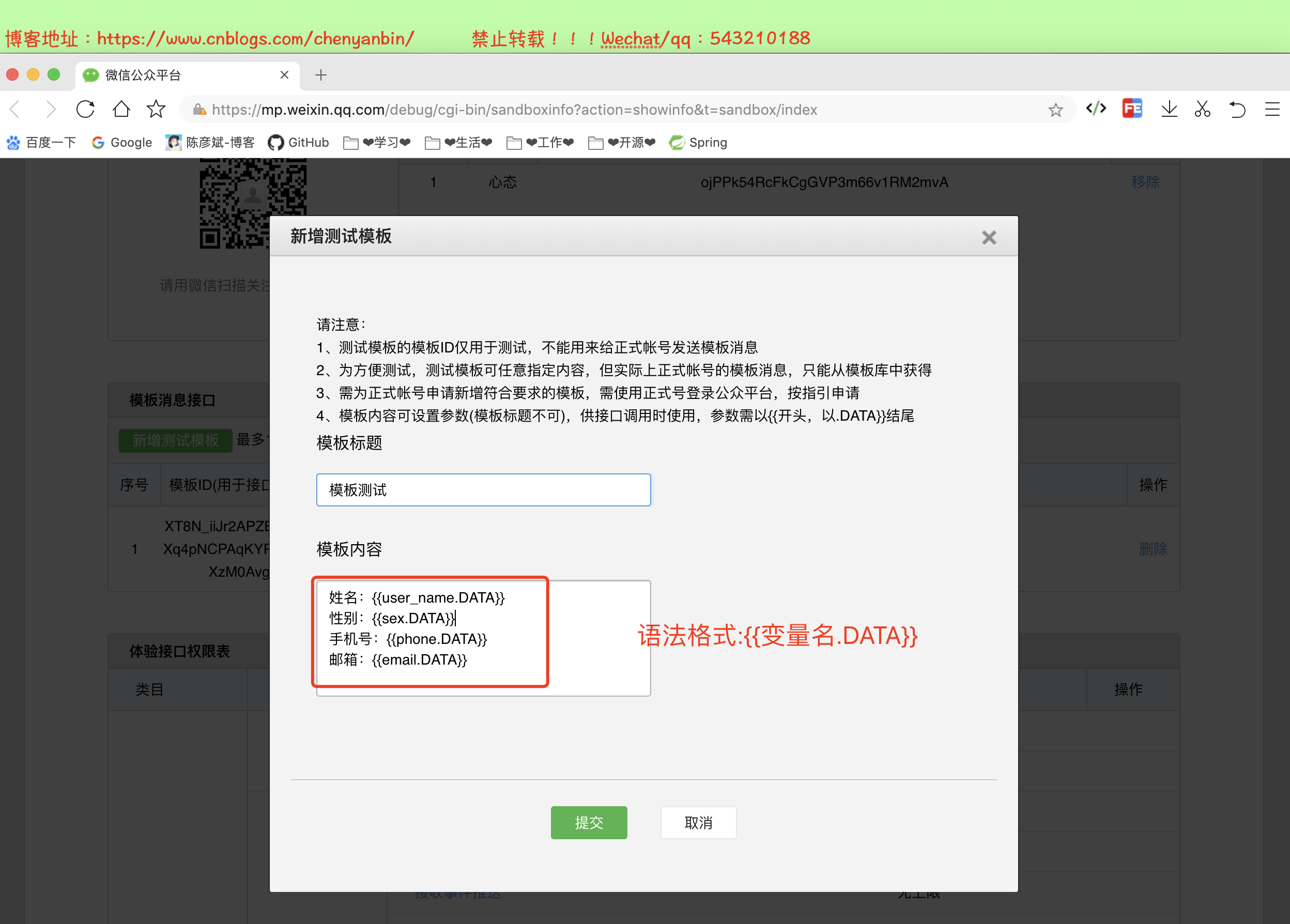
在微信公众平台创建模板
语法:{{变量名.DATA}}
姓名:{{user_name.DATA}}

性别:{{sex.DATA}}

手机号:{{phone.DATA}}

邮箱:{{email.DATA}}
控制层修改
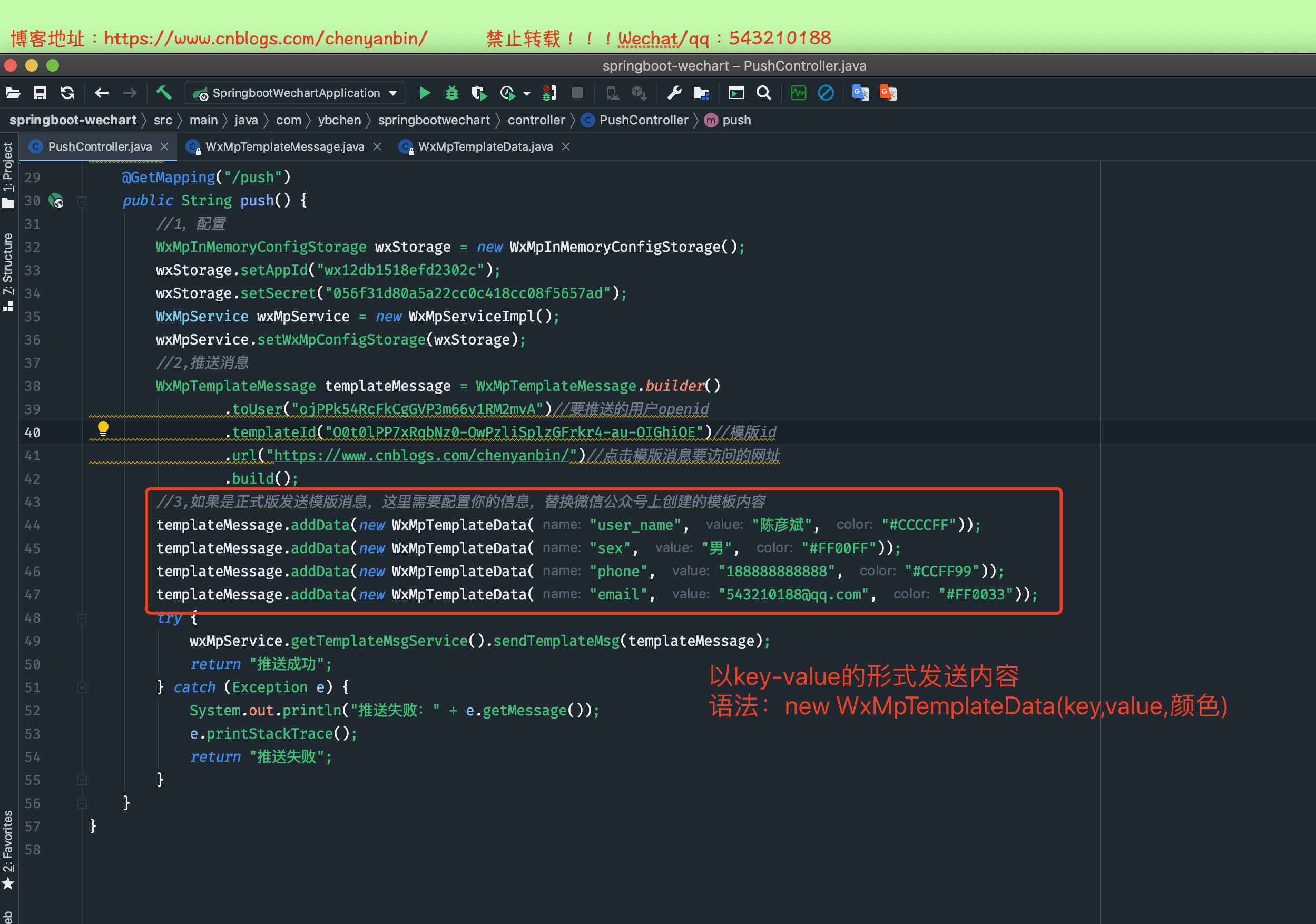


package com.ybchen.springbootwechart.controller;

import me.chanjar.weixin.mp.api.WxMpInMemoryConfigStorage;

import me.chanjar.weixin.mp.api.WxMpService;

import me.chanjar.weixin.mp.api.impl.WxMpServiceImpl;

import me.chanjar.weixin.mp.bean.template.WxMpTemplateData;

import me.chanjar.weixin.mp.bean.template.WxMpTemplateMessage;

import org.springframework.web.bind.annotation.GetMapping;

import org.springframework.web.bind.annotation.RestController;

import java.time.LocalDate;

import java.time.LocalDateTime;

import java.time.format.DateTimeFormatter;

import java.util.Map;

import java.util.Objects;

/**

 * @ClassName:PushController

 * @Description:微信推送

 * @Author:chenyb

 * @Date:2020/11/27 10:33 上午

 * @Versiion:1.0

 */

@RestController

public class PushController {

    /*

     * 微信测试账号推送

     * */

    @GetMapping("/push")

    public String push() {

        //1,配置

        WxMpInMemoryConfigStorage wxStorage = new WxMpInMemoryConfigStorage();

        wxStorage.setAppId("wx12db1518efd2302c");

        wxStorage.setSecret("056f31d80a5a22cc0c418cc08f5657ad");

        WxMpService wxMpService = new WxMpServiceImpl();

        wxMpService.setWxMpConfigStorage(wxStorage);

        //2,推送消息

        WxMpTemplateMessage templateMessage = WxMpTemplateMessage.builder()

                .toUser("ojPPk54RcFkCgGVP3m66v1RM2mvA")//要推送的用户openid

                .templateId("O0t0lPP7xRqbNz0-OwPzliSplzGFrkr4-au-OIGhiOE")//模版id

                .url("https://www.cnblogs.com/chenyanbin/")//点击模版消息要访问的网址

                .build();

        //3,如果是正式版发送模版消息,这里需要配置你的信息,替换微信公众号上创建的模板内容

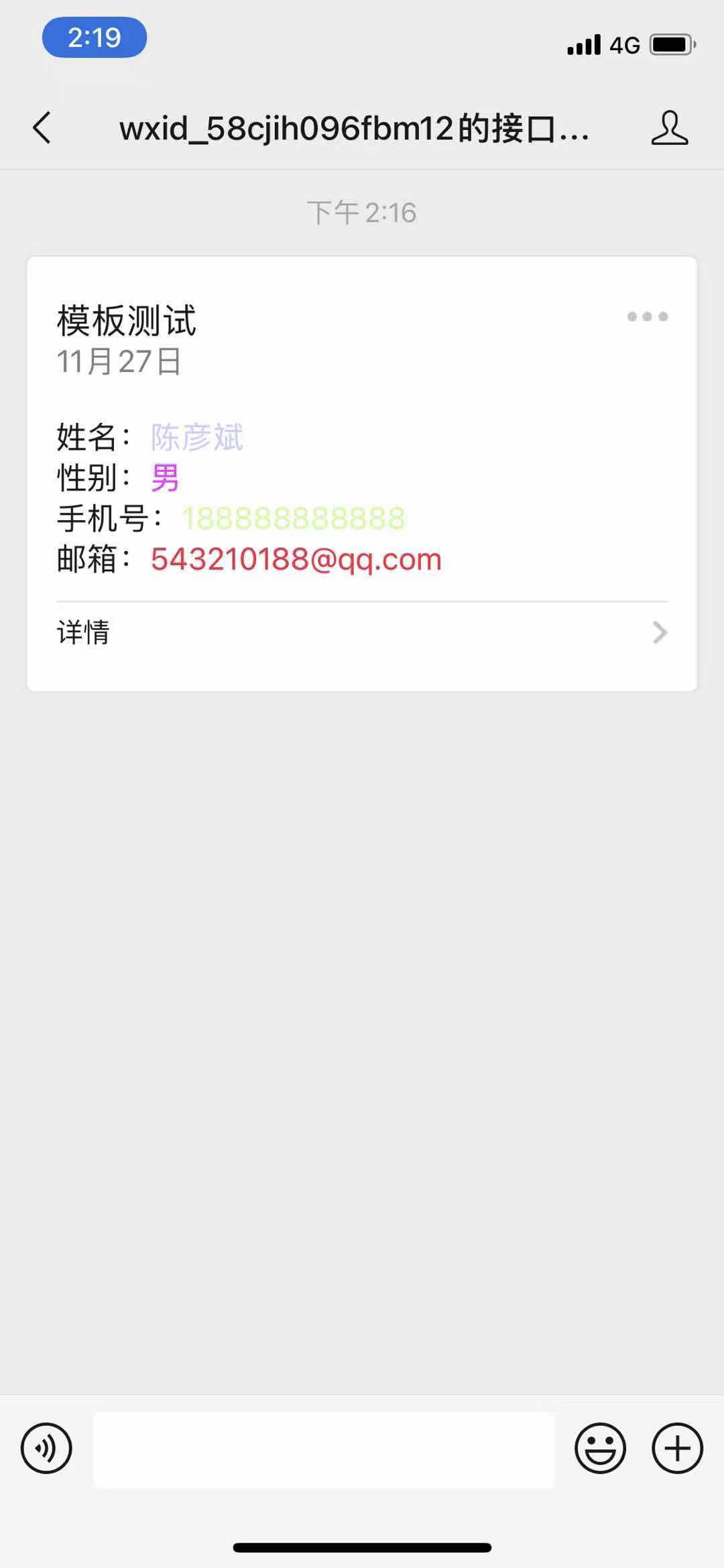
        templateMessage.addData(new WxMpTemplateData("user_name", "陈彦斌", "#CCCCFF"));

        templateMessage.addData(new WxMpTemplateData("sex", "男", "#FF00FF"));

        templateMessage.addData(new WxMpTemplateData("phone", "188888888888", "#CCFF99"));

        templateMessage.addData(new WxMpTemplateData("email", "543210188@qq.com", "#FF0033"));

        try {

            wxMpService.getTemplateMsgService().sendTemplateMsg(templateMessage);

            return "推送成功";

        } catch (Exception e) {

            System.out.println("推送失败:" + e.getMessage());

            e.printStackTrace();

            return "推送失败";

        }

    }

}
推送消息
SpringBoot 实现微信推送模板的更多相关文章
- 使用ESP8266nodeMCU 向微信推送模板数据
使用HTTPS协议向微信公众号推送消息,(使用ESP8266的低成本实现) 前几天被朋友问到这个东西的实现方式,花了一下午时间研究一下,特此记录.没有排版比较乱. 一丶前往微信公众平台注册微信微信公众 ...
- python 微信推送模板消息
#!/usr/bin/env python #-*- coding: utf-8 -*- import httplib import json import MySQLdb #从数据库中获取acces ...
- 微信公众号实现无限制推送模板消息!可向指定openID群发
微信认证的服务号才有推送模板消息接口所以本文需要在认证服务号的情况下学习 以上就是模板消息,只有文字和跳转链接,没有封面图.在服务号的后台添加功能插件-模板消息即可. 模板消息,都是在后台选择一个群发 ...
- 微信开发之获取openid及推送模板消息
有很多的朋友再问我怎么获取code,openid之类的问题,在这里我就给大家分享一下. 在做微信支付是需要获取openid的,推送模板消息也是需要openid包括其他一些功能分享等也都是需要的,ope ...
- C#微信接口之推送模板消息功能示例
本文实例讲述了C#微信接口之推送模板消息功能.分享给大家供大家参考,具体如下: ? 1 2 3 4 5 6 7 8 9 10 11 12 13 14 15 16 17 18 19 20 21 22 2 ...
- day93之微信推送
python之微信推送详解 用什么推送 -邮件 -微信推送 -短信推送微信推送 -公众号(不能主动给用户发消息) -认证的公众号:需要营业执照,需要交钱,可以发多篇文章 - ...
- 让微信推送Jenkins构建消息
Jenkins作为开发必备之神器,各家大小公司都在使用.Jenkins自身内置了基于邮件推送构建结果的功能.但是随着移动互联网的发展,邮件这玩意已经越来越少使用了,是否有一种办法能把jenkins构建 ...
- Docker系列——Grafana+Prometheus+Node-exporter微信推送(三)
在之前博文中,已经成功的实现了邮件推送.目前主流的办公终端,就是企业微信.钉钉.飞书.今天来分享下微信推送,我们具体来看. 企业微信 在配置企业微信推送时,需要有微信企业,具体如何注册.使用,另外百度 ...
- C# 推送模板
C#推送模板.安卓个推.消息推送 http://docs.getui.com/server/csharp/template/
随机推荐
- Mybatis入门 Mybatis存在的意义 解决的问题 基本操作
Mybatis入门 Mybatis的作用 解决的问题 基本操作 为什么要学MyBatis 我们链接操作数据库需要做的步骤 package Test; import java.sql.*; public ...
- sqlsugar入门(4)-修改源码支持多主键保存ISaveable
1.查看其它接口发现少了一个最重要的SaveBuilder.此文件是存放sql模板,where条件,select解析,组装成tosqlstring的最后一个类. 添加文件 using System; ...
- python机器学习TensorFlow框架
TensorFlow框架 关注公众号"轻松学编程"了解更多. 一.简介 TensorFlow是谷歌基于DistBelief进行研发的第二代人工智能学习系统,其命名来源于本身的运 ...
- Vue3教程:一个基于 Vue 3 + Vant 3 的商城项目开源啦!
之前发布过一篇文章,告诉大家我要开发一个 Vue3 的商城项目并开源到 GitHub 上,供大家练手和学习,随后也一直有收到留言和反馈,问我开发到哪里了,什么时候开源之类的问题,今天终于可以通知大家, ...
- Inception系列之Batch-Normalization
训练深度神经网络非常复杂,因为在训练过程中,随着先前各层的参数发生变化,各层输入的分布也会发生变化,图层输入分布的变化带来了一个问题,因为图层需要不断适应新的分布,因此训练变得复杂,随着网络变得更深, ...
- 用数组实现队列(顺序队列&循环队列)
用数组实现队列(顺序队列&循环队列) 顺序队列 ️ 队列(先进先出) 几个问题: 队列方法:入队.出队 队列的存储:即队首队尾两个指针, 扩容:如果队列容量不够了,应该扩容,如果队尾没有位置了 ...
- 基于tensorflow的bilstm_crf的命名实体识别(数据集是msra命名实体识别数据集)
github地址:https://github.com/taishan1994/tensorflow-bilstm-crf 1.熟悉数据 msra数据集总共有三个文件: train.txt:部分数据 ...
- JS生成限定整数区间范围内的随机整数
对于整数区间获取随机整数: m,n均为整数,且n>m. 获取[m,n)区间内的随机整数: 1 var aNumber = (n - m) * Math.random() + m; 2 var r ...
- CSS不同颜色按钮实例
CSS减少代码重复技巧非常多,以主要包含采用相对尺寸.半透明颜色的实例来说明CSS减少代码重复技巧的一些运用. 以下为通过CSS代码实现的一个"Yes!"按钮效果以及相应的代码: ...
- MySQL死锁问题(转)
线上某服务时不时报出如下异常(大约一天二十多次):"Deadlock found when trying to get lock;". Oh, My God! 是死锁问题.尽管报错 ...