
odoo13之文件预览widget/模块
本文示例代码可查看github仓库:odoo13_file_preview
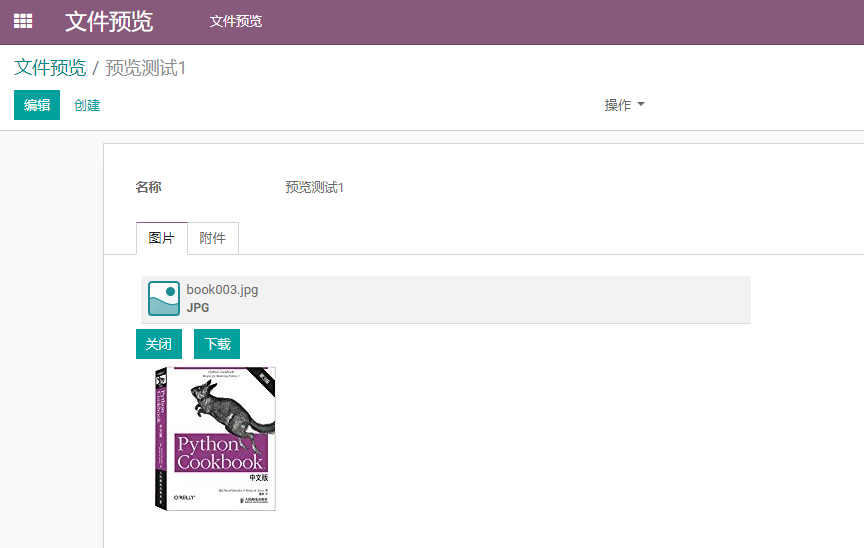
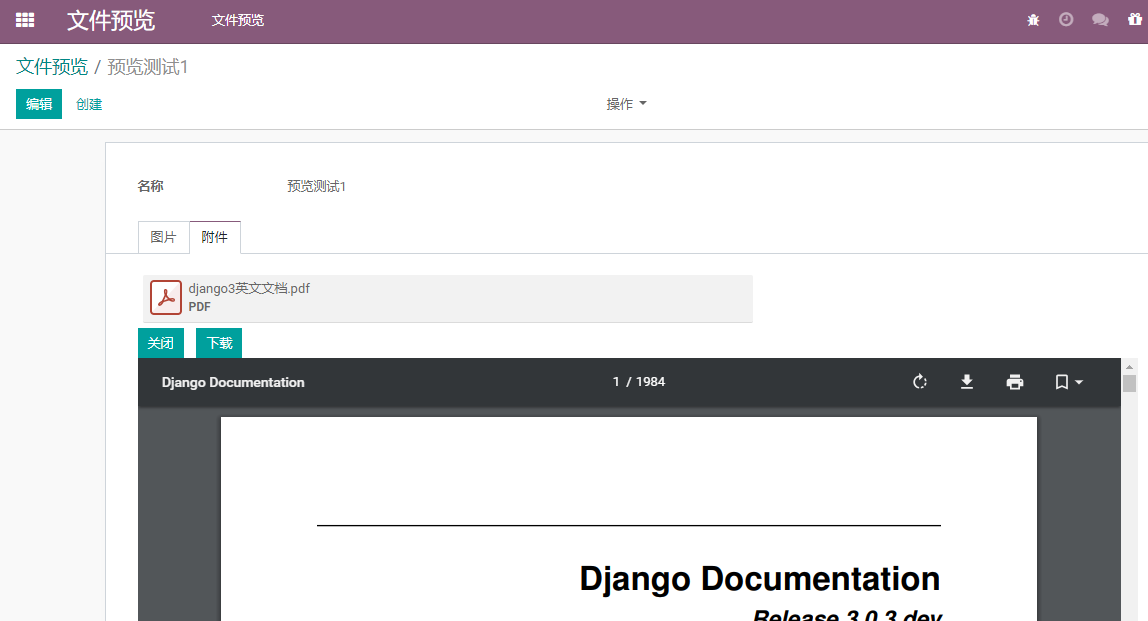
文件预览效果图展示
效果描述:
- 1.当点击图片或者文件时展开图片。
- 2.当点击关闭按钮时关闭图片预览。
- 3.当点击下载按钮时,下载文件。
缺点:
- 当预览图片大小超过1000px的时候,不会动态变小;
- 点击查看一个文件,当点击另一个文件时,上一个文件不会自动关闭。
图片预览效果图
pdf预览效果图
文件预览实现
编写base.xml
base.xml文件用来实现文件的上传及删除操作
在static/base.xml中添加如下内容


<template>

    <div t-name="PdcDocument.files" class="o_attachments" aria-atomic="true">

        <!-- uploaded files -->

        <t t-foreach="widget.value.data" t-as="file">

            <t t-if="!file.data.upload" t-call="PdcDocument.attachment_preview"/>

        </t>

        <!-- uploading files -->

        <t t-foreach="widget.uploadingFiles" t-as="file">

            <t t-set="upload" t-value="true"/>

            <t t-call="PdcDocument.attachment_preview"/>

        </t>

    </div>

    <t t-name="PdcDocument.attachment_preview">

        <t t-set="url" t-value="widget.metadata[file.id] ? widget.metadata[file.id].url : false"/>

        <t t-if="file.data" t-set="file" t-value="file.data"/>

        <t t-set="editable" t-value="widget.mode === 'edit'"/>

        <t t-if="file.mimetype" t-set="mimetype" t-value="file.mimetype"/>

        <div t-attf-class="o_attachment o_attachment_many2many #{ editable ? 'o_attachment_editable' : '' } #{upload ? 'o_attachment_uploading' : ''}"

             t-att-title="file.name">

            <div class="o_attachment_wrap">

                <t t-set="ext" t-value="file.name.replace(/^.*\./, '')"/>

                <div class="o_image_box float-left" t-att-data-id="file.id">

                    <div t-att-title="'Download ' + file.name" aria-label="Download">

                        <span class="o_image o_hover" t-att-data-id="FileId" t-att-data-mimetype="mimetype"

                              t-att-data-ext="ext" role="img"/>

                    </div>

                </div>

                <div class="caption">

                    <a class="ml4" t-att-href="url" t-att-title="'Download ' + file.name">

                        <t t-esc='file.name'/>

                    </a>

                </div>

                <div class="caption small">

                    <div class="ml4 small text-uppercase" t-att-title="'Download ' + file.name">

                        <b>

                            <t t-esc='ext'/>

                        </b>

                    </div>

                    <div t-if="editable" class="progress o_attachment_progress_bar">

                        <div class="progress-bar progress-bar-striped active" style="width: 100%">Uploading</div>

                    </div>

                </div>

                <div t-if="editable" class="o_attachment_uploaded">

                    <i class="text-success fa fa-check" role="img" aria-label="Uploaded" title="Uploaded"/>

                </div>

                <div t-if="editable" class="o_attachment_delete" t-att-data-id="file.id">

                    <span class="text-white" role="img" aria-label="Delete" title="Delete">×</span>

                </div>

            </div>

        </div>

    </t>

</template>
base.xml
编写js文件
js文件用来对数据进行处理
static/js/file_preview.js
odoo.define("Upload_skim_pdf", function (require) {
"use strict";
var AbstractField = require("web.AbstractField");
var field_registry = require("web.field_registry");
var core = require('web.core');
var qweb = core.qweb;
var Upload_skim_pdf = AbstractField.extend({
template: "FieldBinaryFileUploader",
template_files: "PdcDocument.files",
supportedFieldTypes: ['many2many'],
fieldsToFetch: {
name: { type: 'char' },
mimetype: { type: 'char' },
},
events: {
'click .o_attach': '_onAttach',
'click .o_attachment_delete': '_onDelete',
'change .o_input_file': '_onFileChanged',
'click .o_image_box': '_onFilePDF',
'click .pdc_close' : '_onclosePDF',
},
/**
* @constructor
*/
init: function () {
this._super.apply(this, arguments);
if (this.field.type !== 'many2many' || this.field.relation !== 'ir.attachment') {
var msg = _t("The type of the field '%s' must be a many2many field with a relation to 'ir.attachment' model.");
throw _.str.sprintf(msg, this.field.string);
}
this.uploadedFiles = {};
this.uploadingFiles = [];
this.fileupload_id = _.uniqueId('oe_fileupload_temp');
$(window).on(this.fileupload_id, this._onFileLoaded.bind(this));
this.metadata = {};
},
destroy: function () {
this._super();
$(window).off(this.fileupload_id);
},
//--------------------------------------------------------------------------
// Private
//--------------------------------------------------------------------------
_getFileId: function (attachment) {
return attachment.id
},
_getId: function (attachment) {
return attachment.attributes[1].value
},
_generatedMetadata: function () {
var self = this;
_.each(this.value.data, function (record) {
// tagging `allowUnlink` ascertains if the attachment was user
// uploaded or was an existing or system generated attachment
self.metadata[record.id] = {
allowUnlink: self.uploadedFiles[record.data.id] || false,
FileId: self._getFileId(record.data)
};
});
},
_render: function () {
// render the attachments ; as the attachments will changes after each
// _setValue, we put the rendering here to ensure they will be updated
console.log("test123");
this._generatedMetadata();
this.$('.oe_placeholder_files, .o_attachments')
.replaceWith($(qweb.render(this.template_files, {
widget: this,
})));
this.$('.oe_fileupload').show();
// display image thumbnail
this.$('.o_image[data-mimetype^="image"]').each(function () {
var $img = $(this);
if (/gif|jpe|jpg|png/.test($img.data('mimetype')) && $img.data('src')) {
$img.css('background-image', "url('" + $img.data('src') + "')");
}
});
},
_onAttach: function () {
// This widget uses a hidden form to upload files. Clicking on 'Attach'
// will simulate a click on the related input.
this.$('.o_input_file').click();
},
_onclosePDF: function () {
console.log(this.$el.find('.zPDF_iframe').remove());
console.log('111111');
},
_onDelete: function (ev) {
ev.preventDefault();
ev.stopPropagation();
var fileID = $(ev.currentTarget).data('id');
var record = _.findWhere(this.value.data, { res_id: fileID });
if (record) {
this._setValue({
operation: 'FORGET',
ids: [record.id],
});
var metadata = this.metadata[record.id];
if (!metadata || metadata.allowUnlink) {
this._rpc({
model: 'ir.attachment',
method: 'unlink',
args: [record.res_id],
});
}
}
},
_onFileChanged: function (ev) {
var self = this;
ev.stopPropagation();
var files = ev.target.files;
var attachment_ids = this.value.res_ids;
// Don't create an attachment if the upload window is cancelled.
if (files.length === 0)
return;
_.each(files, function (file) {
var record = _.find(self.value.data, function (attachment) {
return attachment.data.name === file.name;
});
if (record) {
var metadata = self.metadata[record.id];
if (!metadata || metadata.allowUnlink) {
// there is a existing attachment with the same name so we
// replace it
attachment_ids = _.without(attachment_ids, record.res_id);
self._rpc({
model: 'ir.attachment',
method: 'unlink',
args: [record.res_id],
});
}
}
self.uploadingFiles.push(file);
});
this._setValue({
operation: 'REPLACE_WITH',
ids: attachment_ids,
});
this.$('form.o_form_binary_form').submit();
this.$('.oe_fileupload').hide();
ev.target.value = "";
},
_onFileLoaded: function () {
var self = this;
// the first argument isn't a file but the jQuery.Event
var files = Array.prototype.slice.call(arguments, 1);
// files has been uploaded, clear uploading
this.uploadingFiles = [];
var attachment_ids = this.value.res_ids;
_.each(files, function (file) {
if (file.error) {
self.do_warn(_t('Uploading Error'), file.error);
} else {
attachment_ids.push(file.id);
self.uploadedFiles[file.id] = true;
}
});
this._setValue({
operation: 'REPLACE_WITH',
ids: attachment_ids,
});
},
_onFilePDF: function (ev) {
var self = this;
var fieldId = self._getId(ev.currentTarget);
self.$el.append(`
<div class="zPDF_iframe">
<div class="pdc_close btn btn-primary">关闭</div>
<div class="btn btn-primary"><a href="/web/content/${fieldId}?download=true" style="text-decoration: none; color: white">下载</a></div><br>
<iframe class="zPDF" scrolling="no" id="main" name="main" frameborder="0" style="min-height:600px;width:1000px;height:100%;" src="/web/content/${fieldId}"></iframe>
</div>
`)
}
});
field_registry.add("Upload_skim_pdf", Upload_skim_pdf);
return Upload_skim_pdf
});
file_preview.js
引入js文件
在views/import_js.xml文件中添加如下内容
<?xml version="1.0" encoding="utf-8"?>

<odoo>

    <template id="assets_backend" name="file_preview_tpl" inherit_id="web.assets_backend">

        <xpath expr="." position="inside">

            <script src="/file_preview/static/js/file_preview.js" />

        </xpath>

    </template>

</odoo>
同时,记得在__mainfest__.py文件中引入上述文件
    'data': [

        'views/import_src.xml',

    ],

    'qweb': [

        "static/base.xml"

    ],
至此,即可在odoo中完成一个自定义widget,接下来只要使用定义的widget即可。
文件预览widget的使用
在form视图中使用widget示例代码
<record id="file_preview_view_form" model="ir.ui.view">

    <field name="name">file.preview.form</field>

    <field name="model">file.preview</field>

    <field name="arch" type="xml">

        <form string="文件预览">

            <sheet>

                <group>

                    <field name="name"/>

                </group>

                <notebook>

                    <page string="图片">

                        <field name="img_ids" widget="Upload_skim_pdf" />

                    </page>

                    <page string="附件">

                        <field name="attachment_ids" widget="Upload_skim_pdf" />

                    </page>

                </notebook>

            </sheet>

        </form>

    </field>

</record>
odoo13之文件预览widget/模块的更多相关文章
- java实现office文件预览
不知觉就过了这个久了,继上篇java实现文件上传下载后,今天给大家分享一篇java实现的对office文件预览功能. 相信大家在平常的项目中会遇到需要对文件实现预览功能,这里不用下载节省很多事.大家请 ...
- Qt SD卡 文件系统挂载、文件预览
/********************************************************************************** * Qt SD卡 文件系统挂载. ...
- Jquery.Treeview+Jquery UI制作Web文件预览
效果图: 前台Html: <%@ Page Language="C#" AutoEventWireup="true" CodeBehind="D ...
- Vue PDF文件预览vue-pdf
最近做项目,遇到预览PDF这个功能,在网上找了找,大多推荐的是pdf.js,不过在Vue中还是想偷懒直接npm组件,最后找到了一个还不错的Vue-pdf 组件,GitHub地址:https:// ...
- 关于pc端 app端pdf,word xls等文件预览的功能
第一种用H5标签<iframe>标签实现 返回的文件类型,文件流,文件流返回必须在设置 contentType对应的Mime Type, 返回文件的物理位置. 已经实测可以支持的文件类型 ...
- 手把手教你用 Spring Boot搭建一个在线文件预览系统!支持ppt、doc等多种类型文件预览
昨晚搭建环境都花了好一会时间,主要在浪费在了安装 openoffice 这个依赖环境上(Mac 需要手动安装). 然后,又一步一步功能演示,记录,调试项目,并且简单研究了一下核心代码之后才把这篇文章写 ...
- java 文件转成pdf文件 预览
一.前端代码 //预览功能 preview: function () { //判断选中状态 var ids =""; var num = 0; $(".checkbox& ...
- COS控制台进阶 - 文件预览和在线编辑
导语 | COS控制台新上线了文件预览功能,用户可在控制台内直接预览.编辑文件内容. 前不久,微软发布了 vscode for web 的公告,是基于web的在线代码编辑器,无需下载安装可以直接在we ...
- 利用tornado实现表格文件预览
项目介绍 本文将介绍笔者的一个项目,主要是利用tornado实现表格文件的预览,能够浏览的表格文件支持CSV以及Excel文件.预览的界面如下: 下面我们将看到这个功能是如何通过tornado ...
随机推荐
- redis(十六):Redis 安装,部署(LINUX环境下)
第一步:下载安装包 访问https://redis.io/download 到官网进行下载.这里下载最新的4.0版本. 第二步:安装 1.通过远程管理工具,将压缩包拷贝到Linux服务器中,执行解压 ...
- Elasticsearch备份数据
Elasticsearch备份数据 1.建立备份目录 POST _snapshot/my_backup/ { "type": "fs", "setti ...
- Shaderlab-10chapter-立方体纹理、玻璃效果
10.1.1天空盒子 window - Lighting - skyMaterial 创建mat,shader选自带的6 side shader 确保相机选skybox 如果某个相机需要覆盖,添加sk ...
- 【设计模式】MVC、MVP、MVVM
1.MVC模式: /** 模擬 Model, View, Controller */ var M = {}, V = {}, C = {}; /** Model 負責存放資料 */ M.data = ...
- 使用QtCreator遇到的一些问题
0. 背景 最近在学习QtCreator(版本:4.8.1:编译器:MSVC 2017 64-bit),遇到了一些问题,特记录如下.( 1. 引用库 QtCreator可以直接包含Windows.h, ...
- javascript : 写一个类似于 jquery css() 的方法
我们知道,jquery css() 方法可以很方便的更改DOM的样式. 但从原理上,这个并不复杂,我们完全可以自己写一个. 上代码. updateDOMStyle(DOM, obj){ Object. ...
- 技术干货:Ceph搭建硬件建议详解
Ceph是专为在商品硬件上运行而设计的,这使得构建和维护超大规模的数据集群在经济上是可行的.当规划出你的集群硬件时,你需要平衡一些考虑因素,包括故障域和潜在的性能问题.硬件规划应该包括将Ceph守护进 ...
- 使用recv函数和send函数的技巧
一些述说 recv函数用于socket通信中接收消息,接口定义如下: int recv(SOCKET s, char *buf, int len, int flags) 参数一:指定接收端套接字描述符 ...
- C++语法小记---函数重载
函数重载 函数重载的本质是对已有功能的扩展 构成重载的三大条件 函数名相同 参数列表不通(与返回值无关) 重载函数的作用域相同 成员函数之间可以重载,成员函数和静态成员函数之间可以构成重载,全局函数之 ...
- vsCode的一些个人配置
本文主要用来记录我在使用vsCode中的一些个人习惯设置. 编辑器主题配置 主题我是用的是 escook-theme,这是我在看某视频教程时发现的一款看起来非常友好的vsCode主题. 文件图标主题 ...