
参数化查询防止Sql注入
拼接sql语句会造成sql注入,注入演示
namespace WindowsFormsApp1

{

    public partial class Form1 : Form

    {

        public Form1()

        {

            InitializeComponent();

        }

        private void button1_Click(object sender, EventArgs e)

        {

            FillData(dataGridView1);

        }

        private void FillData(DataGridView dataGrid)

        {

            string connStr = ConfigurationManager.ConnectionStrings["Northwind"].ConnectionString;

            using (SqlConnection conn = new SqlConnection(connStr))

            {

                string sql = "select * from Employees where EmployeeID=\'" + textBox1.Text + "\'";

                using (SqlCommand sqlCommand = new SqlCommand(sql, conn))

                {

                    using (SqlDataAdapter sqlData = new SqlDataAdapter(sqlCommand))

                    {

                        DataTable dataTable = new DataTable();

                        sqlData.Fill(dataTable);

                        dataGrid.DataSource = dataTable;

                    }

                }

            }

        }

    }

}
正常生成的Sql语句应该为
select * from Employees where EmployeeID=''
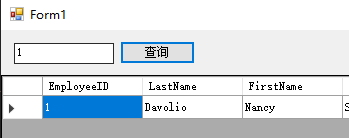
输入sql实际生成的Sql语句为
select * from Employees where EmployeeID='' or 1=1 --'
所有的数据都查询出来了
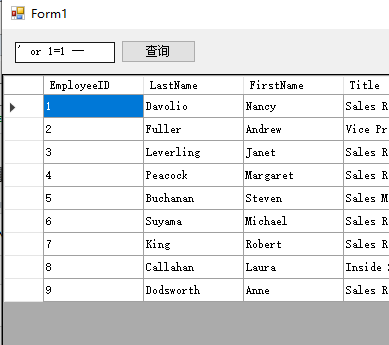
防止注入漏洞应该用SqlParameter做参数化查询
namespace WindowsFormsApp1

{

    public partial class Form1 : Form

    {

        public Form1()

        {

            InitializeComponent();

        }

        private void button1_Click(object sender, EventArgs e)

        {

            FillData(dataGridView1);

        }

        private void FillData(DataGridView dataGrid)

        {

            string connStr = ConfigurationManager.ConnectionStrings["Northwind"].ConnectionString;

            using (SqlConnection conn = new SqlConnection(connStr))

            {

                string sql = "select * from Employees where EmployeeID=@EmployeeID";

                using (SqlCommand sqlCommand = new SqlCommand(sql, conn))

                {

                    SqlParameter[] sqlParameter = { new SqlParameter("@EmployeeID", textBox1.Text) };

                    sqlCommand.Parameters.AddRange(sqlParameter);

                    using (SqlDataAdapter sqlData = new SqlDataAdapter(sqlCommand))

                    {

                        DataTable dataTable = new DataTable();

                        sqlData.Fill(dataTable);

                        dataGrid.DataSource = dataTable;

                    }

                }

            }

        }

    }

}
再输入sql注入会报错
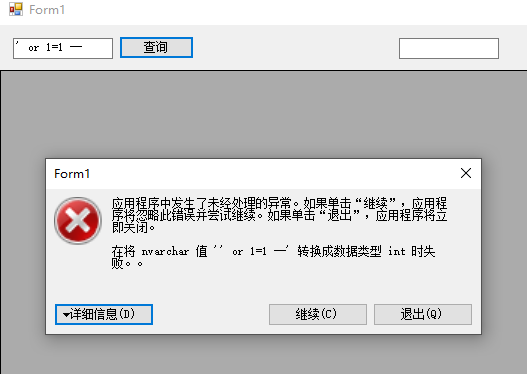
如果用在登录或者未经授权的查询时很有用
重新整理代码
using System;

using System.Data;

using System.Windows.Forms;

using System.Data.SqlClient;

using System.Configuration;

namespace WindowsFormsApp1

{

    public partial class Form1 : Form

    {

        string connStr = ConfigurationManager.ConnectionStrings["Northwind"].ConnectionString;

        public Form1()

        {

            InitializeComponent();

        }

        private void button1_Click(object sender, EventArgs e)

        {

            string sql = "select * from Employees where EmployeeID=@EmployeeID";

            SqlParameter[] sqlParameter = { new SqlParameter("@EmployeeID", textBox1.Text) };

            FillGridView(sql, dataGridView1, sqlParameter);

        }

        private void FillGridView(string sql, DataGridView dataGrid, SqlParameter[] sqlParameter = null)

        {

            using (SqlConnection conn = new SqlConnection(connStr))

            {

                using (SqlCommand sqlCommand = new SqlCommand(sql, conn))

                {

                    if (sqlParameter != null)

                    {

                        sqlCommand.Parameters.AddRange(sqlParameter);

                    }

                    using (SqlDataAdapter sqlDataAdapter = new SqlDataAdapter(sqlCommand))

                    {

                        DataTable dataTable = new DataTable();

                        sqlDataAdapter.Fill(dataTable);

                        dataGrid.DataSource = dataTable;

                    }

                }

            }

        }

    }

}
参数化查询防止Sql注入的更多相关文章
- 使用参数化查询防止SQL注入漏洞
参数化查询防止SQL注入漏洞 看别人的登录注册sql语句有没漏洞即可 Where name=‘admin’ or ‘1=1’ and password=’123’; 可以Or ‘1=1’就是漏洞 h ...
- 023. Asp.net参数化查询预防Sql注入攻击
/// <summary> /// 参数化查询预防SQL注入式攻击 /// </summary> public int checkLogin(string loginName, ...
- 使用参数化查询防止SQL注入漏洞(转)
SQL注入的原理 以往在Web应用程序访问数据库时一般是采取拼接字符串的形式,比如登录的时候就是根据用户名和密码去查询: string sql * FROM [User] WHERE UserName ...
- python mysql参数化查询防sql注入
一.写法 cursor.execute('insert into user (name,password) value (?,?)',(name,password)) 或者 cursor.execut ...
- mybatis模糊查询防止SQL注入
SQL注入,大家都不陌生,是一种常见的攻击方式.攻击者在界面的表单信息或URL上输入一些奇怪的SQL片段(例如“or ‘1’=’1’”这样的语句),有可能入侵参数检验不足的应用程序.所以,在我们的应用 ...
- 安全 -- mysql参数化查询,防止Mysql注入
参数化查询(Parameterized Query 或 Parameterized Statement)是指在设计与数据库链接并访问数据时,在需要填入数值或数据的地方,使用参数(Parameter) ...
- MySQL参数化有效防止SQL注入
sql语句的参数化,可以有效防止sql注入 注意:此处不同于python的字符串格式化,全部使用%s占位 from pymysql import * def main(): find_name = i ...
- ADO.NET笔记——带参数的查询防止SQL注入攻击
相关知识: 把单引号替换成两个单引号,虽然能起到一定的防止SQL注入攻击的作用,但是更为有效的办法是把要拼接的内容做成“参数” SQLCommand支持带参数的查询,也就是说,可以在查询语句中指定参数 ...
- 带参数的查询防止SQL注入攻击
把单引号替换成两个单引号,虽然能起到一定的防止SQL注入攻击的作用,但是更为有效的办法是把要拼接的内容做成“参数” SQLCommand支持带参数的查询,也就是说,可以在查询语句中指定参数: 参数的设 ...
随机推荐
- 二进制包安装Mysql
(1).准备工作 前往mysql官网下载二进制安装包,https://dev.mysql.com/downloads/mysql/5.7.html#downloads(注意:选择操作系统时选Linux ...
- Linux - Linux命令行常用快捷键
Common Shortcut Key 用途 快捷键 说明 光标移动 Ctrl + a 把光标移到行首 Ctrl + e 把光标移到行尾 Ctrl + x 在 EOL 和当前位置移动光标 输入编辑 C ...
- 【嵌入式硬件Esp32】ESP32学习之在windows下搭建eclipse开发环境
一.所需工具 由于项目要用ESP32模块进行开发,折腾了下集成开发环境,现将过程记录下来,以便需要的人使用.其中需要的有交叉编译工具,esp-idf示例代码以及C/C++版的eclipse. 交叉编译 ...
- 修改centos7命令行控制台屏幕分辨率
1) vi /etc/sysconfig/grub 2) GRUB_CMDLINE_LINUX 在rhgb前加 vga=0x0317 (317为分辨率编码) 3) grub2-mkconfig - ...
- leetcode903 Valid Permutations for DI Sequence
思路: dp[i][j]表示到第i + 1个位置为止,并且以剩下的所有数字中第j + 1小的数字为结尾所有的合法序列数. 实现: class Solution { public: int numPer ...
- linux centos7 开启 mysql 3306 端口 外网访问 的实践
第〇步:思路 3306 端口能否被外网访问,主要要考虑: (1)mysql的3306 端口是否开启?是否没有更改端口号? (2)mysql 是否允许3306 被外网访问? (3)linux 是否已经开 ...
- SQL语句 常用记录
1,求平均,保留2位小数: ,)) as avg from {$table}; // amount为数据库某个字段 2,条件累加 , p1, )) AS cnt1 ; // 如果符合 cnt > ...
- python邮件发送自动化测试报告
话不多说直接贴代码 # encoding: utf-8import smtplib #发送邮件模块from email.mime.text import MIMEText #邮件内容from emai ...
- 49.Django起步学习
django起步 django安装 pip install django==2.0.4(版本号) pip install django 默认安装最新版本 创建项目 django-admin start ...
- controller中获取当前项目物理绝对路径
用HttpServletRequest request获取 request.getSession().getServletContext().getRealPath(""); 上面 ...