
九十二:CMS系统之cms后台登录界面
html
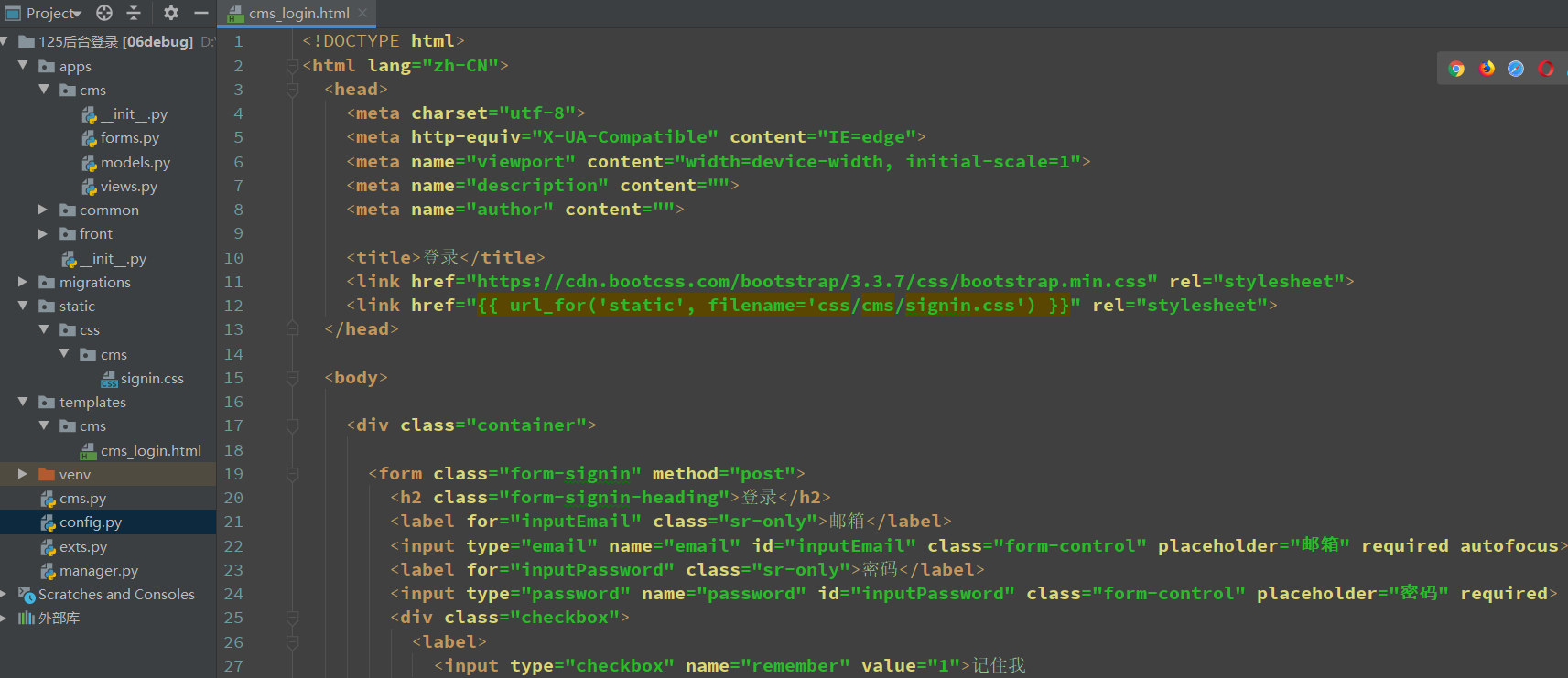
<!DOCTYPE html>
<html lang="zh-CN">
  <head>
    <meta charset="utf-8">
    <meta http-equiv="X-UA-Compatible" content="IE=edge">
    <meta name="viewport" content="width=device-width, initial-scale=1">
    <meta name="description" content="">
    <meta name="author" content="">

    <title>登录</title>
    <link href="https://cdn.bootcss.com/bootstrap/3.3.7/css/bootstrap.min.css" rel="stylesheet">
    <link href="{{ url_for('static', filename='css/cms/signin.css') }}" rel="stylesheet">
  </head>

  <body>

    <div class="container">

      <form class="form-signin" method="post">
        <h2 class="form-signin-heading">登录</h2>
        <label for="inputEmail" class="sr-only">邮箱</label>
        <input type="email" name="email" id="inputEmail" class="form-control" placeholder="邮箱" required autofocus>
        <label for="inputPassword" class="sr-only">密码</label>
        <input type="password" name="password" id="inputPassword" class="form-control" placeholder="密码" required>
        <div class="checkbox">
          <label>
            <input type="checkbox" name="remember" value="1">记住我
          </label>
        </div>
        <button class="btn btn-lg btn-primary btn-block" type="submit">点击登录</button>
      </form>

    </div>
  </body>
</html>
css
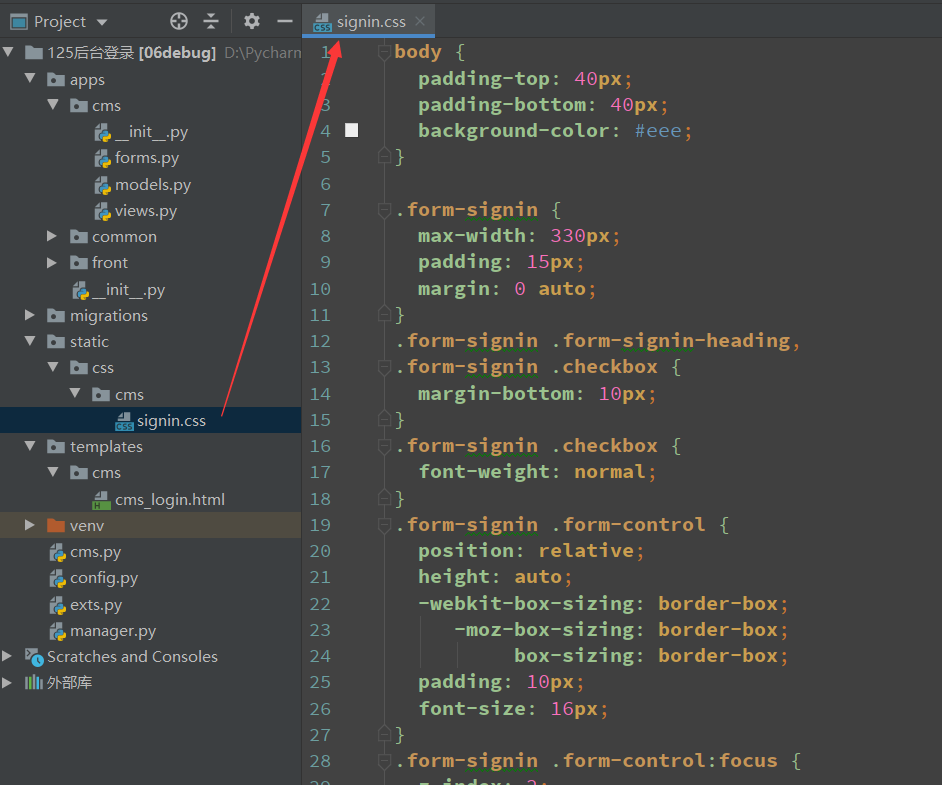
body {
  padding-top: 40px;
  padding-bottom: 40px;
  background-color: #eee;
}

.form-signin {
  max-width: 330px;
  padding: 15px;
  margin: 0 auto;
}
.form-signin .form-signin-heading,
.form-signin .checkbox {
  margin-bottom: 10px;
}
.form-signin .checkbox {
  font-weight: normal;
}
.form-signin .form-control {
  position: relative;
  height: auto;
  -webkit-box-sizing: border-box;
     -moz-box-sizing: border-box;
          box-sizing: border-box;
  padding: 10px;
  font-size: 16px;
}
.form-signin .form-control:focus {
  z-index: 2;
}
.form-signin input[type="email"] {
  margin-bottom: -1px;
  border-bottom-right-radius: 0;
  border-bottom-left-radius: 0;
}
.form-signin input[type="password"] {
  margin-bottom: 10px;
  border-top-left-radius: 0;
  border-top-right-radius: 0;
}
视图
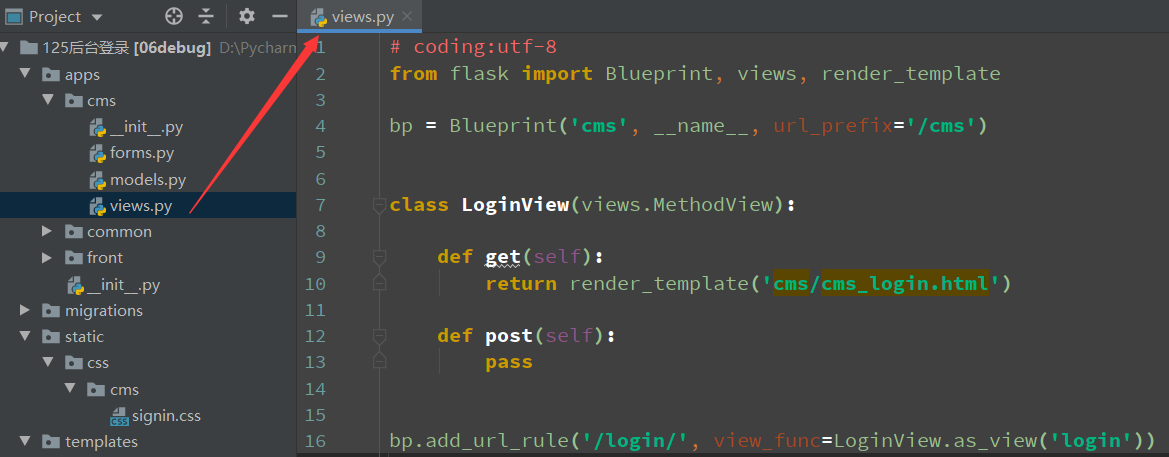
from flask import Blueprint, views, render_template

bp = Blueprint('cms', __name__, url_prefix='/cms')

class LoginView(views.MethodView):

    def get(self):
        return render_template('cms/cms_login.html')

    def post(self):
        pass

bp.add_url_rule('/login/', view_func=LoginView.as_view('login'))
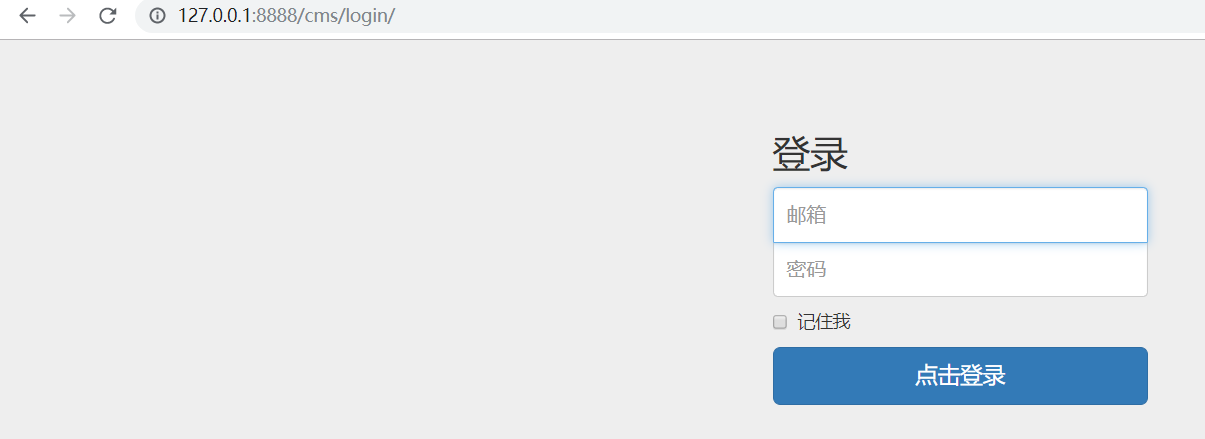
访问
九十二:CMS系统之cms后台登录界面的更多相关文章
- 转载-30分钟搞定后台登录界面(103个后台PSD源文件、素材网站)
原文:30分钟搞定后台登录界面(103个后台PSD源文件.素材网站) 目录 一.界面预览 二.PSD源文件预览 三.工具分享 四.资源说明 五.素材下载网站 六.下载 去年八月时要做一个OA系统为 ...
- Y460 安装ubuntu 12.04系统黑屏,登录界面黑屏
ubuntu 12.04系统黑屏,登录界面黑屏,但是命令行界面可以登录,也可以正常使用,当时在装CVS,装完重启就这样了,可能是因为前一天装更新时,突然断电导致图形界面损坏,参考他人方法,终于修复,总 ...
- ubuntu 12.04系统黑屏,登录界面黑屏
ubuntu 12.04系统黑屏,登录界面黑屏 原文链接:http://www.2cto.com/os/201305/213737.html 1.硬件环境 Intel® Core™ i5- ...
- 九十四:CMS系统之cms后台登录限制
装饰器,验证当前session中是否存在定义的user_id,没有就重定向到登录页 from flask import session, redirect, url_forfrom functools ...
- 九十三:CMS系统之cms后台登录功能
config form from wtforms import Form, StringField, IntegerFieldfrom wtforms.validators import Email, ...
- 30分钟搞定后台登录界面(103个后台PSD源文件、素材网站)
去年八月时要做一个OA系统为了后台界面而烦恼,后来写了一篇博客(<后台管理UI的选择>)介绍了选择过程与常用后台UI,令我想不到的时竟然有许多开发者与我一样都为这个事情而花费不少时间,最后 ...
- 九十六:CMS系统之cms后台用户名渲染和注销功能
用户名渲染,使用flask的g对象,在用户请求进来之后,触发视图函数之前,拿用户的信息,放到g对象里面 @bp.before_requestdef before_request(): "&q ...
- 九十五:CMS系统之cms后台模板渲染
定义一个宏,用于渲染static文件的时候,只需要传文件名就可以,上下两个“-”是解决渲染的时候源代码换行的情况 {% macro static(filename) -%} {{ url_for('s ...
- 九十一:CMS系统之cms用户模型定义
数据库信息 DEBUG = TrueSQLALCHEMY_DATABASE_URI = 'mysql+pymysql://root:123456@127.0.0.1:3306/test'SQLALCH ...
随机推荐
- Linux的bg和fg命令
我们都知道,在 Windows 上面,我们要么让一个程序作为服务在后台一直运行,要么停止这个服务.而不能让程序在前台后台之间切换.而 Linux 提供了 fg 和 bg 命令,让我们轻松调度正在运行的 ...
- Shell脚本相关
cat /proc/17616/cmdline 17616代表进程号 用这个可以完整打印出当前的进程的全名 当前shell的进程号.你可以使用ps -A 看你自己shell 的pid.是内置变量. $ ...
- Jmeter中间件处理-ActiveMQ
消息队列是目前的主流中间件,我们在日常测试过程中,无论是接口还是压力测试,都会遇到需要处理这些中间件数据的情况.本文以Activemq的Topic为例,说明如何基于Jmeter实现消息队列数据的发送和 ...
- javascript只弹出一次框 再次刷新不弹出
.打开页面自动弹出 当关闭弹框的时候 设置cookie生存时间 再次刷新页面判断cookie是否失效 <html> <head> <meta charset=&qu ...
- Python&Selenium 数据驱动【unittest+ddt】
一.摘要 本博文将介绍Python和Selenium做自动化测试的时候,基于unittest框架,借助ddt实现数据驱动 二.测试代码 # encoding = utf-8 ""& ...
- 完整开发vue后台管理系统小结
最近业余帮朋友做两个vue项目,一个是面向用户纯展示系列的(后统称A项目),一个是后端管理系统类的(后统称B项目).两者在技术上都没难度,这里对开发过程遇到的问题.取舍等做一个小节. 关于项目搭建 目 ...
- Navicat Premium 12 安装 与 激活
官方简体中文下载网址:https://www.navicat.com.cn/download/navicat-premium 安装的过程....(都是中文)所以略过. 开始破解....( ...... ...
- [Python自学] day-18 (2) (MTV架构、Django框架、模板语言)
一.实现一个简单的Web服务器 使用Python标准库提供的独立WSGI服务器来实现MVC架构. 首先,实现一个简单的Web服务器: from wsgiref.simple_server import ...
- The Reset Method of Te Philips VTR 5210
Pull down and hold the ON/OFF buttun, Then press the play button
- 如何从word中直接复制图片到编辑器中
Chrome+IE默认支持粘贴剪切板中的图片,但是我要发布的文章存在word里面,图片多达数十张,我总不能一张一张复制吧?Chrome高版本提供了可以将单张图片转换在BASE64字符串的功能.但是无法 ...