
Eureka【支持Remote Region】
工程公共pom依赖
<properties>

        <project.build.sourceEncoding>UTF-8</project.build.sourceEncoding>

        <project.reporting.outputEncoding>UTF-8</project.reporting.outputEncoding>

        <java.version>1.8</java.version>

        <spring-cloud.version>Finchley.RELEASE</spring-cloud.version>

</properties>

<dependencyManagement>

        <dependencies>

            <dependency>

                <groupId>org.springframework.cloud</groupId>

                <artifactId>spring-cloud-dependencies</artifactId>

                <version>${spring-cloud.version}</version>

                <type>pom</type>

                <scope>import</scope>

            </dependency>

        </dependencies>

</dependencyManagement>
1、eureka server工程
1.1、eureka server工程pom依赖:
<!--加上文章头部的公共依赖-->

<dependencies>

        <dependency>

            <groupId>org.springframework.cloud</groupId>

            <artifactId>spring-cloud-starter-netflix-eureka-server</artifactId>

        </dependency>

</dependencies>

<build>

      <plugins>

            <plugin>

                <groupId>org.springframework.boot</groupId>

                <artifactId>spring-boot-maven-plugin</artifactId>

            </plugin>

      </plugins>

</build>
1.2、项目启动类:
import org.springframework.boot.SpringApplication;

import org.springframework.boot.autoconfigure.SpringBootApplication;

import org.springframework.cloud.netflix.eureka.server.EnableEurekaServer;

@SpringBootApplication

@EnableEurekaServer

public class EurkeaServerApplication {

    public static void main(String[] args) {

        SpringApplication.run(EurkeaServerApplication.class, args);

    }

}
1.3、这里配置4个eureka server实例,路径:eureka-server\src\main\resources\,分4个zone,属于region-east、region-west两个区。
属于region-east的配置文件为:application-zone1.yml,application-zone2.yml
application-zone1.yml:
server:

  port: 8761

spring:

  application:

    name: eureka-server

eureka:

  server:

    waitTimeInMsWhenSyncEmpty: 0

    enableSelfPreservation: false

    remoteRegionUrlsWithName:

      region-west: http://localhost:8763/eureka/

  client:

    register-with-eureka: true

    fetch-registry: true

    region: region-east

    service-url:

      zone1: http://localhost:8761/eureka/

      zone2: http://localhost:8762/eureka/

    availability-zones:

      region-east: zone1,zone2

  instance:

    hostname: localhost

    metadataMap.zone: zone1
application-zone2.yml:
server:

  port: 8762

spring:

  application:

    name: eureka-server

eureka:

  server:

    waitTimeInMsWhenSyncEmpty: 0

    enableSelfPreservation: false

    remoteRegionUrlsWithName:

      region-west: http://localhost:8763/eureka/

  client:

    register-with-eureka: true

    fetch-registry: true

    region: region-east

    service-url:

      zone1: http://localhost:8761/eureka/

      zone2: http://localhost:8762/eureka/

    availability-zones:

      region-east: zone1,zone2

  instance:

    hostname: localhost

    metadataMap.zone: zone2
属于region-west的配置文件为:application-zone3-region-west.yml,application-zone4-region-west.yml
application-zone3-region-west.yml
server:

  port: 8763

spring:

  application:

    name: eureka-server

eureka:

  server:

    waitTimeInMsWhenSyncEmpty: 0

    enableSelfPreservation: false

    remoteRegionUrlsWithName:

      region-east: http://localhost:8761/eureka/

  client:

    register-with-eureka: true

    fetch-registry: true

    region: region-west

    service-url:

      zone3: http://localhost:8763/eureka/

      zone4: http://localhost:8764/eureka/

    availability-zones:

      region-west: zone3,zone4

  instance:

    hostname: localhost

    metadataMap.zone: zone3
application-zone4-region-west.yml
server:

  port: 8764

spring:

  application:

    name: eureka-server

eureka:

  server:

    waitTimeInMsWhenSyncEmpty: 0

    enableSelfPreservation: false

    remoteRegionUrlsWithName:

      region-east: http://localhost:8761/eureka/

  client:

    register-with-eureka: true

    fetch-registry: true

    region: region-west

    service-url:

      zone3: http://localhost:8763/eureka/

      zone4: http://localhost:8764/eureka/

    availability-zones:

      region-west: zone3,zone4

  instance:

    hostname: localhost

    metadataMap.zone: zone4
由于框架中,EurekaServerConfigBean的remoteRegionAppWhitelist默认值是null,而getRemoteRegionAppWhitelist(String regionName)方法又被直接调用,如果工程上不处理,就直接空指针异常了。
//框架源码
package org.springframework.cloud.netflix.eureka.server;

import ......

@ConfigurationProperties("eureka.server")

public class EurekaServerConfigBean implements EurekaServerConfig {

    public static final String PREFIX = "eureka.server";

    private static final int MINUTES = 60000;

    @Autowired(

        required = false

    )

    PropertyResolver propertyResolver;

    private String aWSAccessId;

    //.....private String[] remoteRegionUrls;

    private Map<String, Set<String>> remoteRegionAppWhitelist;
  //......
}
so,在eureka server工程中加入以下配置:
import com.netflix.discovery.EurekaClientConfig;

import com.netflix.eureka.EurekaServerConfig;

import org.springframework.boot.autoconfigure.AutoConfigureBefore;

import org.springframework.boot.autoconfigure.condition.ConditionalOnMissingBean;

import org.springframework.cloud.netflix.eureka.server.EurekaServerAutoConfiguration;

import org.springframework.cloud.netflix.eureka.server.EurekaServerConfigBean;

import org.springframework.context.annotation.Bean;

import org.springframework.context.annotation.Configuration;

import java.util.HashMap;

/**

 * 配置类

 */

@Configuration

@AutoConfigureBefore(EurekaServerAutoConfiguration.class)//当前配置类EurekaServerAutoConfiguration加载完毕后的后续加载操作

public class RegionConfig {

    @Bean

    @ConditionalOnMissingBean

    public EurekaServerConfig eurekaServerConfig(EurekaClientConfig clientConfig) {

        EurekaServerConfigBean server = new EurekaServerConfigBean();

        if (clientConfig.shouldRegisterWithEureka()) {

            server.setRegistrySyncRetries(5);

        }

        server.setRemoteRegionAppWhitelist(new HashMap<>());

        return server;

    }

}
1.4、启动实例,执行命令:
mvn spring-boot:run -Dspring.profiles.active=zone1

mvn spring-boot:run -Dspring.profiles.active=zone2

mvn spring-boot:run -Dspring.profiles.active=zone3-region-west

mvn spring-boot:run -Dspring.profiles.active=zone4-region-west
2、Eureka Client工程
2.1、eureka client工程pom依赖:
<!--加上文章头部公共依赖-->

<dependencies>

        <dependency>

            <groupId>org.springframework.cloud</groupId>

            <artifactId>spring-cloud-starter-netflix-eureka-client</artifactId>

        </dependency>

</dependencies>

<build>

      <plugins>

            <plugin>

                <groupId>org.springframework.boot</groupId>

                <artifactId>spring-boot-maven-plugin</artifactId>

            </plugin>

      </plugins>

</build>
2.2、eureka client工程启动类:
import org.springframework.boot.SpringApplication;

import org.springframework.boot.autoconfigure.SpringBootApplication;

import org.springframework.cloud.client.discovery.EnableDiscoveryClient;

@SpringBootApplication

@EnableDiscoveryClient

public class EurekaClientApplication {

    public static void main(String[] args) {

        SpringApplication.run(EurekaClientApplication.class, args);

    }

}
2.3、eureka client工程配置文件
这里配置4个client实例,也是分4个zone,属于region-east、region-west两个区。
属于region-east的配置文件为:application-zone1.yml,application-zone2.yml
application-zone1.yml:
server:

  port: 8071

spring:

  application.name: demo-client

eureka:

  client:

    prefer-same-zone-eureka: true

    region: region-east

    service-url:

      zone1: http://localhost:8761/eureka/

      zone2: http://localhost:8762/eureka/

    availability-zones:

      region-east: zone1,zone2

  instance:

    metadataMap.zone: zone1
application-zone2.yml
server:

  port: 8072

spring:

  application.name: demo-client

eureka:

  client:

    prefer-same-zone-eureka: true

    region: region-east

    service-url:

      zone1: http://localhost:8761/eureka/

      zone2: http://localhost:8762/eureka/

    availability-zones:

      region-east: zone1,zone2

  instance:

    metadataMap.zone: zone2
属于region-west的配置文件为:application-zone3.yml,application-zone4.yml
application-zone3.yml:
server:

  port: 8073

spring:

  application.name: demo-client

eureka:

  client:

    prefer-same-zone-eureka: true

    region: region-west

    service-url:

      zone3: http://localhost:8763/eureka/

      zone4: http://localhost:8764/eureka/

    availability-zones:

      region-west: zone3,zone4

  instance:

    metadataMap.zone: zone3
application-zone4.yml:
server:

  port: 8074

spring:

  application.name: demo-client

eureka:

  client:

    prefer-same-zone-eureka: true

    region: region-west

    service-url:

      zone3: http://localhost:8763/eureka/

      zone4: http://localhost:8764/eureka/

    availability-zones:

      region-west: zone3,zone4

  instance:

    metadataMap.zone: zone4
application.yml:
management:

  endpoints:

    web:

      exposure:

        include: '*'
2.4、启动eureka client工程,执行命令:
mvn spring-boot:run -Dspring.profiles.active=zone1

mvn spring-boot:run -Dspring.profiles.active=zone2

mvn spring-boot:run -Dspring.profiles.active=zone3

mvn spring-boot:run -Dspring.profiles.active=zone4
3、Zuul Gateway工程
3.1、zuul gateway工程pom依赖:
<!--加上文章头部的公共依赖-->

<dependencies>

        <dependency>

            <groupId>org.springframework.cloud</groupId>

            <artifactId>spring-cloud-starter-netflix-zuul</artifactId>

        </dependency>

        <dependency>

            <groupId>org.springframework.cloud</groupId>

            <artifactId>spring-cloud-starter-netflix-eureka-client</artifactId>

        </dependency>

</dependencies>

<build>

      <plugins>

            <plugin>

                <groupId>org.springframework.boot</groupId>

                <artifactId>spring-boot-maven-plugin</artifactId>

            </plugin>

      </plugins>

</build>
3.2、zuul gateway工程启动类:
package cn.springcloud.book;

import org.springframework.boot.SpringApplication;

import org.springframework.boot.autoconfigure.SpringBootApplication;

import org.springframework.cloud.client.discovery.EnableDiscoveryClient;

import org.springframework.cloud.netflix.zuul.EnableZuulProxy;

@SpringBootApplication

@EnableZuulProxy

@EnableDiscoveryClient

public class ZuulGatewayApplication {

    public static void main(String[] args) {

        SpringApplication.run(ZuulGatewayApplication.class, args);

    }

}
3.3、zuul gateway工程配置文件,这里使用2个gateway实例来演示fallback到remote region的应用实例功能,配置文件一个属于region-east,一个属于region-west。
application.yml:
spring:

  application:

    name: zuul-gateway

management:

  endpoints:

    web:

      exposure:

        include: '*'
application-zone1.yml:
server:

  port: 10001

eureka:

  instance:

    metadataMap.zone: zone1

  client:

    register-with-eureka: true

    fetch-registry: true

    region: region-east

    service-url:

      zone1: http://localhost:8761/eureka/

      zone2: http://localhost:8762/eureka/

    availability-zones:

      region-east: zone1,zone2
application-zone3-region-west.yml:
server:

  port: 10002

eureka:

  instance:

    metadataMap.zone: zone3

  client:

    register-with-eureka: true

    fetch-registry: true

    region: region-west

    service-url:

      zone3: http://localhost:8763/eureka/

      zone4: http://localhost:8764/eureka/

    availability-zones:

      region-west: zone3,zone4
3.4、启动gateway工程,执行命令:
mvn spring-boot:run -Dspring.profiles.active=zone1

mvn spring-boot:run -Dspring.profiles.active=zone3-region-west
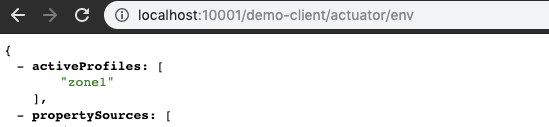
访问:localhost:10001/demo-client/actuator/env,结果如下:
访问:localhost:10002/demo-client/actuator/env,结果如下:
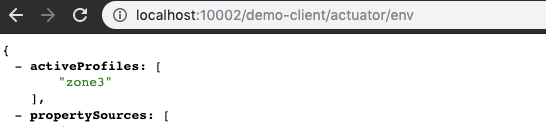
可以看到ZoneAffinity特性(上一篇文章有讲),zone1的gateway访问的是zone1的demo-client,zone3的gateway访问的是zone3的demo-client。
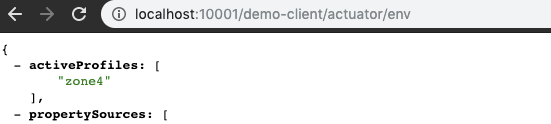
接下来,关闭eureka-client的zone1实例,继续访问 localhost:10001/demo-client/actuator/env,可以看到在经过几个错误之后,自动fallback到了remote-region的zone4实例上,实现了类似异地多活自动转移请求的效果。
Eureka【支持Remote Region】的更多相关文章
- 支持remote write和exemplar的prometheus服务
最近项目组在做Prometheus指标采集和告警,其中用到了Prometheus的exemplar特性,由于该特性比较新,当前支持该特性的存储有比较少.因此需要自行实现exemplar功能. 我在gi ...
- 【分享】让prometheus支持PUSH模式,可以使用remote write协议推送数据
2021-10-21补充: 我通过修改源码来让prometheus支持remote-write,纯属多此一举: --enable-feature=remote-write-receiver这个命令行参 ...
- 深入理解Eureka - Eureka Client获取注册信息机制
深入理解Eureka - Eureka Client获取注册信息机 Eureka Client提供了定时获取注册信息的机制.Eureka Client获取注册信息的所有逻辑都在DiscoveryCli ...
- 0401-服务注册与发现、Eureka简介
一.硬编码问题 解决方案:nginx.或.服务注册与发现 二.服务发现 注册.心跳机制 三.服务发现组件的功能 1.服务注册表:是一个记录当前可用服务实例的网络信息的数据库,是服务发现机制的核心.服务 ...
- SpringCloud核心教程 | 第三篇:服务注册与发现 Eureka篇
Spring Cloud简介 Spring Cloud是一个基于Spring Boot实现的云应用开发工具,它为基于JVM的云应用开发中涉及的配置管理.服务发现.断路器.智能路由.微代理.控制总线.全 ...
- springCloud值Eureka
Spring Cloud特点 约定优于配置 开箱即用.快速启动 适用于各种环境 PC Server 云环境 容器(Docker) 轻量级的组件 服务发现Eureka 组件的支持很丰富, ...
- spring cloud Eureka 配置信息
Eureka instance 一个服务,如:订单系统,会部署多台服务器,而每台服务器上提供的服务就是instance; 负载配置. Eureka service 指的是服务,提供一种特定功能的服务, ...
- 一小时搞定Eureka
一.什么是Eureka Eureka是Netflix公司开源的产品,它是一种基于REST( Representational State Transfer )的服务,主要用于AWS云. Eureka提 ...
- SpringCloud 源码系列(2)—— 注册中心 Eureka(中)
五.服务注册 1.实例信息注册器初始化 服务注册的代码位置不容易发现,我们看 DiscoveryClient 初始化调度任务的这个方法,这段代码会去初始化一个实例信息复制器 InstanceInfoR ...
随机推荐
- Python流程控制和缩进
我们语文学写作文,有如果- -,那么- -的句式,同样Python也有这样的句式: #如何这个条件成立了,那就执行下面这个语句 if 条件: 内容1 内容2 else: 内容3 几点说明:
- MySQL二进制包安装
mysql的安装有多种方法,这里就介绍一下二进制包安装. [root@node1 ~]# tar xvf mysql-5.7.27-linux-glibc2.12-x86_64.tar [root@n ...
- ajax 的 get 方式
因为如果使用ajax 的 get 方式提交数据到后台controller的时候可能会出现缓存而无法提交的现象. 解决这类问题的方法有两种: 1.在ajax的url后面添加一个随机参数如 URL+&qu ...
- Android 之Activity启动模式(二)之 Intent的Flag属性
首页博客链接关于我留言板 前面介绍了通过launchMode设置Activity的启动模式.本章接着介绍Activity的启动模式相关内容,讲解的内容是Intent与启动模式相关的Flag,以及and ...
- Python语法 - yield表达式(类似 m = yield i )
yield是个表达式而不仅仅是个语句,所以可以使用x = yield r 这样的语法, yield表达式可以接收send()发出的参数,yield表达式是跟send方法一起配合使用 send方 ...
- mysql端口3306无法访问
mysql主备复制,show slave status显示IO一直connecting 一.查看了防火墙,已经处于关闭状态 二.查看使用的复制用户的权限,也已经开放 三.telnet访问另外一台机器端 ...
- linux下添加动态链接库路径、动态库加载等方法
linux下添加动态链接库路径的方法 2017年01月20日 10:08:17 阅读数:5596 Linux共享库路径配置 Linux下找不到共享库文件的典型现象为明明已经安装某个软包(如libn ...
- 配置nginx支持path_info
默认情况下,nginx是不支持path_info的,我们需要做些配置让它支持. location ~ \.php(.*)$ { root /var/www/nginx/html; fastcgi_pa ...
- 阶段5 3.微服务项目【学成在线】_day02 CMS前端开发_14-webpack研究-webpack-dev-server
实现自动打包自动刷新浏览器 新建目录和页面看图 cnpm install webpack@3.6.0 webpack-dev-server@2.9.1 html-webpack-plugin@2.30 ...
- 使用iptables为docker容器动态添加端口映射
1.将当前iptables的配置写入保存到/etc/sysconfig/iptables 2.保存 /etc/init.d/iptables sava 3.修改iptables配置(vi /etc/s ...