
ubuntu NGINX uwsgi https 部署Django 遇到的问题
搞了3天终于把Django成功部署到Ubuntu,记录一下;
引用来自泡泡茶壶:
Ubuntu下的Nginx + Uwsgi + Django项目部署详细流程
前提说明:
Django作为小程序的后端,因小程序的请求到后端的都是https请求,所以Django必须支持https请求
写在前面:
部署Django项目前,先用Django自带服务器运行一下看有没有问题,再部署;否则可能项目本身有问题,却以为是部署不正确导致的
运行命令:python manage.py runserver .....
各种配置:
1、nginx支持https请求
1)项目对象的nginx.conf配置
# the upstream component nginx needs to connect to

upstream django {

    # unix:///home/breavo/PyWorkSpace/mysite_code_shuffle/config/eshop.sock

    server xx.xx.xx.xx:8002; # xx.xx.xx.xx是服务器的ip,若是腾讯云服务器,则是服务器外部ip,这里的ip和端口是和uwsgi通信的方式,所以和uwsgi.ini配置文件中一致

}

# configuration of the server

server {

    # the port your site will be served on

    listen 90 ssl; # 监听端口可以是任何端口,但不要和已使用端口冲突

    # listen 8003;

    # the domain name it will serve for

    server_name  indoor.crazymonkey.ml; # 这里可以是域名也可以是本机ip,同上面的xx.xx.xx.xx

    charset     utf-8;

    # max upload size

    client_max_body_size 75M;   # adjust to taste

    # ssl configuration

    ssl on; # 打开了ssl验证,支持https请求

    ssl_certificate /root/hewenjuan/Indoor_Localization/2446810_www.preciselocation.top.pem; # ssl证书放的位置

    ssl_certificate_key /root/hewenjuan/Indoor_Localization/2446810_www.preciselocation.top.key; # 使用绝对路径肯定没错啦

    # Django media

    location /media  {

        alias /root/hewenjuan/Indoor_Localization/media; # your Django project's media files - amend as required,有图片等,

    }

    location /static {

        # alias /path/to/your/mysite/static; # your Django project's static files - amend as required

        alias /root/hewenjuan/Indoor_Localization/static; # 静态文件位置,Django项目admin静态文件

    }

    # Finally, send all non-media requests to the Django server.

    location / {

        uwsgi_pass  django; # 这个就是引用了上面的upstream django配置了

        # include     /home/breavo/PyWorkSpace/mysite_code_shuffle/config/uwsgi_params; # the uwsgi_params file you installed

        include /etc/nginx/uwsgi_params;

    }

}
说明:用nginx -t命令查看上面nginx文件的正确性
2)项目对应的uwsgi.ini配置
# mysite_uwsgi.ini file

[uwsgi]

socket =  xx.xx.xx.xx:8002 # 腾讯云内部ip,端口和nginx.conf配置的Django部分相同

# Django-related settings

# the base directory (full path)

chdir           = /root/hewenjuan/Indoor_Localization  # Django项目所在目录

# Django's wsgi file

module          = Indoor_Localization.wsgi #

# module =  config/hello.py:application

wsgi_file = Indoor_Localization/wsgi.py # Django项目wsgi.py所在位置,相对于上面的chdir目录

# wsgi_file =  /root/hewenjuan/Indoor_Localization/config/hello.py:application

# the virtualenv (full path)

virtualenv = /root/.pyenv/versions/indoorLocation/bin/python3.6  # python虚拟环境绝对位置

# home            = /root/.pyenv

home            = /root/.pyenv/versions/indoorLocation

# process-related settings

# master

master          = true

# maximum number of worker processes

processes       = 10

# the socket (use the full path to be safe

# socket          = /root/hewenjuan/Indoor_Localization/Indoor_Localization.sock

# ... with appropriate permissions - may be needed

chmod-socket    = 666

# clear environment on exit

vacuum          = true

stats           = %(chdir)/config/uwsgi.status

pidfile         = %(chdir)/config/uwsgi.pid

# daemonize = %(chdir)/config/uwsgi.log # 开启该字段,uwsgi会在后台运行,日志保存在该文件中,若没有开启该字段,则在前台运行,日志显示在界面上(调试用方便)

# pidfile = %(chdir)/config/uwsgi.pid

#plugins =  /root/.pyenv/versions/indoorLocation/bin/python3.6
3)每次修改了Django项目文件代码,都需要重启uwsgi和nginx,所以自己写了个启动文件start.sh
killall -9 uwsgi  # 关闭所有uwsgi进程,有时候没有关掉上次的uwsgi进程,启动新的会报错等问题

killall -9 uwsgi  # 额,有时候关闭一次会出现没关掉的情况

uwsgi --ini mysite_uwsgi.ini # 启动mysite_uwsgi.ini文件,即启动uwsgi进程

/etc/init.d/nginx restart # 重启nginx进程
说明:启动start.sh命令:sh start.sh
2、uwsgi支持https请求
1)uwsgi.ini配置
# mysite_uwsgi.ini file

[uwsgi]
# 2446810_www.preciselocation.top.pem,2446810_www.preciselocation.top.key是ssl证书

https = xx.xx.xx.xx:443,2446810_www.preciselocation.top.pem,2446810_www.preciselocation.top.key # xx.xx.xx.xx是腾讯云内部ip

# Django-related settings

# the base directory (full path)

chdir           = /root/hewenjuan/Indoor_Localization

# Django's wsgi file

module          = Indoor_Localization.wsgi

# module =  config/hello.py:application

wsgi_file = Indoor_Localization/wsgi.py

# wsgi_file =  /root/hewenjuan/Indoor_Localization/config/hello.py:application

# the virtualenv (full path)

virtualenv = /root/.pyenv/versions/indoorLocation/bin/python3.6

# home            = /root/.pyenv

home            = /root/.pyenv/versions/indoorLocation

# process-related settings

# master

master          = true

# maximum number of worker processes

processes       = 10

# the socket (use the full path to be safe

# socket          = /root/hewenjuan/Indoor_Localization/Indoor_Localization.sock

# ... with appropriate permissions - may be needed

chmod-socket    = 666

# clear environment on exit

vacuum          = true

stats           = %(chdir)/config/uwsgi.status

pidfile         = %(chdir)/config/uwsgi.pid

# daemonize = %(chdir)/config/uwsgi.log

# pidfile = %(chdir)/config/uwsgi.pid

#plugins =  /root/.pyenv/versions/indoorLocation/bin/python3.6
遇到的问题:
1、每次退出账号重新登录都会提示,pyenv 不存在了

原因:
方法:命令行输入:source ~/.bashrc;即执行.bashrc文件中的语句(包含 了pyenv初始化语句)
2、nginx权限问题:django admin后台样式不显示,查看nginx错误日志(位置:/var/log/nginx/error.log),显示权限拒绝Permission denied
原因:Django项目下的static文件执行权限不够
方法:打开文件/etc/nginx/nginx.conf,修改 user www-data为user root(root:你目前登录的账号名称,也可能是Ubuntu等其他)
参考qingspace:https://www.cnblogs.com/qingspace/p/6838747.html
3、unavailable modifier requested

原因:没有激活python虚拟环境
方法:输入命令:pyenv activate xx,激活xx环境,xx是你项目所在的python虚拟环境
4、安装项目依赖包:pip install -r requirements.txt,遇到一个问题:安装不成功,界面没有显示不成功
出现下面显示的Successfully ...才表示安装成功
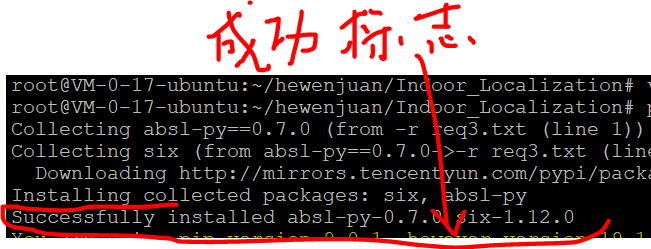
原因:requirements.txt文件中有win_xx的安装包,即有python接入window系统所使用的安装包,类似了win32等,啥除掉即可;
因为有可能写代码使用的是window系统,部署的时候放在了Linux系统
解决方法:删除win32等针对window系统的安装包
ubuntu NGINX uwsgi https 部署Django 遇到的问题的更多相关文章
- centos7下采用Nginx+uwsgi来部署django
之前写过采用Apache和mod_wsgi部署django,因为项目需要,并且想比较一下Nginx和Apache的性能,尝试采用Nginx+uwsgi的模式来部署django. 1.安装uwsgi以及 ...
- 在阿里云 Ubuntu上通过nginx+uwsgi服务器部署Django出现的502错误
https://blog.csdn.net/luojie140/article/details/76919471 https://blog.csdn.net/sinat_21302587/articl ...
- Nginx+uWsgi生产部署Django
部署得过程很简单,部署得核心在于,为什么要这样做,每一个参数代表什么意思,最终的目的是得了解,一些基概念性的东西. uWsgi简介 说Uwsgi之前,先说一下Wsgi. 什么是Wsgi? WSGI: ...
- Python基础 - Ubuntu+Nginx+uwsgi+supervisor部署Flask应用
网上找了许多讲关于Flask应用部署的文章几乎都是一个helloworld的Demo,按照helloworld来部署都没问题,但实际项目部署时还是遇到了不少问题.在这里简单写下自己成功部署的过程,防止 ...
- [技术博客]ubuntu+nginx+uwsgi+Django+https的部署
ubuntu+nginx+uwsgi+Django+https部署文档 配置机器介绍 操作系统:Ubuntu 18.04.2 LTS 64位 python版本:Python 3.6.7 Django版 ...
- ubuntu+nginx+uwsgi部署django web项目
前言 将本地开发的django项目部署至linux上的uwsgi服务器,并配置nginx,完成基于ubuntu+nginx+uwsgi的上线运行.下面整理相关步骤. 服务器配置virtualenv 如 ...
- Ubuntu Nginx uwsgi django 初试
/************************************************************************************** * Ubuntu Ngi ...
- Nginx 和 Gunicorn 部署 Django项目
目录 Nginx 和 Gunicorn 部署 Django项目 配置Nginx 安装配置Gunicorn 通过命令行直接启动 Gunicorn 与 uwsgi 的区别,用哪个好呢 Gunicorn u ...
- django+nginx+uwsgi 项目部署
Django虽然自带一个Server,但只能作为开发时测试使用,我们需要一个可以稳定而持续的服务器对网站进行部署,比如Apache, Nginx, lighttpd等,本篇将利用nginx和uWSGI ...
随机推荐
- 剑指offer23:输入一个整数数组,判断该数组是不是某二叉搜索树的后序遍历的结果。输出Yes OR No。
1 题目描述 输入一个整数数组,判断该数组是不是某二叉搜索树的后序遍历的结果.如果是则输出Yes,否则输出No.假设输入的数组的任意两个数字都互不相同. 2 思路和方法 二叉搜索树:二叉查找树(Bin ...
- Python 【函数】
函数 内置函数print() input() len() type() ... print('Hello World') 函数 参数 定义函数def greet(name): print(name+' ...
- java 内部类、匿名内部类
一:内部类 1:什么是内部类? 大部分时候,类被定义成一个独立的程序单元.在某些情况下,也会把一个类放在另一个类的内部定义,这个定义在其他类内部的类就被称为内部类(有些地方也叫做嵌套类),包含内部类的 ...
- Ubuntu 安装 QtCreator (version : Qt 5.9.8)
平台 :Ubuntu 16.04 QT :5.9.8 (open source) 首先去QT安装包下载安装包,为了保持与arm板子的统一,本人选择了 5.9.8 版本的QT 可 ...
- varnish应用
Nginx+Varnish+基本业务 ngnix nginx.conf配置文件 user root; worker_processes ; error_log logs/error.log crit; ...
- k8s之资源指标API部署metrics-server
1.部署metrics-server 从v1.8开始,引入了新的功能,即把资源指标引入api,资源指标:metrics-server,自定义指标:prometheus,k8s-prometheus-a ...
- bzoj2152 聪聪可可 (树形dp)
大意: 给定树, 随机选两点, 求两点距离是3的倍数的概率. 树形dp入门水题, 枚举每个点作为lca时的答案即可. #include <iostream> #include <qu ...
- Spring集成kafka,消费者运行时内存占用会一直增长
Spring集成kafka,消费者运行时内存占用会一直增长? 20C 本人用Spring集成kafka消费者,发布运行时内存占用会一直升高,最后程序挂掉.请各位大神看看,提供解决方法 以下是我的配置文 ...
- C#通讯框架改写
现有项目是利用C#的socket与PLC进行实时通讯,PLC有两种通讯模式——常规采集&高频采集. 其中常规采集大概在10ms左右发送一次数据,高频采集大概在2ms左右发送一次数据. 现有代码 ...
- JS基础_立即执行函数
<!DOCTYPE html> <html> <head> <meta charset="UTF-8"> <title> ...