
数据库命令行工具USQL、mycli、litecli、pgcli
USQL
USQL 是一款使用 Go 语言开发的支持 SQL/NoSQL 数据库的通用命令行工具,它支持多种主流的数据库软件,目前最新版本是usql 0.7.0。比如 PostgreSQL、MySQL、Oracle Database、SQLite3、Microsoft SQL Server 以及许多其它的数据库(包括 NoSQL 和非关系型数据库)。
USQL 的灵感来自 PostgreSQL 的 PSQL,USQL 支持大多数 PSQL 的核心特性,比如:设置变量、反引号参数。并具有 PSQL 不支持的其它功能,如语法高亮、基于上下文的自动补全和多数据库支持等。
安装 USQL
由于 USQL 使用 Go 语言开发,具备了良好的Linux、Windows等跨平台特性。USQL 安装非常简单,官方也提供二进制、Homebrew、Scoop等多种安装方式。这里我们就使用最具通用性的二进制方式安装,以 Linux 平台为例:
$ wget https://github.com/xo/usql/releases/download/v0.7.0/usql-0.7.0-linux-amd64.tar.bz2
$ tar xjvf usql-0.7.0-linux-amd64.tar.bz2
$ sudo mv usql /usr/local/bin
如果你使用其它平台,可根据实际情况在官方下载页面下载对应版本。
USQL 用法
mycli
mycli 是基于MySQL的命令行工具,直接使用 pip install mycli 安装,
具体介绍见 https://github.com/dbcli/mycli
$ mycli --help

Usage: mycli [OPTIONS] [DATABASE]

  A MySQL terminal client with auto-completion and syntax highlighting.

  Examples:

    - mycli my_database

    - mycli -u my_user -h my_host.com my_database

    - mycli mysql://my_user@my_host.com:3306/my_database

Options:

  -h, --host TEXT               Host address of the database.

  -P, --port INTEGER            Port number to use for connection. Honors

                                $MYSQL_TCP_PORT.

  -u, --user TEXT               User name to connect to the database.

  -S, --socket TEXT             The socket file to use for connection.

  -p, --password TEXT           Password to connect to the database.

  --pass TEXT                   Password to connect to the database.

  --ssh-user TEXT               User name to connect to ssh server.

  --ssh-host TEXT               Host name to connect to ssh server.

  --ssh-port INTEGER            Port to connect to ssh server.

  --ssh-password TEXT           Password to connect to ssh server.

  --ssh-key-filename TEXT       Private key filename (identify file) for the

                                ssh connection.

  --ssl-ca PATH                 CA file in PEM format.

  --ssl-capath TEXT             CA directory.

  --ssl-cert PATH               X509 cert in PEM format.

  --ssl-key PATH                X509 key in PEM format.

  --ssl-cipher TEXT             SSL cipher to use.

  --ssl-verify-server-cert      Verify server's "Common Name" in its cert

                                against hostname used when connecting. This

                                option is disabled by default.

  -V, --version                 Output mycli's version.

  -v, --verbose                 Verbose output.

  -D, --database TEXT           Database to use.

  -d, --dsn TEXT                Use DSN configured into the [alias_dsn]

                                section of myclirc file.

  --list-dsn                    list of DSN configured into the [alias_dsn]

                                section of myclirc file.

  -R, --prompt TEXT             Prompt format (Default: "\t \u@\h:\d> ").

  -l, --logfile FILENAME        Log every query and its results to a file.

  --defaults-group-suffix TEXT  Read MySQL config groups with the specified

                                suffix.

  --defaults-file PATH          Only read MySQL options from the given file.

  --myclirc PATH                Location of myclirc file.

  --auto-vertical-output        Automatically switch to vertical output mode

                                if the result is wider than the terminal

                                width.

  -t, --table                   Display batch output in table format.

  --csv                         Display batch output in CSV format.

  --warn / --no-warn            Warn before running a destructive query.

  --local-infile BOOLEAN        Enable/disable LOAD DATA LOCAL INFILE.

  --login-path TEXT             Read this path from the login file.

  -e, --execute TEXT            Execute command and quit.

  --help                        Show this message and exit.

λ mycli -u root

Password:

mysql 5.5.53

mycli 1.19.0

Chat: https://gitter.im/dbcli/mycli

Mail: https://groups.google.com/forum/#!forum/mycli-users

Home: http://mycli.net

Thanks to the contributor - Jialong Liu

mysql root@localhost:(none)> show data

                                       databases

                                       create database
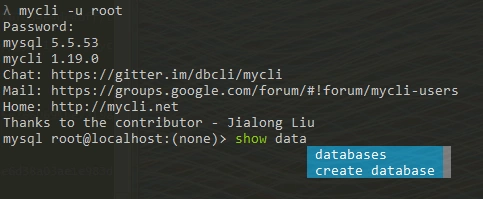
注:进入MySQL命令行后如果想执行Linux命令怎么办,先退出执行然后再登录MySQL?麻烦,其实可以直接用system。
mysql> system pwd

/root

mysql> system ll

sh: ll: command not found

mysql> system ls -al

total 40160

dr-xr-x---.   39 root     root         4096 Jul 10 14:47 .

dr-xr-xr-x.   29 root     root         4096 May  5 18:55 ..
litecli
litecli 是基于 sqlite 的命令行工具,直接用 pip install -U litecli 安装,具体介绍见
https://github.com/dbcli/litecli
$ litecli --help

Usage: litecli [OPTIONS] [DATABASE]

  A SQLite terminal client with auto-completion and syntax highlighting.

  Examples:

    - litecli lite_database

Options:

  -V, --version           Output litecli's version.

  -D, --database TEXT     Database to use.

  -R, --prompt TEXT       Prompt format (Default: "\d> ").

  -l, --logfile FILENAME  Log every query and its results to a file.

  --liteclirc PATH        Location of liteclirc file.

  --auto-vertical-output  Automatically switch to vertical output mode if the

                          result is wider than the terminal width.

  -t, --table             Display batch output in table format.

  --csv                   Display batch output in CSV format.

  --warn / --no-warn      Warn before running a destructive query.

  -e, --execute TEXT      Execute command and quit.

  --help                  Show this message and exit.

λ litecli

Version: 1.0.0

Mail: https://groups.google.com/forum/#!forum/litecli-users

Github: https://github.com/dbcli/litecli

(none)> .tables

Not connected to database.

(none)> .databases

Not connected to database.

(none)> use test

You are now connected to database "test"

Time: 0.001s

test> .tables

Time: 0.000s

test> CREATE TABLE COMPANY(

         ID INT PRIMARY KEY     NOT NULL,

         NAME           TEXT    NOT NULL,

         AGE            INT     NOT NULL,

         ADDRESS        CHAR(50),

         SALARY         REAL

      );

Query OK, 0 rows affected

Time: 0.077s

test> .tables

+---------+

| name    |

+---------+

| COMPANY |

+---------+

Time: 0.040s
pgcli
pgcli 是一个基于 PostgreSQL 的命令行工具,支持自动补全和语法高亮,直接使用pip install -U pgcli 安装,具体介绍见 https://github.com/dbcli/pgcli
$ pgcli --help

Usage: pgcli [OPTIONS] [DATABASE] [USERNAME]Options:

  -h, --host TEXT     Host address of the postgres database.

  -p, --port INTEGER  Port number at which the postgres instance is listening.

  -U, --user TEXT     User name to connect to the postgres database.

  -W, --password      Force password prompt.

  -w, --no-password   Never prompt for password.

  -v, --version       Version of pgcli.

  -d, --dbname TEXT   database name to connect to.

  --pgclirc TEXT      Location of pgclirc file.

  --help              Show this message and exit.
数据库命令行工具USQL、mycli、litecli、pgcli的更多相关文章
- Mysql数据库命令行输入错误怎么办
Mysql数据库命令行输入错误 缺少另一半 错误输入 ' 或 " 时,必须键入另一半才能退出命令. 缺少分号 写入语句缺少分号需要补全. 输入quit或者exit退出 ctrl+c,完全退出 ...
- orcl数据库命令行怎么导入dmp格式的文件
2018-05-23 1.创建空间 以system的身份登陆orcl 打开SQL Window界面,输入以下命令create tablespace SGXC(表空间的名字)datafile 'D:/S ...
- MySql数据库命令行操作说明
MySql数据库操作说明 1. 使用电脑的运行cmd指令打开dos界面 2. 输入cd C:\Program Files\MySql\bin命令回车,进入mysqld目录 3. 输入mysql ...
- 数据库命令行操作语句 linux 详细
1.连接数据库 命令: use <数据库名> 2.查看表的引擎类型等状态信息 SHOW TABLE STATUS [FROMdb_name] [LIKE 'pattern'] 3.当前数据 ...
- MYSQL 数据库命令行终端操作笔记
1.数据库登录: 1.登录本地的MYSQL数据库:mysql -u root -p 2.连接远程主机上的MYSQL数据库:mysql -h 192.168.191.2 -u root -p 123 ...
- postgres 数据库命令行客户端psql的使用命令总结
1.切换到 postgres 用户: 2.输入: psql , 进入到postgresql的客户端psql: 3.\l 查看当前所有的数据库: 4.psql database1 ...
- oracle数据库命令行查看存储过程
之前有用过这种写法,转换大小写在赋给字段,但是没成功,偶然间发现别人有这么写,今天试了下确实可以
- Oracle数据库命令行下数据的导入导出
//设置导入导出字符集,导入导出都要设置一下 export NLS_LANG=AMERICAN_AMERICA.ZHS16GBK //导出 exp system/oracle@orcl file=/u ...
- 七个用于数据科学(data science)的命令行工具
七个用于数据科学(data science)的命令行工具 数据科学是OSEMN(和 awesome 相同发音),它包括获取(Obtaining).整理(Scrubbing).探索(Exploring) ...
随机推荐
- Linux搭建PHP环境(LAMP)
//安装Apache的命令 # yum install httpd //启动Apache的命令 # service httpd start //安装MySQL的命令 # wget http://dev ...
- vue画图运用echarts
<template> <div class="tubiao"> <div id="main" style="width: ...
- 史上最全SVN 教程
以下博文引用<https://blog.csdn.net/u013067756/article/details/73302758>,再此仅供学习和参考. Svn是什么? SVN(全称Sub ...
- JPA 或者Hibernate 实体类说明
这里简单介绍Hibernate的Annotation注解 一.声明实体 @Entity对实体注释.任何Hibernate映射对象都要有这个注释@Table声明此对象映射到数据库的数据表,通过它可以为实 ...
- python基础知识(元组)
元组 不能更改内容 元组 (元素1,元素2) 元组的创建和删除 使用赋值运算符直接创建元组 元组名 = (元素1,元素2........) 只创建一个元素的元组 元组名 = (元素1,) 创建空 ...
- 深入源码分析Spring中的构造器注入
# 1. 示例 构造器注入类,分别有三个构造器,一个是无参构造器,一个是注入一个Bean的构造器,一个是注入两个Bean的构造器: public class ConstructorAutowiredT ...
- PJzhang:关闭wps小广告和快速关闭445端口
猫宁!!! kali linux上安装的wps,没有广告,而且轻巧简洁. 如果你在windows上安装wps,除了ppt.word.excel,还会有一个h5的应用,当然,最令人烦扰的当 ...
- Leetcode之动态规划(DP)专题-712. 两个字符串的最小ASCII删除和(Minimum ASCII Delete Sum for Two Strings)
Leetcode之动态规划(DP)专题-712. 两个字符串的最小ASCII删除和(Minimum ASCII Delete Sum for Two Strings) 给定两个字符串s1, s2,找到 ...
- 【C/C++开发】循环中使用递减计数与递增计数的效率区别
有两个循环语句: 复制代码代码如下: for(i = n; i > 0; i--) { - } for(i = 0; i < n; i++) { - } 为什么前者比后者快 ...
- aws 基于延迟策略配置dns故障切换
前提:由于国内访问首尔地区经常出现不稳定情况,现将请求从nginx(sz)转发到nginx(hk)再转发到首尔地区,在基于不改变nginx(seoul)的配置的前提下,引入aws的延迟策略,同时保证国 ...