
[Abp vNext微服务实践] - 业务开发
前几篇分别介绍了abp vNext微服务框架、开发环境搭建和vue element admin前端框架接入,在vue element admin中实现用户角色管理基本功能后就可以开始进行业务开发了,本篇会详细的介绍如何在abp vNext中开发业务接口和前端页面实现。
业务接口开发
业务接口就是针对业务api接口,通过abp vNext微服务中实现并发布业务接口后,前端获取接口并进行界面开发,如此就实现了abp vNext微服务的前后端分离开发。
step1:创建实体(model)
abp vNext微服务框架中的业务开发同样采用了经典的ddd架构风格和ef core 的code first模式,所以一切的业务都从领域模型(domain)开始。创建数据字典模型如下:

    public class DataDictionary : AuditedAggregateRoot<Guid>,ISoftDelete

    {

        [NotNull]

        public string Name { get; set; }

        public string Code { get; set; }

        [NotNull]

        public string FullName { get; set; }

        public Guid? CategoryID { get; set; }

        public string Notes { get; set; }

        public Guid? PID { get; set; }

        [NotNull]

        public int SEQ { get; set; }

        public bool IsEdit { get; set; }

        public bool IsDeleted { get; set; }

    }
step2:加入AbpDbContext:
public DbSet<DataDictionary> Dictionary { get; set; }
step3:构建ef实体:
            builder.Entity<DataDictionary>(b =>

            {

                b.ToTable("Dictionary");

                b.ConfigureConcurrencyStamp();

                b.ConfigureExtraProperties();

                b.ConfigureAudited();

                b.Property(x => x.Name).IsRequired().HasMaxLength(ProductConsts.MaxNameLength);

                b.Property(x => x.Code).HasMaxLength(ProductConsts.MaxCodeLength);

                b.Property(x => x.FullName).IsRequired().HasMaxLength(ProductConsts.MaxFullNameLength);

                b.Property(x => x.Notes).HasMaxLength(ProductConsts.MaxNotesLength);

                b.Property(x => x.SEQ).IsRequired();

                b.HasIndex(q => q.Code);

                b.HasIndex(q => q.Name);

                b.HasIndex(q => q.CategoryID);

            });
step4:使用ef迁移数据库:
 Add-Migration

 Update-Database
查看输出日志是否成功迁移。
创建数据字典应用服务接口
step5:创建数据字典接口和dto如下:

    public interface IDictionaryAppService : IApplicationService

    {

        Task<PagedResultDto<DictionaryDto>> GetAll(GetDictionaryInputDto input);

        Task<DictionaryDto> Get(Guid id);

        Task<DictionaryDto> Create(CreateDictionaryDto input);

        Task<DictionaryDto> Update(Guid id, UpdateDictionary input);

        Task Delete(List<Guid> ids);

    }
    public class CreateDictionaryDto

    {

        [Required]

        [StringLength(ProductConsts.MaxNameLength)]

        public string Name { get; set; }

        [StringLength(ProductConsts.MaxCodeLength)]

        public string Code { get; set; }

        public Guid? CategoryID { get; set; }

        [StringLength(ProductConsts.MaxNotesLength)]

        public string Notes { get; set; }

        public Guid? PID { get; set; }

        public int SEQ { get; set; }

        public bool IsEdit { get; set; }

    }
    public class DictionaryDto : AuditedEntityDto<Guid>

    {

        public string Name { get; set; }

        public string Code { get; set; }

        public string FullName { get; set; }

        public Guid? CategoryID { get; set; }

        public string Notes { get; set; }

        public Guid? PID { get; set; }

        public int SEQ { get; set; }

        public bool IsEdit { get; set; }

    }
    public class GetDictionaryInputDto: PagedAndSortedResultRequestDto

    {

        public string Filter { get; set; }

        public Guid CategoryID { get; set; }

    }
    public class UpdateDictionary

    {

        [StringLength(ProductConsts.MaxNotesLength)]

        public string Notes { get; set; }

        public Guid? PID { get; set; }

        public int SEQ { get; set; }

    }
实现数据字典应用服务
step6:应用层实现如下:

继承基类:
public class DictionaryAppService : ApplicationService, IDictionaryAppService
注入仓储:
        private readonly IRepository<DataDictionary, Guid> _repository;

     public DictionaryAppService(

            IRepository<DataDictionary, Guid> repository)

        {

            _repository = repository;

        }
实现接口
新增:
        public async Task<DictionaryDto> Create(CreateDictionaryDto input)

        {

            var existingDic = await _repository.FirstOrDefaultAsync(d => d.Name == input.Name);

            if (existingDic != null)

            {

                throw new BusinessException("名称: "+input.Name+"已存在");

            }var result = await _repository.InsertAsync(new DataDictionary

            {

                Id = GuidGenerator.Create(),

                Name = input.Name,

                Code = input.Code,

                FullName = input.Name,

                CategoryID = input.CategoryID,

                Notes = input.Notes,

                PID = input.PID,

                SEQ = input.SEQ,

                IsEdit=input.IsEdit

            });

            return ObjectMapper.Map<DataDictionary, DictionaryDto>(result);

        }
删除:
        public async Task Delete(List<Guid> ids)

        {

            foreach (var id in ids)

            {

                await _repository.DeleteAsync(id);

            }

        }
查询:
        public async Task<DictionaryDto> Get(Guid id)

        {

            var query = await _repository.GetAsync(id);

            var dto = ObjectMapper.Map<DataDictionary, DictionaryDto>(query);return dto;

        }

        public async Task<PagedResultDto<DictionaryDto>> GetAll(GetDictionaryInputDto input)

        {

            var query = _repository

                .Where(d => d.CategoryID == input.CategoryID)

                .WhereIf(!string.IsNullOrEmpty(input.Filter), d => d.Name.Contains(input.Filter) ||

                                                                   d.Code.Contains(input.Filter));

            var items = await query.OrderBy(input.Sorting ?? "SEQ")

                                        .Skip(input.SkipCount)

                                        .Take(input.MaxResultCount).ToListAsync();

            var totalCount = await query.CountAsync();

var dtos = ObjectMapper.Map<List<DataDictionary>, List<DictionaryDto>>(items);return new PagedResultDto<DictionaryDto>(totalCount, dtos);

        }
修改:
        public async Task<DictionaryDto> Update(Guid id, UpdateDictionary input)

        {var dic = await _repository.GetAsync(id);

            dic.Notes = input.Notes;

            dic.SEQ = input.SEQ;

            return ObjectMapper.Map<DataDictionary, DictionaryDto>(dic);

        }
增加数据字典权限
step7:权限
ProductManagementPermissions中增加静态类DataDictionary:
        public static class DataDictionary

        {

            public const string Default = BasicDataManagement + ".DataDictionary";

            public const string Delete = Default + ".Delete";

            public const string Update = Default + ".Update";

            public const string Create = Default + ".Create";

        }
step8:构造权限
ProductManagementPermissionDefinitionProvider中增加dataDictionary:
            var dataDictionary = basicDataManagementGroup.AddPermission(ProductManagementPermissions.DataDictionary.Default, L("DataDictionary"));

            dataDictionary.AddChild(ProductManagementPermissions.DataDictionary.Create, L("Permission:Create"));

            dataDictionary.AddChild(ProductManagementPermissions.DataDictionary.Delete, L("Permission:Delete"));

            dataDictionary.AddChild(ProductManagementPermissions.DataDictionary.Update, L("Permission:Edit"));
增加完成后在数据字典应用服务中分别加上权限过滤器
[Authorize(ProductManagementPermissions.DataDictionary.Default)]

[Authorize(ProductManagementPermissions.DataDictionary.Create)]

[Authorize(ProductManagementPermissions.DataDictionary.Delete)]

[Authorize(ProductManagementPermissions.DataDictionary.Update)]
数据字典DTO映射
step9:ProductManagementApplicationAutoMapperProfile中增加数据字典模型-Dto映射:
CreateMap<DataDictionary, DictionaryDto>();
数据字典web api实现
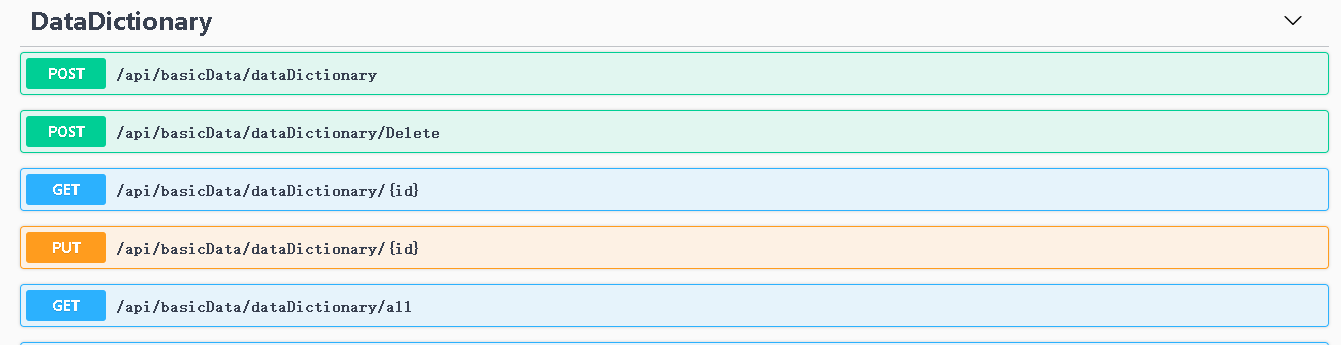
step10:abp vNext中没有使用原先的应用服务动态api,现在api需要在控制器中实现

    [RemoteService]

    [Area("basicData")]

    [Route("api/basicData/dataDictionary")]

    public class DataDictionaryController : AbpController, IDictionaryAppService

    {

        private readonly IDictionaryAppService _dictionaryAppService;

        public DataDictionaryController(IDictionaryAppService dictionaryAppService)

        {

            _dictionaryAppService = dictionaryAppService;

        }

        [HttpPost]

        public Task<DictionaryDto> Create(CreateDictionaryDto input)

        {

            return _dictionaryAppService.Create(input);

        }

        [HttpPost]

        [Route("Delete")]

        public Task Delete(List<Guid> ids)

        {

            return _dictionaryAppService.Delete(ids);

        }

        [HttpGet]

        [Route("{id}")]

        public Task<DictionaryDto> Get(Guid id)

        {

            return _dictionaryAppService.Get(id);

        }

        [HttpGet]

        [Route("all")]

        public Task<PagedResultDto<DictionaryDto>> GetAll(GetDictionaryInputDto input)

        {

            return _dictionaryAppService.GetAll(input);

        }

        [HttpPut]

        [Route("{id}")]

        public Task<DictionaryDto> Update(Guid id, UpdateDictionary input)

        {

            return _dictionaryAppService.Update(id, input);

        }

    }
swagger文档
总结
abp vNext的业务开发模式并没有做太多改动,虽然接口开发的过程有些繁琐,但是对于业务拆分和模型解耦来说是非常有必要的。ddd的架构风格让开发人员无需依赖于sql语法,可以使用抽象的仓储进行轻松高效的查询,这对于代码维护和项目交接来说是十分幸运的。此外,abp vNext还将身份、权限、模型验证、异常处理等进行了完美封装,使得开发人员可以专注于业务开发。
文章目录:https://www.cnblogs.com/william-xu/p/12047529.html
[Abp vNext微服务实践] - 业务开发的更多相关文章
- [Abp vNext微服务实践] - 文章目录
简介 ABP vNext是volosoft的新一代框架,ABP(vNext)完全使用.NET CORE和DDD(领域驱动)打造,目前GitHub已有6K+次提交,发布版本超过40次,Nuget包下载量 ...
- [Abp vNext微服务实践] - 前后端分类
一.前景 abp vNext是ABP 开源 Web应用程序框架,是abp的新一代开源web框架.框架完美的集成.net core.identity server4等开源框架,适用于构建web应用程序和 ...
- [Abp vNext微服务实践] - 框架分析
一.简介 abp vNext新框架的热度一直都很高,于是最近上手将vNext的微服务Demo做了一番研究.我的体验是,vNext的微服务架构确实比较成熟,但是十分难以上手,对于没有微服务开发经验的.n ...
- [Abp vNext微服务实践] - 添加中文语言
简介 abp vNext中提供了多语言功能,默认语言是英文,没有提供中文语言包.在业务开发中,定义权限后需要用中文的备注提供角色选择,本篇将介绍如何在abp vNext中加入中文语言. step1:添 ...
- [Abp vNext微服务实践] - 服务通讯
简介 服务通讯是微服务架构中必不可少的功能,服务通讯的效率决定了微服务架构的优略.常用的微服务通讯策略有两种,分别是rpc.http,其中rpc以gRpc框架为代表使用者最多.abp vNext微服务 ...
- [Abp vNext微服务实践] - vue-element-admin管理Identity
一.简介 abp vNext微服务框架中已经提供通用权限和用户角色管理模块,管理UI使用的是MVC模式,不适用于国内主打的MVVM开发模式.在前端框架选型后笔者决定改造abp vNext微服务框架中原 ...
- [Abp vNext微服务实践] - 启动流程
前几篇分别介绍了abp vNext微服务框架和微服务CI/CD环境搭建,本篇开始介绍vNext微服务框架的开发环境搭建. 环境准备 官方介绍的系统架构图如下: 上图中身份服务和网关服务已经集成在系统中 ...
- [Abp vNext微服务实践] - 租户登录
简介 Abp vNext微服务授权验证基于ids4,实现租户登录需要在授权服务中获取token,和之前的介绍的登录方式一样,只是多了tenant参数.本篇将介绍在Abp vNext授权服务中启用多租户 ...
- [Abp vNext微服务实践] - vue-element-admin登录二
简介: Vue Element Admin是基于vue.element ui开发的后台管理ui,abp vNext是abp新一代微服务框架.本篇将会介绍如何改造Vue Element Admin权限验 ...
随机推荐
- 服务器watchdog看门狗的理解
1.什么是watchdog?watchdog,中文名称叫做“看门狗”,全称watchdog timer,从字面上我们可以知道其实它属于一种定时器.然而它与我们平常所接触的定时器在作用上又有所不同.普通 ...
- power bi可视化--乘用车案例
- 生成SSH秘钥连接github(详细教程)
第一步.首先,检查下自己之前有没有已经生成: 在开始菜单中打开git下的git bash(当然,在其他目录下打开git bash也是一样的): 然后执行 cd ~/.ssh 第二步.如果能进入到.ss ...
- vue操作数组时遇到的坑
用vue操作数组时,一般就那几个方法,而且是可以渲染的,但是有时候列表是渲染不了的先说下操作数组的几个方法吧 1 push ( ) 这个方法是在数组的最后面添加元素 用法: 括号里写需要加入的元素 ...
- c++ 行为型_备忘录模式(Memento)
行为型_备忘录模式(Memento) 作用场景: 当意图在对象外面保存对象的内部状态,但是又不想破坏对象的封装性,就可以考虑备忘录模式. 解释: 其参与者包括 1.Memnto(备忘录,如下列Coun ...
- Vue.directive()的用法和实例
官网实例: https://cn.vuejs.org/v2/api/#Vue-directive https://cn.vuejs.org/v2/guide/custom-directive.html ...
- kafka2.10集群搭建(一)
一.kafka集群搭建 1.上传解压 2.配置文件的配置 1.修改 server.properties文件 broker.id=11 #192.168.199.11 #21 一般使用ip后三位 lis ...
- RocketMQ源码学习--消息存储篇
转载. https://blog.csdn.net/mr253727942/article/details/55805876 1.序言 今天来和大家探讨一下RocketMQ在消息存储方面所作出的努力, ...
- 题目12 打印1到最大的n位数
///////////////////////////////////////////////////////////////////////////////////// // 2.打印1到最大的n位 ...
- 【Trie】Phone List
[题目链接]: https://loj.ac/problem/10049 [题意] 问是否存在一组公共前缀.如果存在输出“NO”,否则输出“YES” [题解] 首先建出Trie树来,然后开始记录所有的 ...