
asp.net 页面静态化
页面静态化,有三种方式 伪静态 真静态,折中法 现在我做的是折中发
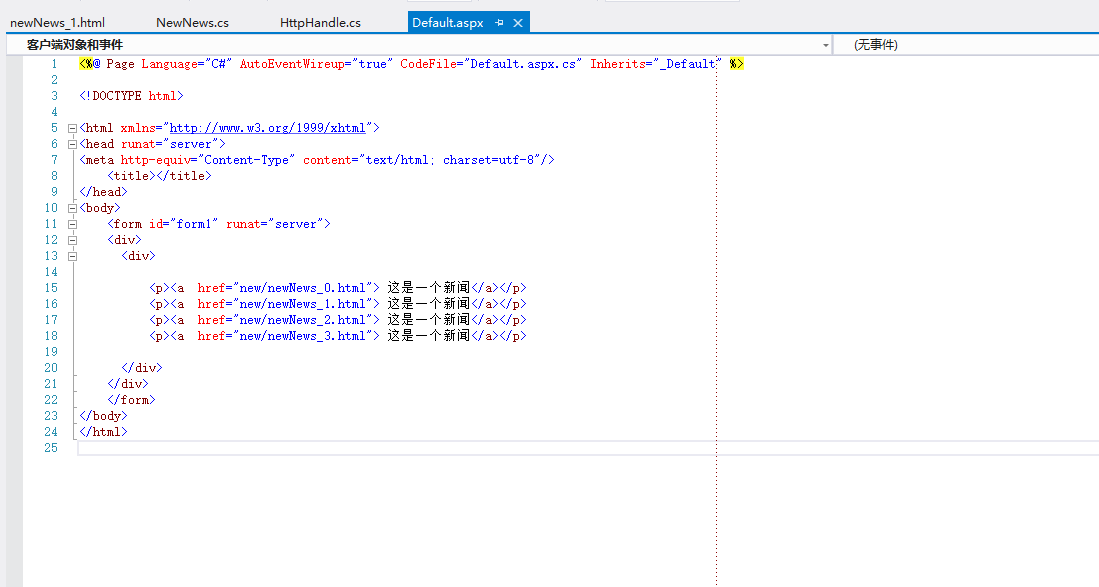
创建一个asp.net 页面, 连接跳转到还未生成的页面
创建HttpHandle类
using System;
using System.Collections.Generic;
using System.Linq;
using System.Web;
using System.IO;
/// <summary>
/// HttpHandle 的摘要说明
/// </summary>
public class HttpHandle : IHttpHandler
{
public bool IsReusable
{
get
{
return false;
}
}
public void ProcessRequest(HttpContext context)
{
string url = context.Request.RawUrl;
int last = url.LastIndexOf("_");
int dot = url.LastIndexOf(".");
int NewNewsID = int.Parse(url.Substring(last + 1, dot - last - 1));
string carfilepath = context.Server.MapPath("~/new/newNews_" + NewNewsID + ".html");
if (!File.Exists(carfilepath))
{
NewNews NN = new NewNews();
List<push> NewNe = NN.NewNe;
string templatepath = context.Server.MapPath("~/new/HtmlPage.html");
string templateHtml = ReadTemplate(templatepath);
templateHtml = templateHtml.Replace("{$NewNewsName}", NewNe[NewNewsID].NewNewsName);
templateHtml = templateHtml.Replace("{$NewNewsTitle}", NewNe[NewNewsID].NewNewsTitle);
templateHtml = templateHtml.Replace("{$NewNewsConters}", NewNe[NewNewsID].NewNewsConters);
WriteHtmlFile(carfilepath, templateHtml);
}
context.Response.WriteFile(carfilepath);
}
// private string ReadTemplate(string templatePath)
//{
// //检测模板文件是否存在
// if (!File.Exists(templatePath))
// {
// //模板文件不存在,抛出异常
// throw new Exception("汽车详情页面的模板文件未找到!");
// }
// //创建文件流
// FileStream fs = new FileStream(templatePath, FileMode.Open);
// //创建流读取器
// StreamReader sr = new StreamReader(fs);
// //读取文件流中的文本
// string templeteHtml = sr.ReadToEnd();
// //关闭流读取器
// sr.Close();
// //关闭文件流
// fs.Close();
// //返回读取的模板HTML
// return templeteHtml;
//}
////写静态文件
//private void WriteHtmlFile(string savedPath, string htmlStr)
//{
// FileStream fs = new FileStream(savedPath, FileMode.Create);
// StreamWriter sw = new StreamWriter(fs);
// sw.Write(htmlStr);
// sw.Close();
// fs.Close();
//}
//读取模板方法
private string ReadTemplate(string templatePath)
{
if (!File.Exists(templatePath))
{
throw new Exception("报错");
}
FileStream fs = new FileStream(templatePath, FileMode.Open);
StreamReader sr = new StreamReader(fs);
string templeteHtml = sr.ReadToEnd();
sr.Close();
fs.Close();
return templeteHtml;
}
//
private void WriteHtmlFile(string savedPath, string htmlStr)
{
FileStream fs = new FileStream(savedPath, FileMode.Create);
StreamWriter sw = new StreamWriter(fs);
sw.Write(htmlStr);
sw.Close();
fs.Close();
}
}
创建一个
NewNews 表示服务器
添加数据
public List<push> NewNe = new List<push>();
public NewNews()
{
NewNe.Add(new push() { NewNewsID = 0, NewNewsName = "今天是2018/5/30", NewNewsTitle = "今天下雨了", NewNewsConters = "圆周" });
NewNe.Add(new push() { NewNewsID = 1, NewNewsName = "今天下雨了嘛是", NewNewsTitle = "今天下雨了", NewNewsConters = "32" });
NewNe.Add(new push() { NewNewsID = 2, NewNewsName = "今天是2018/5/30", NewNewsTitle = "今天下雨了", NewNewsConters = "烦烦烦烦烦烦22342" });
NewNe.Add(new push() { NewNewsID = 3, NewNewsName = "今天是2018/5/30", NewNewsTitle = "今天下雨了", NewNewsConters = "2342" });
}
}
创建一个push 类 添加属性字段
/// <summary>
/// push 的摘要说明
/// </summary>
public class push
{
public int NewNewsID { get; set; }
public string NewNewsName { get; set; }
public string NewNewsTitle { get; set; }
public string NewNewsConters { get; set; }
}
新建一个html页面 .为模板
<!DOCTYPE html>
<html xmlns="http://www.w3.org/1999/xhtml">
<head>
<meta http-equiv="Content-Type" content="text/html; charset=utf-8" />
<title>表格</title>
</head>
<body>
<div>
<p>{$NewNewsName}</p>
<p>{$NewNewsConters}</p>
<p>{$NewNewsTitle}</p>
</div>
</body>
</html>
这样子 就可以了
asp.net 页面静态化的更多相关文章
- Asp.Net MVC页面静态化功能实现二:用递归算法来实现
上一篇提到采用IHttpModule来实现当用户访问网站的时候,通过重新定义Response.Filter来实现将返回给客户端的html代码保存,以便用户下一次访问是直接访问静态页面. Asp.Net ...
- Asp.Net MVC页面静态化功能实现一:利用IHttpModule,摒弃ResultFilter
上一篇有提到利用IHttpModule和ResultFilter实现页面静态化功能.后来经过一些改动,将ResultFilter中要实现的功能全部转移到IHttpModule中来实现 Asp.Net ...
- Asp.Net MVC页面静态化功能实现一:利用IHttpModule和ResultFilter
由于公司现在所采用的是一套CMS内容管理系统的框架,所以最近项目中有一个需求提到要求实现页面静态化的功能.在网上查询了一些资料和文献,最后采用的是小尾鱼的池塘提供的 利用ResultFilter实现a ...
- 利用ResultFilter实现asp.net mvc 页面静态化
为了提高网站性能.和网站的负载能力,页面静态化是一种有效的方式,这里对于asp.net mvc3 构架下的网站,提供一种个人认为比较好的静态话方式. 实现原理是通过mvc提供的过滤器扩展点实现页面内容 ...
- 利用ResultFilter实现asp.net mvc3 页面静态化
为了提高网站性能.和网站的负载能力,页面静态化是一种有效的方式,这里对于asp.net mvc3 构架下的网站,提供一种个人认为比较好的静态话方式. 实现原理是通过mvc提供的过滤器扩展点实现页面内容 ...
- Asp.net动态页面静态化之初始NVelocity模板引擎
Asp.net动态页面静态化之初始NVelocity模板引擎 静态页面是网页的代码都在页面中,不须要运行asp,php,jsp,.net等程序生成client网页代码的网页,静态页面网址中一般不含&q ...
- ASP.NET MVC 页面静态化操作的思路
本文主要讲述了在asp.net mvc中,页面静态化的几种思路和方法.对于网站来说,生成纯html静态页面除了有利于seo外,还可以减轻网站的负载能力和提高网站性能.在asp.net mvc中,视图的 ...
- ASP.NET MVC使用SSI来实现页面静态化
页面静态化分为两种:伪静态和真静态,这里主要介绍的是真静态. 进入正题之前先简单介绍一下SSI和shtml: 1).SSI是Server Side Include的简称(服务器端嵌入) 2).shtm ...
- ASP.NET MVC中,动态处理页面静态化
首先解释一下什么是动态处理页面静态化 对于需要静态化的页面,第一次访问某个Action时,会先执行Action,并在页面渲染后向Response和服务器中网站的目录下都写入需要返回的html,而第二次 ...
随机推荐
- Css3 伪元素
伪元素---用于向某些选择器设置特殊的效果 语法:元素::伪元素 (element::pseudo-element) 兼容性:IE9+ FireFox4+ Chrome Safari Opera fi ...
- Sed---linux系统三剑客(二)
grep .sed.awk被称为linux中的"三剑客". grep 更适合单纯的查找或匹配文本 sed 更适合编辑匹配到的文本 awk 更适合格式化文本,对文本进行较复杂格式 ...
- Eureka报错: Connect to localhost:8761 timed out
最近整理配置Eureka时, 注册服务后, Eureka服务一直报出如下错误: 如下是我的单台eureka的 application.yml 配置: spring: application: name ...
- Java面试(一)
2 什么是java虚拟机: 可以执行java字节码的虚拟机进程,而不需要为每一个平台单独重写或重新编译.虚拟机知道底层指令长度. 3 JDK,JRE区别: JRE是Java虚拟机,可以解释JAVA字节 ...
- C语言课程设计
目录 实现目的 游戏玩法介绍 实现流程与作品架构 任务列表及贡献度 总结感想 作品源码与仓库地址(附页) 资料引用与出处(附页) 实现目的 2048,作为一款极其经典的游戏,从发行到现在,已经有了极多 ...
- ValueError: row index was 65536, not allowed by .xls format
报错:ValueError: row index was 65536, not allowed by .xls format 读取.xls文件正常,在写.xls文件,pd.to_excel()时候会报 ...
- 【AtCoder】CODE FESTIVAL 2016 qual C
CODE FESTIVAL 2016 qual C A - CF -- #include <bits/stdc++.h> #define fi first #define se secon ...
- 第三章 VIVADO 自定义IP 流水灯实验
第二章里面已经说过了,MIZ701 PL部分没有输入时钟,因此驱动PL资源必须是通过PS来提供时钟,所以这个流水灯实验也得建立一个最小系统了,然后再添加一个流水灯的自定义IP. 3.0本章难度系数★★ ...
- 【AC自动机】病毒
[题目链接] https://loj.ac/problem/10062 [题意] 寻找一个没有模式串为子串的无限01串.是否存在. [题解] 其实就是用dfs找一个环. 1.环需要从根结点出发找到这个 ...
- kubernetes 水平伸缩及yaml格式编写
Replication Controller:用来部署.升级PodReplica Set:下一代的Replication ControllerDeployment:可以更加方便的管理Pod和Repli ...