
python3 爬取简书30日热门,同时存储到txt与mongodb中
初学python,记录学习过程。
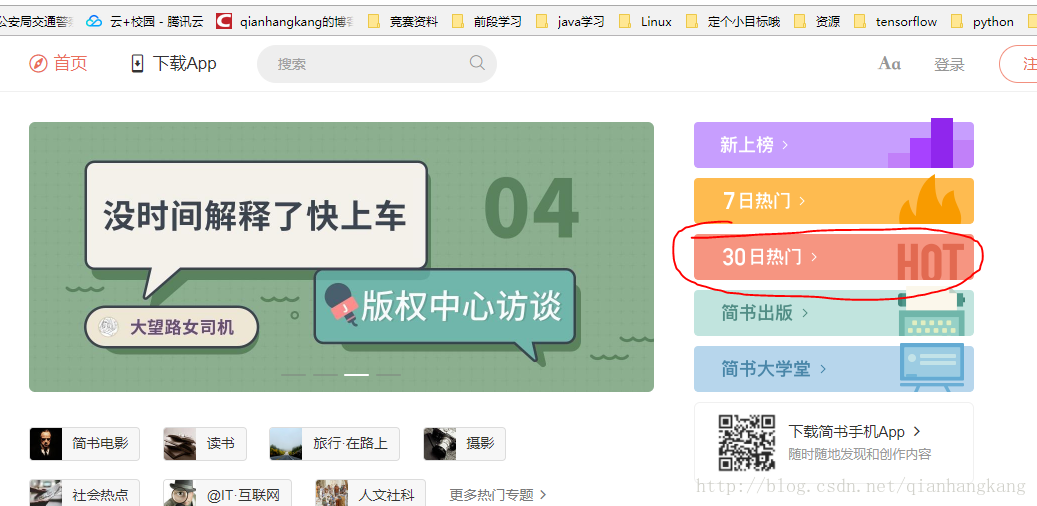
新上榜,七日热门等同理。
此次主要为了学习python中对mongodb的操作,顺便巩固requests与BeautifulSoup。
点击,得到URL https://www.jianshu.com/trending/monthly?utm_medium=index-banner-s&utm_source=desktop
下拉,发现Ajax自动加载,F12观察请求。
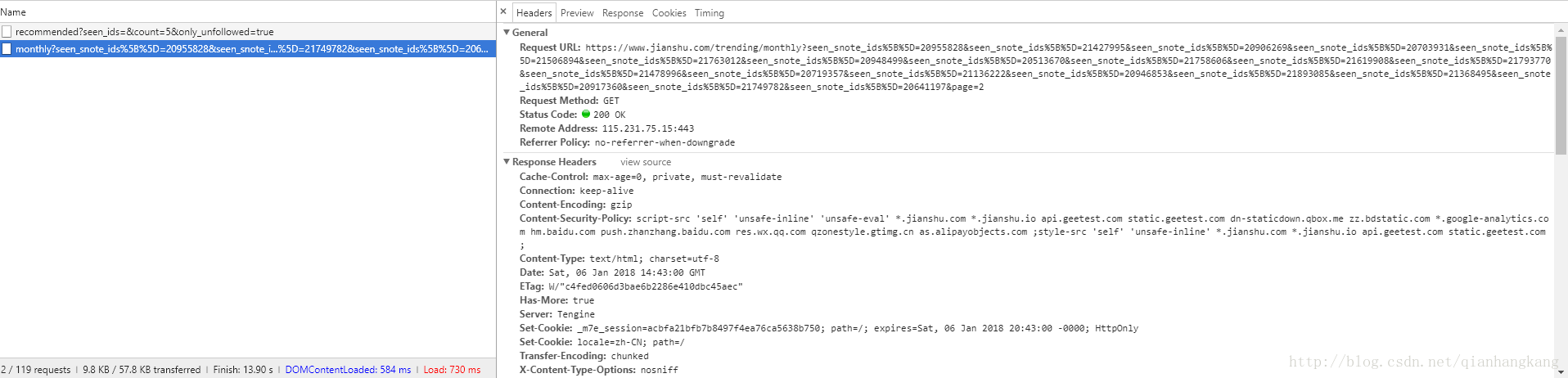
Ajax的请求为:https://www.jianshu.com/trending/monthly?seen_snote_ids%5B%5D=20955828&seen_snote_ids%5B%5D=21427995&seen_snote_ids%5B%5D=20906269&seen_snote_ids%5B%5D=20703931&seen_snote_ids%5B%5D=21506894&seen_snote_ids%5B%5D=21763012&seen_snote_ids%5B%5D=20948499&seen_snote_ids%5B%5D=20513670&seen_snote_ids%5B%5D=21758606&seen_snote_ids%5B%5D=21619908&seen_snote_ids%5B%5D=21793770&seen_snote_ids%5B%5D=21478996&seen_snote_ids%5B%5D=20719357&seen_snote_ids%5B%5D=21136222&seen_snote_ids%5B%5D=20946853&seen_snote_ids%5B%5D=21893085&seen_snote_ids%5B%5D=21368495&seen_snote_ids%5B%5D=20917360&seen_snote_ids%5B%5D=21749782&seen_snote_ids%5B%5D=20641197&page=2
仔细观察发现中间存在众多重复的seen_snote_ids,不知啥用,那么去掉试试,将URL换成 https://www.jianshu.com/trending/monthly?page=2,发现OK,中间的seen_snote_ids参数对于请求结果没有影响,那么得到接口https://www.jianshu.com/trending/monthly?page=(1,2,3……),测试了下发现page=11就没了...并且一页加载20条文章。
OK,预习下mongodb在python中的操作。
1、需要用到 pymongo,怎么下载就不多说了,百度谷歌你看着办
2、开启mongodb,用配置文件启动。
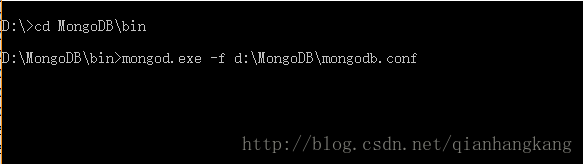
顺便给出配置文件吧....
- #设置数据目录的路径
- dbpath = g:\data\db
- #设置日志信息的文件路径
- logpath = D:\MongoDB\log\mongodb.log
- #打开日志输出操作
- logappend = true
- #在以后进行用户管理的时候使用它
- noauth = true
- #监听的端口号
- port = 27017
3、在python中使用,给出我当初参考的博客,我觉得蛮清晰明了了点击打开链接
最后,给出源代码
- #爬取简书上三十日榜并存入数据库中 mongodb
- import pymongo
- import requests
- from requests import RequestException
- from bs4 import BeautifulSoup
- client = pymongo.MongoClient('localhost', 27017)
- db = client.jianshu # mldn是连接的数据库名 若不存在则自动创建
- TABLENAME = 'top'
- def get_jianshu_monthTop(url):
- try:
- response = requests.get(url)
- if response.status_code ==200:
- return response.text
- print(url + ',visit error')
- return None
- except RequestException:
- return None
- def parse_html(html):
- base_url = 'https://www.jianshu.com'
- soup = BeautifulSoup(html, "html.parser")
- nickname = [i.string for i in soup.select('.info > .nickname')];
- span = soup.find_all('span',class_ = 'time')
- time = []
- for i in span:
- time.append(i['data-shared-at'][0:10])##截取,例2017-12-27T10:11:11+08:00截取成2017-12-27
- title = [i.string for i in soup.select('.content > .title')]
- url = [base_url+i['href'] for i in soup.select('.content > .title')]
- intro = [i.get_text().strip() for i in soup.select('.content > .abstract')]
- readcount = [i.get_text().strip() for i in soup.select('.meta > a:nth-of-type(1)')]
- commentcount = [i.get_text().strip() for i in soup.select('.meta > a:nth-of-type(2)')]
- likecount = [i.get_text().strip() for i in soup.select('.meta > span:nth-of-type(1)')]
- tipcount = [i.get_text().strip() for i in soup.select('.meta > span:nth-of-type(2)')]
- return zip(nickname,time,title,url,intro,readcount,commentcount,likecount,tipcount)
- #将数据存到mongodb中
- def save_to_mongodb(item):
- if db[TABLENAME].insert(item):
- print('save success:',item)
- return True
- print('save fail:',item)
- return False
- #将数据存到results.txt中
- def save_to_file(item):
- file = open('result.txt', 'a', encoding='utf-8')
- file.write(item)
- file.write('\n')
- file.close()
- def main(offset):
- url = """https://www.jianshu.com/trending/monthly?page=""" + str(offset)
- html = get_jianshu_monthTop(url)
- for i in parse_html(html):
- item = {
- '作者':i[0],
- '发布时间':i[1],
- '标题':i[2],
- 'URL':i[3],
- '简介':i[4],
- '阅读量':i[5],
- '评论量':i[6],
- '点赞量':i[7],
- '打赏量':i[8]
- }
- save_to_mongodb(item)
- save_to_file(str(item))
- if __name__ == '__main__':
- for i in range(1,11):
- main(i)
OK,最后给出效果图
TIPS:右键,新标签页打开图片,查看高清大图:)
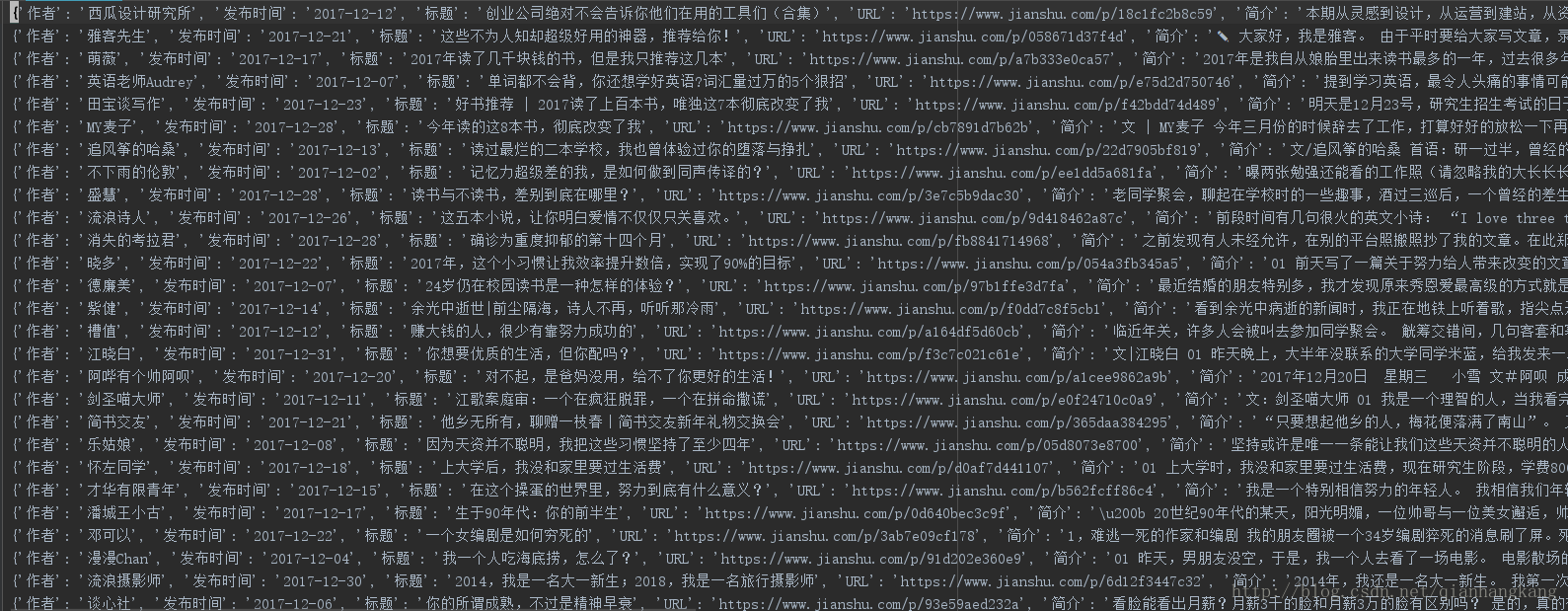
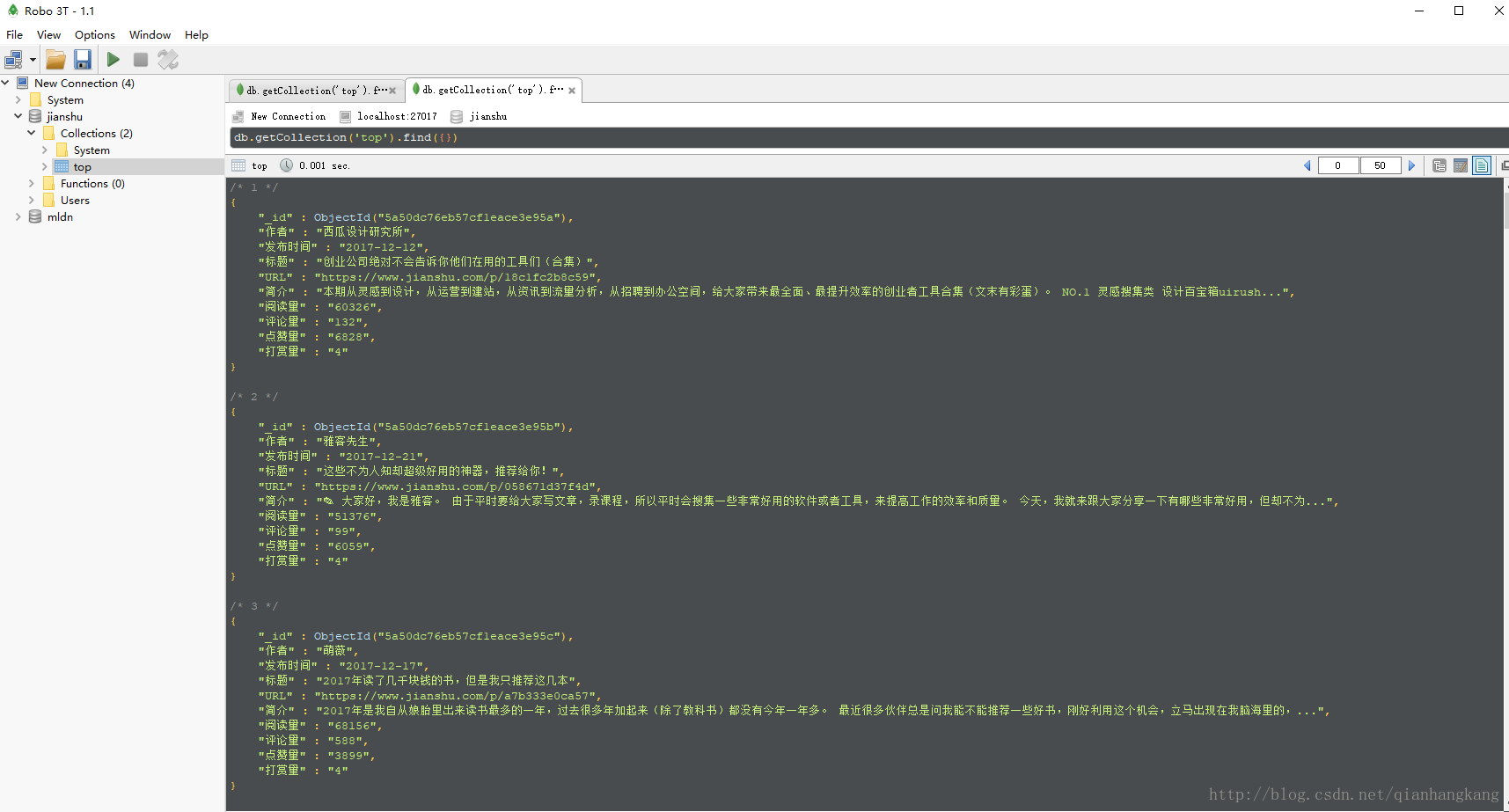
抓了共157条数据。。。
python3 爬取简书30日热门,同时存储到txt与mongodb中的更多相关文章
- python2.7 爬取简书30日热门专题文章之简单分析_20170207
昨天在简书上写了用Scrapy抓取简书30日热门文章,对scrapy是刚接触,跨页面抓取以及在pipelines里调用settings,连接mysql等还不是很熟悉,今天依旧以单独的py文件区去抓取数 ...
- Python爬取简书主页信息
主要学习如何通过抓包工具分析简书的Ajax加载,有时间再写一个Multithread proxy spider提升效率. 1. 关键点: 使用单线程爬取,未登录,爬取简书主页Ajax加载的内容.主要有 ...
- Node爬取简书首页文章
Node爬取简书首页文章 博主刚学node,打算写个爬虫练练手,这次的爬虫目标是简书的首页文章 流程分析 使用superagent发送http请求到服务端,获取HTML文本 用cheerio解析获得的 ...
- Scrapy+selenium爬取简书全站
Scrapy+selenium爬取简书全站 环境 Ubuntu 18.04 Python 3.8 Scrapy 2.1 爬取内容 文字标题 作者 作者头像 发布日期 内容 文章连接 文章ID 思路 分 ...
- 【python3】爬取简书评论生成词云
一.起因: 昨天在简书上看到这么一篇文章<中国的父母,大都有毛病>,看完之后个人是比较认同作者的观点. 不过,翻了下评论,发现评论区争议颇大,基本两极化.好奇,想看看整体的评论是个什么样, ...
- scrapy爬取简书整站文章
在这里我们使用CrawlSpider爬虫模板, 通过其过滤规则进行抓取, 并将抓取后的结果存入mysql中,下面直接上代码: jianshu_spider.py # -*- coding: utf-8 ...
- 爬取简书图片(使用BeautifulSoup)
import requests from bs4 import BeautifulSoup url_list = [] kv = {'User-Agent':'Mozilla/5.0'} r = re ...
- python 爬取简书评论
import json import requests from lxml import etree from time import sleep url = "https://www.ji ...
- Python3爬取人人网(校内网)个人照片及朋友照片,并一键下载到本地~~~附源代码
题记: 11月14日早晨8点,人人网发布公告,宣布人人公司将人人网社交平台业务相关资产以2000万美元的现金加4000万美元的股票对价出售予北京多牛传媒,自此,人人公司将专注于境内的二手车业务和在美国 ...
随机推荐
- 力扣(LeetCode)226. 翻转二叉树
翻转一棵二叉树. 示例: 思想 递归 java版 /** * Definition for a binary tree node. * public class TreeNode { * int va ...
- Java 多条件复杂排序小结
前言 今天下午做了拼多多在牛客网上的在线笔试题,感觉自己的智商被鄙视到了···不过其中一道题的某一部分引起了我极大的兴趣,感觉可以总结一下,做好积累~ 题目的部分我拍照如下所示 这里面最复杂的就是第3 ...
- Vue.use源码分析
我想有过vue开发经验的,对于vue.use并不陌生.当使用vue-resource或vue-router等全局组件时,必须通过Vue.use方法引入,才起作用.那么vue.use在组件引入之前到底做 ...
- lua --- 逻辑运算符小结
lua中的逻辑运算符,认为只有false.nil为假,其他的都为真(包括0.空串) a and b -- 如果a为false,则返回a,否则返回b a or b -- 如果a为true,则返 ...
- 非递归遍历二叉树Java实现
2018-10-03 20:16:53 非递归遍历二叉树是使用堆栈来进行保存,个人推荐使用双while结构,完全按照遍历顺序来进行堆栈的操作,当然在前序和后序的遍历过程中还有其他的压栈流程. 一.Bi ...
- 批量显示QC结果的利器(转)
作者:greenhillman MultiQC homepage: http://multiqc.info功能:把多个测序结果的qc结果整合成一个报告.支持fastqc.trimmomatic.bow ...
- Python自学:第二章 修改字符串的大小写 titile.()、upper()、lower()
title.():首字母大写 upper():全大写 lower():全小写 ada lovelace:人名,传控计算机创始人 name = "ada lovelace" prin ...
- c++-pimer-plus-6th-chapter03
Chapter Review Having more than one integer type lets you choose the type that is best suited to a p ...
- linux权限管理之基本权限
基本权限 UGO ======================================================== 文件权限设置: 可以赋于某个用户或组 能够以何种方式 访问某个文件 ...
- jquery中的全选、反选、全不选和单删、批删
HTML页面 <!doctype html><html lang="en"><head> <meta charset="UTF- ...