
Eclipse中使用MySql遇到:Loading class `com.mysql.jdbc.Driver'. This is deprecated. The new driver class is `com.mysql.cj.jdbc.Driver'. The driver is automatically registered via the SPI and manual loading o
在Eclipse中使用MySQL遇到了点小问题
如果对Eclipse中配置MySql还有疑问的可以参考一下这篇博客:https://blog.csdn.net/qq_38247544/article/details/80419692
参考菜鸟上的例子的代码如下:
当然,这是修改后没问题后的代码
 package mysqltest;

 import java.sql.*;

 public class Mysql {

     // jdbc驱动名以及数据库URL

     // static final String JDBC_DRIVER = "com.mysql.cj.jdbc.Driver";

     static final String DB_URL = "jdbc:mysql://localhost:3306/javamysql" + "?serverTimezone=GMT%2B8";

     // 数据库的用户名与密码,需要根据自己的设置

     static final String USER = "root";

     static final String PASS = "root";

     public static void main(String[] args) {

         Connection conn = null;

         Statement stmt = null;

         try {

             // 注册JDBC驱动

             Class.forName("com.mysql.jdbc.Driver");

             // 打开链接

             System.out.println("连接到数据库……");

             conn = DriverManager.getConnection(DB_URL, USER, PASS);

             // 执行查询

             System.out.println("实例化statement对象……");

             stmt = conn.createStatement();

             String sql;

             sql = "SELECT id, name, url FROM websites";

             ResultSet rs = stmt.executeQuery(sql);

             // 展开结果集数据库

             while (rs.next()) {

                 // 通过字段检索

                 int id = rs.getInt("id");

                 String name = rs.getString("name");

                 String url = rs.getString("url");

                 // 输出数据

                 System.out.print("ID:" + id);

                 System.out.print(",站点名:" + name);

                 System.out.println(",站点URL:" + url);

             }

             // 完成后关闭

             rs.close();

             stmt.close();

             conn.close();

         } catch (SQLException se) {

             // 处理 JDBC错误

             se.printStackTrace();

         } catch (Exception e) {

             // 处理Class.forname 错误

             e.printStackTrace();

         } finally {

             // 关闭资源

             try {

                 if (stmt != null)

                     stmt.close();

             } catch (SQLException se2) {

             } // 什么都不做

             try {

                 if (conn != null)

                     conn.close();

             } catch (SQLException se) {

                 se.printStackTrace();

             }

         }

         System.out.println("Goodbye!");

     }

 }
遇到的问题如下:
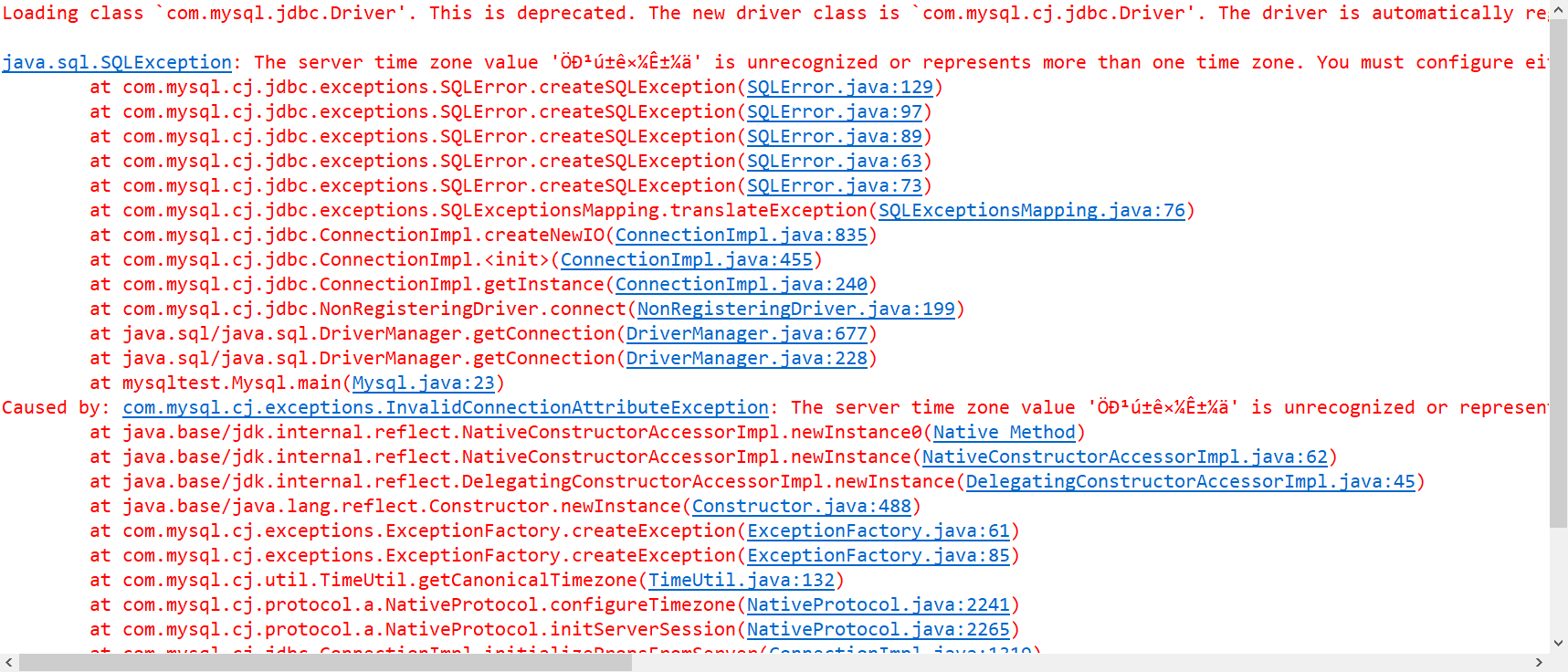
原来是因为使用最新的驱动包中`com.mysql.jdbc.Driver'类已经过时,新的`com.mysql.cj.jdbc.Driver'通过SPI自动注册,不再需要手动加载驱动类)
Loading class `com.mysql.jdbc.Driver'. This is deprecated. The new driver class is `com.mysql.cj.jdbc.Driver'. The driver is automatically registered via the SPI and manual loading of the driver class is generally unnecessary.
但是后面还有一个如下的问题:
The server time zone value 'Öйú±ê׼ʱ¼ä' is unrecognized or represents more than one time zone. You must configure either the server or JDBC driver (via the serverTimezone configuration property) to use a more specifc time zone value if you want to utilize time zone support.
找到了这篇博客
需要在数据库 URL中设置serverTimezone属性:(就是代码第八行)
static final String DB_URL = "jdbc:mysql://localhost:3306/RUNOOB" + "?serverTimezone=GMT%2B8"; 这里的 GMT%2B8 代表是东八区。(虽然不太明白为啥要加这个)
jdbc:mysql://localhost:3306/javamysql 端口号后面是你的数据库
最后问题解决了,如果有遇到相同问题的小伙伴可以参考一下!
Eclipse中使用MySql遇到:Loading class `com.mysql.jdbc.Driver'. This is deprecated. The new driver class is `com.mysql.cj.jdbc.Driver'. The driver is automatically registered via the SPI and manual loading o的更多相关文章
- Loading class `com.mysql.jdbc.Driver'. This is deprecated. The new driver class is `com.mysql.cj.jdbc.Driver'. The driver is automatically registered via the SPI and manual loading of the driver class
Loading class `com.mysql.jdbc.Driver'. This is deprecated. The new driver class is `com.mysql.cj.jdb ...
- The driver is automatically registered via the SPI and manual loading of the driver class....
Loading class `com.mysql.jdbc.Driver'. This is deprecated. The new driver class is `com.mysql.cj.jdb ...
- spring-boot 再添加mysql启动器的时候报错, The driver is automatically registered via the SPI and manual loading of the driver class....
mysql驱动更新迭代之后驱动,稍微有点变化: com.mysql.jdbc.Driver (变化为) --> driver-class-name: com.mysql.cj.jdbc.Driv ...
- Loading class `com.mysql.jdbc.Driver'. This is deprecated. The driver is automatically registered via the SPI and manual loading of the driver class is generally unnecessary.
简单介绍 声明:使用JDK9.MYSQL8.idea 报错处理 报错信息如下 原因 提示信息表明数据库驱动com.mysql.jdbc.Driver已经被弃用了.应当使用新的驱动com.mysql.c ...
- spingboot启动报驱动Loading class `com.mysql.jdbc.Driver'. This is deprecated. The new driver class is `com.mysql.cj.jdbc.Driver'. The driver is automatically registered via the SPI and manual loading of th
原因: springboot应用了最新的驱动com.mysql.cj.jdbc.Driver,这个驱动需要用mysql-connector-java包的6.x版本才可以, 而mysql-connect ...
- mysql 问题 Loading class `com.mysql.jdbc.Driver'. This is deprecated. The new driver class is `com.mysql.cj.jdb
异常错误:Loading class `com.mysql.jdbc.Driver'. This is deprecated. The new driver class is `com.mysql.c ...
- JDBC连接数据库报错:Loading class `com.mysql.jdbc.Driver'. This is deprecated.
使用JDBC连接数据库时出现报错, 报错内容:Loading class `com.mysql.jdbc.Driver'. This is deprecated. The new driver cla ...
- com.mysql.jdbc.Driver 和 com.mysql.cj.jdbc.Driver的区别 serverTimezone设定
转自: http://blog.csdn.net/superdangbo/article/details/78732700 com.mysql.jdbc.Driver 和 com.mysql.cj.j ...
- com.mysql.jdbc.Driver 和 com.mysql.cj.jdbc.Driver的区别
com.mysql.jdbc.Driver 是 mysql-connector-java 5中的,com.mysql.cj.jdbc.Driver 是 mysql-connector-java 6中的 ...
随机推荐
- 计算概论(A)/基础编程练习2(8题)/8:1的个数
#include<stdio.h> int main() { ; // 存储测试数据的二进制形式中1的个数 int bian[N]; // 输入十进制整数N 表示N行测试数据 scanf( ...
- 禁止单个IP或ip段访问
//IP禁止判断接口,返回true则为找到 function checkIp($ip, $ipbanned) { $ipbannedFlag = false; if (!empty($ipbanned ...
- java.util.concurrent.RejectedExecutionException: event executor terminated解决方法之一
INFO | jvm 1 | 2017/03/09 19:45:10 | java.util.concurrent.RejectedExecutionException: event executor ...
- Linus 谈软件开发管理经验(转载)
转注:英文原文写于 2011 年 导读:没有人比Linus Torvalds更了解软件开发项目管理中的酸甜苦辣了.作为Linux的创建者,Torvalds在过去二十年指导了数以千计的开发者共同改进开源 ...
- 【题解】Luogu CF343D Water Tree
原题传送门:CF343D Water Tree 这道题要用树链剖分,我博客里有对树链剖分的详细介绍 这明显是弱智题 树剖套珂朵莉树多简单啊 前置芝士:珂朵莉树 窝博客里对珂朵莉树的介绍 没什么好说的自 ...
- 问题:oracle 12c rac数据库服务器的home目录丢失问题解决2018-06-25 18:30
问题原因:是由于运维粗心,在缩容/home(此目录下挂载了逻辑卷lv_home)时没有先缩小文件系统(resize2fs)也没有备份,导致home数据损坏,重启时系统无法正常启动 解决方案:跳过此ho ...
- [c/c++] programming之路(3)、转义字符及内存
一.转义字符 #include<stdio.h> void main(){ printf("hello \nworld\a");// \n换行 \a机器响一声 getc ...
- 使用vim打造自己的python编辑器
基础配置 vim的配置是在用户主目录下的 ~/.vimrc 文件中完成的,如果没有的话,需要自己新建一下: cd ~ touch .vimrc 首先做些简单的配置: set nocompatible ...
- overture里设置踏板标记
在学习如何设置踏板标记之前,我们先来了解什么是踏板标记.踏板标记一般是使用在乐谱上,众所周知,钢琴有三个踏板,每个踏板的作用都不一样:右边的踏板称为“延音踏板”,是用来延长琴弦振动的时间,使音延长的效 ...
- Spring 学习——Spring框架结构、概念
maven项目结构 记忆:在一个项目中,project下一层级时src,也就是源文件,所有需要进行编译的文件都是在这个目录下,其实也就是这一个目录,然后向下扩展.在src目录下,存在main文件夹,里 ...