
react native中使用 react-native-easy-toast 和react-native-htmlview
第一步,下载依赖
npm install react-native-htmlview --save

npm install react-native-easy-toast --save
第二步,引入
import Toast, {DURATION} from 'react-native-easy-toast'

import HTMLView from 'react-native-htmlview';
第三步,使用
export default class App extends Component{

    render(){

        const htmlContent = `<p><a href="https://www.cnblogs.com/ldlx-mars/p/9360650.html">火星黑洞</a></p>`;

        return(

            <View>

                <Text onPress={()=>{this.refs.toast.show('hello world!',500)}}>我是首页</Text>

                <Toast ref="toast" position='center' opacity={.8}/>

                <HTMLView

                    value={htmlContent}

                    stylesheet={styles}

                />

            </View>

        )

    }

}
然后执行项目
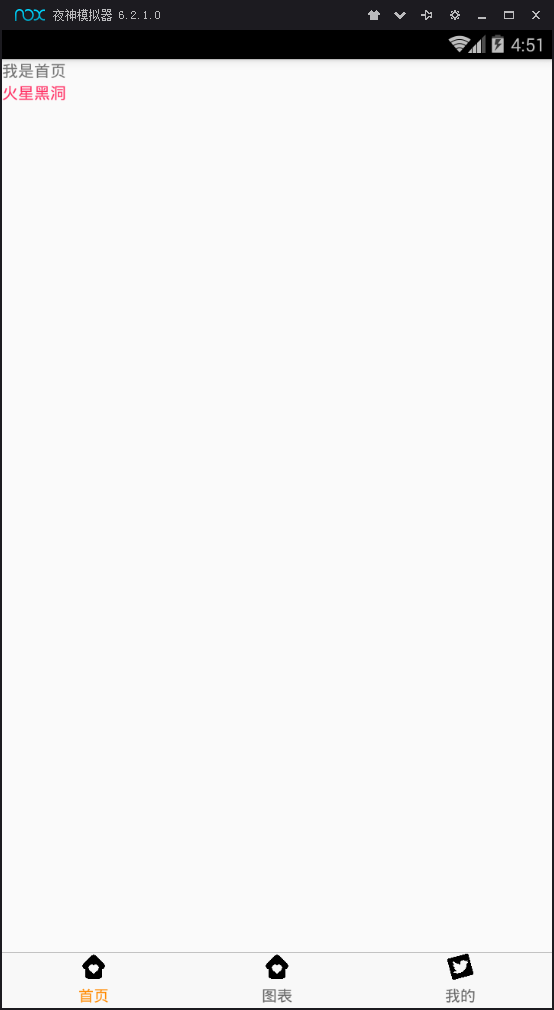
完整代码是,app.js
import React, { Component } from 'react';

import {  StyleSheet,View,Text } from 'react-native';

import Toast, {DURATION} from 'react-native-easy-toast'

import HTMLView from 'react-native-htmlview';

export default class App extends Component{

    render(){

        const htmlContent = `<p><a href="https://www.cnblogs.com/ldlx-mars/p/9360650.html">火星黑洞</a></p>`;

        return(

            <View>

                <Text onPress={()=>{this.refs.toast.show('hello world!',500)}}>我是首页</Text>

                <Toast ref="toast" position='center' opacity={.8}/>

                <HTMLView

                    value={htmlContent}

                    stylesheet={styles}

                />

            </View>

        )

    }

}

const styles = StyleSheet.create({

    a: {

      fontWeight: '300',

      color: '#FF3366',

    },

});
react native中使用 react-native-easy-toast 和react-native-htmlview的更多相关文章
- React Native 中 CSS 的使用
首先声明,此文原作者为黎 跃春 React Native中CSS 内联样式 对象样式 使用Stylesheet.Create 样式拼接 导出样式对象 下面的代码是index.ios.js中的代码: / ...
- react native中的欢迎页(解决首加载白屏)
参照网页: http://blog.csdn.net/fengyuzhengfan/article/details/52712829 首先是在原生中写一些方法,然后通过react native中js去 ...
- React Native中的网络请求fetch和简单封装
React Native中的网络请求fetch使用方法最为简单,但却可以实现大多数的网络请求,需要了解更多的可以访问: https://segmentfault.com/a/1190000003810 ...
- [转] 「指尖上的魔法」 - 谈谈 React Native 中的手势
http://gold.xitu.io/entry/55fa202960b28497519db23f React-Native是一款由Facebook开发并开源的框架,主要卖点是使用JavaScrip ...
- [转] 在React Native中使用ART
http://bbs.reactnative.cn/topic/306/%E5%9C%A8react-native%E4%B8%AD%E4%BD%BF%E7%94%A8art 前半个月捣腾了一下Rea ...
- react native中使用echarts
开发平台:mac pro node版本:v8.11.2 npm版本:6.4.1 react-native版本:0.57.8 native-echarts版本:^0.5.0 目标平台:android端收 ...
- react native中一次错误排查 Error:Error: Duplicate resources
最近一直在使用react native中,遇到了很多的坑,同时也学习到了一些移动端的开发经验. 今天在做一个打包的测试时,遇到了一个问题,打包过程中报错“Error:Error: Duplicate ...
- 在React Native中,使用fetch网络请求 实现get 和 post
//在React Native中,使用fetch实现网络请求 /* fetch 是一个封装程度更高的网络API, 使用了Promise * Promise 是异步编程的一种解决方案 * Promise ...
- 《React Native 精解与实战》书籍连载「React Native 中的生命周期」
此文是我的出版书籍<React Native 精解与实战>连载分享,此书由机械工业出版社出版,书中详解了 React Native 框架底层原理.React Native 组件布局.组件与 ...
- react native中如何往服务器上传网络图片
let common_url = 'http://192.168.1.1:8080/'; //服务器地址 let token = ''; //用户登陆后返回的token /** * 使用fetch实现 ...
随机推荐
- 使用hive分析nginx访问日志方法
以下案例是使用hive分析nginx的访问日志案例,其中字段分隔通过正则表达式匹配,具体步骤如下: 日志格式: 192.168.5.139 - - [08/Jun/2017:17:09:12 +080 ...
- springmvc整合spring+mybatis出现的404或者报找不到这个类的时候。
1.文件配置没有问题的时候看这个看看.输出目录改成这个.要有这里所有的目录才行
- wpf(windos窗体)
在windos窗体中可以放置各种控件,以及为控件定义事件等等,而窗体的显示可以通过show方法以及showdialog方法.他们的区别是 show:运行程序的时候弹出新窗体,而该新窗体会一闪而过,最小 ...
- kvm qemu ,ubuntu debian rootfs 通过qemu复现路由器漏洞
KVM https://www.toutiao.com/i6264303973256135170/?tt_from=weixin&utm_campaign=client_share&t ...
- 转:HashMap实现原理分析(面试问题:两个hashcode相同 的对象怎么存入hashmap的)
原文地址:https://www.cnblogs.com/faunjoe88/p/7992319.html 主要内容: 1)put 疑问:如果两个key通过hash%Entry[].length得 ...
- elastic search范围查询
queryBuilder.must(QueryBuilders.rangeQuery("pt_longitude").from(minLongitude).to(maxLongit ...
- 20165225《Java程序设计》第三周学习总结
20165225<Java程序设计>第三周学习总结 1.视频与课本中的学习: 遇到的问题: 问题如下,无法编译. 最后经同学点出要放在同一个打包的文件夹里,于是就运行成功了,下面是4_15 ...
- 20165336 实验三 敏捷开发与XP实践
20165336 实验三 敏捷开发与XP实践 一.实验报告封面 课程:Java程序设计 班级:1653班 姓名:康志强 学号:20165336 指导教师:娄嘉鹏 实验日期:2018年4月28日 实验时 ...
- Python创建第一个django应用
在helloworld工程的基础上,我们准备创建第一个基于web的django应用,把这个应用名字命名为Guest 1.首先,是如何创建这个应用包,当然第一选择我们可以进入到cmd中,执行如下命令 ...
- Java Web----------response&&request
1.response 代表响应, 可以理解为一个空的箱子,我们在里面填入要发送到浏览器的内容. 服务器会把这些内容组装成http响应. 1.1 响应首行 协议/版本号 状态码 状态码描述 添加状态码 ...