
html5 Websockets development guidance
1. WebSockets -- full-duplex communication
The main HTML5 pillars include Markup, CSS3, and JavaScript APIs
For whole set of HTML5, visit html5rocks.com (google product)
The URL
The following image shows the WebSocket URL example in tokens:
schema host port server
ws://example.com:/chat.php
wss is supported as well and is the WebSocket equivalent to https for secure connections (SSL).
Who's using WebSockets
Name Website Description
Gamooga http://www.gamooga.com/ Real-time backend for apps and games
GitLive http://gitlive.com/ Notifications on GitHub projects
Superfeedr http://superfeedr.com/ Real-time data pushing
Pusher http://pusher.com/ Scalable real-time functionality API for web and mobile apps
Smarkets https://smarkets.com/ Real-time betting
IRC Cloud https://www.irccloud.com/ Chatting
Two great resources containing a large variety of WebSocket demos are as follows:
• http://www.websocket.org/demos.html
• http://www.html5rocks.com/en/features/connectivity
2. The WebSocket API web client
WebSocket communication and data transmission is bidirectional, so we need two parties to establish it: a server and a client.
HTML5 basics:
- Markup HTML (.html)
For more information about the HTML5 markup, consider visiting http://html5doctor.com/. There is a complete reference for the supported HTML5 tags at http://html5doctor.com/element-index/.
- Styling CSS (.css)
http://www.css3.info/ is a great resource for CSS3 and further reading.
- Logic JavaScript (.js)
The markup defines the structure and the CSS rules apply the styling. What about event handling and user actions? Well, here comes JavaScript! The WebSocket API is pure JavaScript, too!
WebSocket API allows you to connect to a local or remote server, listen for messages, send data, and close the connection. Typical WebSocket workflow shows below:
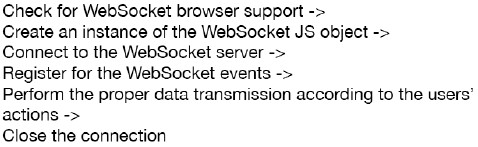
JavaScript provides an easy way to find out whether a browser can execute WebSocket-specific code:
if (window.WebSocket) {   // validation check

  console.log("WebSockets supported.");

  // Continue with the rest of the WebSockets-specific functionality…

}

else {

  console.log("WebSockets not supported.");

  alert("Consider updating your browser for a richer experience.");

}
Want to see which browsers do support the WebSocket protocol? There is an up-to-date resource available at http://caniuse.com/#feat=websockets.
- The WebSocket object :var socket = new WebSocket("ws://echo.websocket.org");
- Events: Open, Message, Close, and Error.
You can handle them either by implementing the onopen, onmessage, onclose, and onerror functions respectively, or by using the addEventListener method.
- Actions: The WebSocket protocol supports two main actions: send() and close().
- Properties:
Properties Description
url Returns the URL of the WebSocket protocol Returns the protocol used by the server
readyState Reports the state of the connection and can take one of the following selfexplanatory values:
WebSocket.OPEN
WebSocket.CLOSED
WebSocket.CONNECTING
WebSocket.CLOSING
bufferedAmount Returns the total number of bytes that were queued when the send() method was called
binaryType Returns the binary data format we
received when the onmessage event was raised
The complete client example:
index.html:
<!DOCTYPE html>

<html>

<head>

<title>HTML5 WebSockets</title>

<link rel="stylesheet" href="style.css" />

<script src="chat.js"></script>

</head>

<body>

<h1> HTML5 WebSocket chat. </h1>

<input type="text" id="text-view" />

<input type="button" id="send-button" value="Send!" />

<input type="button" id="stop-button" value="Stop" />

</br>

<label id="status-label">Status</label>

</body>

</html>
Chat.js:
 window.onload = function() {

 var textView = document.getElementById("text-view");

 var buttonSend = document.getElementById("send-button");

 var buttonStop = document.getElementById("stop-button");

 var label = document.getElementById("status-label");

 var socket = new WebSocket("ws://echo.websocket.org");

 socket.onopen = function(event) {

 label.innerHTML = "Connection open";

 }

 socket.onmessage = function(event) {

 if (typeof event.data === "string") {

 label.innerHTML = label.innerHTML + "<br />" + event.data;

 }

 }

 socket.onclose = function(event) {

 var code = event.code;

 var reason = event.reason;

 var wasClean = event.wasClean;

 if (wasClean) {

 label.innerHTML = "Connection closed normally.";

 }

 else {

 label.innerHTML = "Connection closed with message: " +

 reason + " (Code: " + code + ")";

 }

 }

 socket.onerror = function(event) {

 label.innerHTML = "Error: " + event;

 }

 buttonSend.onclick = function() {

 if (socket.readyState == WebSocket.OPEN) {

 socket.send(textView.value);

 }

 }

 buttonStop.onclick = function() {

 if (socket.readyState == WebSocket.OPEN) {

 socket.close();

 }

 }

 }
Server side:
Server Client
Create a server on localhost:8181
Start running
Initial handshake: establish connection <----------- Request connection
Handle the incoming message --------------------> Send message
refer to book (p. 31):http://www.amazon.com/Getting-Started-HTML5-WebSocket-Programming/dp/1782166963
create dll file in c#

html5 Websockets development guidance的更多相关文章
- HTML5分析实战WebSockets基本介绍
HTML5 WebSockets规范定义了API,同意web使用页面WebSockets与远程主机协议的双向交流. 介绍WebSocket接口,并限定了全双工通信信道,通过套接字网络.HTML5 We ...
- HTML5分析实战WebSockets一个简短的引论
HTML5 WebSockets规范定义了API,同意web页面使用WebSockets与远程主机协议的双向通信. 介绍WebSocket接口,并限定了全双工通信信道,通过套接字网络. HTML5 W ...
- 《HTML5编程之旅》系列三:WebSockets 技术解析
本文主要研究HTML5 WebSockets的使用方法,它是HTML5中最强大的通信功能,定义了一个全双工的通信信道,只需Web上的一个Socket即可进行通信,能减少不必要的网络流量并降低网络延迟. ...
- HTML5 postMessage 和 onmessage API 具体应用
HTML5 postMessage 和 onmessage API 具体应用 随着 HTML5 的发展.了解并熟悉 HTML5 的 API 接口是很重要的.postMessage(send) 和 on ...
- 现在就使用HTML5的十大原因
你难道还没有考虑使用HTML5? 当然我猜想你可能有自己的原因: 它现在还没有被广泛的支持,在IE中不好使,或者你就是喜欢写比较严格的XHTML代码. HTML5是Web开发世界的一次重大的改变,事实 ...
- HTML5实现屏幕手势解锁(转载)
来源:https://github.com/lvming6816077/H5lockhttp://threejs.org/examples/http://www.inf.usi.ch/phd/wett ...
- [转]人人网首页拖拽上传详解(HTML5 Drag&Drop、FileReader API、formdata)
人人网首页拖拽上传详解(HTML5 Drag&Drop.FileReader API.formdata) 2011年12月11日 | 彬Go 上一篇:给力的 Google HTML5 训练营( ...
- 使用HTML5的十大原因
你难道还没有考虑使用HTML5? 当然我猜想你可能有自己的原因:它现在还没有被广泛的支持,在IE中不好使,或者你就是喜欢写比较严格的XHTML代码.HTML5是web开发世界的一次重大的改变,事实上不 ...
- Bone.io是一个轻量级的框架构建高性能实时单页HTML5应用程序
Bone.io允许你使用HTML5 WebSockets构建实时应用程序,提供“热”数据到浏览器.这使您可以轻松地构建丰富的,高度响应的用户界面. 项目主页:http://www.open-open. ...
随机推荐
- [js] 变量空值研究
最近js的空值弄得焦头烂额,今天写个博客记录下. javascript变量空值一共有3种 1.“” var e=""; 2.null var e=null; 3.NaN var e ...
- SQL Server 修改表结构后无法保存的老问题
在修改表结构后无法保存,这是每次重装SQL Server后都会遇到的问题,好记性不如烂笔头,在这里记一下吧. 保存修改了的表结构时会提示“不允许保存更改.您所做的更改要求删除并重新创建以下表.您对无法 ...
- (转)Java中的static关键字解析
转载: http://www.cnblogs.com/dolphin0520/p/3799052.html 一.static关键字的用途 在<Java编程思想>P86页有这样一段话: &q ...
- Mysql5.5升级到5.7后MySQLdb不能正常使用的问题解决
ubuntu系统 报错信息1 Type "help", "copyright", "credits" or "license&qu ...
- Windows 上如何安装Sqlite
对SQLite文明已久,却是从来没使用过,今天就来安装试用下. 一.安装 下载地址:http://www.sqlite.org/download.html 将Precompiled Binaries ...
- python2.7高级编程 笔记二(Python中的描述符)
Python中包含了许多内建的语言特性,它们使得代码简洁且易于理解.这些特性包括列表/集合/字典推导式,属性(property).以及装饰器(decorator).对于大部分特性来说,这些" ...
- framebuffer line_length 參數
以下是在 trace 關機充電動畫所遇到一個疑惑, 關於 framebuffer device 的屬性 line_length 大小值, 一個 display panel,1920 × 1080, 每 ...
- UISearchController 的用法[点击搜索框,自动到顶部]
//在ViewDidLoad里面如下代码 self.searchViewController = [[UISearchController alloc]initWithSearchResultsCon ...
- caffe调试小结2
1.裁剪 crop size227,在训练时候采用随机裁剪,在测试时候只裁剪中间部分
- Java集合框架List,Map,Set等全面介绍
Java集合框架的基本接口/类层次结构: java.util.Collection [I]+--java.util.List [I] +--java.util.ArrayList [C] +- ...