
PXE安装操作系统
TFTP服务
用PXE安装操作系统依赖于DHCP服务和TFTP服务
网卡一般都内置的TFTP客户端的程序
systemctl enable tftp systemctl enable dhcpd
 [root@centos7 dhcp]# yum install tftp-server

 [root@centos7 dhcp]# rpm -ql tftp-server

 /etc/xinetd.d/tftp

 /usr/lib/systemd/system/tftp.service

 /usr/lib/systemd/system/tftp.socket

 /usr/sbin/in.tftpd

 /usr/share/doc/tftp-server-5.2

 /usr/share/doc/tftp-server-5.2/CHANGES

 /usr/share/doc/tftp-server-5.2/README

 /usr/share/doc/tftp-server-5.2/README.security

 /usr/share/man/man8/in.tftpd..gz

 /usr/share/man/man8/tftpd..gz

 /var/lib/tftpboot

 #安装客户端

 [root@yxh6 ~]# yum install tftp

 [root@yxh6 ~]# tftp 192.168.231.7

 tftp> get file

 #file存在服务端的/var/lib/tftpboot目录下
TFTP配置
搭建PXE服务器
[root@centos7 html]#yum install httpd

[root@centos7 html]# systemctl start httpd

[root@centos7 html]# vi /etc/fstab

/dev/sr0             /var/www/html/centos7          iso9660       defautls

[root@centos7 html]# mount -a

mount: /dev/sr0 is write-protected, mounting read-only

[root@centos7 html]# mkdir ksdir{,}

[root@centos7 html]# ls

centos6  centos7  ksdir6  ksdir7

[root@centos7 html]# cp /root/anaconda-ks.cfg ksdir7/ks7_desktop.cfg

[root@centos7 html]# cd ksdir7

[root@centos7 ksdir7]# ls

ks7_desktop.cfg

[root@centos7 ksdir7]# ll

total

-rw-------  root root  May  : ks7_desktop.cfg

[root@centos7 ksdir7]# chmod  ks7_desktop.cfg

[root@centos7 ksdir7]# ll

total

-rw-r--r--  root root  May  : ks7_desktop.cfg
准备yum源和ks文件
[root@centos7 dhcp]# vi dhcpd.conf

#配置和自动安装系统相关的配置

subnet 192.168.231.0 netmask 255.255.255.224 {

  range 192.168.231.10 192.168.231.20;

  option routers 192.168.231.254;

  next-server 192.168.231.7;

  filename "pxelinux.0";

}

[root@centos7 dhcp]# systemctl restart dhcpd.service

[root@centos7 dhcp]# systemctl enable dhcpd httpd
配置DHCP
 [root@centos7 dhcp]# yum install  tftp-server syslinux

 [root@centos7 dhcp]# cd /var/lib/tftpboot

 [root@centos7 tftpboot]# mkdir pxelinux.cfg/

 #pxelinux. 文件来自于 syslinux软件包,必须先安装syslinux

 [root@centos7 tftpboot]# cp /usr/share/syslinux/pxelinux.  .

 [root@centos7 tftpboot]# cp /var/www/html/centos7/isolinux/{vmlinuz,initrd.img,vesamenu.c32} /var/lib/tftpboot/

 [root@centos7 tftpboot]#cp /var/www/html/centos7/isolinux/isolinux.cfg /var/lib/tftpboot/pxelinux.cfg/default

 [root@centos7 pxelinux.cfg]# vi default

 label linux

   menu label ^Install Desktop7

   kernel vmlinuz

   append initrd=initrd.img ks=http://192.168.231.7/ksdir7/ks7_desktop.cfg

 [root@centos7 pxelinux.cfg]#systemctl enable tftp.socket

 [root@centos7 pxelinux.cfg]#systemctl start  tftp
配置TFTP
 #version=DEVEL

 # System authorization information

 auth --enableshadow --passalgo=sha512

 # Use CDROM installation media

 url --url=http://192.168.231.7/centos7

 # Use graphical install

 #graphical

 text

 # Run the Setup Agent on first boot

 firstboot --enable

 ignoredisk --only-use=sda

 # Keyboard layouts

 keyboard --vckeymap=us --xlayouts='us'

 # System language

 lang en_US.UTF-

 reboot

 # Network information

 network  --bootproto=dhcp --device=ens33 --onboot=on --ipv6=auto --no-activate

 network  --hostname=centosmy7.localdomain

 # Root password

 rootpw --iscrypted $$RzUIKaLkncGUm9SL$FtuXzR8IpSz2OEQp.LlDrDH1O62SMrZ/Gj06iTSNqlxWma/aHf21lpikhNln6UgNyuL/HqGUrM45feTBkMC1T0

 # System services

 services --disabled="chronyd"

 # System timezone

 timezone Asia/Shanghai --isUtc --nontp

 # X Window System configuration information

 xconfig  --startxonboot

 # System bootloader configuration

 bootloader --append=" crashkernel=auto" --location=mbr --boot-drive=sda

 zerombr

 # Partition clearing information

 clearpart --none --initlabel

 # Disk partitioning information

 part swap --fstype="swap" --ondisk=sda --size=

 part / --fstype="xfs" --ondisk=sda --size=

 part /data --fstype="xfs" --ondisk=sda --size=

 part /boot --fstype="xfs" --ondisk=sda --size=

 %packages

 @base

 @core

 @dial-up

 @fonts

 @guest-agents

 @print-client

 @x11

 kexec-tools

 %end

 %addon com_redhat_kdump --enable --reserve-mb='auto'

 %end

 %anaconda

 pwpolicy root --minlen= --minquality= --notstrict --nochanges --notempty

 pwpolicy user --minlen= --minquality= --notstrict --nochanges --emptyok

 pwpolicy luks --minlen= --minquality= --notstrict --nochanges --notempty

 %end

 %post

  systemctl disable initial-setup.service

  systemctl  disable  initial-setup-graphical.service

  systemctl set-default multi-user.target

  mkdir -p /root/oscreate

  useradd laozijiadeuser

 %end
ks文件示例
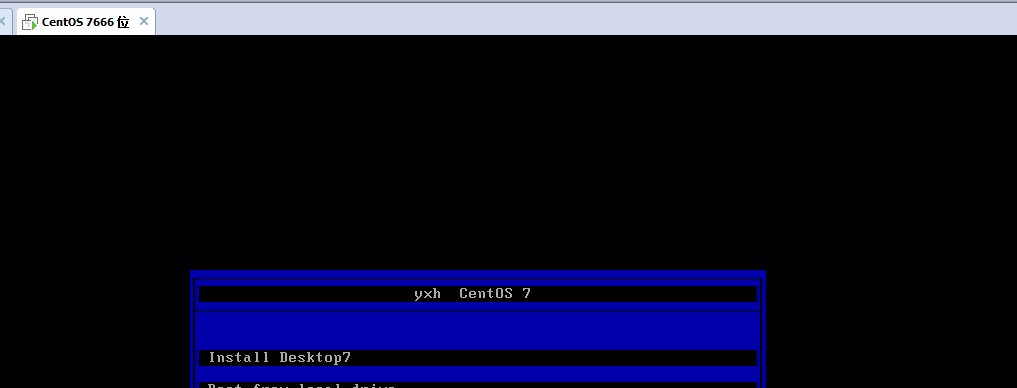
新创建一个虚拟机,把网卡的网段设置成和服务器为同一个网段,启动机器出现下图
PXE安装多个版本的系统
安装不同版本的操作系统,需要分别拷贝对应的内核文件和ks文件,不能混合使用
mkdir /var/lib/tftpboot/pxelinux.cfg/

cp /usr/share/syslinux/pxelinux. /var/lib/tftpboot/

cp /usr/share/syslinux/menu.c32 /var/lib/tftpboot/

mkdir /var/lib/tftpboot/centos{,}

cp  /var/www/html/centos//isolinux/{vmlinuz,initrd.img} /var/lib/tftpboot/centos7/

cp  /var/www/html/centos//isolinux/{vmlinuz,initrd.img} /var/lib/tftpboot/centos6/

cp /var/www/html/centos//isolinux/isolinux.cfg  /var/lib/tftpboot/pxelinux.cfg/default

vim /var/lib/tftpboot/pxelinux.cfg/default

cat /var/lib/tftpboot/pxelinux.cfg/default

cat /var/lib/tftpboot/pxelinux.cfg/default

default menu.c32

timeout

menu title www.yxh.com

label centos7

  menu label ^Install  Desktop CentOS

  kernel centos7/vmlinuz

  append initrd=centos7/initrd.img ks=http://192.168.30.17/ksdir/ks7_desktop.cfg

label centos6

  menu label install ^Mini CentOS

  menu default

  kernel centos6/vmlinuz

  append initrd=centos6/initrd.img ks=http://192.168.30.17/ksdir/ks6_mini.cfg

label local

  menu label Boot from ^local drive

  localboot 0xffff

menu end
代码示例
 tree /var/lib/tftpboot/

 /var/lib/tftpboot/

 ├── centos6

 │├── initrd.img

 │└── vmlinuz

 ├── centos7

 │├── initrd.img

 │ └── vmlinuz

 ├── menu.c32

 ├── pxelinux.

 └── pxelinux.cfg

     └── default
文件结构目录
Linux配置服务的一般步骤
1.检查防火墙和selinux
2.安装包
3.启动服务
4.检查服务是否成功启动
5.在客户端执行命令测试
6.每个服务都有自己的工作主目录
PXE安装操作系统的更多相关文章
- PXE+Kickstart+DHCP+TFTP实现无人值守安装操作系统
PXE+Kickstart+DHCP+TFTP实现无人值守安装操作系统 PXE + Kickstart PXE的工作流程及配置文件 Kickstart的配置文件 Linux安装大致可以分为2个阶段 第 ...
- [转]CentOS 6.4下PXE+Kickstart无人值守安装操作系统
一.简介 1.1 什么是PXE PXE(Pre-boot Execution Environment,预启动执行环境)是由Intel公司开发的最新技术,工作于Client/Server的网络模式,支持 ...
- CentOS 6.4下PXE+Kickstart无人值守安装操作系统 转
一.简介 1.1 什么是PXE PXE(Pre-boot Execution Environment,预启动执行环境)是由Intel公司开发的最新技术,工作于Client/Server的网络模式,支持 ...
- RHEL7下PXE+NFS+Kickstart无人值守安装操作系统
RHEL7下PXE+NFS+Kickstart无人值守安装操作系统 1.配置yum源 vim /etc/yum.repos.d/development.repo [development] name= ...
- RHEL7下PXE+Apache+Kickstart无人值守安装操作系统
RHEL7下PXE+Apache+Kickstart无人值守安装操作系统 1.配置yum源 vim /etc/yum.repos.d/development.repo [development] na ...
- CentOS 6.6下PXE+Kickstart无人值守安装操作系统
一.简介 1.1 什么是PXE PXE(Pre-boot Execution Environment,预启动执行环境)是由Intel公司开发的最新技术,工作于Client/Server的网络模式,支持 ...
- 【转载】CentOS 6.4下PXE+Kickstart无人值守安装操作系统
[转载]CentOS 6.4下PXE+Kickstart无人值守安装操作系统 转自:CentOS 6.4下PXE+Kickstart无人值守安装操作系统 - David_Tang - 博客园 http ...
- Centos下PXE+Kickstart无人值守安装操作系统
一.简介 1.1 什么是PXE PXE(Pre-boot Execution Environment,预启动执行环境)是由Intel公司开发的最新技术,工作于Client/Server的网络模式,支持 ...
- CentOS 7下PXE+Kickstart无人值守安装操作系统
1.简介 1.1. 什么是PXE PXE(Pre-boot Execution Environment,预启动执行环境)是由Intel公司开发的最新技术,工作于Client/Server的网络模式,支 ...
随机推荐
- C# Linq删除父级的同时删除子级
之前使用Include获取外键对象列表后,进行删除,一直报错操作失败: 无法更改关系,因为一个或多个外键属性不可以为 null...后面还有一串.尝试了几种方式,比如将u.AlbumList=null ...
- nginx的80端口跳转到443
然后在80端口设置http跳转到https 在80端口location中加入rewrite ^(.*)$ https://$host$1 permanent; 如图,然后输入命令service ngi ...
- 【CF582E】Boolean Function 树形DP+FWT
[CF582E]Boolean Function 题意:给你一个长度为n的表达式,其中未知数有A,B,C,D和?,运算有&和|和?(表达式中用括号确定了唯一的运算顺序).?代表A,B,C,D或 ...
- android.DataBindingUtil
import android.databinding.DataBindingUtil import android.os.Bundle import android.support.v7.app.Ap ...
- wpgcms---导航高亮显示
在使用wpgcms做项目的时候,有时候三级栏目默认是没有高亮显示的一级导航的,例如:文章详情页要对应的文章栏目进行高亮显示,三级单篇页要对应栏目是高亮显示.具体做法是: 首先看获取导航的方式: {% ...
- day_6.22python多线程
僵尸进程:子进程结束,父类未结束 孤儿进程:父类进程over.,子进程未结束 0号进程负责运行,1号进程负责生成,所有孤儿进程的收容所(孤儿进程:父类进程over)1号进程,永不结束! Linux: ...
- Python2安装igraph
前言 igraph是一个进行图计算和社交网络分析的软件包,支持python语言,打算学习igraph,然后应用在自己的项目中. 系统环境 64位win10系统,同时安装了python3.6和pytho ...
- TOP100summit【分享实录-网易】构建云直播分发网络
本篇文章内容来自2016年TOP100summit网易视频云.网易杭州研究院服务端技术专家邵峰的案例分享.编辑:Cynthia 邵峰:网易视频云.网易杭州研究院服务端技术专家浙江大学计算机专业博士毕业 ...
- AD 16 下绘图的几个技巧
1.绘制封装如果引脚过多怎么办,使用阵列粘贴功能 首先建立一个焊盘,然后选中,使用 ctrl + c 复制,注意复制确认的时候,鼠标一定要点击到焊盘中间. 选择阵列粘贴 条款就是你要复制多少个,增量就 ...
- [No0000127]WCF安全体系netTCPBinding绑定
netTCPBinding绑定之Transport安全模式 一.netTCPBinding 此绑定使用TCP传输协议,不具交互性,只适用于 WCF 到 WCF 的通信. 此绑定的传输安全性的实现: ...