
nopCommerce架构分析系列(二)数据Cache
原文(http://www.cnblogs.com/gusixing/archive/2012/04/12/2443799.html)非常感谢作者顾思行的分享!
序言
在很多访问量较大的系统中,尤其在某一项数据访问频次较高时,我们会考虑使用缓存,减少系统和数据库的交互,以达到良好的用户体验。缓存主要有页面缓存和数据缓存。数据缓存的实现有很多方式,有基于memcached的,还有基于.net 4.0数据缓存框架,还有一些其他的实现方式。院子里有 PetterLiumemcached快递上手之C#,有兴趣的可以查看,本文主要讨论的是基于.net 4.0 数据缓存框架.
数据缓存的实现原理
nopCommerce项目中有两类的数据缓存,一个是全局数据缓存MemoryCacheManager,是用.net 4.0数据缓存框架实现的。另一个是页面请求级的数据缓存PerRequestCacheManager是基于HttpContextBase实现的。
1、数据缓存框架是.net 4.0框架中新增的功能,详细了解.net 4.0 的缓存功能请看阿不写的全面认识一下.NET 4.0的缓存功能。
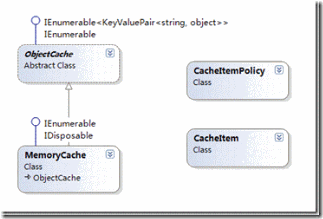
图1 部分缓存框架相关的类
2、基于HttpContextBase页面请求级数据缓存
HttpContextBase 类为抽象类,该类包含的成员与 HttpContext 类相同。 使用 HttpContextBase 类可以创建一些派生类,这些派生类与
HttpContext 类相似,但是可以进行自定义并在 ASP.NET 管道外部使用。 在执行单元测试时,通常使用派生类实现具有自定义行为的成员以实现正在测试的方案,这更容易进行单元测试。HttpContextWrapper 类是从 HttpContextBase 类派生的。 HttpContextWrapper 类用作 HttpContext 类的包装。 在运行时,通常使用 HttpContextWrapper 类的实例调用 HttpContext 对象上的成员。
HttpContext的Items集合是IDictionary键/值对的对象集合,在HttpRequest的生存期中共享。存储成本很高的调用的结果,防止该调用在页面上出现多次。一个HttpRequest中的各个单元需要处理相同或类似的数据。如果数据的生存期只是一个请求,就可以考虑使用HttpContext. Items作为短期的高速缓存。
nopCommerce项目中的缓存
1、缓存的实现
nopCommerce项目缓存类层级图
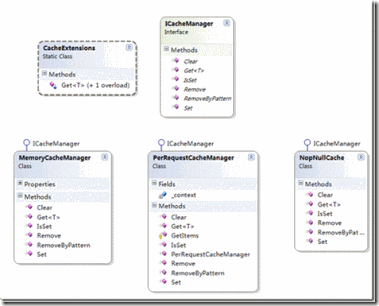
ICacheManager接口,该接口定义了数据缓存常用的方法。
 public interface ICacheManager

     {

         /// <summary>

         /// Gets or sets the value associated with the specified key.

         /// </summary>

         /// <typeparam name="T">Type</typeparam>

         /// <param name="key">The key of the value to get.</param>

         /// <returns>The value associated with the specified key.</returns>

         T Get<T>(string key);

         /// <summary>

         /// Adds the specified key and object to the cache.

         /// </summary>

         /// <param name="key">key</param>

         /// <param name="data">Data</param>

         /// <param name="cacheTime">Cache time</param>

         void Set(string key, object data, int cacheTime);

         /// <summary>

         /// Gets a value indicating whether the value associated with the specified key is cached

         /// </summary>

         /// <param name="key">key</param>

         /// <returns>Result</returns>

         bool IsSet(string key);

         /// <summary>

         /// Removes the value with the specified key from the cache

         /// </summary>

         /// <param name="key">/key</param>

         void Remove(string key);

         /// <summary>

         /// Removes items by pattern

         /// </summary>

         /// <param name="pattern">pattern</param>

         void RemoveByPattern(string pattern);

         /// <summary>

         /// Clear all cache data

         /// </summary>

         void Clear();

     }
CacheExtensions扩展方法对ICacheManager进行扩展。
 /// <summary>

     /// Extensions

     /// </summary>

     public static class CacheExtensions

     {

         public static T Get<T>(this ICacheManager cacheManager, string key, Func<T> acquire)

         {

             return Get(cacheManager, key, , acquire);

         }

         public static T Get<T>(this ICacheManager cacheManager, string key, int cacheTime, Func<T> acquire)

         {

             if (cacheManager.IsSet(key))

             {

                 return cacheManager.Get<T>(key);

             }

             else

             {

                 var result = acquire();

                 //if (result != null)

                     cacheManager.Set(key, result, cacheTime);

                 return result;

             }

         }

     }
MemoryCacheCache类,使用.net 缓存框架实现数据缓存
 /// <summary>

     /// Represents a MemoryCacheCache

     /// </summary>

     public partial class MemoryCacheManager : ICacheManager

     {

         protected ObjectCache Cache

         {

             get

             {

                 return MemoryCache.Default;

             }

         }

         /// <summary>

         /// Gets or sets the value associated with the specified key.

         /// </summary>

         /// <typeparam name="T">Type</typeparam>

         /// <param name="key">The key of the value to get.</param>

         /// <returns>The value associated with the specified key.</returns>

         public T Get<T>(string key)

         {

             return (T)Cache[key];

         }

         /// <summary>

         /// Adds the specified key and object to the cache.

         /// </summary>

         /// <param name="key">key</param>

         /// <param name="data">Data</param>

         /// <param name="cacheTime">Cache time</param>

         public void Set(string key, object data, int cacheTime)

         {

             if (data == null)

                 return;

             var policy = new CacheItemPolicy();

             policy.AbsoluteExpiration = DateTime.Now + TimeSpan.FromMinutes(cacheTime);

             Cache.Add(new CacheItem(key, data), policy);

         }

         /// <summary>

         /// Gets a value indicating whether the value associated with the specified key is cached

         /// </summary>

         /// <param name="key">key</param>

         /// <returns>Result</returns>

         public bool IsSet(string key)

         {

             return (Cache.Contains(key));

         }

         /// <summary>

         /// Removes the value with the specified key from the cache

         /// </summary>

         /// <param name="key">/key</param>

         public void Remove(string key)

         {

             Cache.Remove(key);

         }

         /// <summary>

         /// Removes items by pattern

         /// </summary>

         /// <param name="pattern">pattern</param>

         public void RemoveByPattern(string pattern)

         {

             var regex = new Regex(pattern, RegexOptions.Singleline | RegexOptions.Compiled | RegexOptions.IgnoreCase);

             var keysToRemove = new List<String>();

             foreach (var item in Cache)

                 if (regex.IsMatch(item.Key))

                     keysToRemove.Add(item.Key);

             foreach (string key in keysToRemove)

             {

                 Remove(key);

             }

         }

         /// <summary>

         /// Clear all cache data

         /// </summary>

         public void Clear()

         {

             foreach (var item in Cache)

                 Remove(item.Key);

         }

     }
PerRequestCacheManager类,实现页面请求级的数据缓存。
 /// <summary>

     /// Represents a NopStaticCache

     /// </summary>

     public partial class PerRequestCacheManager : ICacheManager

     {

         private readonly HttpContextBase _context;

         /// <summary>

         /// Ctor

         /// </summary>

         /// <param name="context">Context</param>

         public PerRequestCacheManager(HttpContextBase context)

         {

             this._context = context;

         }

         /// <summary>

         /// Creates a new instance of the NopRequestCache class

         /// </summary>

         protected IDictionary GetItems()

         {

             if (_context != null)

                 return _context.Items;

             return null;

         }

         /// <summary>

         /// Gets or sets the value associated with the specified key.

         /// </summary>

         /// <typeparam name="T">Type</typeparam>

         /// <param name="key">The key of the value to get.</param>

         /// <returns>The value associated with the specified key.</returns>

         public T Get<T>(string key)

         {

             var items = GetItems();

             if (items == null)

                 return default(T);

             return (T)items[key];

         }

         /// <summary>

         /// Adds the specified key and object to the cache.

         /// </summary>

         /// <param name="key">key</param>

         /// <param name="data">Data</param>

         /// <param name="cacheTime">Cache time</param>

         public void Set(string key, object data, int cacheTime)

         {

             var items = GetItems();

             if (items == null)

                 return;

             if (data != null)

             {

                 if (items.Contains(key))

                     items[key] = data;

                 else

                     items.Add(key, data);

             }

         }

         /// <summary>

         /// Gets a value indicating whether the value associated with the specified key is cached

         /// </summary>

         /// <param name="key">key</param>

         /// <returns>Result</returns>

         public bool IsSet(string key)

         {

             var items = GetItems();

             if (items == null)

                 return false;

             return (items[key] != null);

         }

         /// <summary>

         /// Removes the value with the specified key from the cache

         /// </summary>

         /// <param name="key">/key</param>

         public void Remove(string key)

         {

             var items = GetItems();

             if (items == null)

                 return;

             items.Remove(key);

         }

         /// <summary>

         /// Removes items by pattern

         /// </summary>

         /// <param name="pattern">pattern</param>

         public void RemoveByPattern(string pattern)

         {

             var items = GetItems();

             if (items == null)

                 return;

             var enumerator = items.GetEnumerator();

             var regex = new Regex(pattern, RegexOptions.Singleline | RegexOptions.Compiled | RegexOptions.IgnoreCase);

             var keysToRemove = new List<String>();

             while (enumerator.MoveNext())

             {

                 if (regex.IsMatch(enumerator.Key.ToString()))

                 {

                     keysToRemove.Add(enumerator.Key.ToString());

                 }

             }

             foreach (string key in keysToRemove)

             {

                 items.Remove(key);

             }

         }

         /// <summary>

         /// Clear all cache data

         /// </summary>

         public void Clear()

         {

             var items = GetItems();

             if (items == null)

                 return;

             var enumerator = items.GetEnumerator();

             var keysToRemove = new List<String>();

             while (enumerator.MoveNext())

             {

                 keysToRemove.Add(enumerator.Key.ToString());

             }

             foreach (string key in keysToRemove)

             {

                 items.Remove(key);

             }

         }

     }
NopNullCache类,空的数据缓存类。
 /// <summary>

     /// Represents a NopNullCache

     /// </summary>

     public partial class NopNullCache : ICacheManager

     {

         /// <summary>

         /// Gets or sets the value associated with the specified key.

         /// </summary>

         /// <typeparam name="T">Type</typeparam>

         /// <param name="key">The key of the value to get.</param>

         /// <returns>The value associated with the specified key.</returns>

         public T Get<T>(string key)

         {

             return default(T);

         }

         /// <summary>

         /// Adds the specified key and object to the cache.

         /// </summary>

         /// <param name="key">key</param>

         /// <param name="data">Data</param>

         /// <param name="cacheTime">Cache time</param>

         public void Set(string key, object data, int cacheTime)

         {

         }

         /// <summary>

         /// Gets a value indicating whether the value associated with the specified key is cached

         /// </summary>

         /// <param name="key">key</param>

         /// <returns>Result</returns>

         public bool IsSet(string key)

         {

             return false;

         }

         /// <summary>

         /// Removes the value with the specified key from the cache

         /// </summary>

         /// <param name="key">/key</param>

         public void Remove(string key)

         {

         }

         /// <summary>

         /// Removes items by pattern

         /// </summary>

         /// <param name="pattern">pattern</param>

         public void RemoveByPattern(string pattern)

         {

         }

         /// <summary>

         /// Clear all cache data

         /// </summary>

         public void Clear()

         {

         }

     }
2、缓存的应用
下面是BlogService类中的CRUD,从中我们可以了解到,数据缓存是如何处理的,在数据检索时,直接从缓存取数据,其他方法均根据相关正则表达式移除BlogPost的所有缓存,以避免读取到脏数据。
 /// <summary>

         /// Gets a blog post

         /// </summary>

         /// <param name="blogPostId">Blog post identifier</param>

         /// <returns>Blog post</returns>

         public virtual BlogPost GetBlogPostById(int blogPostId)

         {

             if (blogPostId == )

                 return null;

             string key = string.Format(BLOGPOST_BY_ID_KEY, blogPostId);

             return _cacheManager.Get(key, () =>

             {

                 var pv = _blogPostRepository.GetById(blogPostId);

                 return pv;

             });

         }

         /// <summary>

         /// Deletes a blog post

         /// </summary>

         /// <param name="blogPost">Blog post</param>

         public virtual void DeleteBlogPost(BlogPost blogPost)

         {

             if (blogPost == null)

                 throw new ArgumentNullException("blogPost");

             _blogPostRepository.Delete(blogPost);

             _cacheManager.RemoveByPattern(BLOGPOST_PATTERN_KEY);

             //event notification

             _eventPublisher.EntityDeleted(blogPost);

         }

         /// <summary>

         /// Inserts an blog post

         /// </summary>

         /// <param name="blogPost">Blog post</param>

         public virtual void InsertBlogPost(BlogPost blogPost)

         {

             if (blogPost == null)

                 throw new ArgumentNullException("blogPost");

             _blogPostRepository.Insert(blogPost);

             _cacheManager.RemoveByPattern(BLOGPOST_PATTERN_KEY);

             //event notification

             _eventPublisher.EntityInserted(blogPost);

         }

         /// <summary>

         /// Updates the blog post

         /// </summary>

         /// <param name="blogPost">Blog post</param>

         public virtual void UpdateBlogPost(BlogPost blogPost)

         {

             if (blogPost == null)

                 throw new ArgumentNullException("blogPost");

             _blogPostRepository.Update(blogPost);

             _cacheManager.RemoveByPattern(BLOGPOST_PATTERN_KEY);

             //event notification

             _eventPublisher.EntityUpdated(blogPost);

         }
下面是nopCommerce中该部分的依赖注入部分:ps:nopCommerce的依赖注入会在以后为大家介绍:)
 //HTTP context and other related stuff

             builder.Register(c =>

                 //register FakeHttpContext when HttpContext is not available

                 HttpContext.Current != null ?

                 (new HttpContextWrapper(HttpContext.Current) as HttpContextBase) :

                 (new FakeHttpContext("~/") as HttpContextBase))

                 .As<HttpContextBase>()

                 .InstancePerHttpRequest();

             builder.Register(c => c.Resolve<HttpContextBase>().Request)

                 .As<HttpRequestBase>()

                 .InstancePerHttpRequest();

             builder.Register(c => c.Resolve<HttpContextBase>().Response)

                 .As<HttpResponseBase>()

                 .InstancePerHttpRequest();

             builder.Register(c => c.Resolve<HttpContextBase>().Server)

                 .As<HttpServerUtilityBase>()

                 .InstancePerHttpRequest();

             builder.Register(c => c.Resolve<HttpContextBase>().Session)

                 .As<HttpSessionStateBase>()

                 .InstancePerHttpRequest();

        //cache manager

             builder.RegisterType<MemoryCacheManager>().As<ICacheManager>().Named<ICacheManager>("nop_cache_static").SingleInstance();

             builder.RegisterType<PerRequestCacheManager>().As<ICacheManager>().Named<ICacheManager>("nop_cache_per_request").InstancePerHttpRequest();
有何改进指出?
在缓存具体实现的时候,除了检索方法,其他的CRUD方法,均删除了所有同类的数据缓存,我们是不是可以这样想,上面的BlogPost肯定是有主键的,我们可以根据主键对缓存里面数据进行相关的操作,而不是在增删改的时候,移除所有的BlogPost缓存。
总结
在我们的系统中,根据需要去判断是否需要去设置缓存,采用何种方式去实现缓存?nopCommerce项目中给我提供了很好的例子,在实际应用可以借鉴其实现方式,增强我们系统的用户体验。
相关资料:
1、为短时间状态存储应用HttpContext.Current.Items
4、为什么是HttpContextBase而不是IHttpContext
nopCommerce架构分析系列(二)数据Cache的更多相关文章
- NopCommerce架构分析(转载)
原文 一,NopCommerce架构分析之开篇 NopCommerce是.net开源项目中比较成熟的一款业务应用框架,也是电子商务系统中的典范.所以很想多学习一下里面的设计和实现方式. 二,NopCo ...
- [Tomcat 源码分析系列] (二) : Tomcat 启动脚本-catalina.bat
概述 Tomcat 的三个最重要的启动脚本: startup.bat catalina.bat setclasspath.bat 上一篇咱们分析了 startup.bat 脚本 这一篇咱们来分析 ca ...
- NopCommerce架构分析之三---数据库初试化及数据操作
系统启动时执行任务:IStartupTask,启动时执行的任务主要是数据库的初始化和加载. IStartupTask调用IEfDataProvider进行数据库的初始化. IEfDataProvide ...
- b2c项目基础架构分析(二)前端框架 以及补漏的第一篇名词解释
继续上篇,上篇里忘记了也很重要的前端部分,今天的网站基本上是以一个启示页,然后少量的整页切换,大量的浏览器后台调用web服务局部.动态更新页面显示状态这种方式在运作的,从若干年前简单的ajax流行起来 ...
- NopCommerce架构分析之八------多语言
系统支持的语言是有类:Language表示: 多语言资源对应的类为:LocalizedProperty: 当先选择某种语言存储在类中:GenericAttribute: 多语言可以导出为XML文件,当 ...
- NopCommerce架构分析之五------Model绑定Action参数
asp.net MVC中Action参数不只是一些基本类型,也支持实体参数.那么从客户端传来的数据如何映射或转换成实体对象呢?就是通过实体绑定类ModelBinder.此系列类在请求转化为后台Cont ...
- NopCommerce架构分析之六------自定义RazorViewEngine
系统中对Razor的支持包括两部分,其中之一就是自定义RazorViewEngine 一.自定义RazorViewEngine 在Global.asax.cs的Application_Start方法中 ...
- NopCommerce架构分析之一----依赖类生成容器
NopCommerce为了实现松耦合的框架设计目的,使用了IOC框架:Autofac.据有人测试,Autofac是性能好的IOC工具. 1.在IOC中,组件首先需要在IOC中注册,有通过配置文件注册的 ...
- k8s架构分析(二)--技术流ken
master节点 k8s的集群由master和node组成,节点上运行着若干k8s服务. master节点之上运行着的后台服务有kube-apiserver .kube-scheduler.kube- ...
随机推荐
- 查看哪些进程占用了SWAP分区?
在日常管理中,我们经常会遇到swap分区使用比较多,那么导致是那些进程使用的呢,其实我们可以通过/proc/pid/下的smaps来获得.使用下面的命令可以列出所有进程占用的swap分区的大小,分别我 ...
- let关键字
作用: 与var类似, 用于声明一个变量特点: 只在块作用域内有效 不能重复声明 不会预处理, 不存在提升应用: 循环遍历加监听 //应用实例 <body> <button>测 ...
- 你使用PetaPoco必须知道的事情
之前没有用PetaPoco调用过存储过程,今天发现问题 Sql sql = ); var list = sqlserverDB.GetInstance().Fetch<AdminGroup> ...
- sql 根据时间获取数据
获取当月数据 MONTH(时间字段)=MONTH(GETDATE()) and year(时间字段)=year(GETDATE()) 计算两个时间差了多少分钟 DATEDIFF(mi,'7:00',c ...
- java web实现img读取盘符下的图像
最近做了一个项目,用户上传图片后通过img控件显示出来.大家都知道img通过src属性就可以显示图片.如<img src="http://127.0.0.1/a/b/abc.jpg&q ...
- .net简单页面后台绑定下拉框,按钮,分页 后台cs文件
二.cs文件 using System;using System.Collections.Generic;using System.Web.UI;using System.Web.UI.WebCont ...
- C# 如何获取错误所在行数
两种方法,一种是利用error.StackTrace,另外一种是try-catch找到错误行数,具体如下: 一.error.StackTrace代码 int i = ex.StackTrace.Ind ...
- PHP上传文件DEMO
<!DOCTYPE HTML PUBLIC "-//W3C//DTD HTML 4.01 Frameset//EN"> <html> <head> ...
- hdu4355 三分
F - 三分 Crawling in process... Crawling failed Time Limit:2000MS Memory Limit:32768KB 64bit I ...
- 转载--eclipse git插件安装
原文地址:http://yufenfei.iteye.com/blog/1750124/ 一.Eclipse上安装GIT插件EGit Eclipse的版本eclipse-java-helios-SR2 ...