
JAX-WS + Spring 开发webservice
通过几天的时间研究了下使用jax-ws来开发webservice,看了网上的一些资料总结出jax-ws的开发大概分为两种。
以下项目使用的spring3.0,jar包可以到官网下载
第一种:使用独立的端口(指端口可以在spring中自定义配置)
首先说第一种方式,这种方式不需要添加额外的jar包,他使用的是JDK自带的JWS来实现的。
web.xml文件配置:
<?xml version="1.0" encoding="UTF-8"?>

<web-app xmlns:xsi="http://www.w3.org/2001/XMLSchema-instance"

    xmlns="http://java.sun.com/xml/ns/javaee"

    xsi:schemaLocation="http://java.sun.com/xml/ns/javaee http://java.sun.com/xml/ns/javaee/web-app_2_5.xsd"

    id="WebApp_ID" version="2.5">

    <display-name>JAXWSExample</display-name>

    <!-- applicationContext*.xml文件在src目录下的conf文件夹中-->

    <context-param>

        <param-name>contextConfigLocation</param-name>

        <param-value>classpath:conf/applicationContext*.xml</param-value>

    </context-param>

    <listener>

        <listener-class>org.springframework.web.context.ContextLoaderListener</listener-class>

    </listener>

    <!-- Log4j 日志 -->

    <listener>

        <listener-class>org.springframework.web.util.Log4jConfigListener</listener-class>

    </listener>

    <!-- 防止内存泄露 -->

    <listener>

        <listener-class>org.springframework.web.util.IntrospectorCleanupListener</listener-class>

    </listener>

</web-app>
applicationContext-jaxws.xml
<?xml version="1.0" encoding="UTF-8"?>

<beans xmlns="http://www.springframework.org/schema/beans"

    xmlns:context="http://www.springframework.org/schema/context"

    xmlns:xsi="http://www.w3.org/2001/XMLSchema-instance"

    xsi:schemaLocation="http://www.springframework.org/schema/beans http://www.springframework.org/schema/beans/spring-beans-2.5.xsd

    http://www.springframework.org/schema/context http://www.springframework.org/schema/context/spring-context-2.5.xsd">

    <context:annotation-config />

    <context:component-scan base-package="com.example.ws"></context:component-scan>

  <!-- baseAddress 的value地址以及端口号是自定义的,端口号不要为已使用过的 -->

    <bean class="org.springframework.remoting.jaxws.SimpleJaxWsServiceExporter">

        <property name="baseAddress" value="http://localhost:8088/" />

    </bean>

</beans>
java Code
package com.example.ws;

import javax.jws.WebMethod;

import javax.jws.WebService;

import javax.jws.soap.SOAPBinding;

import javax.jws.soap.SOAPBinding.Style;

import org.springframework.stereotype.Service;

// spring注解使用

@Service("exampleService")

// webservice地址使用

@WebService(serviceName="example")

// 防止jdk版本问题

@SOAPBinding(style=Style.RPC)

public class ExampleService {

    // dependency dao/service

    //@Autowired

    //private IBaseDao baseDao;

    @WebMethod

    public String example1 (String request){

        System.out.println(request);

        String response= request + "hello";

        return response;

    }

}
java代码中方法写的比较简单,也可以将输入参数和输出参数写为对象,这个根据需求来定。
以上就是第一种方法的实现方式,本地访问地址直接是:http://localhost:8088/example?wsdl
第二种方式: 使用servlet方式,该方式使用服务器端口
此种方式的话需要依赖于jax-ws 2.2中的jar文件,另外还需要下载额外的jaxws-spring-1.8.jar和xbean-spring-3.0.jar
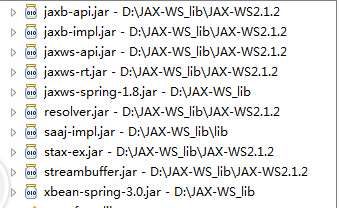
web.xml
<?xml version="1.0" encoding="UTF-8"?>

<web-app version="2.5" xmlns="http://java.sun.com/xml/ns/javaee"

    xmlns:xsi="http://www.w3.org/2001/XMLSchema-instance"

    xsi:schemaLocation="http://java.sun.com/xml/ns/javaee

    http://java.sun.com/xml/ns/javaee/web-app_2_5.xsd">

    <welcome-file-list>

        <welcome-file>index.jsp</welcome-file>

    </welcome-file-list>

  <!-- 到END处用来配置启动spring容器 -->

    <listener>

        <listener-class>org.springframework.web.context.ContextLoaderListener</listener-class>

    </listener>


    <context-param>

        <param-name>contextConfigLocation</param-name>

        <param-value>classpath:conf/applicationContext*.xml</param-value>

    </context-param>

  <!-- END -->

  <!-- 用于配置地址栏请求路径 -->

    <servlet>

        <servlet-name>JaxWsServlet</servlet-name>

        <servlet-class>com.sun.xml.ws.transport.http.servlet.WSSpringServlet</servlet-class>

    </servlet>

    <servlet-mapping>

        <servlet-name>JaxWsServlet</servlet-name>

        <url-pattern>/services/*</url-pattern>

    </servlet-mapping>

</web-app>
applicationContext-jaxws.xml,与之前不同之处在于,需要xml头需要增加wss的声明
<?xml version="1.0" encoding="UTF-8"?>

<beans xmlns="http://www.springframework.org/schema/beans"

    xmlns:context="http://www.springframework.org/schema/context"

    xmlns:xsi="http://www.w3.org/2001/XMLSchema-instance" xmlns:ws="http://jax-ws.dev.java.net/spring/core"

    xmlns:wss="http://jax-ws.dev.java.net/spring/servlet"

    xsi:schemaLocation="http://www.springframework.org/schema/beans http://www.springframework.org/schema/beans/spring-beans-2.5.xsd

    http://www.springframework.org/schema/context http://www.springframework.org/schema/context/spring-context-2.5.xsd

    http://jax-ws.dev.java.net/spring/core

    http://jax-ws.dev.java.net/spring/core.xsd

    http://jax-ws.dev.java.net/spring/servlet

    http://jax-ws.dev.java.net/spring/servlet.xsd">


  <!-- 扫描spring注解 -->

    <context:annotation-config />

    <context:component-scan base-package="com.example.ws">

    </context:component-scan>


  <!-- 绑定webservice地址,需要与web.xml的地址对应 -->

    <wss:binding url="/services/add">

        <wss:service>

            <ws:service bean="#exampleService" />

        </wss:service>

    </wss:binding>

</beans>
java Code
package com.example.ws;

import javax.jws.WebMethod;

import javax.jws.WebService;

import javax.jws.soap.SOAPBinding;

import javax.jws.soap.SOAPBinding.Style;

import org.springframework.stereotype.Service;

@Service("exampleService")
// 只有此处与方法一不同

@WebService

@SOAPBinding(style=Style.RPC)

public class ExampleService {

    @WebMethod

    public String example1(String request){

        System.out.println(request);

        String response = request+ "hello";

        return response;

    }

}
此种方式的本地请求地址为:http://localhost:8080/JAXWsExample2/services/add?wsdl
http://ip地址:服务器端口号/ 项目应用名/servlet定义地址?wsdl
以上两种方式本人在本地使用Tomcat服务都可以测试通过
在WebSphere服务器上目前测试只有第二种可用
JAX-WS + Spring 开发webservice的更多相关文章
- CXF整合Spring开发WebService
刚开始学webservice时就听说了cxf,一直没有尝试过,这两天试了一下,还不错,总结如下: 要使用cxf当然是要先去apache下载cxf,下载完成之后,先要配置环境变量,有以下三步: 1.打开 ...
- CXF Spring开发WebService,基于SOAP和REST方式 【转】
官网示例 http://cxf.apache.org/docs/writing-a-service-with-spring.html http://cxf.apache.org/docs/jax-rs ...
- CXF Spring开发WebService,基于SOAP和REST方式
版本CXF2.6.9 添加的包文件 这个版本的不可在Tomcat7上运行,会出错. 配置文件 applicationContext.xml <?xml version="1.0&quo ...
- 在使用SSH+Spring开发webservice ,报的一些异常及处理方法
1.No bean named 'cxf' is defined 配置文件被我分成了三份,启动时忘记将webService配置导入到主文件,修改后如下: 2.bad request 400 访问路径写 ...
- 基于JAX-WS的Web Service服务端/客户端 ;JAX-WS + Spring 开发webservice
一.基于JAX-WS的Web Service服务端/客户端 下面描述的是在main函数中使用JAX-WS的Web Service的方法,不是在web工程里访问,在web工程里访问,参加第二节. JAX ...
- struts1+spring+myeclipse +cxf 开发webservice以及普通java应用调用webservice的实例
Cxf + Spring+ myeclipse+ cxf 进行 Webservice服务端开发 使用Cxf开发webservice的服务端项目结构 Spring配置文件applicationCont ...
- 转载 WebService 的CXF框架 WS方式Spring开发
WebService 的CXF框架 WS方式Spring开发 1.建项目,导包. 1 <project xmlns="http://maven.apache.org/POM/4.0 ...
- WebService 的CXF框架 WS方式Spring开发
1.建项目,导包. <project xmlns="http://maven.apache.org/POM/4.0.0" xmlns:xsi="http://www ...
- Spring Boot用Cxf的jax-ws开发WebService
首先上项目的pom.xml: <?xml version="1.0" encoding="UTF-8"?> <project xmlns=&q ...
随机推荐
- 【POJ2185】【KMP + HASH】Milking Grid
Description Every morning when they are milked, the Farmer John's cows form a rectangular grid that ...
- 内置方法+lambda是pythonic的利器
python可以写的非常简洁,通过使用内置的map,reduce,filter,lambda方法,非常具有文艺范. 举个例子,例如 def fromIpToNum(ipAddr): return ...
- centos安装nodejs和mongodb
安装nodejs: Run as root on RHEL, CentOS or Fedora, for Node.js v4 LTS Argon: curl --silent --location ...
- js 去除字符串开头或者前几个字符。slice 也可以用于截取某一部分
摘草自w3 slice() 方法可从已有的数组中返回选定的元素. 语法 arrayObject.slice(start,end) 参数 描述 start 必需.规定从何处开始选取.如果是负数,那么它规 ...
- mysql命令行导出导入数据库
一.MYSQL的命令行模式的设置: 桌面->我的电脑->属性->环境变量->新建->PATH=“:path\mysql\bin;”其中path为MYSQL的安装路径.二. ...
- centos下Elasticsearch数据迁移与备份
########### ### 共享创建es官方网站就一句话 ######## 1.下载 文件共享 .. rpm -i http://mirror.symnds.com/distributions ...
- bzoj2687: 交与并
Description 对于一个区间集合{A1,A2……AK}(K>1,Ai<>Aj{i<>j}),我们定义其权值 W=|A1∪A2∪……∪A ...
- CSS HACK的方法
所有浏览器 通用 height: 100px; IE6 专用 _height: 100px; IE7 专用 *+height: 100px; IE6.IE7 共用 *height: 100px; IE ...
- 3ds max 2016 新功能
3ds max 2016 新功能_MCG节点编辑器 这是介绍视频下载: http://pan.baidu.com/s/1gds4wqJ
- inux 下c/c++ 连接mysql数据库全过程-----已经通过验证
安装Mysql(还可以下载 .gz包,解压安装,再此只介绍此法,其实都一样了,或百度一下...重点在下下下下面) 1.首先安装Mysql服务器 sudo apt-get install mysql-s ...