
NIO学习:异步IO实例
工作模式:
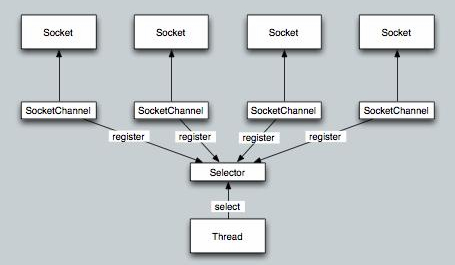
客户端代码:
package demos.nio.socketChannel;

import java.io.ByteArrayOutputStream;

import java.io.IOException;

import java.net.InetSocketAddress;

import java.nio.ByteBuffer;

import java.nio.channels.SelectionKey;

import java.nio.channels.Selector;

import java.nio.channels.SocketChannel;

import java.util.Arrays;

import java.util.Iterator;

import java.util.Set;

import org.apache.log4j.Logger;

/**

 * 非阻塞 Socket 客户端

 * 通过一个线程监听管理所有通道

 *

 */

public class Client {

    private Logger logger=Logger.getLogger(Client.class);

    /** * 服务器Ip */

    private String ip;

    /** * 服务器端口 */

    private int port;

    /** * 控制是否监听通道事件 */

    private volatile boolean isListenable;

    /** * 缓冲区大小 */

    private final int bufferSize = 1024;

    /** * 选择器每次阻塞监听的最大时间 */

    private final int selectorTime = 1000;

    /** * 创建Selector来管理通道事件 */

    private Selector selector;

    public Client(String ip, int port) {

        this.ip = ip;

        this.port = port;

        // 监听器

        try {

            selector = Selector.open();

        } catch (IOException e) {

            e.printStackTrace();

        }

    }

    public void send(String msg) {

        send(msg.getBytes());

    }

    /**

     * 发送数据

     *

     * @param data

     */

    public void send(byte[] data) {

        try {

            // 打开一个网络通道

            SocketChannel socketChannel = SocketChannel.open();

            // 设置通道为非阻塞

            socketChannel.configureBlocking(false);

            // 注册管道事件,监听连接成功

            SelectionKey key = socketChannel.register(selector,

                    SelectionKey.OP_CONNECT);

            // 将发送数据附加在SelectionKey上

            key.attach(ByteBuffer.wrap(data));

            // 建立连接

            socketChannel.connect(new InetSocketAddress(ip, port));

            //当第一个通道被注册到Selector上时,开启守护线程开始监听通道的事件

            if (!isListenable&&selector.keys().size() == 1) {

                //开启监听

                isListenable = true;

                // 开一个线程监听所有通道的事件

                Thread thread = new Thread(this.new SelectionTask());

                thread.start();

            }

        } catch (Exception e) {

            e.printStackTrace();

        }

    }

    /**

     * 往通道中写入数据

     * 当通道为非阻塞时它都是可写的,所以如果需要写数据,则注册监听写事件即可

     * @param selectionKey

     */

    private void writeData(SelectionKey selectionKey) {

        selectionKey.interestOps(selectionKey.interestOps()

                | SelectionKey.OP_WRITE);

        selectionKey.selector().wakeup();

    }

    public void closeListen() {

        logger.debug("关闭监听");

        this.isListenable = false;

        this.selector.wakeup();

    }

    /**

     * 判断是否继续监听

     * 如果selector中没有可监听的通道,则取消监听

     * @return

     */

    private boolean isListen() {

        return this.isListenable && (this.selector.keys().size() > 0);

    }

    /**

     * 监听任务

     *

     * @author root

     *

     */

    class SelectionTask implements Runnable {

        /**

         * 处理监听到的事件

         *

         * @param selectionKey

         * @throws IOException

         */

        private void handleSelectionKey(SelectionKey selectionKey)

                throws IOException {

            /** * 缓冲区 */

            ByteBuffer byteBuffer = ByteBuffer.allocate(bufferSize);

            SocketChannel channel = (SocketChannel) selectionKey.channel();

            if (!selectionKey.isValid()) {

                return;

            }

            if (selectionKey.isConnectable()) {

                if (!channel.isConnectionPending()) {

                    return;

                }

                channel.finishConnect();

                logger.debug("与服务器连接成功");

                // 连接成功后开始写数据

                writeData(selectionKey);

            } else if (selectionKey.isReadable()) {

                //循环把接受到的数据写入到内存中

                ByteArrayOutputStream outputStream = new ByteArrayOutputStream();

                byteBuffer.clear();

                while (channel.read(byteBuffer) > 0) {

                    byteBuffer.flip();

                    byte[] b = Arrays.copyOf(byteBuffer.array(), byteBuffer

                            .limit());

                    outputStream.write(b);

                    byteBuffer.clear();

                }

                logger.debug("客户端收到信息:"

                        + new String(outputStream.toByteArray()));

                // 使Selector注销对该Channel的监听

                selectionKey.cancel();

            } else if (selectionKey.isWritable()) {

                logger.debug("写出数据");

                ByteBuffer buffer = (ByteBuffer) selectionKey.attachment();

                if (buffer == null) {

                    return;

                }

                while (buffer.hasRemaining()) {

                    channel.write(buffer);

                }

                selectionKey.interestOps(SelectionKey.OP_READ);

            }

        }

        @Override

        public void run() {

            try {

                // 控制是否监听

                while (isListen()) {

                    //判断是否监听到了感兴趣的事件

                    if (selector.select(selectorTime) <= 0) {

                        continue;

                    }

                    Set<SelectionKey> selectionKeys = selector.selectedKeys();

                    Iterator<SelectionKey> iterator = selectionKeys.iterator();

                    while (iterator.hasNext()) {

                        handleSelectionKey(iterator.next());

                        //处理完selectionKey后需要移除它

                        iterator.remove();

                    }

                }

                selector.close();

            } catch (IOException e) {

                e.printStackTrace();

            }

        }

    }

    public static void main(String[] args) throws InterruptedException {

        Client socket = new Client("127.0.0.1", 8686);

        socket.send("hello");

    }

}
NIO学习:异步IO实例的更多相关文章
- Python并发编程之学习异步IO框架:asyncio 中篇(十)
大家好,并发编程 进入第十章.好了,今天的内容其实还挺多的,我准备了三天,到今天才整理完毕.希望大家看完,有所收获的,能给小明一个赞.这就是对小明最大的鼓励了.为了更好地衔接这一节,我们先来回顾一下上 ...
- 异步IO实例
#include <stdio.h> #include <stdlib.h> #include <errno.h> #include <string.h> ...
- Java网络编程和NIO详解5:Java 非阻塞 IO 和异步 IO
Java网络编程和NIO详解5:Java 非阻塞 IO 和异步 IO Java 非阻塞 IO 和异步 IO 转自https://www.javadoop.com/post/nio-and-aio 本系 ...
- Python(3)---从迭代器到异步IO
whenif 关注 2017.02.13 23:48* 字数 1750 阅读 250评论 0喜欢 8 目录 1. 迭代(iteration)与迭代器(iterator) 1.1 构建简单迭代器 1.2 ...
- NIO 之阻塞IO和非阻塞IO(转载)
阻塞模式 IO 我们已经介绍过使用 Java NIO 包组成一个简单的客户端-服务端网络通讯所需要的 ServerSocketChannel.SocketChannel 和 Buffer,我们这里整合 ...
- 异步IO与回调
最好了解 Java NIO 中 Buffer.Channel 和 Selector 的基本操作,主要是一些接口操作,比较简单. 本文将介绍非阻塞 IO 和异步 IO,也就是大家耳熟能详的 NIO 和 ...
- netty权威指南学习笔记一——NIO入门(2)伪异步IO
在上一节我们介绍了四种IO相关编程的各个特点,并通过代码进行复习了传统的网络编程代码,伪异步主要是引用了线程池,对BIO中服务端进行了相应的改造优化,线程池的引入,使得我们在应对大量客户端请求的时候不 ...
- Java NIO 学习笔记(六)----异步文件通道 AsynchronousFileChannel
目录: Java NIO 学习笔记(一)----概述,Channel/Buffer Java NIO 学习笔记(二)----聚集和分散,通道到通道 Java NIO 学习笔记(三)----Select ...
- JAVA NIO学习一:NIO简介、NIO&IO的主要区别
在前面学习了IO之后,今天我们开始进入NIO学习环节,首先我们会NIO做一个简单的介绍,让大家认识NIO,然后会和IO进行一个对比认识进行区分.好了,下面我们就开始学习: 一.NIO简介 1.概述 从 ...
随机推荐
- 【HDOJ】3071 Gcd & Lcm game
刚开始看这个题目,觉得没法做.关键点是数据小于100.因此,可以枚举所有小于100的素因子进行位压缩.gcd就是求最小值,lcm就是求最大值.c++有时候超时,g++800ms.线段树可解. /* 3 ...
- 【HDOJ】4162 Shape Number
循环串的最小表示法. /* */ #include <iostream> #include <string> #include <map> #include < ...
- 【PythonChallenge】Level 5
题目主要找发声类似于Peak Hell的Python模块,查了一下手册pickle已经是最像的了.看了一下源代码,发现panner.p.如同发现了新大陆,拷贝内容.使用pickle解答.答案为chan ...
- 错误信息:A TCP error (10013: 以一种访问权限不允许的方式做了一个访问套接字的尝试。) occurred while listening on IP Endpoint=192.168.1.18:8002.
百度之后,知道这个原因是端口已经被其他进程打开了 使用cmd命令,查看8002端口被哪一个程序占用了 C:\Windows\System32>netstat -ano | find " ...
- 屯题50AC纪念
从2.1起开始屯题,一直弄到现在才完成了一发50题的目标,实在太弱 (当然之间事比较多,还是挺不容易的) 不过总算是完成了一个小的目标了 接下来两周要进行小高考最后冲刺了,所以我大概不会再怎么刷题了 ...
- NOI2010超级钢琴
超级钢琴 [问题描述] 小Z是一个小有名气的钢琴家,最近C博士送给了小Z一架超级钢琴,小Z希望能够用这架钢琴创作出世界上最美妙的音乐. 这架超级钢琴可以弹奏出n个音符,编号为1至n.第i个音符的美妙度 ...
- javascript 中concat与push的区别
1. push 遇到数组参数时,把整个数组参数作为一个元素:而 concat 则是拆开数组参数,一个元素一个元素地加进去. 2. push 直接改变当前数组:concat 不改变当前数组. 总结:如果 ...
- json-lib反序列化时(JSONObject.toBean),时间类型为空的处理
需求: 在我们的项目里希望JsonString传入日期类型值为空时,JSONObject.toBean时可以将Java对象的该日期属性设为null. 解决过程: json-lib反序列化Json字符串 ...
- linux内核中分配4M以上大内存的方法
在内核中, kmalloc能够分配的最大连续内存为2的(MAX_ORDER-1)次方个page(参见alloc_pages函数, "if (unlikely(order >= ...
- HW5.8
public class Solution { public static void main(String[] args) { System.out.printf("%s\t%s\t%s\ ...