
【转】Android ProgressDialog的使用
原文网址:http://blog.csdn.net/sjf0115/article/details/7255280
版权声明:本文为博主原创文章,未经博主允许不得转载。
<1>简介
ProgressDialog是AlertDialog类的一个扩展,可以为一个未定义进度的任务显示一个旋转轮形状的进度动画,或者为一个指定进度的任务显示一个进度条。
一个对话框中显示一个进步指标和一个可选的文本信息或一个视图。只有文本信息或一个视图,可以同时使用。
对话框可以按back键取消。
<2>方法
setProgressStyle() 设置进度条风格
setTitle() 设置ProgressDialog 标题
setMessage() 设置ProgressDialog 提示信息
setIcon() 设置ProgressDialog 标题图标
setIndeterminate() 设置ProgressDialog 的进度条是否不明确
setCancelable() 设置ProgressDialog 是否可以按退回按键取消
setButton() 设置ProgressDialog 的一个Button
setProgress() 设置ProgressDialog 进度条进度
show() 显示ProgressDialog
<3>范例
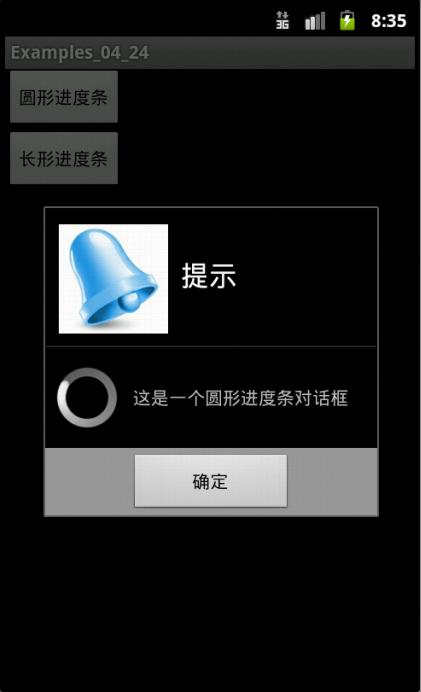
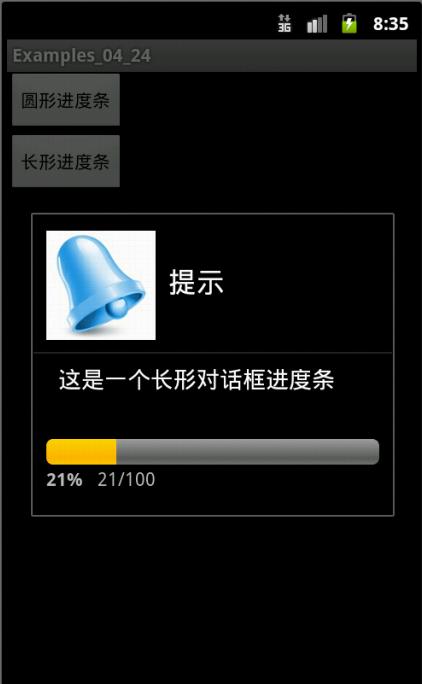
- package com.yarin.android.Examples_04_24;
- import android.app.Activity;
- import android.app.ProgressDialog;
- import android.content.DialogInterface;
- import android.os.Bundle;
- import android.view.View;
- import android.view.View.OnClickListener;
- import android.widget.Button;
- public class Activity01 extends Activity
- {
- private Button Button1 = null;
- private Button Button2 = null;
- int count = 0;
- //声明进度条对话框
- ProgressDialog progressDialog = null;
- /** Called when the activity is first created. */
- @Override
- public void onCreate(Bundle savedInstanceState)
- {
- super.onCreate(savedInstanceState);
- setContentView(R.layout.main);
- //得到按钮对象
- Button1 = (Button)findViewById(R.id.Button01);
- Button2 = (Button)findViewById(R.id.Button02);
- //设置mButton01的事件监听
- Button1.setOnClickListener(new Button1Listener());
- //设置mButton02的事件监听
- Button2.setOnClickListener(new Button2Listener());
- }
- private class Button1Listener implements OnClickListener{
- public void onClick(View v) {
- //创建ProgressDialog对象
- progressDialog = new ProgressDialog(Activity01.this);
- // 设置进度条风格,风格为圆形,旋转的
- progressDialog.setProgressStyle(ProgressDialog.STYLE_SPINNER);
- // 设置ProgressDialog 标题
- progressDialog.setTitle("提示");
- // 设置ProgressDialog 提示信息
- progressDialog.setMessage("这是一个圆形进度条对话框");
- // 设置ProgressDialog 标题图标
- progressDialog.setIcon(R.drawable.a);
- // 设置ProgressDialog 的进度条是否不明确
- progressDialog.setIndeterminate(false);
- // 设置ProgressDialog 是否可以按退回按键取消
- progressDialog.setCancelable(true);
- //设置ProgressDialog 的一个Button
- progressDialog.setButton("确定", new SureButtonListener());
- // 让ProgressDialog显示
- progressDialog.show();
- }
- }
- //Dialog中确定按钮的监听器
- private class SureButtonListener implements android.content.DialogInterface.OnClickListener{
- public void onClick(DialogInterface dialog, int which) {
- //点击“确定按钮”取消对话框
- dialog.cancel();
- }
- }
- private class Button2Listener implements OnClickListener{
- public void onClick(View v) {
- count = 0;
- // 创建ProgressDialog对象
- progressDialog = new ProgressDialog(Activity01.this);
- // 设置进度条风格,风格为长形
- progressDialog.setProgressStyle(ProgressDialog.STYLE_HORIZONTAL);
- // 设置ProgressDialog 标题
- progressDialog.setTitle("提示");
- // 设置ProgressDialog 提示信息
- progressDialog.setMessage("这是一个长形对话框进度条");
- // 设置ProgressDialog 标题图标
- progressDialog.setIcon(R.drawable.a);
- // 设置ProgressDialog 进度条进度
- progressDialog.setProgress(100); 《==应该改为 progressDialog.setMax(100)
- // 设置ProgressDialog 的进度条是否不明确
- progressDialog.setIndeterminate(false);
- // 设置ProgressDialog 是否可以按退回按键取消
- progressDialog.setCancelable(true);
- // 让ProgressDialog显示
- progressDialog.show();
- new Thread()
- {
- public void run()
- {
- try
- {
- while (count <= 100)
- {
- // 由线程来控制进度。
- progressDialog.setProgress(count++);
- Thread.sleep(100);
- }
- progressDialog.cancel();
- }
- catch (InterruptedException e)
- {
- progressDialog.cancel();
- }
- }
- }.start();
- }
- }
- }
- <?xml version="1.0" encoding="utf-8"?>
- <LinearLayout xmlns:android="http://schemas.android.com/apk/res/android"
- android:orientation="vertical"
- android:layout_width="fill_parent"
- android:layout_height="fill_parent"
- >
- <Button
- android:id="@+id/Button01"
- android:layout_width="wrap_content"
- android:layout_height="wrap_content"
- android:text="圆形进度条" />
- <Button
- android:id="@+id/Button02"
- android:layout_width="wrap_content"
- android:layout_height="wrap_content"
- android:text="长形进度条" />
- </LinearLayout>
【转】Android ProgressDialog的使用的更多相关文章
- 【转】Android ProgressDialog的使用2
原文网址:http://www.cnblogs.com/hnrainll/archive/2012/03/28/2420908.html <?xml version="1.0" ...
- Android ProgressDialog 加载进度
<RelativeLayout xmlns:android="http://schemas.android.com/apk/res/android" xmlns:tools= ...
- android progressdialog 对话框试用实例
ProgressDialog 跟AlertDialog用法差不多,不同的是:ProgressDialog 显示的是一种"加载中"的效果,android 中 ProgressDial ...
- android ProgressDialog 正在载...Loading...
final ProgressDialog pd = new ProgressDialog(mContext); pd.setMessage("正在加载..."); pd.show( ...
- Android——ProgressDialog 进度条对话框
public class ProgressDialogActivity extends Activity { private Button btn_large_pd, btn_horizonta ...
- Android ProgressDialog 简单实用
ProgressDialog progressDialog; @SuppressLint("HandlerLeak") Handler handler1 = new Handler ...
- android:ProgressDialog控件
ProgressDialog 和 AlertDialog 有点类似,都可以在界面上弹出一个对话框,都能够屏蔽 掉其他控件的交互能力.不同的是,ProgressDialog 会在对话框中显示一个进度条, ...
- 自定义android ProgressDialog
Android系统自己提供的UI的都是比较难看的,开发中经常用到自定义对话框,下面分享个最近项目中使用的加载框. 下面是源代码,主要的原理就是准备几个图片,然后循环播放. MainActivity ...
- Android学习笔记_81_Android ProgressDialog ProgressBar 各种效果
1,弹出Dialog 屏幕不变暗. 创建一个样式就OK了:在styles.xml文件里添加样式: 1, <style name="dialog" parent="@ ...
随机推荐
- Sliverlight linq中的数组筛选数据库中的数据
首先 什么是linq呢 ? LINQ即Language Integrated Query(语言集成查询),LINQ是集成到C#和Visual Basic.NET这些语言中用于提供查询数据能力的一个新特 ...
- c语言学习之基础知识点介绍(十):数组
本节主要介绍数组. 一.数组 /* 数组:一个变量可以存n个变量. 语法:类型 数组名[长度(正整数)]; 例如:int score[5];//定义了一个int类型的数组,长度为5,可以保存5个数据. ...
- 1.redis.3.2 下载,安装、配置、使用 - 1
1.下载: 2.使用: 挤压之后,使用cmd执行,如下图 redis-server--service-installredis.windows.conf,执行安装 提示成功之后,剩下就好办了, 这 ...
- Quartz.net 定时任务在IIS中未按时执行
IIS 垃圾回收机制下解决Quartz.net 的不执行问题 IIS中涉及了垃圾回收机制,quartz.net 在ASP.NET 项目中可以实现线程监控定时执行任务,但是在IIS7.5机一下版本中涉及 ...
- SQL SERVER while循环
在SQL数据库中,可以通过WHILE实现循环,下面就将为您介绍SQL循环执行while控制,希望对您提升WHILE的使用水平能够有些帮助. WHILE Boolean_expression { ...
- php 微信3 自定义菜单
<pre name="code" class="php"><pre name="code" class="htm ...
- 设计模式之 State 状态模式
状态模式的核心在于 1. 状态的转换导致行为(Handle)的差异,比如人的状态是饿的时候,吃(Handle)的行为是2个馒头,人状态是不太饿的时候,吃(Handle)的行为是半个馒头 2. Stat ...
- 『重构--改善既有代码的设计』读书笔记---Duplicate Observed Data
当MVC出现的时候,极大的推动了Model与View分离的潮流.然而对于一些已存在的老系统或者没有维护好的系统,你都会看到当前存在大把的巨大类----将Model,View,Controller都写在 ...
- SQL分页小Demo
SELECT @TotalCount=count(1) FROM TableA A WITH(NOLOCK) INNER JOIN TableB B WITH(NOLOCK) ON A.Id=B.Id ...
- demo_04绘制三角形
<!DOCTYPE html> <html> <head> <meta charset="UTF-8"> <title> ...