
ListFragment的使用
ListFragment继承了Fragment,顾名思义,ListFragment是一种特殊的Fragment,它包含了一个ListView,在ListView里面显示数据。
1. MainActivity
Java类文件:
package com.example.hzhi.fragmentdemo;

import android.app.Activity;

import android.os.Bundle;

import android.app.FragmentManager;

import android.app.FragmentTransaction;

public class MainActivity extends Activity {

    private FragmentManager manager;

    private FragmentTransaction transaction;

    @Override

    protected void onCreate(Bundle savedInstanceState) {

        super.onCreate(savedInstanceState);

        setContentView(R.layout.activity_main);

        manager = getFragmentManager();

        transaction = manager.beginTransaction();

        ListFragmentImpl frgImpl = new ListFragmentImpl();

        ListFragmentSelf frgSelf = new ListFragmentSelf();

        transaction.add(R.id.fragment1, frgImpl, "frgImpl");

        transaction.add(R.id.fragment2, frgSelf, "frgSelf");

        transaction.commit();

    }

}
xml布局文件:
<LinearLayout xmlns:android="http://schemas.android.com/apk/res/android"

    xmlns:tools="http://schemas.android.com/tools"

    android:layout_width="match_parent"

    android:layout_height="match_parent"

    android:orientation="horizontal" >

    <LinearLayout

        android:id="@+id/fragment1"

        android:layout_weight="1"

        android:layout_width="match_parent"

        android:layout_height="match_parent"

        android:orientation="vertical"/>

    <LinearLayout

        android:id="@+id/fragment2"

        android:layout_weight="1"

        android:layout_width="match_parent"

        android:layout_height="match_parent"

        android:orientation="vertical"/>

</LinearLayout>
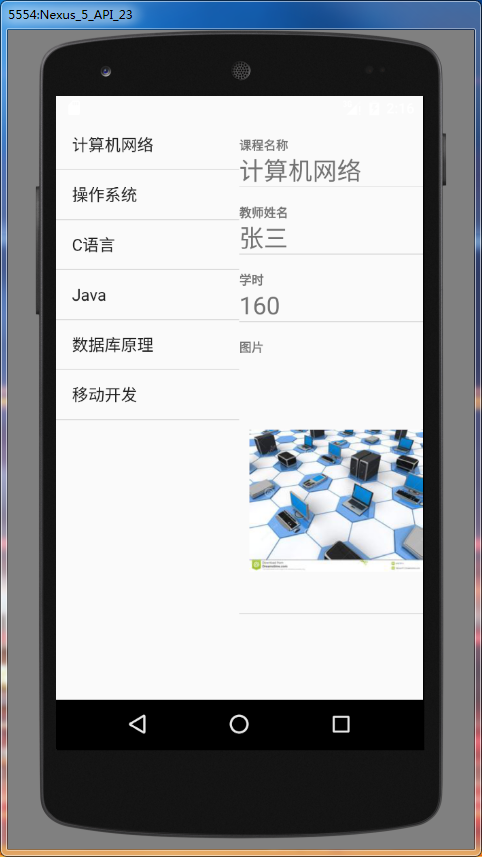
可见MainActivity是比较简单的,在布局里面放了左右两个ListFragment。
2. ListFragment
2.1 左边的ListFragment
Java类文件:
package com.example.hzhi.fragmentdemo;

import android.app.ListFragment;

import android.widget.ListView;

import android.os.Bundle;

import android.view.LayoutInflater;

import android.view.View;

import android.view.ViewGroup;

import android.widget.ArrayAdapter;

import android.util.Log;

import android.widget.Toast;

import android.widget.SimpleAdapter;

import java.util.Map;

import java.util.HashMap;

import java.util.List;

import java.util.ArrayList;

public class ListFragmentImpl extends ListFragment{

    private static final String TAG = "ListFragmentImpl";

    private ListView selfList;

    String[] classes = {

            "计算机网络",

            "操作系统",

            "C语言",

            "Java",

            "数据库原理",

            "移动开发",

    };

    @Override

    public View onCreateView(LayoutInflater inflater, ViewGroup container,

                             Bundle savedInstanceState) {

        Log.d(TAG, "onCreateView");

        return inflater.inflate(R.layout.list_fragment_impl, container, false);

    }

    @Override

    public void onCreate(Bundle savedInstanceState) {

        Log.d(TAG, "onCreate");

        super.onCreate(savedInstanceState);

        // 设置ListFragment默认的ListView,即@id/android:list

        this.setListAdapter(new ArrayAdapter<String>(getActivity(),

                android.R.layout.simple_list_item_1, classes));

    }

    public void onListItemClick(ListView parent, View v,

                                int position, long id) {

        Log.d(TAG, "onListItemClick");

        // 找到ListFragmentSelf

        ListFragmentSelf listFragmentSelf = (ListFragmentSelf) getFragmentManager().

                findFragmentByTag("frgSelf");

        listFragmentSelf.flushData(position);

    }

}
布局文件:
<?xml version="1.0" encoding="utf-8"?>

<LinearLayout xmlns:android="http://schemas.android.com/apk/res/android"

    android:layout_width="match_parent"

    android:layout_height="match_parent"

    android:orientation="vertical" >

    <!-- ListFragment对应的android:id值固定为"@id/android:list" -->

    <ListView

        android:id="@id/android:list"

        android:layout_width="match_parent"

        android:layout_height="match_parent"

        android:drawSelectorOnTop="false"

        />

</LinearLayout>
2.2 右边的ListFragment
Java类文件:
package com.example.hzhi.fragmentdemo;

import android.app.ListFragment;

import android.widget.ListView;

import android.os.Bundle;

import android.view.LayoutInflater;

import android.view.View;

import android.view.ViewGroup;

import android.util.Log;

import android.widget.SimpleAdapter;

import java.util.Map;

import java.util.HashMap;

import java.util.List;

import java.util.ArrayList;

public class ListFragmentSelf extends ListFragment{

    private static final String TAG = "ListFragmentImpl";

    private ListView selfList;

    final String[] from = new String[] {"name", "title", "info", "picture"};

    final int[] to = new int[] {R.id.text0, R.id.text1, R.id.text2, R.id.picture};

    private String[] tname = new String[]{"计算机网络", "操作系统", "C语言", "Java", "数据库原理", "移动开发"};

    private String[] ttitle = new String[]{"张三", "李四", "王五", "Tom", "Mike", "Peter"};

    private String[] ttime = new String[]{"160", "50", "40", "200", "180", "150"};

    private int[] pic = new int[]{R.drawable.jsjwl, R.drawable.czxt, R.drawable.cyy,

            R.drawable.java, R.drawable.sjkyl, R.drawable.ydkf};

    @Override

    public View onCreateView(LayoutInflater inflater, ViewGroup container,

                             Bundle savedInstanceState) {

        Log.d(TAG, "onCreateView");

        return inflater.inflate(R.layout.list_fragment_self, container, false);

    }

    @Override

    public void onCreate(Bundle savedInstanceState) {

        Log.d(TAG, "onCreate");

        super.onCreate(savedInstanceState);

        flushData(0);

    }

    public void onListItemClick(ListView parent, View v,

                                int position, long id) {

        Log.d(TAG, "onListItemClick");

    }

    public void flushData(int p){

        // 建立SimpleAdapter,将from和to对应起来

        SimpleAdapter adapter = new SimpleAdapter(

                this.getActivity(), getSimpleData(p),

                R.layout.list_item, from, to);

        this.setListAdapter(adapter);

    }

    private List<Map<String, Object>> getSimpleData(int p) {

        List<Map<String, Object>> list = new ArrayList<Map<String, Object>>();

        Map<String, Object> map = new HashMap<String, Object>();

        map.put("title", "课程名称");

        map.put("info", tname[p]);

        list.add(map);

        map = new HashMap<String, Object>();

        map.put("title", "教师姓名");

        map.put("info", ttitle[p]);

        list.add(map);

        map = new HashMap<String, Object>();

        map.put("title", "学时");

        map.put("info", ttime[p]);

        list.add(map);

        map = new HashMap<String, Object>();

        map.put("title", "图片");

        map.put("picture", pic[p]);

        list.add(map);

        return list;

    }

}
布局文件:
<?xml version="1.0" encoding="utf-8"?>

<LinearLayout xmlns:android="http://schemas.android.com/apk/res/android"

    android:layout_width="match_parent"

    android:layout_height="match_parent"

    android:orientation="vertical" >

    <!-- ListFragment对应的android:id值固定为"@id/android:list" -->

    <ListView

        android:id="@id/android:list"

        android:layout_width="match_parent"

        android:layout_height="match_parent"

        android:drawSelectorOnTop="false"

        />

</LinearLayout>
行布局文件:
<?xml version="1.0" encoding="utf-8"?>

<LinearLayout xmlns:android="http://schemas.android.com/apk/res/android"

    android:layout_width="match_parent"

    android:layout_height="match_parent"

    android:orientation="vertical" >

    <TextView android:id="@+id/text0"

        android:textSize="12sp"

        android:textStyle="bold"

        android:layout_width="match_parent"

        android:layout_height="wrap_content"/>

    <TextView android:id="@+id/text1"

        android:textSize="12sp"

        android:textStyle="bold"

        android:layout_width="match_parent"

        android:layout_height="wrap_content"/>

    <TextView android:id="@+id/text2"

        android:textSize="24sp"

        android:layout_width="match_parent"

        android:layout_height="wrap_content"/>

    <ImageView

        android:id="@+id/picture"

        android:layout_width="wrap_content"

        android:layout_height="wrap_content"

        android:paddingLeft="10dp" />

</LinearLayout>
最重要的方法是,当点击左边ListFragment的某一行时,取得改行的position,然后根据Tag找到右边的ListFragment,并调用flushData()方法,使右边的ListFragment刷新数据。
3. 运行结果
ListFragment的使用的更多相关文章
- ListFragment源码 (待分析)
/* * Copyright (C) 2010 The Android Open Source Project * * Licensed under the Apache License, Versi ...
- ListFragment创建及其生命周期
相同的ListFragment 带有一个无参构造 一个有参构造 在该Fragment所依附的Activity视图创建时被实例化一次 方法周期分别为1.无参构造2.onInflate3.onAttach ...
- Fragment中添加ListView而不使用ListFragment
最初的构想是,将Fragment和ViewPager结合起来, 然后突发奇想,在第一个Fragment里添加了ListView, 依照网上的建议,extends了ListFragment,接着各种报错 ...
- [Android]ListFragment.setEmptyText() 抛 java.lang.IllegalStateException
在ListFragment子类中直接调用setEmptyText(getString(R.string.msg_no_invited_parties)), 抛java.lang.IllegalStat ...
- Android系列之Fragment(四)----ListFragment的使用
[声明] 欢迎转载,但请保留文章原始出处→_→ 生命壹号:http://www.cnblogs.com/smyhvae/ 文章来源:http://www.cnblogs.com/smyhvae/p/ ...
- ListFragment
ListFragment http://developer.android.com/reference/android/app/ListFragment.html extends Fragment C ...
- Android App组件之ListFragment -- 说明和示例
Android App组件之ListFragment -- 说明和示例 1 ListFragement介绍 ListFragment继承于Fragment.因此它具有Fragment的特性,能够作为a ...
- Android ListFragment实例Demo(自己定义适配器)
上一篇文章介绍了ListFragment,当中的ListView并没有自己定义适配器,实际上在实际开发中常会用到自己定义适配器,是实现更复杂的列表数据展示. 所以这篇文章添加了自己定义适配器.来进行L ...
- android,在fragment中使用listview,不使用listfragment
public class LeftFragment extends Fragment{ private ListView listView; @Override public View onCreat ...
随机推荐
- 【iOS】Xcode8+Swift3 纯代码模式实现 UICollectionView
开发环境 macOS Sierra 10.12.Xcode 8.0,如下图所示: 总体思路 1.建立空白的storyboard用于呈现列表 2.实现自定义单个单元格(继承自:UICollectionV ...
- PHP设计模式(四)单例模式(Singleton For PHP)
今天讲单例设计模式,这种设计模式和工厂模式一样,用的非常非常多,同时单例模式比较容易的一种设计模式. 一.什么是单例设计模式 单例模式,也叫单子模式,是一种常用的软件设计模式.在应用这个模式时,单例对 ...
- css样式之border-radius
border-radius 属性设置边框的园角 可能的值:像素,百分比 扩展延伸 html代码 <div></div> css代码 div { height: 200px; w ...
- 好用的Markdown编辑器一览 readme.md 编辑查看
https://github.com/pandao/editor.md https://pandao.github.io/editor.md/examples/index.html Editor.md ...
- Win7安装MySQL-5.7.16过程
1.在C盘新建MYSQL文件夹:2.将mysql-5.7.16-winx64拷贝到C:\MYSQL文件夹下,更名为mysql-5.7.16:3.在mysql-5.7.16目录下,建my.ini文件,内 ...
- MSSQL 事务,视图,索引,存储过程,触发器
事务 事务是一种机制.是一种操作序列,它包含了一组数据库操作命令,这组命令要么全部执行,要么全部不执行. 在数据库系统上执行并发操作时事务是作为最小的控制单元来使用的.这特别适用于多用户同时操作的数据 ...
- MongoDB常用操作--集合1
1.创建集合有两种方式,显示创建和隐式创建 显示创建可以使用命令 db.createCollection("集合名称") 隐式创建可以使用命令 db.集合名称.insert({}) ...
- Web应用之LAMP源码环境部署
一.LAMP环境的介绍 1.LAMP环境的重要性 思索许久,最终还是决定写一篇详细的LAMP的源码编译安装的实验文档,一来是为了给自己一个交代,把技术进行系统的归纳,将技术以极致的形式呈现出来,做为一 ...
- excel常用技巧
复制表格时,如果要加上行标和列标.页面布局->工作表选项:标题,勾上打印->复制下拉框->复制为图片加上打印样式 一行长拆成几行短或几行短变成一行长的文本拆分,可以通过:填充-> ...
- 保护ASP.NET 应用免受 CSRF 攻击
CSRF是什么? CSRF(Cross-site request forgery),中文名称:跨站请求伪造,也被称为:one click attack/session riding,缩写为:CSRF/ ...