
dynamic解析Http xml格式响应数据
继续上一篇 构建RESTful风格的WCF服务 ,咱已经把服务端的数据和服务准备好了,客户端调用 wcf rest接口后如何解析xml?下面使用dynamic关键字解析来至于WCF REST XML响应数据。
首先创建一个WCF客户端类,添加GET、POST处理方法:
  public class WcfRestClient

    {

        public Uri BaseUri { get; private set; } //Url:http://localhost:1008/

        public WcfRestClient(Uri baseUri)

        {

            BaseUri = baseUri;

        }

        public WcfRestClient(string baseUrl)

            : this(new Uri(baseUrl))

        {

        }

        private dynamic GetResponseObject(HttpWebRequest request)

        {

            try

            {

                var response = request.GetResponse() as HttpWebResponse;

                using (var stream = response.GetResponseStream())

                {

                    if (!stream.CanRead)

                        return null;

                    StreamReader reader = new StreamReader(stream);

                    string source = reader.ReadToEnd();

                    response.Close();

                    return XmlStringToDynamic(source);

                }

            }

            catch (WebException ex)

            {

                using (var stream = ex.Response.GetResponseStream())

                {

                    if (!stream.CanRead)

                        return null;

                    StreamReader reader = new StreamReader(stream);

                    string source = reader.ReadToEnd();

                    return XmlStringToDynamic(source);

                }

            }

        }


    //GET请求

        public dynamic WebGet(string path)

        {

            HttpWebRequest request=(HttpWebRequest)HttpWebRequest.Create(BaseUri.ToString()+path);

            return GetResponseObject(request);

        }


    //POST请求

        public dynamic WebPost(string path, string data)

        {

            HttpWebRequest request = (HttpWebRequest)HttpWebRequest.Create(BaseUri.ToString() + path);

            request.Method = "POST";

            if (!String.IsNullOrEmpty(data))

            {

                request.ContentType = "text/xml"; //xml格式传输数据

                byte[] buffer = Encoding.UTF8.GetBytes(data);

                request.ContentLength = buffer.Length;

                using (var stream = request.GetRequestStream())

                {

                    stream.Write(buffer, , buffer.Length);

                    stream.Flush();

                }

            }

            return GetResponseObject(request);

        }
         //
        public static dynamic XmlStringToDynamic(string xml)

        {

            if (String.IsNullOrEmpty(xml))

                return null;

            XElement element = XElement.Parse(xml);

            dynamic dynamicResult = new DynamicXMLNode(element);

            return dynamicResult;

        }
}
2、dynamic处理xml节点DynamicXMLNode类,需要继承DynamicObject(System.Dynamic),对返回的xml对象进行动态解析。
  public class DynamicXMLNode:DynamicObject

    {

        public DynamicXMLNode() { }

        XElement node;

        public XElement Element

        {

            get

            {

                return node;

            }

        }

        public DynamicXMLNode(XElement node)

        {

            this.node = node;

        }

        public DynamicXMLNode(string name)

        {

            node = new XElement(name);

        }

        public override bool TryGetMember(GetMemberBinder binder, out object result)

        {

            if (binder.Name == "Value")

            {

                result = node.Value;

                return true;

            }

            if (binder.Name == "ElementCount")

            {

                if (node.HasElements)

                    result = node.Elements().Count();

                else

                    result = ;

                return true;

            }

            XElement getNode;

            try

            {

                getNode = node.Element(binder.Name);

            }

            catch

            {

                result = null;

                return true;

            }

            if (getNode != null)

            {

                result = new DynamicXMLNode(getNode);

                return true;

            }

            else

            {

                result = null;

                return false;

            }

        }

    }
3、最后咱们来测试一下发起GET和POST请求,首先创建一个aspx页面,在.cs文件:
 /// <summary>

        /// 处理GET请求

        /// </summary>

        private void GetData()

        {

            WcfRestClient client = new WcfRestClient("http://localhost:1008/");

            dynamic result = client.WebGet(String.Format("user/search/{0}", ""));

            this.txtGetUrl.Text = client.BaseUri + String.Format("user/search/{0}", "");

            this.txtId.Text = result.Id.Value;

            this.txtCode.Text = result.Code.Value;

            this.txtName.Text = result.Name.Value;

            this.txtDesc.Text = result.Description.Value;

        }

        /// <summary>

        /// 测试POST请求

        /// </summary>

        private void PostData()

        {

            string strBuiler = String.Format("<UserInfo><Code>{0}</Code><Description>{1}</Description><Id>{2}</Id><Name>{3}</Name></UserInfo>","","post请求",,"好基友");

            WcfRestClient client = new WcfRestClient("http://localhost:1008/");

            dynamic result = client.WebPost("user/register", strBuiler);

            this.txtPOSTUrl.Text = client.BaseUri + "user/register";

            this.txtId1.Text = result.Id.Value;

            this.txtCode1.Text = result.Code.Value;

            this.txtName1.Text = result.Name.Value;

            this.txtDesc1.Text = result.Description.Value;

        }
测试结果:
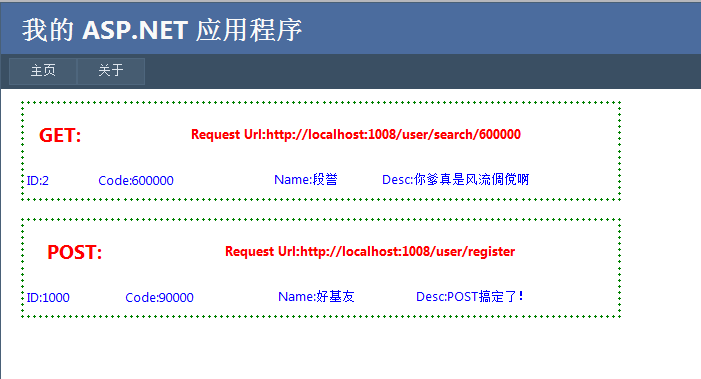
噢了。。。
dynamic解析Http xml格式响应数据的更多相关文章
- scrapy 解析xml格式的数据
XMLFeedSpider 主要用于 解析 xml格式的数据 创建一个scrapy 项目文件 scrapy startproject xxx 创建一个spider scrapy genspider - ...
- 如何在JSP页面里面显示xml格式的数据
正常情况下,在jsp页面里的标签里写xml格式的数据,在浏览器里面的页面里显示出来的是乱码. 为什么会显示乱码呢?原来xml标签在jsp里会被解析为浏览器对象,因为xml最开始被设计出来是 为了写网页 ...
- xml格式的数据转化成数组
将得到的xml格式的数据转化成数组 <?php //构造xml $url = "http://api.map.baidu.com/telematics/v3/weather?locat ...
- C#操作数据表中XML格式的数据
以前还真没有见过数据表中存储XML格式的数据,刚开始听说的时候,还以为是数据表中有XML的字段类型, 再了解,其实也就是字符串类型的,只不过字符串的格式是XML格式的.确实孤陋寡闻!汗... (可添加 ...
- SpringMVC处理XML格式的数据
1.搭建SpringMVC+spring环境 2.web.xml,Springmvc-config.xml.springMVC提供了处理xml格式请求响应的HttpMessageConverter,s ...
- Asp.net Core WebApi 支持json/xml格式的数据返回
Asp.net core 在做webapi项目的时候,默认是只返回json格式的数据的,如果想要开启xml数据返回,需要在startup里配置如下: public void ConfigureServ ...
- android开发 服务器端访问MySQL数据库,并把数据库中的某张表解析成xml格式输出到浏览器
我们此时只要写一个Servlet就可以了: public class UpdateMenuServlet extends HttpServlet { /** * */ private static f ...
- 关于java后台如何接收xml格式的数据
业务场景:用户发送下单请求,格式为xml格式,服务器接收数据完成下单,并返回结果给客户. 请求格式: <request> <head> <sign></sig ...
- JAVA 读取xml格式的数据
<?xml version="1.0" encoding="UTF-8"?> <column-enums> <type name= ...
随机推荐
- java线程一
我们可以在计算机上运行各种计算机软件程序.每一个运行的程序可能包括多个独立运行的线程(Thread).线程(Thread)是一份独立运行的程序,有自己专用的运行栈.线程有可能和其他线程共享一些资源,比 ...
- IDEA14/Eclipse+Tomcat7热部署,jrebel6破解与eclipse配置
换了最新的eclipse,以前很多的插件都用不了,对于web开发的人来说,jrebel这种防重启神器必须要配备,防止修改类名.java文件.配置文件后的tomcat重启. 首先给一个下载地址: htt ...
- node API assert
1.assert.throws(block, [error], [message]): assert.throws( function(){ throw new Error('wrong'); }, ...
- javascript中的with关键字
说起js中的with关键字,很多小伙伴们的第一印象可能就是with关键字的作用在于改变作用域,然后最关键的一点是不推荐使用with关键字.听到不推荐with关键字后,我们很多人都会忽略掉with关键字 ...
- linux系统编程之信号(六):信号发送函数sigqueue和信号安装函数sigaction
一,sigaction() #include <signal.h> int sigaction(int signum,const struct sigaction *act,struct ...
- AbpZero之企业微信---登录(拓展第三方auth授权登录)---第二步:开始逐步实现企业微信登录
上回分解到AbpZero的auth登录机制,这里我们开始着手逐步实现我们的auth登录. 我们新建一个类库XXXX.Web.Authentication.External 在类库下新建一个类QYWec ...
- C#多线程编程系列(二)- 线程基础
目录 C#多线程编程系列(二)- 线程基础 1.1 简介 1.2 创建线程 1.3 暂停线程 1.4 线程等待 1.5 终止线程 1.6 检测线程状态 1.7 线程优先级 1.8 前台线程和后台线程 ...
- Elasticsearch入门 + 基础概念学习
原文地址:https://www.cnblogs.com/shoufeng/p/9887327.html 目录 1 Elasticsearch概述 1.1 Elasticsearch是什么 1.2 E ...
- Core Data Tutorial for IOS: Getting Started
http://www.raywenderlich.com/934/core-data-tutorial-for-ios-getting-started
- 使用browserSync自动刷新
本篇主要是以 http://www.imooc.com/article/14759 为参考来写的: 已经整理到github上:https://github.com/Macaulish/gulp-Bro ...