
elasticsearch插件安装之--中文分词器 ik 安装
/**
* 系统环境: vm12 下的centos 7.2
* 当前安装版本: elasticsearch-2.4.0.tar.gz
*/
ElasticSearch中内置了许多分词器, standard, english, chinese等, 中文分词效果不佳, 所以使用ik
安装ik分词器
下载链接: https://github.com/medcl/elasticsearch-analysis-ik/releases

版本对应关系: https://github.com/medcl/elasticsearch-analysis-ik
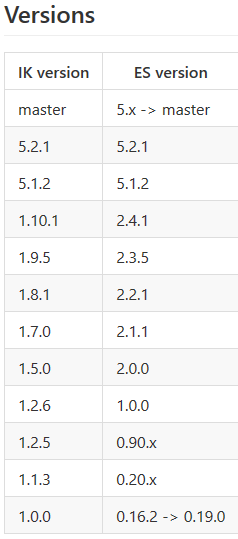
关闭elasticsearch.bat,将下载下来的压缩文件解压,在ES目录中的plugins文件夹里新建名为ik的文件夹,将解压得到的所有文件复制到ik中。
unzip elasticsearch-analysis-ik-1.10.0.zip
确认 plugin-descriptor.properties 中的版本和安装的elasticsearch版本一直, 否则报异常
在elasticsearch.yml中增加ik设置
index.analysis.analyzer.ik.type : “ik”
或者添加:
index:

  analysis:

    analyzer:

      ik:

          alias: [ik_analyzer]

          type: org.elasticsearch.index.analysis.IkAnalyzerProvider

      ik_max_word:

          type: ik

          use_smart: false

      ik_smart:

          type: ik

          use_smart: true
重新启动elasticsearch

注意: 不可将zip包放在在ik目录同级, 否则报错
Exception in thread "main" java.lang.IllegalStateException: Could not load plugin descriptor for existing plugin [elasticsearch-analysis-ik-1.10..zip]. Was the plugin built before 2.0?

Likely root cause: java.nio.file.FileSystemException: /usr/work/elasticsearch/elasticsearch-2.4./plugins/elasticsearch-analysis-ik-1.10..zip/plugin-descriptor.properties: 不是目录

    at sun.nio.fs.UnixException.translateToIOException(UnixException.java:)

    at sun.nio.fs.UnixException.rethrowAsIOException(UnixException.java:)

    at sun.nio.fs.UnixException.rethrowAsIOException(UnixException.java:)

    at sun.nio.fs.UnixFileSystemProvider.newByteChannel(UnixFileSystemProvider.java:)

    at java.nio.file.Files.newByteChannel(Files.java:)

    at java.nio.file.Files.newByteChannel(Files.java:)

    at java.nio.file.spi.FileSystemProvider.newInputStream(FileSystemProvider.java:)

    at java.nio.file.Files.newInputStream(Files.java:)

    at org.elasticsearch.plugins.PluginInfo.readFromProperties(PluginInfo.java:)

    at org.elasticsearch.plugins.PluginsService.getPluginBundles(PluginsService.java:)

    at org.elasticsearch.plugins.PluginsService.<init>(PluginsService.java:)

    at org.elasticsearch.node.Node.<init>(Node.java:)

    at org.elasticsearch.node.Node.<init>(Node.java:)

    at org.elasticsearch.node.NodeBuilder.build(NodeBuilder.java:)

    at org.elasticsearch.bootstrap.Bootstrap.setup(Bootstrap.java:)

    at org.elasticsearch.bootstrap.Bootstrap.init(Bootstrap.java:)

    at org.elasticsearch.bootstrap.Elasticsearch.main(Elasticsearch.java:)

Refer to the log for complete error details.
测试:
首先配置:
curl -XPUT localhost:/local -d '{

    "settings" : {

        "analysis" : {

            "analyzer" : {

                "ik" : {

                    "tokenizer" : "ik"

                }

            }

        }

    },

    "mappings" : {

        "article" : {

            "dynamic" : true,

            "properties" : {

                "title" : {

                    "type" : "string",

                    "analyzer" : "ik"

                }

            }

        }

    }

}'
然后测试
curl 'http://localhost:9200/index/_analyze?analyzer=ik&pretty=true' -d'

{

    "text":"中华人民共和国国歌"

}

'

{

  "tokens" : [ {

    "token" : "text",

    "start_offset" : ,

    "end_offset" : ,

    "type" : "ENGLISH",

    "position" :

  }, {

    "token" : "中华人民共和国",

    "start_offset" : ,

    "end_offset" : ,

    "type" : "CN_WORD",

    "position" :

  }, {

    "token" : "国歌",

    "start_offset" : ,

    "end_offset" : ,

    "type" : "CN_WORD",

    "position" :

  } ]

}
想要返回最细粒度的结果, 需要在elaticsearch.yml中配置
index:

  analysis:

    analyzer:

      ik:

          alias: [ik_analyzer]

          type: org.elasticsearch.index.analysis.IkAnalyzerProvider

      ik_smart:

          type: ik

          use_smart: true

      ik_max_word:

          type: ik

          use_smart: false
elasticsearch插件安装之--中文分词器 ik 安装的更多相关文章
- ElasticSearch搜索引擎安装配置中文分词器IK插件
近几篇ElasticSearch系列: 1.阿里云服务器Linux系统安装配置ElasticSearch搜索引擎 2.Linux系统中ElasticSearch搜索引擎安装配置Head插件 3.Ela ...
- 如何给Elasticsearch安装中文分词器IK
安装Elasticsearch安装中文分词器IK的步骤: 1. 停止elasticsearch 2.2的服务 2. 在以下地址下载对应的elasticsearch-analysis-ik插件安装包(版 ...
- ElasticSearch安装中文分词器IK
1.安装IK分词器,下载对应版本的插件,elasticsearch-analysis-ik中文分词器的开发者一直进行维护的,对应着elasticsearch的版本,所以选择好自己的版本即可.IKAna ...
- 如何在Elasticsearch中安装中文分词器(IK)和拼音分词器?
声明:我使用的Elasticsearch的版本是5.4.0,安装分词器前请先安装maven 一:安装maven https://github.com/apache/maven 说明: 安装maven需 ...
- 沉淀再出发:ElasticSearch的中文分词器ik
沉淀再出发:ElasticSearch的中文分词器ik 一.前言 为什么要在elasticsearch中要使用ik这样的中文分词呢,那是因为es提供的分词是英文分词,对于中文的分词就做的非常不好了 ...
- 转:solr6.0配置中文分词器IK Analyzer
solr6.0中进行中文分词器IK Analyzer的配置和solr低版本中最大不同点在于IK Analyzer中jar包的引用.一般的IK分词jar包都是不能用的,因为IK分词中传统的jar不支持s ...
- 我与solr(六)--solr6.0配置中文分词器IK Analyzer
转自:http://blog.csdn.net/linzhiqiang0316/article/details/51554217,表示感谢. 由于前面没有设置分词器,以至于查询的结果出入比较大,并且无 ...
- 如何在Elasticsearch中安装中文分词器(IK+pinyin)
如果直接使用Elasticsearch的朋友在处理中文内容的搜索时,肯定会遇到很尴尬的问题--中文词语被分成了一个一个的汉字,当用Kibana作图的时候,按照term来分组,结果一个汉字被分成了一组. ...
- docker 安装ElasticSearch的中文分词器IK
首先确保ElasticSearch镜像已经启动 安装插件 方式一:在线安装 进入容器 docker exec -it elasticsearch /bin/bash 在线下载并安装 ./bin/ela ...
随机推荐
- openwrt,mjpeg流,wifi摄像头与APP联动,拍照、录像
最近公司好忙,自己主管的产品又忙着上线,好久都没更新博客了. 最近产品在做一款wifi摄像头,摄像头与手机同时连接在一个局域网内,即可实现摄像头图像在手机显示,并且拍照录像等功能 mjpeg是一张一张 ...
- hdu 5037 周期优化
http://acm.hdu.edu.cn/showproblem.php?pid=5037 有只青蛙踩石子过河,河宽m,有n个石子坐标已知.青蛙每次最多跳L.现在可以在河中再放一些石子,使得青蛙过河 ...
- 切勿用普通for循环遍历LinkedList
ArrayList与LinkedList的普通for循环遍历 对于大部分Java程序员朋友们来说,可能平时使用得最多的List就是ArrayList,对于ArrayList的遍历,一般用如下写法: p ...
- (zxing.net)解码
//图片路径 string imgPath = @"D:\barcode.png"; //解码通用类 IBarcodeReader reader = new BarcodeRead ...
- ubuntu Mono+Jexus 部署到 ASP.NET MVC 5
之前搞了很多次都是卡在了razor那个异常哪里,今天心血来潮就在试一试,一试竟然成功了,激动的我赶紧记录下历程.废话不说,走起... ubuntu 16.04 安装mono(最新版 5.14.0) 官 ...
- NetCore入门篇:(八)Net Core项目使用Controller之三
一.简介 1.本节主要说明入参的几种接收方式 二.不限定模式 1.定义一个id入参与一个model入参. 2.get\post分别查看访问效果. api代码 public class OneContr ...
- VS中ReportView的坑爹问题
ReportViewer不是.netframework提供的,而是visual studio提供的组件,它依赖如下组件: Microsoft.ReportViewer.Winforms.dll Mic ...
- Unix下cp、tar、sudo命令的使用
环境 Ubuntu14.04 (这里用这样一个类Unix系统来代替Unix,sudo命令也是linux下的一个命令) 实例 : Ubuntu firefox flash插件的安装 到Adobe下载ta ...
- Swift 如何像 C语言 那样接收入口参数?
我们都知道在 Swift 语言当中不再有 main 函数了,可能了解过 C语言或者 Java 语言的同学对这一点赶到深深的不适.总之,取而代之的是 main.swift. int main(int a ...
- mybatis3.4与spring3.2.5整合出现的问题
错误信息: Exception in thread "main" java.lang.AbstractMethodError: org.mybatis.spring.transac ...