
Struts 2 - Hello World Example
As you learnt from the Struts 2 architecture, when you click on a hyperlink or submit an HTML form in a Struts 2 web application, the input is collected by the Controller which is sent to a Java class called Actions. After the Action is executed, a Result selects a resource to render the response. The resource is generally a JSP, but it can also be a PDF file, an Excel spreadsheet, or a Java applet window.
Assume you already build-up your development environment. Now let us proceed for building our first Hello World struts2 project. The aim of this project is to build a web application that collects the user's name and displays "Hello World" followed by the user name. We would have to create following four components for any Struts 2 project:
| SN | Components & Description |
|---|---|
| 1 | Action Create an action class which will contain complete business logic and control the interaction between the user, the model, and the view. |
| 2 | Interceptors Create interceptors if required, or use existing interceptors. This is part of Controller. |
| 3 | View Create a JSPs to interact with the user to take input and to present the final messages. |
| 4 | Configuration Files Create configuration files to couple the Action, View and Controllers. These files are struts.xml, web.xml, struts.properties. |
I am going to use Eclipse IDE, so all the required components will be created under a Dynamic Web Project. So let us start with creating Dynamic Web Project.
Create a Dynamic Web Project:
Start your Eclipse and then go with File > New > Dynamic Web Project and enter project name as HelloWorldStruts2 and set rest of the options as given in the following screen:
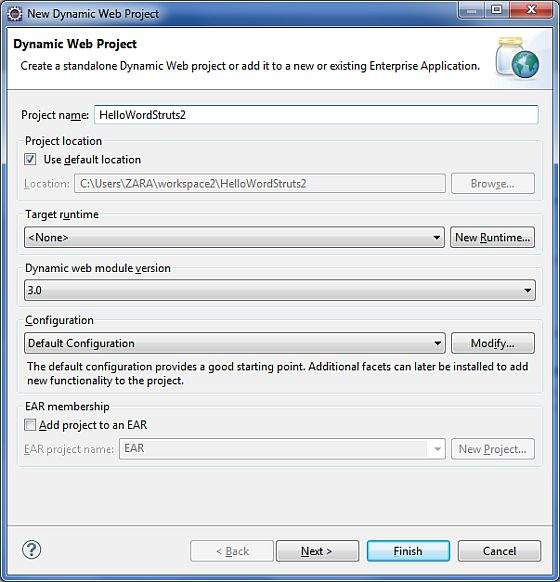
Select all the default options in the next screens and finally check Generate Web.xml deployment descriptor option. This will create a dynamic web project for you in Eclipse. Now go with Windows > Show View > Project Explorer, and you will see your project window something as below:

Now copy following files from struts 2 lib folder C:\struts-2.2.3\lib to our project's WEB-INF\lib folder. To do this, you can simply drag and drop all the following files into WEB-INF\lib folder.
    commons-fileupload-x.y.z.jar

    commons-io-x.y.z.jar

    commons-lang-x.y.jar

    commons-logging-x.y.z.jar

    commons-logging-api-x.y.jar

    freemarker-x.y.z.jar

    javassist-.xy.z.GA

    ognl-x.y.z.jar

    struts2-core-x.y.z.jar

    xwork-core.x.y.z.jar
Create Action Class:
Action class is the key to Struts 2 application and we implement most of the business logic in action class. So let us create a java file HelloWorldAction.java under Java Resources > src with a package name com.tutorialspoint.struts2 with the contents given below.
The Action class responds to a user action when user clicks a URL. One or more of the Action class's methods are executed and a String result is returned. Based on the value of the result, a specific JSP page is rendered.
package com.tutorialspoint.struts2;

public class HelloWorldAction{

   private String name;

   public String execute() throws Exception {

      return "success";

   }

   public String getName() {

      return name;

   }

   public void setName(String name) {

      this.name = name;

   }

}
This is a very simple class with one property called "name". We have standard getters and setter methods for the "name" property and an execute method that returns the string "success".
The Struts 2 framework will create an object of the HelloWorldAction class and call the execute method in response to a user's action. You put your business logic inside execute method and finally returns the String constant. Simply saying for for each URL, you would have to implement one action class and either you can use that class name directly as your action name or you can map to some other name using struts.xml file as shown below.
Create a View
We need a JSP to present the final message, this page will be called by Struts 2 framework when a predefined action will happen and this mapping will be defined in struts.xml file. So let us create the below jsp file HelloWorld.jsp in the WebContent folder in your eclipse project. To do this, right click on the WebContent folder in the project explorer and select New >JSP File.
<%@ page contentType="text/html; charset=UTF-8" %>

<%@ taglib prefix="s" uri="/struts-tags" %>

<html>

<head>

<title>Hello World</title>

</head>

<body>

   Hello World, <s:property value="name"/>

</body>

</html>
The taglib directive tells the Servlet container that this page will be using the Struts 2 tags and that these tags will be preceded by s. The s:property tag displays the value of action class property "name> which is returned by the method getName() of the HelloWorldAction class.
Create main page:
We also need to create index.jsp in the WebContent folder. This file will serve as the initial action URL where a user can click to tell the Struts 2 framework to call the a defined method of the HelloWorldAction class and render the HelloWorld.jsp view.
<%@ page language="java" contentType="text/html; charset=ISO-8859-1"

   pageEncoding="ISO-8859-1"%>

<%@ taglib prefix="s" uri="/struts-tags"%>

   <!DOCTYPE html PUBLIC "-//W3C//DTD HTML 4.01 Transitional//EN"

"http://www.w3.org/TR/html4/loose.dtd">

<html>

<head>

<title>Hello World</title>

</head>

<body>

   <h1>Hello World From Struts2</h1>

   <form action="hello">

      <label for="name">Please enter your name</label><br/>

      <input type="text" name="name"/>

      <input type="submit" value="Say Hello"/>

   </form>

</body>

</html>
The hello action defined in the above view file will be mapped to the HelloWorldAction class and its execute method using struts.xml file. When a user clicks on the Submit button it will cause the Struts 2 framework to run the execute method defined in the HelloWorldAction class and based on the returned value of the method, an appropriate view will be selected and rendered as a response.
Configuration Files
We need a mapping to tie the URL, the HelloWorldAction class (Model), and the HelloWorld.jsp (the view) together. The mapping tells the Struts 2 framework which class will respond to the user's action (the URL), which method of that class will be executed, and what view to render based on the String result that method returns.
So let us create a file called struts.xml. Since Struts 2 requires struts.xml to be present in classes folder. So create struts.xml file under the WebContent/WEB-INF/classes folder. Eclipse does not create the "classes" folder by default, so you need to do this yourself. To do this, right click on the WEB-INF folder in the project explorer and select New > Folder. Your struts.xml should look like:
<?xml version="1.0" encoding="UTF-8"?>

<!DOCTYPE struts PUBLIC

   "-//Apache Software Foundation//DTD Struts Configuration 2.0//EN"

   "http://struts.apache.org/dtds/struts-2.0.dtd">

<struts>

<constant name="struts.devMode" value="true" />

   <package name="helloworld" extends="struts-default">

      <action name="hello"

            class="com.tutorialspoint.struts2.HelloWorldAction"

            method="execute">

            <result name="success">/HelloWorld.jsp</result>

      </action>

   </package>

</struts>
Few words about the above configuration file. Here we set the constant struts.devMode to true, because we are working in development environment and we need to see some useful log messages. Then, we defined a package called helloworld. Creating a package is useful when you want to group your actions together. In our example, we named our action as "hello" which is corresponding to the URL /hello.action and is backed up by the HelloWorldAction.class. The execute method of HelloWorldAction.class is the method that is run when the URL /hello.action is invoked. If the outcome of the execute method returns "success", then we take the user to HelloWorld.jsp.
Next step is to create a web.xml file which is an entry point for any request to Struts 2. The entry point of Struts2 application will be a filter defined in deployment descriptor (web.xml). Hence we will define an entry oforg.apache.struts2.dispatcher.FilterDispatcher class in web.xml. The web.xml file needs to be created under the WEB-INF folder under WebContent. Eclipse had already created a skelton web.xml file for you when you created the project. So, lets just modify it as follows:
<?xml version="1.0" encoding="UTF-8"?>

<web-app xmlns:xsi="http://www.w3.org/2001/XMLSchema-instance"

   xmlns="http://java.sun.com/xml/ns/javaee"

   xmlns:web="http://java.sun.com/xml/ns/javaee/web-app_2_5.xsd"

   xsi:schemaLocation="http://java.sun.com/xml/ns/javaee

   http://java.sun.com/xml/ns/javaee/web-app_3_0.xsd"

   id="WebApp_ID" version="3.0">

   <display-name>Struts 2</display-name>

   <welcome-file-list>

      <welcome-file>index.jsp</welcome-file>

   </welcome-file-list>

   <filter>

      <filter-name>struts2</filter-name>

      <filter-class>

         org.apache.struts2.dispatcher.FilterDispatcher

      </filter-class>

   </filter>

   <filter-mapping>

      <filter-name>struts2</filter-name>

      <url-pattern>/*</url-pattern>

   </filter-mapping>

</web-app>
We have specified index.jsp to be our welcome file. Then we have configured the Struts2 filter to run on all urls (i.e, any url that match the pattern /*)
Enable Detailed Log:
You can enabled complete logging functionality while working with Struts 2 by creating logging.properties file under WEB-INF/classes folder. Keep the following two lines in your property file:
org.apache.catalina.core.ContainerBase.[Catalina].level = INFO

org.apache.catalina.core.ContainerBase.[Catalina].handlers = \

                              java.util.logging.ConsoleHandler
The default logging.properties specifies a ConsoleHandler for routing logging to stdout and also a FileHandler. A handler's log level threshold can be set using SEVERE, WARNING, INFO, CONFIG, FINE, FINER, FINEST or ALL.
That's it. We are ready to run our Hello World application using Struts 2 framework.
Execute the Application
Right click on the project name and click Export > WAR File to create a War file. Then deploy this WAR in the Tomcat's webapps directory. Finally, start Tomcat server and try to access URL http://localhost:8080/HelloWorldStruts2/index.jsp. This will give you following screen:
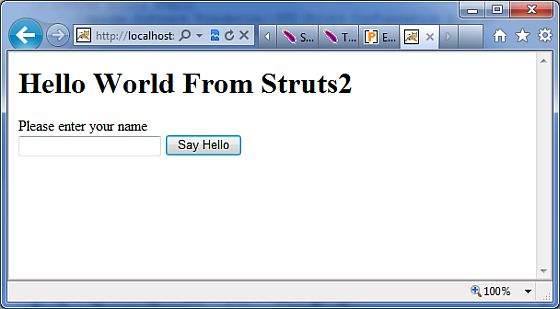
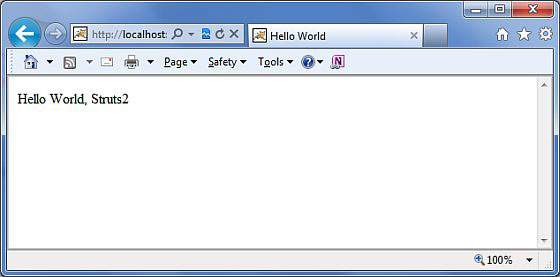
Enter a value "Struts2" and submit the page. You should see the next page
Note that you can define index as an action in struts.xml file and in that case you can call index page as http://localhost:8080/HelloWorldStruts2/index.action. Check below how you can define index as an action:
<?xml version="1.0" encoding="UTF-8"?>

<!DOCTYPE struts PUBLIC

   "-//Apache Software Foundation//DTD Struts Configuration 2.0//EN"

   "http://struts.apache.org/dtds/struts-2.0.dtd">

<struts>

<constant name="struts.devMode" value="true" />

   <package name="helloworld" extends="struts-default">

      <action name="index">

            <result >/index.jsp</result>

      </action>

      <action name="hello"

            class="com.tutorialspoint.struts2.HelloWorldAction"

            method="execute">

            <result name="success">/HelloWorld.jsp</result>

      </action>

   </package>

</struts>
Struts 2 - Hello World Example的更多相关文章
- 菜鸟学Struts2——Struts工作原理
在完成Struts2的HelloWorld后,对Struts2的工作原理进行学习.Struts2框架可以按照模块来划分为Servlet Filters,Struts核心模块,拦截器和用户实现部分,其中 ...
- Struts的拦截器
Struts的拦截器 1.什么是拦截器 Struts的拦截器和Servlet过滤器类似,在执行Action的execute方法之前,Struts会首先执行Struts.xml中引用的拦截器,在执行完所 ...
- Struts框架的核心业务
Struts的核心业务 Struts核心业务有很多,这里主要介绍了比较简单一些的: 请求数据的处理,和数据自动封装,类型自动转换 1.Struts中数据处理 1.1.方式1:直接过去servletap ...
- Struts的文件上传下载
Struts的文件上传下载 1.文件上传 Struts2的文件上传也是使用fileUpload的组件,这个组默认是集合在框架里面的.且是使用拦截器:<interceptor name=" ...
- 配置hibernate,Struts。文件
hibernate文件配置 <?xml version="1.0" encoding="UTF-8"?> <!DOCTYPE hibernat ...
- hibernate与Struts框架结合编写简单针对修改练习
失败页面fail.jsp <%@ page language="java" contentType="text/html; charset=UTF-8" ...
- 3. 解析 struts.xml 文件
1. struts.xml 文件基本配置: 主要放在资源路径下,配置 sturts2相关的 Action , 拦截器等配置 <struts> <!-- 设置常量 --> < ...
- Struts+Spring+Hibernate项目的启动线程
在Java Web项目中,经常要在项目开始运行时启动一个线程,每隔一定的时间就运行一定的代码,比如扫描数据库的变化等等.要实现这个功能,可以现在web.xml文件中定义一个Listener,然后在这个 ...
- Struts 原理
今天开始接触公司的框架,叫YNA,三个字母应该是雅马哈的缩写,这个框架听公司前辈说功能很强大,但实际上我看不懂.哈哈...... 其中整合了SSH框架,接下来我说下Struts的一些原理 其实这张图就 ...
- axis2+struts拦截地址冲突问题
axis2和struts在整合过程中,struts会把axis的地址也拦截了,默认当成一个action处理, 会因为找不到action而报错: <!-- struts配置 --> < ...
随机推荐
- 6.redis的分布式锁
https://www.cnblogs.com/linjiqin/p/8003838.html
- bzoj千题计划132:bzoj1189: [HNOI2007]紧急疏散evacuate
http://www.lydsy.com/JudgeOnline/problem.php?id=1189 二分答案 源点向人连边,流量为1 门拆为mid个点,同一个门的第j个点向第j+1个点连边,流量 ...
- bzoj千题计划127:bzoj1041: [HAOI2008]圆上的整点
http://www.lydsy.com/JudgeOnline/problem.php?id=1041 设 X>0 ,Y>0 X^2 + Y^2 = R^2 X^2 = R^2-Y^2 ...
- java抽象类和普通类的区别
1.抽象类不能被实例化. 2.抽象类可以有构造函数,被继承时子类必须继承父类一个构造方法,抽象方法不能被声明为静态. 3.抽象方法只需申明,而无需实现,抽象类中可以允许普通方法有主体 4.含有抽象方法 ...
- java正则:不包含某个规则字符串【转】
概述 做日志分析工作的经常需要跟成千上万的日志条目打交道,为了在庞大的数据量中找到特定模式的数据,常常需要编写很多复杂的正则表达式.例如枚举出日志文件中不包含某个特定字符串的条目,找出不以某个特定字符 ...
- jQuery中的text(),html(),val()的区别
一.jquery中HTML 1. 无参html() 方法用来获取任意元素的HTML内容,如果你调用多个选定元素的.html()方法,那么其读取的只是第一个元素,换句话说:如果选择器匹配多于一个的元素, ...
- 15个超级实用的jQuery插件
jQuery是一个可订制的.轻量级的前端开发框架,它会让你的前端开发拥有无限的可能性.它会在敏捷Web开发中帮你做很多事情,比如简化HTML文档的解析.事件处理.动画效果和Ajax交互.实践上jQue ...
- 早该知道的7个JavaScript技巧
我写JavaScript代码已经很久了,都记不起是什么年代开始的了.对于JavaScript这种语言近几年所取得的成就,我感到非常的兴奋:我很幸运也是这些成就的获益者.我写了不少的文章,章节,还有一本 ...
- Kafka消息系统基础知识索引
一些观念的修正 从 0.9 版本开始,Kafka 的标语已经从“一个高吞吐量,分布式的消息系统”改为"一个分布式流平台". Kafka不仅仅是一个队列,而且是一个存储,有超强的堆积 ...
- iOS学习笔记(1)— UIView 渲染和内容管理
iOS中应用程序基本上都是基于MVC模式开发的.UIView就是模型-视图-控制器中的视图,在iOS终端上看到的.摸到的都是UIView. UIView在屏幕上定义了一个矩形区域和管理区域内容的接口. ...