
【Android】3.15 短串分享功能
分类:C#、Android、VS2015、百度地图应用; 创建日期:2016-02-04
一、简介
短串分享是指,用户搜索查询后得到的每一个地理位置结果将会对应一条短串(短链接),用户可以通过短信、邮件或第三方分享组件(如微博、微信等)把短串分享给其他用户从而实现地理位置信息的分享。当其他用户收到分享的短串后,点击短串即可打开手机上的百度地图客户端或者手机浏览器进行查看。
例如,用户搜索“百度大厦”后通过短信使用短串分享功能把该地点分享给好友,好友点击短信中的短串“http://j.map.baidu.com/BkmBk” 后可以调起百度地图客户端或者手机浏览器查看“百度大厦”的地理位置信息。
目前百度的短串分享功能暂时开放了下面两种:
- POI搜索结果分享
- 反向地理编码结果分享
据百度官网说日后会开放更多的功能。
二、运行截图
简介:将POI点、反Geo点生成短链接以分享给好友。
详述:
(1)将POI点、反Geo点,生成短链接串,此链接可通过短信等形式分享给好友;
(2)好友在终端设备点击此链接可快速打开Web地图、百度地图客户端进行信息展示;
(3)百度官网目前(2016年1月)暂时开放了“POI搜索结果分享”和“反向地理编码结果分享”,据说日后会开放更多的短串分享功能。
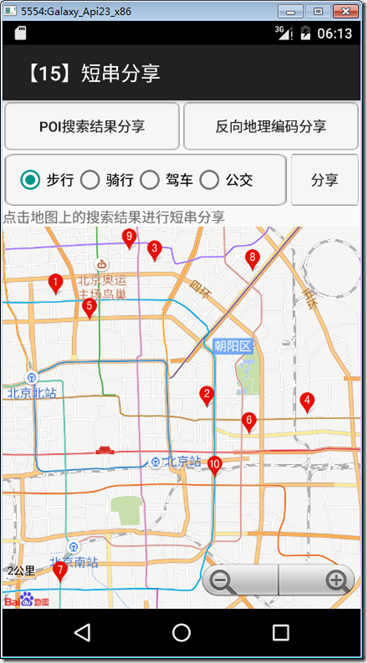
本示例运行截图如下:
三、设计步骤
1、添加demo15_share.xml文件
在layout文件夹下添加该文件,然后将代码改为下面的内容:
<RelativeLayout xmlns:android="http://schemas.android.com/apk/res/android"

    android:layout_width="match_parent"

    android:layout_height="match_parent"

    android:background="@android:color/white" >

    <TextView

        android:id="@+id/textView1"

        android:layout_width="wrap_content"

        android:layout_height="wrap_content"

        android:layout_alignParentLeft="true"

        android:layout_alignParentTop="true"

        android:layout_marginLeft="10dp"

        android:layout_marginRight="10dp"

        android:layout_marginTop="36dp"

        android:text="@string/share_tip"

        android:textColor="@android:color/black"

        android:textSize="16sp" />

    <Button

        android:id="@+id/btnStartShare"

        android:layout_width="wrap_content"

        android:layout_height="wrap_content"

        android:layout_below="@+id/textView1"

        android:layout_centerHorizontal="true"

        android:layout_marginTop="32dp"

        android:text="开始体验" />

</RelativeLayout>
2、添加demo15_share_activity.xml文件
在layout文件夹下添加该文件,然后将代码改为下面的内容:
<?xml version="1.0" encoding="utf-8"?>

<LinearLayout xmlns:android="http://schemas.android.com/apk/res/android"

    android:layout_width="fill_parent"

    android:layout_height="fill_parent"

    android:orientation="vertical" >

    <LinearLayout

        xmlns:android="http://schemas.android.com/apk/res/android"

        android:layout_width="fill_parent"

        android:layout_height="wrap_content"

        android:orientation="horizontal" >

        <Button

            android:id="@+id/poishare"

            android:layout_width="fill_parent"

            android:layout_height="fill_parent"

            android:layout_marginBottom="2dip"

            android:layout_marginLeft="2dip"

            android:layout_marginRight="2dip"

            android:layout_marginTop="2dip"

            android:layout_weight="1"

            android:background="@drawable/button_style"

            android:padding="10dip"

            android:text="poi搜索结果分享" />

        <Button

            android:id="@+id/addrshare"

            android:layout_width="fill_parent"

            android:layout_height="fill_parent"

            android:layout_marginBottom="2dip"

            android:layout_marginLeft="2dip"

            android:layout_marginRight="2dip"

            android:layout_marginTop="2dip"

            android:layout_weight="1"

            android:background="@drawable/button_style"

            android:text="反向地理编码分享" />

    </LinearLayout>

    <LinearLayout

        xmlns:android="http://schemas.android.com/apk/res/android"

        android:layout_width="fill_parent"

        android:layout_height="wrap_content"

        android:orientation="horizontal" >

        <RadioGroup

            android:id="@+id/routeMode"

            android:layout_width="fill_parent"

            android:layout_height="fill_parent"

            android:layout_marginBottom="2dip"

            android:layout_marginLeft="2dip"

            android:layout_marginRight="2dip"

            android:layout_marginTop="2dip"

            android:layout_weight="1"

            android:background="@drawable/button_style"

            android:padding="10dip"

            android:orientation="horizontal" >

            <RadioButton

                android:layout_width="wrap_content"

                android:layout_height="fill_parent"

                android:text="步行"

                android:checked="true"

                android:id="@+id/foot"/>

            <RadioButton

                android:layout_width="wrap_content"

                android:layout_height="fill_parent"

                android:text="骑行"

                android:id="@+id/cycle"/>

            <RadioButton

                android:layout_width="wrap_content"

                android:layout_height="fill_parent"

                android:text="驾车"

                android:id="@+id/car"/>

            <RadioButton

                android:layout_width="wrap_content"

                android:layout_height="fill_parent"

                android:text="公交"

                android:id="@+id/bus"/>

        </RadioGroup>

        <Button

            android:id="@+id/routeShare"

            android:layout_width="fill_parent"

            android:layout_height="fill_parent"

            android:layout_marginBottom="2dip"

            android:layout_marginLeft="2dip"

            android:layout_marginRight="2dip"

            android:layout_marginTop="2dip"

            android:layout_weight="4"

            android:background="@drawable/button_style"

            android:text="分享" />

    </LinearLayout>

    <LinearLayout

        xmlns:android="http://schemas.android.com/apk/res/android"

        android:layout_width="fill_parent"

        android:layout_height="wrap_content"

        android:orientation="horizontal" >

        <TextView

            android:layout_width="fill_parent"

            android:layout_height="wrap_content"

            android:text="点击地图上的搜索结果进行短串分享" />

    </LinearLayout>

    <com.baidu.mapapi.map.TextureMapView

        android:id="@+id/bmapView"

        android:layout_width="fill_parent"

        android:layout_height="fill_parent"

        android:clickable="true" />

</LinearLayout>
3、添加Demo15Share.cs文件
在SrcSdkDemos文件夹下添加该文件,然后将代码改为下面的内容:
using Android.App;

using Android.Content;

using Android.OS;

using Android.Widget;

namespace BdMapV371Demos.SrcSdkDemos

{

    [Activity(Label = "@string/demo_name_share")]

    public class Demo15Share : Activity

    {

        protected override void OnCreate(Bundle savedInstanceState)

        {

            base.OnCreate(savedInstanceState);

            SetContentView(Resource.Layout.demo15_share);

            var btn = FindViewById<Button>(Resource.Id.btnStartShare);

            btn.Click += delegate

            {

                Intent intent = new Intent();

                intent.SetClass(this, typeof(Demo15ShareActivity));

                StartActivity(intent);

            };

        }

    }

}
4、添加Demo15ShareActivity.cs文件
在SrcSdkDemos文件夹下添加该文件,然后将代码改为下面的内容:
using Android.App;

using Android.Content;

using Android.OS;

using Android.Widget;

using Com.Baidu.Mapapi.Map;

using Com.Baidu.Mapapi.Model;

using Com.Baidu.Mapapi.Search.Core;

using Com.Baidu.Mapapi.Search.Geocode;

using Com.Baidu.Mapapi.Search.Poi;

using Com.Baidu.Mapapi.Search.Share;

using Com.Baidu.Mapapi.Search.Route;

using BdMapV371Demos.SrcOverlayUtil;

namespace BdMapV371Demos.SrcSdkDemos

{

    /// <summary>

    /// 演示poi搜索短串分享功能

    /// </summary>

    [Activity(Label = "@string/demo_name_share")]

    public class Demo15ShareActivity : Activity

    {

        private TextureMapView mMapView = null;

        private PoiSearch mPoiSearch = null; // 搜索模块,也可去掉地图模块独立使用

        private ShareUrlSearch mShareUrlSearch = null;

        private GeoCoder mGeoCoder = null;

        // 保存搜索结果地址

        private string currentAddr = null;

        // 搜索城市

        private string mCity = "北京";

        // 搜索关键字

        private string searchKey = "餐馆";

        // 反地理编译点坐标

        private LatLng mPoint = new LatLng(40.056878, 116.308141);

        private BaiduMap mBaiduMap = null;

        private Marker mAddrMarker = null;

        private RouteShareURLOption.RouteShareMode mRouteShareMode;

        private PlanNode startNode;

        private PlanNode enPlanNode;

        protected override void OnCreate(Bundle savedInstanceState)

        {

            base.OnCreate(savedInstanceState);

            SetContentView(Resource.Layout.demo15_share_activity);

            mMapView = FindViewById<TextureMapView>(Resource.Id.bmapView);

            mBaiduMap = mMapView.Map;

            //处理布局中控件的相关事件

            LayoutEvents();

            //处理搜索监听事件

            ListenerEvents();

        }

        /// <summary>

        /// 处理布局中控件的相关事件

        /// </summary>

        private void LayoutEvents()

        {

            //【poi搜索结果分享】按钮

            var btnPoishare = FindViewById<Button>(Resource.Id.poishare);

            btnPoishare.Click += delegate

            {

                // 发起poi搜索

                mPoiSearch.SearchInCity(new PoiCitySearchOption()

                    .City(mCity).Keyword(searchKey));

                Toast.MakeText(this,

                        "在" + mCity + "搜索 " + searchKey,

                        ToastLength.Short).Show();

            };

            //【反向地理编码分享】按钮

            var btnAddrShare = FindViewById<Button>(Resource.Id.addrshare);

            btnAddrShare.Click += delegate

            {

                // 发起反地理编码请求

                mGeoCoder.ReverseGeoCode(new ReverseGeoCodeOption().Location(mPoint));

                Toast.MakeText(

                       this,

                       string.Format("搜索位置: {0:f6},{1:f6}", mPoint.Latitude, mPoint.Longitude),

                       ToastLength.Short).Show();

            };

            //单选按钮

            mRouteShareMode = RouteShareURLOption.RouteShareMode.FootRouteShareMode;

            var routeMode = FindViewById<RadioGroup>(Resource.Id.routeMode);

            routeMode.CheckedChange += (s, e) =>

            {

                switch (e.CheckedId)

                {

                    case Resource.Id.foot: //步行

                        mRouteShareMode = RouteShareURLOption.RouteShareMode.FootRouteShareMode;

                        break;

                    case Resource.Id.cycle: //骑行

                        mRouteShareMode = RouteShareURLOption.RouteShareMode.CycleRouteShareMode;

                        break;

                    case Resource.Id.car:  //驾车

                        mRouteShareMode = RouteShareURLOption.RouteShareMode.CarRouteShareMode;

                        break;

                    case Resource.Id.bus:  //公交

                        mRouteShareMode = RouteShareURLOption.RouteShareMode.BusRouteShareMode;

                        break;

                    default: break;

                }

            };

            //【分享】按钮

            var btnRouteShare = FindViewById<Button>(Resource.Id.routeShare);

            btnRouteShare.Click += delegate

            {

                startNode = PlanNode.WithLocation(new LatLng(40.056885, 116.308142));

                enPlanNode = PlanNode.WithLocation(new LatLng(39.921933, 116.488962));

                mShareUrlSearch.RequestRouteShareUrl(new RouteShareURLOption()

                        .From(startNode).To(enPlanNode).RoutMode(mRouteShareMode));

            };

        }

        /// <summary>

        /// 处理搜索相关的监听事件

        /// </summary>

        private void ListenerEvents()

        {

            //----BaiduMap.IOnMarkerClickListener接口--------------

            // 实现该接口要求的1个监听事件

            //-----------------------------------------------------

            mBaiduMap.MarkerClick += (s, e) =>

            {

                var marker = e.P0;

                if (marker == mAddrMarker)

                {

                    mShareUrlSearch

                        .RequestLocationShareUrl(new LocationShareURLOption()

                        .Location(marker.Position).Snippet("测试分享点")

                        .Name(marker.Title));

                }

            };

            //---ISetOnGetPoiSearchResultListener接口--------------

            // 实现mPoiSearch.SetOnGetPoiSearchResultListener(this);接口要求的2个监听事件

            //-----------------------------------------------------

            mPoiSearch = PoiSearch.NewInstance();

            mPoiSearch.GetPoiResult += (s, e) =>

            {

                var result = e.P0;

                if (result == null || result.Error != SearchResult.ERRORNO.NoError)

                {

                    Toast.MakeText(this, "抱歉,未找到结果", ToastLength.Long).Show();

                    return;

                }

                mBaiduMap.Clear();

                PoiShareOverlay poiOverlay = new PoiShareOverlay(this, mBaiduMap);

                mBaiduMap.SetOnMarkerClickListener(poiOverlay);

                poiOverlay.SetData(result);

                poiOverlay.AddToMap();

                poiOverlay.ZoomToSpan();

            };

            mPoiSearch.GetPoiDetailResult += (s, e) => { };

            //----ISetOnGetShareUrlResultListener接口--------------

            //实现mShareUrlSearch.SetOnGetShareUrlResultListener(this);接口要求的3个监听事件

            //-----------------------------------------------------

            mShareUrlSearch = ShareUrlSearch.NewInstance();

            mShareUrlSearch.GetLocationShareUrlResult += (s, e) =>

            {

                var result = e.P0;

                // 分享短串结果

                Intent it = new Intent(Intent.ActionSend);

                it.PutExtra(Intent.ExtraText, "您的朋友通过百度地图SDK与您分享一个位置: " + currentAddr

                        + " -- " + result.Url);

                it.SetType("text/plain");

                StartActivity(Intent.CreateChooser(it, "将短串分享到"));

            };

            mShareUrlSearch.GetPoiDetailShareUrlResult += (s, e) =>

            {

                var result = e.P0;

                // 分享短串结果

                Intent it = new Intent(Intent.ActionSend);

                it.PutExtra(Intent.ExtraText, "您的朋友通过百度地图SDK与您分享一个位置: " + currentAddr

                        + " -- " + result.Url);

                it.SetType("text/plain");

                StartActivity(Intent.CreateChooser(it, "将短串分享到"));

            };

            mShareUrlSearch.GetRouteShareUrlResult += (s, e) =>

            {

                var shareUrlResult = e.P0;

                Intent it = new Intent(Intent.ActionSend);

                it.PutExtra(Intent.ExtraText, "您的朋友通过百度地图SDK与您分享一条路线,URL "

                        + " -- " + shareUrlResult.Url);

                it.SetType("text/plain");

                StartActivity(Intent.CreateChooser(it, "将短串分享到"));

            };

            //-----IOnGetGeoCoderResultListener接口-------------------

            //实现mGeoCoder.SetOnGetGeoCodeResultListener(this);要求的2个监听事件

            //--------------------------------------------------------

            mGeoCoder = GeoCoder.NewInstance();

            mGeoCoder.GetGeoCodeResult += (s, e) => { };

            mGeoCoder.GetReverseGeoCodeResult += (s, e) =>

            {

                var result = e.P0;

                if (result == null || result.Error != SearchResult.ERRORNO.NoError)

                {

                    Toast.MakeText(this, "抱歉,未找到结果", ToastLength.Long).Show();

                    return;

                }

                mBaiduMap.Clear();

                mAddrMarker = (Marker)mBaiduMap.AddOverlay(new MarkerOptions()

                        .InvokeIcon(BitmapDescriptorFactory

                                .FromResource(Resource.Drawable.icon_marka))

                        .InvokeTitle(result.Address).InvokePosition(result.Location));

            };

        }

        protected override void OnPause()

        {

            mMapView.OnPause();

            base.OnPause();

        }

        protected override void OnResume()

        {

            mMapView.OnResume();

            base.OnResume();

        }

        protected override void OnDestroy()

        {

            mMapView.OnDestroy();

            mPoiSearch.Destroy();

            mShareUrlSearch.Destroy();

            base.OnDestroy();

        }

        /// <summary>

        /// 使用PoiOverlay 展示poi点,在poi被点击时发起短串请求

        /// </summary>

        private class PoiShareOverlay : PoiOverlay

        {

            Demo15ShareActivity shareDemoActivity;

            public PoiShareOverlay(Demo15ShareActivity shareDemoActivity, BaiduMap baiduMap)

                : base(baiduMap)

            {

                this.shareDemoActivity = shareDemoActivity;

            }

            public override bool OnPoiClick(int i)

            {

                PoiInfo info = this.GetPoiResult().AllPoi[i];

                shareDemoActivity.currentAddr = info.Address;

                shareDemoActivity.mShareUrlSearch

                        .RequestPoiDetailShareUrl(new PoiDetailShareURLOption()

                                .PoiUid(info.Uid));

                return true;

            }

        }

    }

}
5、修改MainActivity.cs
在MainActivity.cs文件的demos字段定义中,去掉【示例15】下面的注释。
运行观察结果。
【Android】3.15 短串分享功能的更多相关文章
- 利用 Android 系统原生 API 实现分享功能
利用 Android 系统原生 API 实现分享功能 这篇文章提供一个封装好的 Share2 库供大家参考. GitHub 项目地址:Share2 大家知道,要调用 Android 系统内建的分享功能 ...
- Android中使用ShareSDK集成分享功能
引言 现在APP开发集成分享功能已经是非常普遍的需求了.其他集成分享技术我没有使用过,今天我就来介绍下使用ShareSDK来进行分享功能开发的一些基本步骤和注意点,帮助朋友们避免一些坑.好了 ...
- Android集成友盟社会化分享功能
1. 产品概述 友盟社会化组件,可以让移动应用快速具备社会化分享.登录.评论.喜欢等功能,并提供实时.全面的社会化数据统计分析服务. 指南将会手把手教你使用社会化组件SDK,用5分钟为APP增加新浪 ...
- Android 使用系统自带分享功能
way1: Intent intent = new Intent(Intent.ACTION_SEND); intent.setType("text/plain");// setT ...
- Android注冊短信验证码功能
一.短信验证的效果是通过使用聚合数据的SDK实现的 ,效果例如以下: 二.依据前一段时间的博客中输了怎么注冊! 注冊之后找到个人中心找到申请一个应用就可以! 三.依据官方文档创建项目 官方文档API下 ...
- Android 学习第13课,android 实现发送短信的功能
1. 界面布局 界面代码: <LinearLayout xmlns:android="http://schemas.android.com/apk/res/android" ...
- Android APP代码拨打电话、打开手机分享功能等隐式意图
Android APP拨打电话: Intent intent=new Intent(Intent.ACTION_DIAL,Uri.parse("tel:"+110)); start ...
- 【Android进阶】使用第三方平台ShareSDK实现新浪微博的一键分享功能
在公司最近的一个项目中,需要实现一键分享功能,在这里我使用的是第三方平台ShareSDK,将使用经验与大家分享 先看效果图 主界面 分享界面 由于第一次使用,所以需要先进行新浪授权,授权界面 分享结果 ...
- 在Android中使App高速、简单地支持新浪微博、微信、QQ、facebook等十几个主流社交平台的分享功能
前言 在如今的APP或者游戏中,分享功能差点儿已经成为标配.分享功能不但能够满足用户的需求.也能够为产品带来很多其它的用户,甚至能够对用户的行为.活跃度.年龄段等情况进行数据统计,使得软件公司能够对产 ...
随机推荐
- ifconf和ifreq
http://blog.csdn.net/jasenwan88/article/details/7763689 用ioctl获得本地ip地址时要用到两个结构体ifconf和ifreq,它们对于大多数人 ...
- Appium Python 六:管理应用和Activity
管理应用 1. 将当前应用放到后台 执行之后,应用会被放到后台特定时间.比如这里就是5秒,5秒过后,应用会重新回到前台. driver.background_app(5) 官网示例: driver.b ...
- JSTL详解(二)
JSTL详解(二) 在JSTL中,一般用途的标签只要是指具有输出,设置变量,和错误处理等功能的标签,他们在jsp中使用很频繁,它们有: l <c:out> l ...
- windows XP系统搜索无线网络时提示“windows无法配置此无线连接”,如何处理?
转自:http://support1.lenovo.com.cn/lenovo/wsi/htmls/detail_12839009034375918.html 文章编号:C191612 201 ...
- JDBC的简单操作
JDBC是一组能够执行SQL语句的API 由于传统的数据库操作方式需要程序员掌握各个不同的数据库的API,极其不便 因此java定义了JDBC这一标准的接口和类,为程序员操作数据库提供了统一的方式 J ...
- JAVA Drp项目实战—— Unable to compile class for JSP 一波三折
交代下背景.电脑系统是64位的,用的是64位的Tomcat.安装是32位的Myeclipse10,java环境也是32位的.Tomcat在開始启动时会报这样一个错误,"Can't load ...
- JS禁止后退键(backspace)使浏览器后退
背景说明: 今天项目测试中,同事发现一个Bug,当键盘敲下后退键(Backspace)后,浏览器自动后退,不符合需求,故建议禁止浏览器后退键. 提出需求: 当键盘敲下后退键(Backspace)后 1 ...
- 类的专有方法(__repr__)
# -*- coding: utf-8 -*- #python 27 #xiaodeng #http://blog.csdn.net/yyt8yyt8/article/details/7030416 ...
- echo “新密码”|passwd --stdin 用户名
--stdin This option is used to indicate that passwd should read the new password from standard input ...
- 腾讯云-搭建 JAVA 开发环境
搭建 JAVA 开发环境 搭建 JAVA 开发环境 任务时间:18min ~ 20min 此实验教大家如何配置 JDK .Tomcat 和 Mysql 00.安装 JDK JDK 是开发Java程序必 ...