
动态加载与插件系统的初步实现(三):WinForm示例
代码文件在此Download,本文章围绕前文所述默认AppDomain、插件容器AppDomain两个域及IPlugin、PluginProvider、PluginProxy3个类的使用与变化进行。
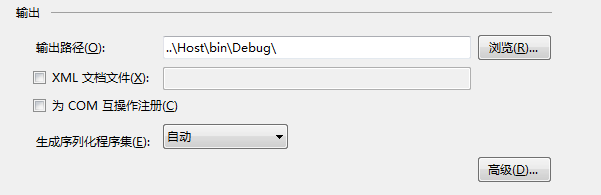
添加WinForm项目Host、类库Plugin、引用System.Windows.Forms;的类库Plugin_A与Plugin_B,其中Plugin_A、Plugin_B的项目属性中,“生成”选项卡中“输出路径”设置为..\Host\bin\Debug\,即指向Host项目的Bin目录。
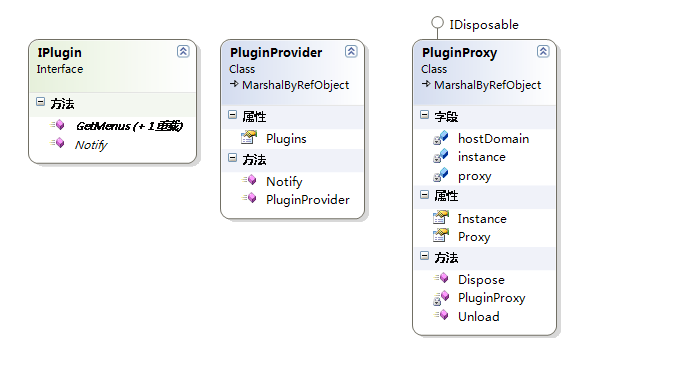
考虑到WinForm项目常常涉及多级菜单构建,这里以两级菜单示例。
Plugin项目中IPlugin代码:
public interface IPlugin

{

    IList<String> GetMenus();

    IList<String> GetMenus(String menu);

    void Notify(Object userState);

}
其中无参方法GetMenus()提取一级菜单,有参重载GetMenus(String menu)提取二级菜单,Notify(Object userState)是两个应用程序域的通知调用。
PluginProxy继承MarshalByRefObject,代码长点:
public class PluginProxy : MarshalByRefObject, IDisposable

{

    private readonly static PluginProxy instance = new PluginProxy();

    public static PluginProxy Instance

    {

        get { return instance; }

    }

    private PluginProxy()

    {

    }

    private AppDomain hostDomain = null;

    private PluginProvider proxy = null;

    public PluginProvider Proxy

    {

        get

        {

            if (hostDomain == null)

            {

                hostDomain = AppDomain.CreateDomain("PluginHost");

            }

            if (proxy == null)

            {

                Type proxyType = typeof(PluginProvider);

                proxy = (PluginProvider)hostDomain.CreateInstanceAndUnwrap(proxyType.Assembly.FullName, proxyType.FullName);

            }

            return proxy;

        }

    }

    public void Unload()

    {

        if (hostDomain != null)

        {

            proxy = null;

            AppDomain.Unload(hostDomain);

            hostDomain = null;

        }

    }

    public void Dispose()

    {

        Unload();

    }

}
PluginProvider除构造函数外,Notify(IPlugin plugin, Object userState)方法将调用IPlugin插件的Notify方法:
public class PluginProvider : MarshalByRefObject

{

    [ImportMany]

    public IEnumerable<Lazy<IPlugin>> Plugins { get; set; }

    public PluginProvider()

    {

        AggregateCatalog catalog = new AggregateCatalog();

        catalog.Catalogs.Add(new DirectoryCatalog("."));

        CompositionContainer container = new CompositionContainer(catalog);

        container.ComposeParts(this);

    }

    public void Notify(IPlugin plugin, Object userState)

    {

        plugin.Notify(userState);

    }

}
然后是插件Plugin_A、Plugin_B的实现。添加Plugin类(类名与命名空间随意)引用System.ComponentModel.Composition,加入[Export(typeof(IPlugin))]修饰。这里使用了一份XML显示菜单目录,将在得到通知后将一个Form弹出来:
[Export(typeof(IPlugin))]

public class PluginA : MarshalByRefObject, IPlugin

{

    private String menus =

        @"<Component>

            <Net>

              <AuthenticationManager />

              <Authorization />

              <Cookie />

            </Net>

            <IO>

              <ErrorEventArgs />

              <FileSystemEventArgs />

            </IO>

        </Component>";

    public IList<String> GetMenus()

    {

        return XElement.Parse(menus).Elements().Select(x => x.Name.LocalName).ToArray();

    }

    public IList<String> GetMenus(String menu)

    {

        return XElement.Parse(menus).Elements(menu).Elements().Select(x => x.Name.LocalName).ToArray();

    }

    public void Notify(Object userState)

    {

        String text = (String)userState;

        Label label = new Label()

        {

            Text = text,

            AutoSize = false,

            Dock = DockStyle.Fill,

            TextAlign = System.Drawing.ContentAlignment.MiddleCenter,

        };

        Form frm = new Form();

        frm.Controls.Add(label);

        frm.ShowDialog();

    }

}
Plugin_B与Plugin_A类似,不再重复,然后是Host实现。Host使用了两个FlowLayoutPanel分别用于显示一级菜单与两级菜单。
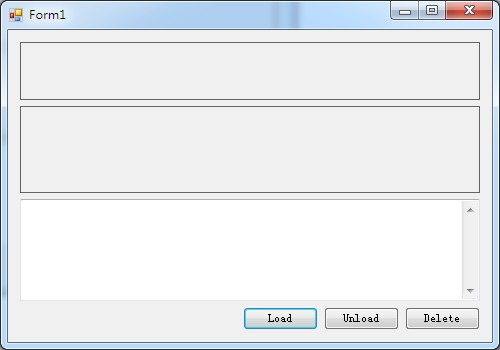
Load按钮加载插件列表,将每个插件绑定到一个Button上:
private void button1_Click(object sender, EventArgs e)

{

    flowLayoutPanel1.Controls.Clear();

    textBox1.AppendText("PluginProvider loaded");

    textBox1.AppendText(Environment.NewLine);

    PluginProvider proxy = PluginProxy.Instance.Proxy;

    IEnumerable<Lazy<IPlugin>> plugins = proxy.Plugins;

    foreach (var plugin in plugins)

    {

        foreach (var menu in plugin.Value.GetMenus())

        {

            Button menuBtn = new Button();

            menuBtn.Text = menu;

            menuBtn.Tag = plugin.Value;

            menuBtn.Click += menuBtn_Click;

            flowLayoutPanel1.Controls.Add(menuBtn);

        }

    }

}

private void menuBtn_Click(object sender, EventArgs e)

{

    flowLayoutPanel2.Controls.Clear();

    Button menuBtn = (Button)sender;

    try

    {

        IPlugin plugin = (IPlugin)menuBtn.Tag;

        foreach (var item in plugin.GetMenus(menuBtn.Text))

        {

            Button itemBtn = new Button();

            itemBtn.Text = item;

            itemBtn.Tag = plugin;

            itemBtn.Click += itemBtn_Click;

            flowLayoutPanel2.Controls.Add(itemBtn);

        }

    }

    catch (AppDomainUnloadedException)

    {

        textBox1.AppendText("Plugin domain have been uloaded");

        textBox1.AppendText(Environment.NewLine);

    }

}

private void itemBtn_Click(object sender, EventArgs e)

{

    try

    {

        Button menuBtn = (Button)sender;

        IPlugin plugin = (IPlugin)menuBtn.Tag;

        PluginProvider proxy = PluginProxy.Instance.Proxy;

        proxy.Notify(plugin, menuBtn.Text);

    }

    catch (AppDomainUnloadedException)

    {

        textBox1.AppendText("Plugin domain not loaded");

        textBox1.AppendText(Environment.NewLine);

    }

}
Unload按钮卸载插件AppDomain:
private void button2_Click(object sender, EventArgs e)

{

    PluginProxy.Instance.Unload();

    textBox1.AppendText("PluginProvider unloaded");

    textBox1.AppendText(Environment.NewLine);

}
Delete按钮移除Plugin_A.dll、Plugin_B.dll:
private void button3_Click(object sender, EventArgs e)

{

    try

    {

        String[] pluginPaths = new[] { "Plugin_A.dll", "Plugin_B.dll" };

        foreach (var item in pluginPaths)

        {

            if (System.IO.File.Exists(item))

            {

                System.IO.File.Delete(item);

                textBox1.AppendText(item + " deleted");

            }

            else

            {

                textBox1.AppendText(item + " not exist");

            }

            textBox1.AppendText(Environment.NewLine);

        }

    }

    catch (Exception ex)

    {

        textBox1.AppendText(ex.Message);

        textBox1.AppendText(Environment.NewLine);

    }

}
运行结果如下: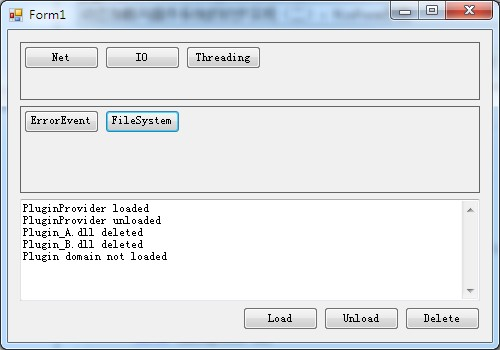
我尝试比较IEnumerable<Lazy<IPlugin>>与IEnumerable<IPlugin>的进程内存占用,在一个额外的Button里进行100加载与卸载,统计内存变化图如下,有兴趣的可以下载EXCEL文件看看: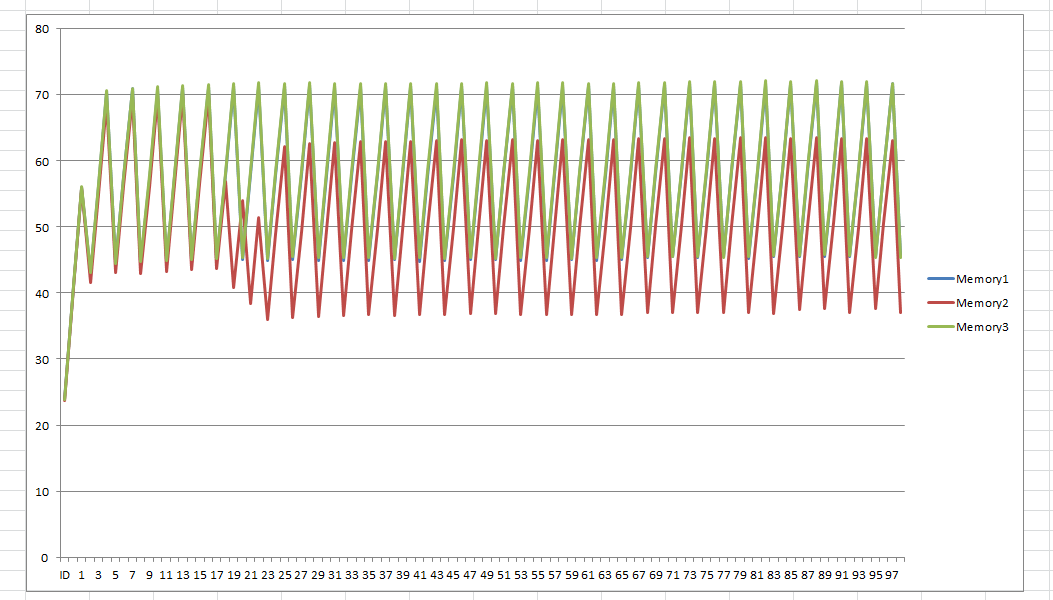
附求职信息:目前在北京,寻求.Net相关职位,偏向后端,请邮件jusfr.v#gmail.com,替换#为@,沟通后奉上简历。
动态加载与插件系统的初步实现(三):WinForm示例的更多相关文章
- 动态加载与插件系统的初步实现(3):WinForm示例
动态加载与插件系统的初步实现(三):WinForm示例 代码文件在此Download,本文章围绕前文所述默认AppDomain.插件容器AppDomain两个域及IPlugin.PluginProvi ...
- 动态加载与插件系统的初步实现(四):解析JSON、扩展Fiddler
按文章结构,这部分应该给出WCFRest项目示例,我想WinForm示例足够详尽了,况且WCFRest还不需要使用插件AppDomain那一套,于是把最近写的Fiddler扩展搬上来吧. Fiddle ...
- 动态加载与插件系统的初步实现(一):反射与MEF解决方案
涉及内容: 反射与MEF解决方案 AppDomain卸载与代理 WinForm.WcfRestService示 PRRT1: 反射实现 插件系统的基本目的是实现宿主与组件的隔离,核心是作为接驳约定的接 ...
- 动态加载与插件系统的初步实现(二):AppDomain卸载与代理
前一篇文章简单展示了类型发现和MEF使用,本文初步进入AppDomain相关内容. CLR程序运行时会创建默认程序集容器即AppDomain,默认AppDomain不支持卸载其程序集,但CLR支持创建 ...
- C# 实现动态加载DLL插件 及HRESULT:0x80131047处理
本代码实现DLL的动态加载, 类似PS里的滤镜插件! 1. 建立一个接口项目类库,此处名称为:Test.IPlugin using System; namespace Test.IPlugin { p ...
- vue动态加载jQuery插件
要先npm安装jQuery插件哦 window.$=$; window.jQuery=$; function loadJs(Url,callback){ var Nscript=document.cr ...
- Java_Java中动态加载jar文件和class文件
转自:http://blog.csdn.net/mousebaby808/article/details/31788325 概述 诸如tomcat这样的服务器,在启动的时候会加载应用程序中lib目录下 ...
- [转载] Java中动态加载jar文件和class文件
转载自http://blog.csdn.net/mousebaby808/article/details/31788325 概述 诸如tomcat这样的服务器,在启动的时候会加载应用程序中lib目录下 ...
- liteos动态加载(十三)
1. 概述 1.1 基本概念 动态加载是一种程序加载技术. 静态链接是在链接阶段将程序各模块文件链接成一个完整的可执行文件,运行时作为整体一次性加载进内存.动态加载允许用户将程序各模块编译成独立的文件 ...
随机推荐
- HashMap集合特点
>HashMap集合特点 HashMap:是基于哈希表的Map接口实现. 哈希表的作用是用来保证键的唯一性的. 不明白,直接看HashMap的put方法源码 //HashM ...
- October 04th 2017 Week 40th Wednesday
We teach people how to remember, we never teach them how to grow. 我们教会人们如何记忆,却从来不教他们如何成长. Without pr ...
- 全局唯一Id:雪花算法
雪花算法-snowflake 分布式系统中,有一些需要使用全局唯一ID的场景,这种时候为了防止ID冲突可以使用36位的UUID,但是UUID有一些缺点,首先他相对比较长,另外UUID一般是无序的. 有 ...
- ngRouter和ui-router区别
在单页面应用中要把各个分散的视图给组织起来是通过路由机制来实现的.本文主要对 AngularJS 原生的 ngRoute 路由模块和第三方路由模块 ui.router 的用法进行简单介绍,并做一个对比 ...
- Hadoop学习之路(五)Hadoop集群搭建模式和各模式问题
分布式集群的通用问题 当前的HDFS和YARN都是一主多从的分布式架构,主从节点---管理者和工作者 问题:如果主节点或是管理者宕机了.会出现什么问题? 群龙无首,整个集群不可用.所以在一主多从的架构 ...
- iteritems()与items()
iteritems:以迭代器对象返回字典键值对 item:以列表形式返回字典键值对 >>> dic = {'a':3,'c':1,'b':2} >>> print ...
- Java泛型学习二
通配符的使用 上一篇中知道,Box<Number>和Box<Integer>实际上都是Box类型,现在需要继续探讨一个问题,那么在逻辑上,类似于Box<Number> ...
- Windows与Linux之间的文件自动同步
问题:在工作中遇到一个场景,需要每天定时将Linux机器上的文件自动同步到Windows机器上. 解决方案有两个: 1.在Windows 机器上设置共享目录,然后在Linux机器上挂载共享 目录,每天 ...
- C语言程序设计I—第十周教学
第十周教学总结(04/11-10/11) 教学内容 第4章 循环结构-while /do-while语句 4.1用格里高利公式求π的近似值,4.2 统计一个整数的位数 课前准备 在蓝墨云班课发布资源: ...
- POJ 3356 水LCS
题目链接: http://poj.org/problem?id=3356 AGTC Time Limit: 1000MS Memory Limit: 65536K Total Submission ...