
POI导出复杂Excel,合并单元格(2)


/**

     *  导出excel (HSSFWorkbook)

     */

    @GetMapping("/testExport")

    public void testExport1(HttpServletResponse response)

    {

        /** 第一步,创建一个Workbook,对应一个Excel文件  */

        HSSFWorkbook wb = new HSSFWorkbook();

        /** 第二步,在Workbook中添加一个sheet,对应Excel文件中的sheet  */

        HSSFSheet sheet = wb.createSheet("excel导出标题");

        /** 第三步,设置样式以及字体样式*/

        HSSFCellStyle titleStyle = createTitleCellStyle(wb);

        HSSFCellStyle headerStyle = createHeadCellStyle(wb);

        HSSFCellStyle contentStyle = createContentCellStyle(wb);

        /** 第四步,创建标题 ,合并标题单元格 */

        // 行号

        int rowNum = 0;

        // 创建第一页的第一行,索引从0开始

        HSSFRow row0 = sheet.createRow(rowNum++);

        row0.setHeight((short) 800);// 设置行高

        String title = "excel导出标题";

        HSSFCell c00 = row0.createCell(0);

        c00.setCellValue(title);

        c00.setCellStyle(titleStyle);

        // 合并单元格,参数依次为起始行,结束行,起始列,结束列 (索引0开始)

        sheet.addMergedRegion(new CellRangeAddress(0, 0, 0, 6));//标题合并单元格操作,6为总列数

        // 第二行

        HSSFRow row1 = sheet.createRow(rowNum++);

        row1.setHeight((short) 500);

        String[] row_first = {"填表单位:", "", "", "", "", " 2019年第2季度 ", ""};

        for (int i = 0; i < row_first.length; i++) {

            HSSFCell tempCell = row1.createCell(i);

            tempCell.setCellStyle(headerStyle);

            if (i == 0) {

                tempCell.setCellValue(row_first[i] + "测试单位");

            } else if (i == 5) {

                tempCell.setCellStyle(headerStyle);

                tempCell.setCellValue(row_first[i]);

            } else {

                tempCell.setCellValue(row_first[i]);

            }

        }

        // 合并

        sheet.addMergedRegion(new CellRangeAddress(1, 1, 0, 4));

        sheet.addMergedRegion(new CellRangeAddress(1, 1, 5, 6));

        //第三行

        HSSFRow row2 = sheet.createRow(rowNum++);

        row2.setHeight((short) 700);

        String[] row_second = {"名称", "采集情况", "", "", "登记情况", "", "备注"};

        for (int i = 0; i < row_second.length; i++) {

            HSSFCell tempCell = row2.createCell(i);

            tempCell.setCellValue(row_second[i]);

            tempCell.setCellStyle(headerStyle);

        }

        // 合并

        sheet.addMergedRegion(new CellRangeAddress(2, 3, 0, 0));//名称

        sheet.addMergedRegion(new CellRangeAddress(2, 2, 1, 3));//采集情况

        sheet.addMergedRegion(new CellRangeAddress(2, 2, 4, 5));//登记情况

        sheet.addMergedRegion(new CellRangeAddress(2, 3, 6, 6));//备注

        //第四行

        HSSFRow row3 = sheet.createRow(rowNum++);

        row3.setHeight((short) 700);

        String[] row_third = {"", "登记数(人)", "办证总数(人)", "办证率(%)", "登记户数(户)", "签订数(份)", ""};

        for (int i = 0; i < row_third.length; i++) {

            HSSFCell tempCell = row3.createCell(i);

            tempCell.setCellValue(row_third[i]);

            tempCell.setCellStyle(headerStyle);

        }

        //循环每一行数据

        List<Map<String, Object>> dataList = new ArrayList<Map<String, Object>>(); //查询出来的数据

        Map<String,Object> map = new HashMap<String,Object>();

        map.put("name", "测试名称1");

        map.put("r1", "111");

        map.put("r2", "222");

        map.put("r3", "333");

        map.put("r4", "444");

        map.put("r5", "555");

        map.put("r6", "666");

        dataList.add(map);

        dataList.add(map);//加多一条list

        for (Map<String, Object> excelData : dataList) {

            HSSFRow tempRow = sheet.createRow(rowNum++);

            tempRow.setHeight((short) 500);

            // 循环单元格填入数据

            for (int j = 0; j < 7; j++) {

                HSSFCell tempCell = tempRow.createCell(j);

                tempCell.setCellStyle(contentStyle);

                String tempValue;

                if (j == 0) {

                    // 乡镇、街道名称

                    tempValue = excelData.get("name").toString();

                } else if (j == 1) {

                    // 登记数(人)

                    tempValue = excelData.get("r1").toString();

                } else if (j == 2) {

                    // 办证总数(人)

                    tempValue = excelData.get("r2").toString();

                } else if (j == 3) {

                    // 办证率(%)

                    tempValue = excelData.get("r3").toString();

                } else if (j == 4) {

                    // 登记户数(户)

                    tempValue = excelData.get("r4").toString();

                } else if (j == 5) {

                    // 签订数(份)

                    tempValue = excelData.get("r5").toString();

                } else {

                    // 备注

                    tempValue = excelData.get("r6").toString();

                }

                tempCell.setCellValue(tempValue);

            }

        }

        // 注释行

        HSSFRow remark = sheet.createRow(rowNum++);

        remark.setHeight((short) 500);

        String[] row_remark = {"注:表中的“办证率=办证总数÷登记数×100%”", "", "", "", "", "", ""};

        for (int i = 0; i < row_remark.length; i++) {

            HSSFCell tempCell = remark.createCell(i);

            if (i == 0) {

                tempCell.setCellStyle(headerStyle);

            } else {

                tempCell.setCellStyle(contentStyle);

            }

            tempCell.setCellValue(row_remark[i]);

        }

        int remarkRowNum = dataList.size() + 4;

        sheet.addMergedRegion(new CellRangeAddress(remarkRowNum, remarkRowNum, 0, 6));//注释行合并单元格

        // 尾行

        HSSFRow foot = sheet.createRow(rowNum++);

        foot.setHeight((short) 500);

        String[] row_foot = {"审核人:", "", "填表人:", "", "填表时间:", "", ""};

        for (int i = 0; i < row_foot.length; i++) {

            HSSFCell tempCell = foot.createCell(i);

            tempCell.setCellStyle(contentStyle);

            if (i == 0) {

                tempCell.setCellValue(row_foot[i] + "张三");

            } else if (i == 2) {

                tempCell.setCellValue(row_foot[i] + "李四");

            } else if (i == 4) {

                tempCell.setCellValue(row_foot[i] + "xxxx");

            } else {

                tempCell.setCellValue(row_foot[i]);

            }

        }

        int footRowNum = dataList.size() + 5;

        // 注

        sheet.addMergedRegion(new CellRangeAddress(footRowNum, footRowNum, 0, 1));

        sheet.addMergedRegion(new CellRangeAddress(footRowNum, footRowNum, 2, 3));

        sheet.addMergedRegion(new CellRangeAddress(footRowNum, footRowNum, 4, 6));

        //导出

        // HttpServletResponse response = this.getResponse();

        String fileName = "报表名称.xls";

        try {

            response.setCharacterEncoding("UTF-8");

            response.setHeader("content-Type", "application/vnd.ms-excel");

            response.setHeader("Content-Disposition", "attachment;filename=" + URLEncoder.encode(fileName, "UTF-8"));

            OutputStream stream = response.getOutputStream();

            if (null != wb && null != stream) {

                wb.write(stream);// 将数据写出去

                wb.close();

                stream.close();

            }

        } catch (Exception e) {

            e.printStackTrace();

        }

    }
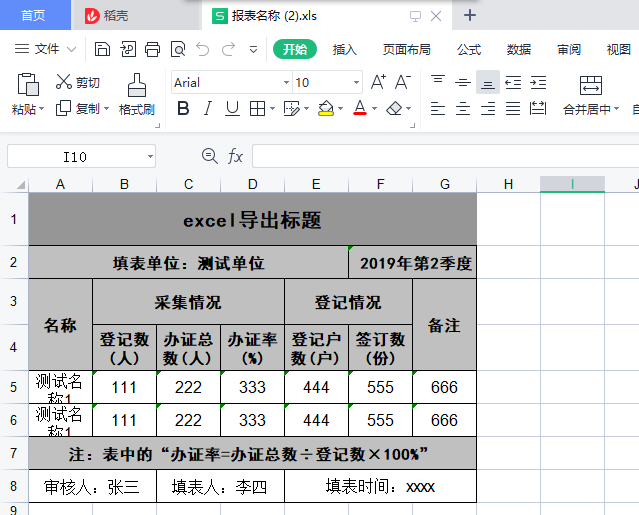
导出结果如图
POI导出复杂Excel,合并单元格(2)的更多相关文章
- Java poi导出设置 Excel某些单元格不可编辑
小白的总结,大神勿喷:需要转载请说明出处,如果有什么问题,欢迎留言 一.需求: 1.某一列 .某一行或某些单元格不可编辑,其他列可以编辑 二.期间遇到的问题 1.无法设置成不可编辑 2.设置为不可编辑 ...
- asp.net C#取Excel 合并单元格内容
asp教程.net c#取excel 合并单元格内容读取excel数据,填充dataset// 连接字符串 string xlspath = server.mappath("~/www.11 ...
- 使用POI创建word表格合并单元格兼容wps
poi创建word表格合并单元格代码如下: /** * @Description: 跨列合并 */ public void mergeCellsHorizontal(XWPFTable table, ...
- java poi导出Excel合并单元格并设置边框
import org.apache.poi.hssf.usermodel.HSSFCell; import org.apache.poi.hssf.usermodel.HSSFCellStyle; i ...
- poi导出excel合并单元格(包括列合并、行合并)
1 工程所需jar包如下:commons-codec-1.5.jarcommons-logging-1.1.jarlog4j-1.2.13.jarjunit-3.8.1.jarpoi-3.9-2012 ...
- poi excel 合并单元格
结论:final CellRangeAddress cra = new CellRangeAddress(rowId, rowId + rowSkip, colId, colId + c ...
- 前端Excel表格导入导出,包括合并单元格,表格自定义样式等
表格数据导入 读取导入Excel表格数据这里采用的是 xlsx 插件 npm i xlsx 读取excel需要通过 XLSX.read(data, {type: type}) 方法来实现,返回一个叫W ...
- npoi导出excel合并单元格
需要引用NPOI.dll程序集和Ionic.Zip.dll程序集 string[] headerRowName = { "序号", "地市", "镇街 ...
- NPOI之Excel——合并单元格、设置样式、输入公式、设置筛选等
首先建立一个空白的工作簿用作测试,并在其中建立空白工作表,在表中建立空白行,在行中建立单元格,并填入内容: //建立空白工作簿 IWorkbook workbook = new HSSFWorkboo ...
- NPOI之Excel——合并单元格、设置样式、输入公式
首先建立一个空白的工作簿用作测试,并在其中建立空白工作表,在表中建立空白行,在行中建立单元格,并填入内容: //建立空白工作簿 IWorkbook workbook = new HSSFWorkboo ...
随机推荐
- python黑帽子(第四章)
Scapy窃取ftp登录账号密码 sniff函数的参数 filter 过滤规则,默认是嗅探所有数据包,具体过滤规则与wireshark相同. iface 参数设置嗅探器索要嗅探的网卡,默认对所有的网卡 ...
- i2c调试工具分享
i2c-tools简介 在嵌入式开发仲,有时候需要确认硬件是否正常连接,设备是否正常工作,设备的地址是多少等等,这里我们就需要使用一个用于测试I2C总线的工具--i2c-tools. i2c-tool ...
- VulnHub-Earth 打靶记录
目录 VulnHub-Earth 打靶记录 知识点 目标探测 信息收集 Shell反弹&信息二次收集 提权 权限维持 VulnHub-Earth 打靶记录 搭建靶场的时候一定要使用NATser ...
- JavaWeb和WebGIS学习笔记(四)——使用uDig美化地图,并叠加显示多个图层
系列链接: Java web与web gis学习笔记(一)--Tomcat环境搭建 Java web与web gis学习笔记(二)--百度地图API调用 JavaWeb和WebGIS学习笔记(三)-- ...
- CA周记 - 带你进⼊ OpenAI 的世界
2021年11月的 Microsoft Ignite , 微软带来了全新的 Azure OpenAI Service,通过新的 Azure 认知服务能够访问 OpenAI 强大的 GPT-3 模型 . ...
- 【Java分享客栈】一文搞定CompletableFuture并行处理,成倍缩短查询时间。
前言 工作中你可能会遇到很多这样的场景,一个接口,要从其他几个service调用查询方法,分别获取到需要的值之后再封装数据返回. 还可能在微服务中遇到类似的情况,某个服务的接口,要使用好几次f ...
- 一文带你读懂zookeeper在大数据生态的应用
一个执着于技术的公众号 一.简述 在一群动物掌管的世界中,动物没有人类聪明的思想,为了保持动物世界的生态平衡,这时,动物管理员-zookeeper诞生了. 打开Apache zookeeper的官网, ...
- Nacos源码系列—关于服务注册的那些事
点赞再看,养成习惯,微信搜索[牧小农]关注我获取更多资讯,风里雨里,小农等你,很高兴能够成为你的朋友. 项目源码地址:公众号回复 nacos,即可免费获取源码 简介 首先我们在看Nacos源码之前,要 ...
- Solon 1.7.6 发布,更现代感的应用开发框架
相对于 Spring Boot 和 Spring Cloud 的项目 启动快 5 - 10 倍 qps 高 2- 3 倍 运行时内存节省 1/3 ~ 1/2 打包可以缩小到 1/2 ~ 1/10(比如 ...
- 思索 p5.js 的最佳实践
思索 p5.js 的最佳实践 本文写于 2020 年 12 月 18 日 p5.js 是一个 JavaScript 库,用于为艺术家.设计师提供更容易上手的创意编程. 它有着完整的一套基于 Canva ...