
动态爱心-详细教程(小白也会)(HTML)
动态爱心
超级超级超级简单!!!赶紧做给你们的"Ta"看吧!
(最后有详细步骤)
视频效果:

话不多说直接上代码
点击查看代码
<!DOCTYPE HTML PUBLIC "-//W3C//DTD HTML 4.0 Transitional//EN">

<HTML>

 <HEAD>

  <TITLE> New Document </TITLE>

  <META NAME="Generator" CONTENT="EditPlus">

  <META NAME="Author" CONTENT="">

  <META NAME="Keywords" CONTENT="">

  <META NAME="Description" CONTENT="">

  <style>

  html, body {

  height: 100%;

  padding: 0;

  margin: 0;

  background: #000;

}

canvas {

  position: absolute;

  width: 100%;

  height: 100%;

}

  </style>

 </HEAD>

 <BODY>

  <canvas id="pinkboard"></canvas>

  <script>

  /*

 * Settings

 */

var settings = {

  particles: {

    length:   500, // maximum amount of particles

    duration:   2, // particle duration in sec

    velocity: 100, // particle velocity in pixels/sec

    effect: -0.75, // play with this for a nice effect

    size:      30, // particle size in pixels

  },

};

/*

 * RequestAnimationFrame polyfill by Erik Möller

 */

(function(){var b=0;var c=["ms","moz","webkit","o"];for(var a=0;a<c.length&&!window.requestAnimationFrame;++a){window.requestAnimationFrame=window[c[a]+"RequestAnimationFrame"];window.cancelAnimationFrame=window[c[a]+"CancelAnimationFrame"]||window[c[a]+"CancelRequestAnimationFrame"]}if(!window.requestAnimationFrame){window.requestAnimationFrame=function(h,e){var d=new Date().getTime();var f=Math.max(0,16-(d-b));var g=window.setTimeout(function(){h(d+f)},f);b=d+f;return g}}if(!window.cancelAnimationFrame){window.cancelAnimationFrame=function(d){clearTimeout(d)}}}());

/*

 * Point class

 */

var Point = (function() {

  function Point(x, y) {

    this.x = (typeof x !== 'undefined') ? x : 0;

    this.y = (typeof y !== 'undefined') ? y : 0;

  }

  Point.prototype.clone = function() {

    return new Point(this.x, this.y);

  };

  Point.prototype.length = function(length) {

    if (typeof length == 'undefined')

      return Math.sqrt(this.x * this.x + this.y * this.y);

    this.normalize();

    this.x *= length;

    this.y *= length;

    return this;

  };

  Point.prototype.normalize = function() {

    var length = this.length();

    this.x /= length;

    this.y /= length;

    return this;

  };

  return Point;

})();

/*

 * Particle class

 */

var Particle = (function() {

  function Particle() {

    this.position = new Point();

    this.velocity = new Point();

    this.acceleration = new Point();

    this.age = 0;

  }

  Particle.prototype.initialize = function(x, y, dx, dy) {

    this.position.x = x;

    this.position.y = y;

    this.velocity.x = dx;

    this.velocity.y = dy;

    this.acceleration.x = dx * settings.particles.effect;

    this.acceleration.y = dy * settings.particles.effect;

    this.age = 0;

  };

  Particle.prototype.update = function(deltaTime) {

    this.position.x += this.velocity.x * deltaTime;

    this.position.y += this.velocity.y * deltaTime;

    this.velocity.x += this.acceleration.x * deltaTime;

    this.velocity.y += this.acceleration.y * deltaTime;

    this.age += deltaTime;

  };

  Particle.prototype.draw = function(context, image) {

    function ease(t) {

      return (--t) * t * t + 1;

    }

    var size = image.width * ease(this.age / settings.particles.duration);

    context.globalAlpha = 1 - this.age / settings.particles.duration;

    context.drawImage(image, this.position.x - size / 2, this.position.y - size / 2, size, size);

  };

  return Particle;

})();

/*

 * ParticlePool class

 */

var ParticlePool = (function() {

  var particles,

      firstActive = 0,

      firstFree   = 0,

      duration    = settings.particles.duration;

  function ParticlePool(length) {

    // create and populate particle pool

    particles = new Array(length);

    for (var i = 0; i < particles.length; i++)

      particles[i] = new Particle();

  }

  ParticlePool.prototype.add = function(x, y, dx, dy) {

    particles[firstFree].initialize(x, y, dx, dy);

    // handle circular queue

    firstFree++;

    if (firstFree   == particles.length) firstFree   = 0;

    if (firstActive == firstFree       ) firstActive++;

    if (firstActive == particles.length) firstActive = 0;

  };

  ParticlePool.prototype.update = function(deltaTime) {

    var i;

    // update active particles

    if (firstActive < firstFree) {

      for (i = firstActive; i < firstFree; i++)

        particles[i].update(deltaTime);

    }

    if (firstFree < firstActive) {

      for (i = firstActive; i < particles.length; i++)

        particles[i].update(deltaTime);

      for (i = 0; i < firstFree; i++)

        particles[i].update(deltaTime);

    }

    // remove inactive particles

    while (particles[firstActive].age >= duration && firstActive != firstFree) {

      firstActive++;

      if (firstActive == particles.length) firstActive = 0;

    }

  };

  ParticlePool.prototype.draw = function(context, image) {

    // draw active particles

    if (firstActive < firstFree) {

      for (i = firstActive; i < firstFree; i++)

        particles[i].draw(context, image);

    }

    if (firstFree < firstActive) {

      for (i = firstActive; i < particles.length; i++)

        particles[i].draw(context, image);

      for (i = 0; i < firstFree; i++)

        particles[i].draw(context, image);

    }

  };

  return ParticlePool;

})();

/*

 * Putting it all together

 */

(function(canvas) {

  var context = canvas.getContext('2d'),

      particles = new ParticlePool(settings.particles.length),

      particleRate = settings.particles.length / settings.particles.duration, // particles/sec

      time;

  // get point on heart with -PI <= t <= PI

  function pointOnHeart(t) {

    return new Point(

      160 * Math.pow(Math.sin(t), 3),

      130 * Math.cos(t) - 50 * Math.cos(2 * t) - 20 * Math.cos(3 * t) - 10 * Math.cos(4 * t) + 25

    );

  }

  // creating the particle image using a dummy canvas

  var image = (function() {

    var canvas  = document.createElement('canvas'),

        context = canvas.getContext('2d');

    canvas.width  = settings.particles.size;

    canvas.height = settings.particles.size;

    // helper function to create the path

    function to(t) {

      var point = pointOnHeart(t);

      point.x = settings.particles.size / 2 + point.x * settings.particles.size / 350;

      point.y = settings.particles.size / 2 - point.y * settings.particles.size / 350;

      return point;

    }

    // create the path

    context.beginPath();

    var t = -Math.PI;

    var point = to(t);

    context.moveTo(point.x, point.y);

    while (t < Math.PI) {

      t += 0.01; // baby steps!

      point = to(t);

      context.lineTo(point.x, point.y);

    }

    context.closePath();

    // create the fill

    context.fillStyle = '#ea80b0';

    context.fill();

    // create the image

    var image = new Image();

    image.src = canvas.toDataURL();

    return image;

  })();

  // render that thing!

  function render() {

    // next animation frame

    requestAnimationFrame(render);

    // update time

    var newTime   = new Date().getTime() / 1000,

        deltaTime = newTime - (time || newTime);

    time = newTime;

    // clear canvas

    context.clearRect(0, 0, canvas.width, canvas.height);

    // create new particles

    var amount = particleRate * deltaTime;

    for (var i = 0; i < amount; i++) {

      var pos = pointOnHeart(Math.PI - 2 * Math.PI * Math.random());

      var dir = pos.clone().length(settings.particles.velocity);

      particles.add(canvas.width / 2 + pos.x, canvas.height / 2 - pos.y, dir.x, -dir.y);

    }

    // update and draw particles

    particles.update(deltaTime);

    particles.draw(context, image);

  }

  // handle (re-)sizing of the canvas

  function onResize() {

    canvas.width  = canvas.clientWidth;

    canvas.height = canvas.clientHeight;

  }

  window.onresize = onResize;

  // delay rendering bootstrap

  setTimeout(function() {

    onResize();

    render();

  }, 10);

})(document.getElementById('pinkboard'));

  </script>

 </BODY>

</HTML>
详细步骤
1. 在桌面新建一个txt文件

2. 双击打开,并将以上代码粘贴到文件中
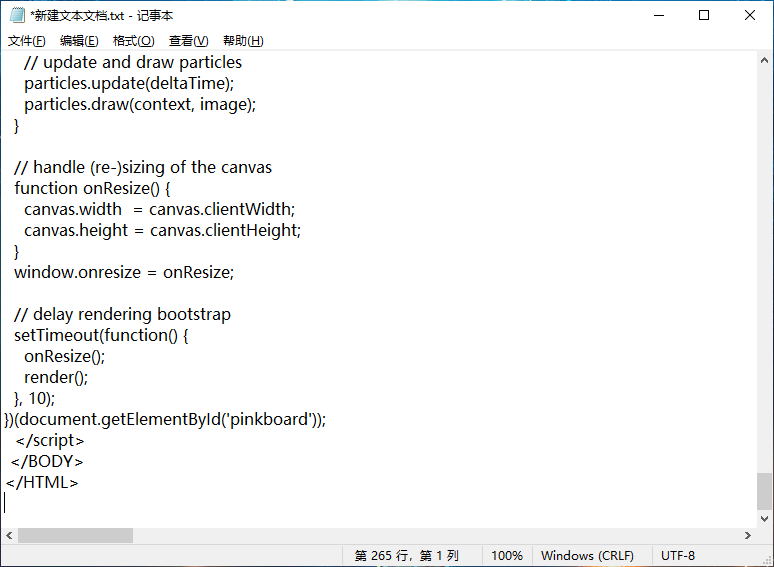
3. 关闭文本文档并点击保存

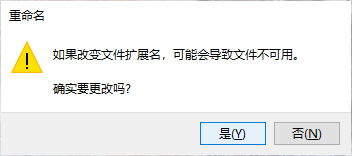
4. 修改文件名后缀为'.html'

如果没有文件后缀名的小伙伴可以参照下面这张图的操作打开文件扩展名

5. 在弹窗中点击"是"
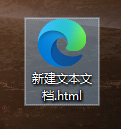
5. 之后会发现图标变成网页文件,双击打开即可
动态爱心-详细教程(小白也会)(HTML)的更多相关文章
- Python环境搭建—安利Python小白的Python安装详细教程
人生苦短,我用Python.众所周知,Python目前越来越火,学习Python的小伙伴也越来越多.最近看到群里的小伙伴经常碰到不会安装Python或者不知道去哪下载Python安装包等系列问题,为了 ...
- Python环境搭建—安利Python小白的Python和Pycharm安装详细教程
人生苦短,我用Python.众所周知,Python目前越来越火,学习Python的小伙伴也越来越多.最近看到群里的小伙伴经常碰到不会安装Python或者不知道去哪下载Python安装包等系列问题,为了 ...
- [分享] 从定制Win7母盘到封装详细教程 By BILL ( 10月23日补充说明 )
[分享] 从定制Win7母盘到封装详细教程 By BILL ( 10月23日补充说明 ) billcheung 发表于 2011-10-23 00:07:49 https://www.itsk.com ...
- Solr集群搭建详细教程(一)
一.Solr集群的系统架构 注:欢迎大家转载,非商业用途请在醒目位置注明本文链接和作者名dijia478,商业用途请联系本人dijia478@163.com. SolrCloud(solr 云)是So ...
- 转载:python + requests实现的接口自动化框架详细教程
转自https://my.oschina.net/u/3041656/blog/820023 摘要: python + requests实现的接口自动化框架详细教程 前段时间由于公司测试方向的转型,由 ...
- NumPy 超详细教程(1):NumPy 数组
系列文章地址 NumPy 最详细教程(1):NumPy 数组 NumPy 超详细教程(2):数据类型 NumPy 超详细教程(3):ndarray 的内部机理及高级迭代 文章目录 Numpy 数组:n ...
- Spring入门详细教程(三)
前言 本篇紧接着spring入门详细教程(二),建议阅读本篇前,先阅读第一篇和第二篇.链接如下: Spring入门详细教程(一) https://www.cnblogs.com/jichi/p/101 ...
- Spring入门详细教程(二)
前言 本篇紧接着spring入门详细教程(一),建议阅读本篇前,先阅读第一篇.链接如下: Spring入门详细教程(一) https://www.cnblogs.com/jichi/p/1016553 ...
- eclipse怎么导入maven项目 eclipse导入maven项目详细教程
转自:http://www.pc6.com/infoview/Article_114542.html Eclipse怎么导入maven项目一直是困扰着大量程序猿和刚上手小白们的问题,使用eclipse ...
随机推荐
- 基于Vue3实现一个前端埋点上报插件并打包发布到npm
前端埋点对于那些营销活动的项目是必须的,它可以反应出用户的喜好与习惯,从而让项目的运营者们能够调整策略优化流程提高用户体验从而获取更多的$.这篇文章将实现一个Vue3版本的埋点上报插件,主要功能有 通 ...
- 【PMP学习笔记】第5章 项目范围管理
一.规范管理的内涵 项目范围管理:包括确保项目做且只做所需的全部工作,以成功完成项目的各个过程. 项目范围:为交付具有规定特性与功能的产品.服务或成果而必须完成的工作. 预测型:开始时定义可交付成果, ...
- [双重 for 循环]打印一个倒三角形
[双重 for 循环]打印一个倒三角形 核心算法 里层循环:j = i; j <= 10; j++ 当i=1时,j=1 , j<=10,j++,打印10个星星 当i=2时,j=2 , j& ...
- 引擎之旅 Chapter.1 高分辨率时钟
目录 游戏中的时间线 真实时间线 游戏时间线 全局时钟的实现方式 我们如何理解时间.在现实生活中,时间就是一个有方向的直线.从一个无穷远到另一个无穷远.用数学去抽象地思考,它就是一个从无穷小到无穷大的 ...
- 优化器Optimal
未完成!!!!!! 神经网络的训练主要是通过优化损失函数来更新参数,而面对庞大数量的参数的更新,优化函数的设计就显得尤为重要,下面介绍一下几种常用的优化器及其演变过程: [先说明一下要用到符号的含义] ...
- LFS(Linux From Scratch)构建过程全记录(五):交叉工具链的构建
写在前面 本文将详细讲述如何构建工具链 前置知识 在LFS-BOOK中,我们需要学习一些关于"交叉编译"的内容,详见书本 安装Binutils-2.39 我们cd到sources文 ...
- Mybatis 一级缓存和二级缓存原理区别 (图文详解)
Java面试经常问到Mybatis一级缓存和二级缓存,今天就给大家重点详解Mybatis一级缓存和二级缓存原理与区别@mikechen Mybatis缓存 缓存就是内存中的数据,常常来自对数据库查询结 ...
- LVGL 模拟仿真(Windows+CodeBlocks)
一.准备材料 Code Blocks官网:https://www.codeblocks.org/ Code Blocks 汉化包:链接: https://pan.baidu.com/s/12zB5bD ...
- Prometheus高可用部署
Prometheus的本地存储给Prometheus带来了简单高效的使用体验,可以让Promthues在单节点的情况下满足大部分用户的监控需求.但是本地存储也同时限制了Prometheus的可扩展性, ...
- Ubuntu20.04本地安装Redash中文版
一.安装基础环境: # 1.更换APT国内源 sudo sed -i s@/cn.archive.ubuntu.com/@/mirrors.aliyun.com/@g /etc/apt/sources ...