
微信小程序实战,用vue3实现每日浪漫情话推荐~
1、前言
之前做了个恋爱话术微信小程序,满足了日常聊天的需要,实现高情商的恋爱聊天。最近也完成了话术库的优化更新,新增30万条话术数据,同时使用了分词技术,匹配更完善。
但最近突然发现,每天早上给女朋友发一段优美情话可以让她开心一整天,但无奈自己的语言水平确实有限,不能随手拈来,着实让人有点不爽。
不过办法总比困难多,作为高情商的程序猿,来源于日常生活的需求往往是咱们最大的动力,必须盘他,所以想着在之前的恋爱话术小程序上在加一个每日情话推荐的功能。
希望这个程序对其他单身或者恋爱中的兄弟们有所帮助,也希望兄弟们关注加三连支持一波哈~~~
2、推荐接口简介
辣鸡服务器,兄弟们轻点调哈
浪漫推荐情话开放接口
接口地址:https://yin-feng.top/open/getRecommendLove
请求方式:POST
请求数据类型:application/json
响应数据类型:*/*
请求参数:
{}
响应参数:
| 参数名称 | 参数说明 | 类型 | schema |
|---|---|---|---|
| content | 内容 | string | |
| id | id | integer(int64) | integer(int64) |
| score | 分数 | integer(int32) | integer(int32) |
| title | 标题 | string |
响应示例:
[

    {

        "content": "",

        "id": 0,

        "score": 0,

        "title": ""

    }

]
3、前端页面开发
老样子,咱们还是使用uniapp框架来开发,uniapp的介绍就不多说了哈。
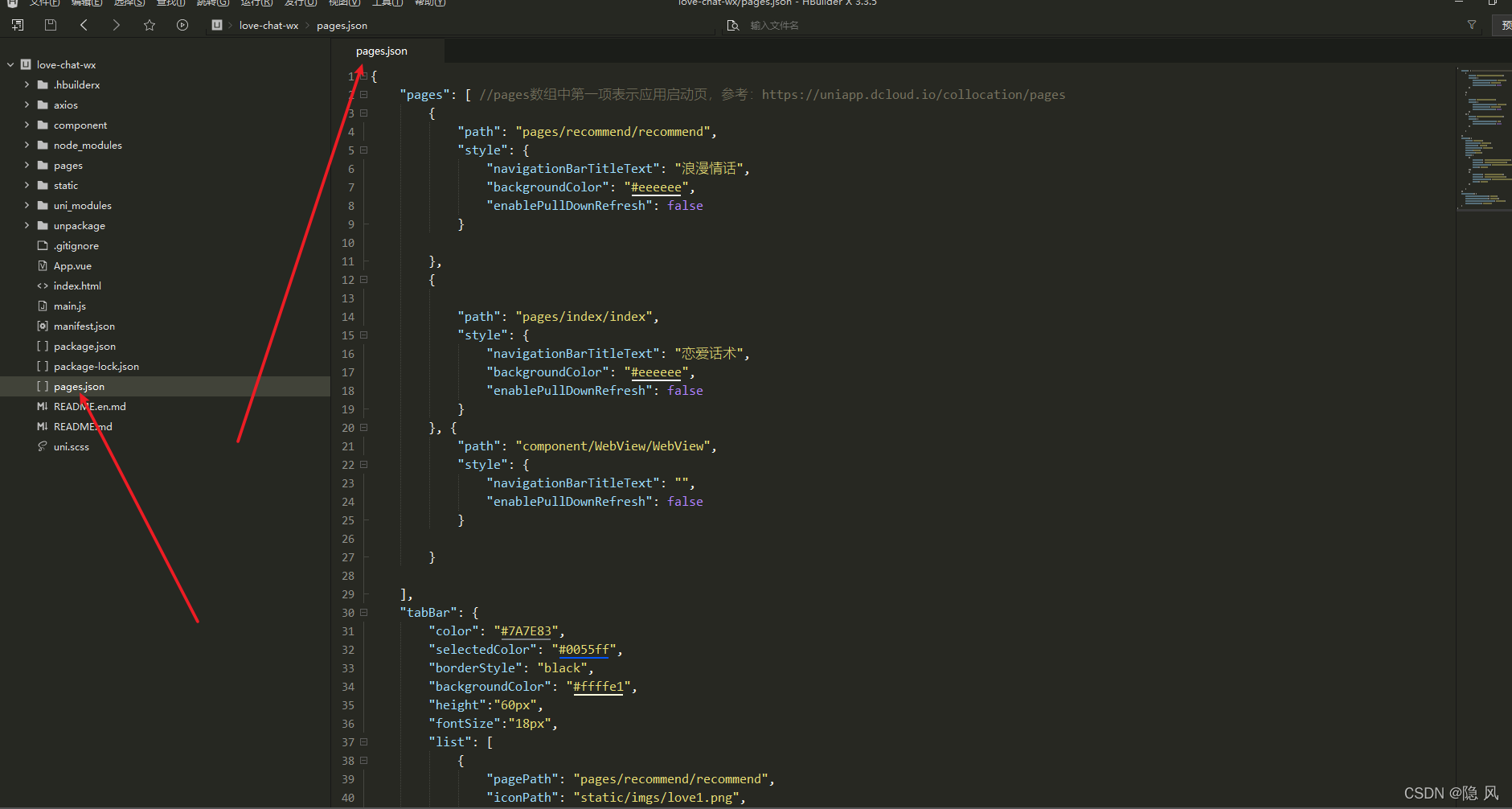
3.1 配置pages.json文件
我们这次打算配两个菜单,包括浪漫情话推荐和话术搜索。主要在pages.json里面就行配置。
pages.json 文件用来对 uni-app 进行全局配置,决定页面文件的路径、窗口样式、原生的导航栏、底部的原生tabbar 等。它类似微信小程序中app.json的页面管理部分。
在 pages.json 中提供 tabBar 配置,不仅仅是为了方便快速开发导航,更重要的是在App和小程序端提升性能。在这两个平台,底层原生引擎在启动时无需等待js引擎初始化,即可直接读取 pages.json 中配置的 tabBar 信息,渲染原生tab。
官方文档参考tabBar
特别注意
- 当设置 position 为 top 时,将不会显示 icon
- tabBar 中的 list 是一个数组,只能配置最少2个、最多5个 tab,tab 按数组的顺序排序。
- tabbar 切换第一次加载时可能渲染不及时,可以在每个tabbar页面的onLoad生命周期里先弹出一个等待雪花(hello uni-app使用了此方式)
- tabbar 的页面展现过一次后就保留在内存中,再次切换 tabbar 页面,只会触发每个页面的onShow,不会再触发onLoad。
- 顶部的 tabbar 目前仅微信小程序上支持。需要用到顶部选项卡的话,建议不使用 tabbar 的顶部设置,而是自己做顶部选项卡。
新增浪漫情话页面配置
{

            "path": "pages/recommend/recommend",

            "style": {

                "navigationBarTitleText": "浪漫情话",

                "backgroundColor": "#eeeeee",

                "enablePullDownRefresh": false

            }

        }
添加两个tab标签
"tabBar": {

        "color": "#7A7E83",

        "selectedColor": "#0055ff",

        "borderStyle": "black",

        "backgroundColor": "#ffffe1",

        "height":"60px",

        "fontSize":"18px",

        "list": [

            {

                "pagePath": "pages/recommend/recommend",

                "iconPath": "static/imgs/love1.png",

                "selectedIconPath": "static/imgs/love2.png",

                "text": "浪漫情话"

            },

            {

                "pagePath": "pages/index/index",

                "iconPath": "static/imgs/爱心1.png",

                "selectedIconPath": "static/imgs/爱心2.png",

                "text": "话术搜索"

            }

        ]

    }
完整的page.json文件
{

    "pages": [ //pages数组中第一项表示应用启动页,参考:https://uniapp.dcloud.io/collocation/pages

        {

            "path": "pages/recommend/recommend",

            "style": {

                "navigationBarTitleText": "浪漫情话",

                "backgroundColor": "#eeeeee",

                "enablePullDownRefresh": false

            }

        },

        {

            "path": "pages/index/index",

            "style": {

                "navigationBarTitleText": "恋爱话术",

                "backgroundColor": "#eeeeee",

                "enablePullDownRefresh": false

            }

        }, {

            "path": "component/WebView/WebView",

            "style": {

                "navigationBarTitleText": "",

                "enablePullDownRefresh": false

            }

        }

    ],

    "tabBar": {

        "color": "#7A7E83",

        "selectedColor": "#0055ff",

        "borderStyle": "black",

        "backgroundColor": "#ffffe1",

        "height":"60px",

        "fontSize":"18px",

        "list": [

            {

                "pagePath": "pages/recommend/recommend",

                "iconPath": "static/imgs/love1.png",

                "selectedIconPath": "static/imgs/love2.png",

                "text": "浪漫情话"

            },

            {

                "pagePath": "pages/index/index",

                "iconPath": "static/imgs/爱心1.png",

                "selectedIconPath": "static/imgs/爱心2.png",

                "text": "话术搜索"

            }

        ]

    },

    "globalStyle": {

        "navigationBarTextStyle": "black",

        "navigationBarTitleText": "恋爱话术",

        "navigationBarBackgroundColor": "#ffffe1",

        "backgroundColor": "#f5ffff"

    }

}
3.2 封装api接口
主要在http.api.js里面配置,这个文件之前也包含了咱们的话术搜索接口
import service from './http.interceptor.js'

const api = {

    // 话术搜索

    getLoveChat: params => service.post('/open/getLoveChat', params),

    getBanner: () => service.post('/open/getBanner'),

    // 浪漫情话推荐

    getRecommendLove: () => service.post('/open/getRecommendLove'),

    loveScore: params => service.post('/open/loveScore', params),

}

export default api
3.3 编写浪漫情话页面
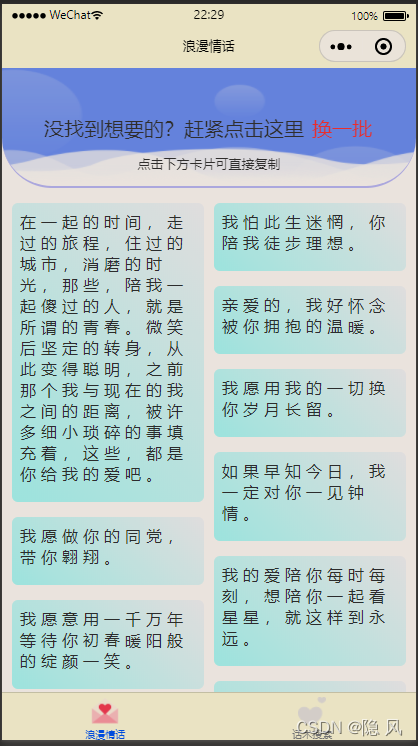
咱们还是使用vue3加uniapp的语法进行页面开发,同时为了使页面更优美,封装一个瀑布流组件进行渲染数据。下图就是咱们要实现的大致效果
3.3.1 封装瀑布流组件
<template>

    <view class="u-waterfall">

        <view id="u-left-column" class="u-column">

            <slot name="left" :leftList="leftList"></slot>

        </view>

        <view id="u-right-column" class="u-column">

            <slot name="right" :rightList="rightList"></slot>

        </view>

    </view>

</template>

<script>

    export default {

        name: "waterfall",

        props: {

            value: {

                // 瀑布流数据

                type: Array,

                required: true,

                default: function() {

                    return [];

                }

            }

        },

        data() {

            return {

                leftList: [],

                rightList: [],

                tempList: []

            }

        },

        watch: {

            copyFlowList(nVal, oVal) {

                this.tempList = this.cloneData(this.copyFlowList);

                this.leftList = []

                this.rightList = []

                this.splitData();

            }

        },

        mounted() {

            this.tempList = this.cloneData(this.copyFlowList);

            this.splitData();

        },

        computed: {

            // 破坏flowList变量的引用,否则watch的结果新旧值是一样的

            copyFlowList() {

                return this.cloneData(this.value);

            }

        },

        methods: {

            async splitData() {

                if (!this.tempList.length) return;

                let leftRect = await this.$uGetRect('#u-left-column');

                let rightRect = await this.$uGetRect('#u-right-column');

                // 如果左边小于或等于右边,就添加到左边,否则添加到右边

                let item = this.tempList[0];

                // 解决多次快速上拉后,可能数据会乱的问题,因为经过上面的两个await节点查询阻塞一定时间,加上后面的定时器干扰

                // 数组可能变成[],导致此item值可能为undefined

                if (!item) return;

                if (leftRect.height < rightRect.height) {

                    this.leftList.push(item);

                } else if (leftRect.height > rightRect.height) {

                    this.rightList.push(item);

                } else {

                    // 这里是为了保证第一和第二张添加时,左右都能有内容

                    // 因为添加第一张,实际队列的高度可能还是0,这时需要根据队列元素长度判断下一个该放哪边

                    if (this.leftList.length <= this.rightList.length) {

                        this.leftList.push(item);

                    } else {

                        this.rightList.push(item);

                    }

                }

                // 移除临时列表的第一项

                this.tempList.splice(0, 1);

                // 如果临时数组还有数据,继续循环

                if (this.tempList.length) {

                    this.splitData();

                } else {

                    // 在这里模拟触发 我们定义的全局事件 实现数据通信的目的

                    let height = (leftRect.height > rightRect.height ? leftRect.height : rightRect.height) + 120

                    uni.$emit('swiperHeightChange', height + 'px')

                }

            },

            // 复制而不是引用对象和数组

            cloneData(data) {

                return JSON.parse(JSON.stringify(data));

            },

        }

    }

</script>

<style lang="scss" scoped>

    @mixin vue-flex($direction: row) {

        /* #ifndef APP-NVUE */

        display: flex;

        flex-direction: $direction;

        /* #endif */

    }

    .u-waterfall {

        @include vue-flex;

        flex-direction: row;

        align-items: flex-start;

    }

    .u-column {

        @include vue-flex;

        flex: 1;

        flex-direction: column;

        height: auto;

    }

    .u-image {

        width: 100%;

    }

</style>
3.3.2 template代码编写
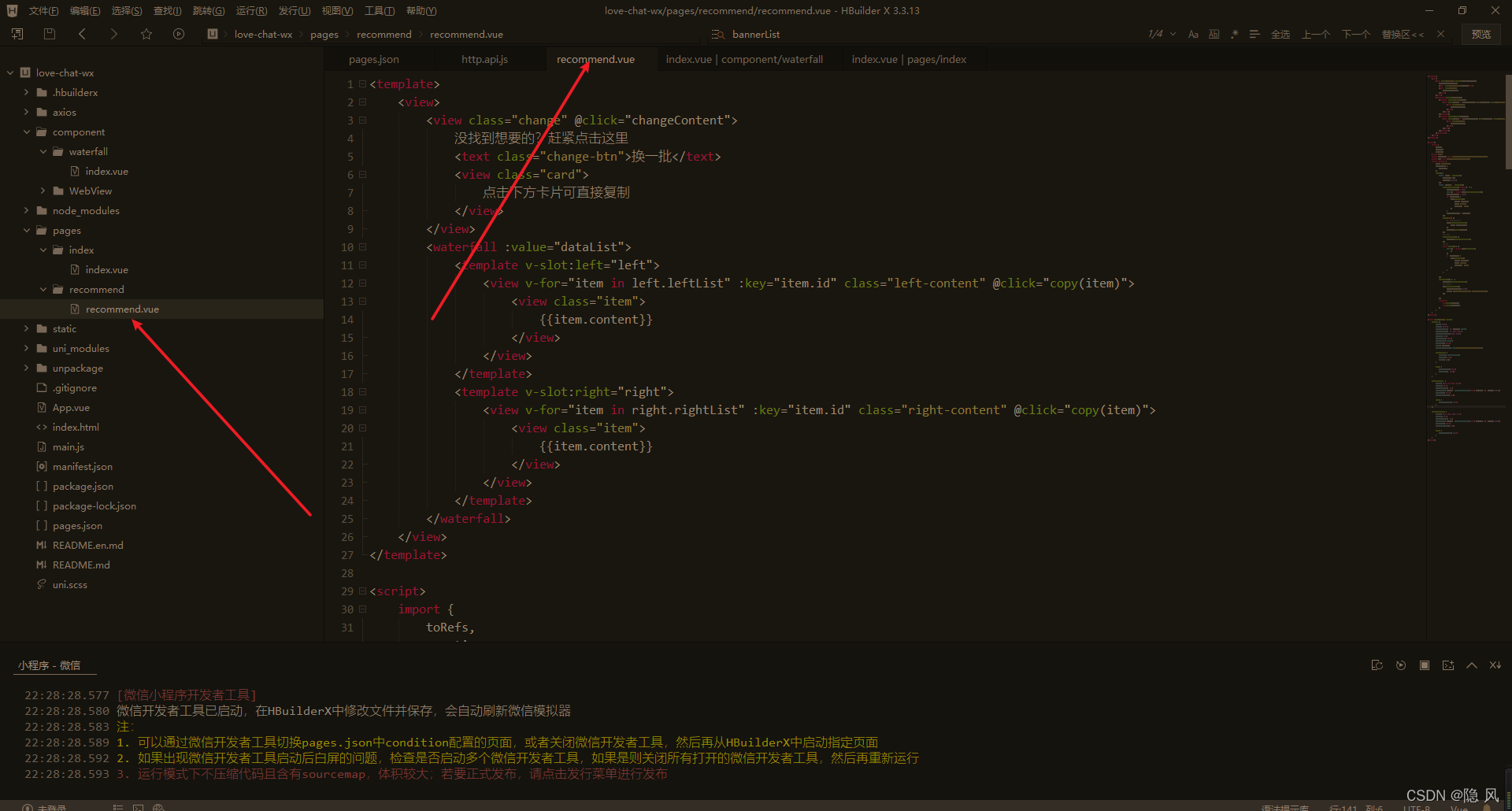
这里在引入瀑布流组件之后可直接在html里面使用
<template>

    <view>

        <view class="change" @click="changeContent">

            没找到想要的?赶紧点击这里

            <text class="change-btn">换一批</text>

            <view class="card">

                点击下方卡片可直接复制

            </view>

        </view>

        <waterfall :value="dataList">

            <template v-slot:left="left">

                <view v-for="item in left.leftList" :key="item.id" class="left-content" @click="copy(item)">

                    <view class="item">

                        {{item.content}}

                    </view>

                </view>

            </template>

            <template v-slot:right="right">

                <view v-for="item in right.rightList" :key="item.id" class="right-content" @click="copy(item)">

                    <view class="item">

                        {{item.content}}

                    </view>

                </view>

            </template>

        </waterfall>

    </view>

</template>
3.3.3 js核心方法编写
关键代码也不多,主要是一些请求数据的方法和响应式变量的定义。
<script>

    import {

        toRefs,

        reactive,

        onMounted

    } from 'vue'

    import waterfall from '../../component/waterfall/index.vue'

    import api from '../../axios/http.api.js'

    export default {

        name: 'content',

        components: {

            waterfall

        },

        setup() {

            const state = reactive({

                dataList: [],

                loading: false,

            })

            const methods = reactive({

                getRecommendLove: async () => {

                    state.loading = true

                    let res = await api.getRecommendLove()

                    state.loading = false

                    if (res.code) {

                        uni.showToast({

                            title: res.msg,

                            icon: 'none',

                            position: 'top'

                        })

                    }

                    state.dataList = res.data

                },

                copy(item) {

                    // 复制话术到剪切板

                    uni.setClipboardData({

                        data: item.content

                    })

                    methods.score(item.id)

                },

                // 换一批

                changeContent() {

                    methods.getRecommendLove()

                },

                // 打分

                async score(id) {

                    let res = await api.loveScore({

                        id

                    })

                    if (res.code) {

                        uni.showToast({

                            title: res.msg,

                            icon: 'none',

                            position: 'top'

                        })

                    }

                }

            })

            onMounted(() => {

                methods.getRecommendLove()

                // 分享菜单

                wx.showShareMenu({

                    withShareTicket: true,

                    menus: ['shareAppMessage', 'shareTimeline']

                })

            })

            return {

                ...toRefs(state),

                ...toRefs(methods)

            }

        }

    }

</script>
3.3.4 css样式代码编写
咱们毕竟不是专业的前端,所以样式就随便应付一下就行,兄弟们不要介意哈
<style lang="less" scoped>

    .change {

        width: 100%;

        height: 120px;

        border-bottom: 2px #aaaaff solid;

        border-radius: 0 0 50px 50px;

        background-size: 100% 100%;

        opacity: 0.8;

        padding-top: 45px;

        text-align: center;

        font-size: 20px;

        color: #000000;

        background-image: url(../../static/imgs/img4.png);

        .change-btn {

            display: inline-block;

            padding: 2px;

            color: red;

        }

        .card {

            padding-top: 12px;

            font-size: 13px;

        }

    }

    .left-content {

        margin: 15px 5px 15px 10px;

        padding: 8px;

        border-radius: 6px;

        background: #aaffff linear-gradient(44deg, #aaffff 0%, #F4F8FF 100%);

        font-size: 16px;

        letter-spacing: 5px;

        .item {

            margin-bottom: 10px;

        }

    }

    .right-content {

        margin: 15px 10px 15px 5px;

        padding: 8px;

        border-radius: 6px;

        background: #aaffff linear-gradient(44deg, #aaffff 0%, #F4F8FF 100%);

        font-size: 16px;

        letter-spacing: 5px;

        .item {

            margin-bottom: 10px;

        }

    }

</style>
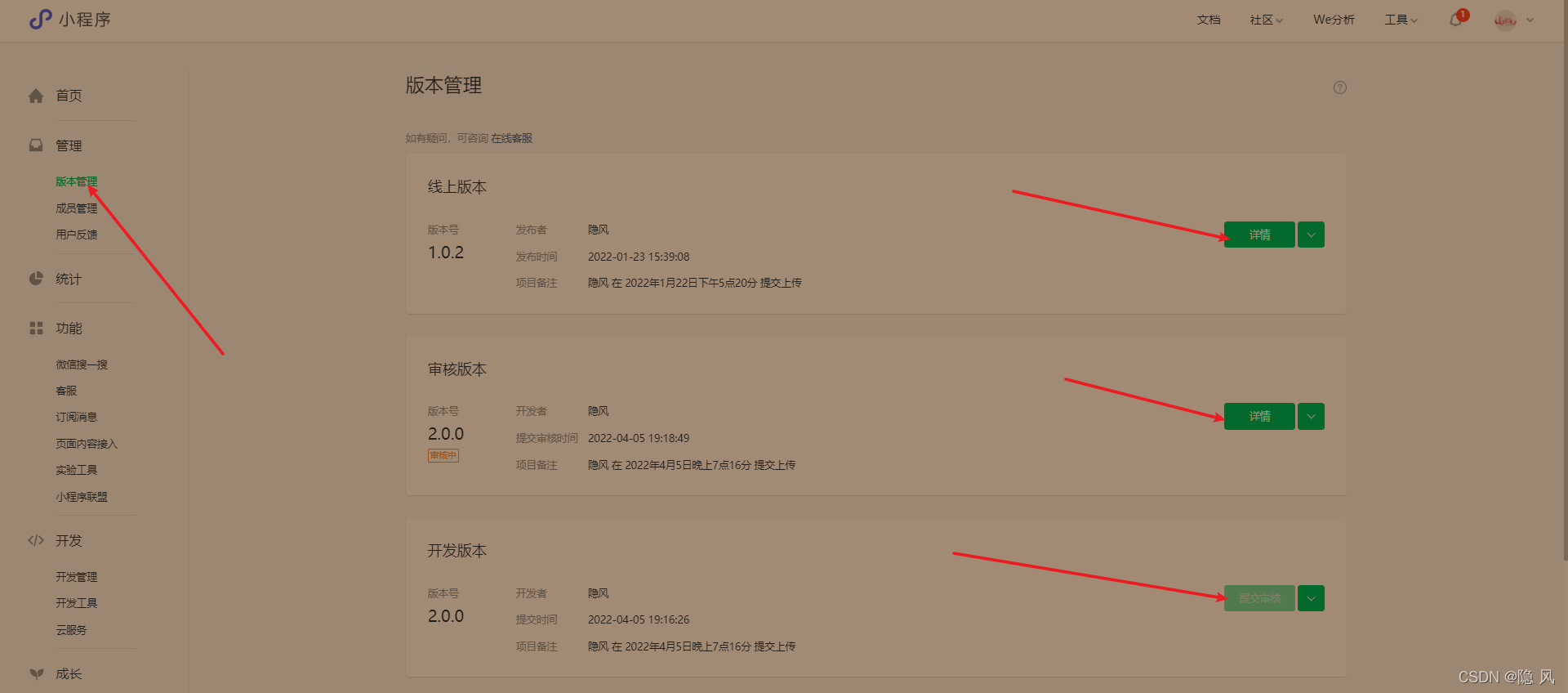
4、发布微信小程序
发布流程参考这篇博客恋爱话术微信小程序
兄弟们可以扫描下面的太阳码进行体验哈

5、总结
源码地址在这哈,会保持一直开源,希望兄弟们多多支持,下了源码的老铁麻烦点个star哈
// 下了源码的老铁麻烦点个star哈

https://gitee.com/yinfeng-code/love-chat-wx.git
肝文不易,希望对其他单身或者恋爱中的兄弟们有所帮助,也希望兄弟们关注加三连支持一波哈
微信小程序实战,用vue3实现每日浪漫情话推荐~的更多相关文章
- [转]微信小程序之购物车 —— 微信小程序实战商城系列(5)
本文转自:http://blog.csdn.net/michael_ouyang/article/details/70755892 续上一篇的文章:微信小程序之商品属性分类 —— 微信小程序实战商城 ...
- [转]微信小程序之购物数量加减 —— 微信小程序实战商城系列(3)
本文转自:http://blog.csdn.net/michael_ouyang/article/details/70194144 我们在购买宝贝的时候,购物的数量,经常是我们需要使用的,如下所示: ...
- [转]微信小程序之加载更多(分页加载)实例 —— 微信小程序实战系列(2)
本文转自;http://blog.csdn.net/michael_ouyang/article/details/56846185 loadmore 加载更多(分页加载) 当用户打开一个页面时,假设后 ...
- 【微信小程序】转载:微信小程序实战篇-下拉刷新与加载更多
下拉刷新 实现下拉刷新目前能想到的有两种方式 1. 调用系统的API,系统有提供下拉刷新的API接口 当然,你可以直接在全局变量app.json的window里面配置上面这个属性,这样整个项目都允许下 ...
- 微信小程序实战篇:商品属性联动选择(案例)
本期的微信小程序实战篇来做一个电商网站经常用到的-商品属性联动选择的效果,素材参考了一点点奶茶. 效果演示: 商品属性联动.gif 代码示例 1.commodity.xml <!-- < ...
- 微信小程序实战 购物车功能
代码地址如下:http://www.demodashi.com/demo/12400.html 一.准备工作 软件环境:微信开发者工具 官方下载地址:https://mp.weixin.qq.com/ ...
- 微信小程序实战之天气预报
原文:微信小程序实战之天气预报 这个案例是仿UC中天气界面做的中间也有点出入,预留了显示当前城市名字和刷新图标的位置,自己可以写下,也可以添加搜索城市.值得注意的是100%这个设置好像已经不好使了,可 ...
- 微信小程序实战之百思不得姐精简版
原文:微信小程序实战之百思不得姐精简版 微信小程序基本组件和API已撸完,总归要回到正题的,花了大半天时间做了个精简版的百思不得姐,包括段子,图片,音频,视频,四个模块.这篇就带着大家简述下这个小的A ...
- WordPress 网站开发“微信小程序“实战(三)
本文是"WordPress 开发微信小程序"系列的第三篇,本文记录的是开发"DeveWork+"小程序1.2 版本的过程.建议先看完第一篇.第二篇再来阅读本文. ...
随机推荐
- 在基于ABP框架的前端项目Vue&Element项目中采用日期格式处理,对比Moment.js和day.js的处理
Day.js 是一个轻量的处理时间和日期的 JavaScript 库,和 Moment.js 的 API 设计保持完全一样. 如果您曾经用过 Moment.js, 那么您已经知道如何使用 Day.js ...
- vue-cli实现异步请求返回mock模拟数据
在前后端分离开发的过程中,前端开发过程中,页面的数据显示一般都是写死的静态数据,也就是没有经过接口,直接写死在代码中的,在后端给出接口后,再替换为接口数据,为了减少对接成本,mock就出现了.通过预先 ...
- 浏览器输入URL,按下回车后发生什么?
大致流程 URL 解析 DNS 查询 TCP 连接 服务器处理请求 浏览器接受响应 浏览器解析渲染页面 断开连接
- python的matplotlib.pyplot绘制甘特图
博主本来就想简单地找一下代码,画一幅甘特图,结果百度之后发现甘特图的代码基本都不是用matplotlib库,但是像柱状图等统计图通常都是用这个库进行绘制的,所以博主就花了一些时间,自己敲了一份代码,简 ...
- kubernetes关于证书配置得问题总结
总结证书配置 1.证书首先分为两种配置方式, 1) 一种是在集群中配置 2) 一种是在上游负载均衡中配置. 1)https证书在集群中配置,并域名直接解析到集群的ingress-nginx-contr ...
- 阿里一面,说说你了解zookeeper的应用场景有哪些?
1.前言 又到了金三银四的时候,大家都按耐不住内心的躁动,我在这里给大家分享下之前面试中遇到的一个知识点(zookeeper应用场景),希望对大家有些帮助.如有不足,欢迎大佬们指点指点. 2.zook ...
- 前端好用API之Fullscreen
前情 在前端开发需求中,特别网页有视频需求时,需要做视频全屏功能,或者在某些可视化大屏项目也要做全屏. Fullscreen介绍 让你可以简单地控制浏览器,使得一个元素与其子元素,如果存在的话,可以占 ...
- I 安装饮水机 中国石油大学新生训练赛#10
问题 I: 安装饮水机 时间限制: 1 Sec 内存限制: 128 MB提交 状态 题目描述 为倡导城市低碳生活,市文明办计划举办马拉松比赛,为确保比赛安全,沿途设置了一些观察点.每个观察点派一个观 ...
- 西门子S7-1200PLC不让下载一直报“模块具有激活的测试和调试功能,防止下载到设备”解决方法
错误如图 这是因为PLC被强制了,导致下载会报这类错误.取消强制就可以下载. 或者将cpu重置为出厂设置,也能再次下载. 参考:https://www.ad.siemens.com.cn/servic ...
- 半吊子菜鸟学Web开发 -- PHP学习 1-基础语法
1索引数组 $fruit = array("苹果","香蕉","菠萝"): print_r($fruit); 索引数组的初始化,有三种方式: ...