
Android:ScrollView和SwipeRefreshLayout高度测量
今天组里的同事要做一个奇葩的效果,要求在ScrollView里嵌套一个RefreshLayout。类似代码如下:
<?xml version="1.0" encoding="utf-8"?>

<LinearLayout xmlns:android="http://schemas.android.com/apk/res/android"

    android:layout_width="match_parent"

    android:layout_height="match_parent"

    android:orientation="vertical">

    //红色背景

    <ScrollView

        android:layout_width="match_parent"

        android:layout_height="match_parent"

        android:background="#ff00ff">

            //黄色背景

            <android.support.v4.widget.SwipeRefreshLayout

                android:layout_width="match_parent"

                android:layout_height="fill_parent"

                android:background="#ffff00">

                //黑色背景

                <LinearLayout

                    android:layout_width="match_parent"

                    android:background="#000000"

                    android:layout_height="100dp" />

            </android.support.v4.widget.SwipeRefreshLayout>

    </ScrollView>

</LinearLayout>
期望效果是这样的:
 (蓝色部分是ToolsBar,请忽略)
而实际效果是这样的:
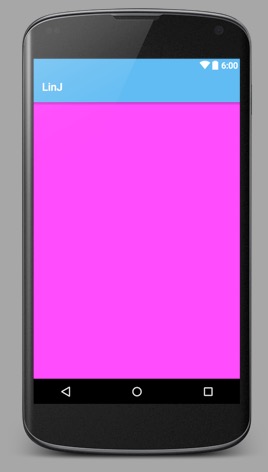
好奇怪,明明设置了SwipeRefreshLayout的高度是fill_parent,为何完全不显示?要知道,在SwipeRefreshLayout内部还设置了一个高度为100dp的LinearLayout,正常来说SwipeRefreshLayout最少也占据了100dp的高度啊,现在的高度居然为0。
这个问题得分两部分说明:
1.ScrollView的高度测量。
2.SwipeRefreshLayout的高度测量。
在这之前,先简单介绍一下View测量的三种模式(mode),具体的关于View的测量流程不细说,可到网上找些资料。

AT_MOST:最大尺寸模式,一般设置为wrap_content时会使用该模式测量,子View不会超过父View给与的最大宽高。
EXACTLY:精确模式,一般设置为fill_parent时会使用该测量模式,父View给与多少宽高,子View就使用多少。
UNSPECIFIED:未指定模式,子View测量出来有多大就有多大,不受父View给与的宽高影响。
关于ScrollView的高度测量,是在这篇文章中找到原因和解决方案的(老外的,需要翻墙)。重点在于fillViewport属性。我们先把布局文件中的SwipeRefreshLayout换成LinearLayout。看下效果
<?xml version="1.0" encoding="utf-8"?>

<LinearLayout xmlns:android="http://schemas.android.com/apk/res/android"

    android:layout_width="match_parent"

    android:layout_height="match_parent"

    android:orientation="vertical">

    //红色背景

    <ScrollView

        android:layout_width="match_parent"

        android:layout_height="match_parent"

        android:background="#ff00ff">

        //黄色背景

        <LinearLayout

            android:layout_width="match_parent"

            android:layout_height="fill_parent"

            android:background="#ffff00">

            //黑色背景

            <LinearLayout

                android:layout_width="match_parent"

                android:layout_height="100dp"

                android:background="#000000" />

        </LinearLayout>

    </ScrollView>

</LinearLayout>

我们会发现,尽管已经将ScrollView内部的LinearLayout设置成fill_parent,它的高度仍旧只有100dp。接下来将ScrollView的fillViewport设置为true。
<?xml version="1.0" encoding="utf-8"?>

<LinearLayout xmlns:android="http://schemas.android.com/apk/res/android"

    android:layout_width="match_parent"

    android:layout_height="match_parent"

    android:orientation="vertical">

    //红色背景

    <ScrollView

        android:layout_width="match_parent"

        android:layout_height="match_parent"

        android:fillViewport="true"

        android:background="#ff00ff">

        //黄色背景

        <LinearLayout

            android:layout_width="match_parent"

            android:layout_height="fill_parent"

            android:background="#ffff00">

            //黑色背景

            <LinearLayout

                android:layout_width="match_parent"

                android:layout_height="100dp"

                android:background="#000000" />

        </LinearLayout>

    </ScrollView>

</LinearLayout>

正常了,LinearLayout填充满了ScrollView的高度。
接下去看看ScrollView的和测量相关的几个方法:
 @Override

    protected void onMeasure(int widthMeasureSpec, int heightMeasureSpec) {

        super.onMeasure(widthMeasureSpec, heightMeasureSpec);

        if (!mFillViewport) {

            return;

        }

        final int heightMode = MeasureSpec.getMode(heightMeasureSpec);

        if (heightMode == MeasureSpec.UNSPECIFIED) {

            return;

        }

        if (getChildCount() > 0) {

            final View child = getChildAt(0);

            int height = getMeasuredHeight();

            if (child.getMeasuredHeight() < height) {

                final FrameLayout.LayoutParams lp = (LayoutParams) child.getLayoutParams();

                int childWidthMeasureSpec = getChildMeasureSpec(widthMeasureSpec,

                        mPaddingLeft + mPaddingRight, lp.width);

                height -= mPaddingTop;

                height -= mPaddingBottom;

                int childHeightMeasureSpec =

                        MeasureSpec.makeMeasureSpec(height, MeasureSpec.EXACTLY);

                child.measure(childWidthMeasureSpec, childHeightMeasureSpec);

            }

        }

    }

@Override

    protected void measureChild(View child, int parentWidthMeasureSpec, int parentHeightMeasureSpec) {

        ViewGroup.LayoutParams lp = child.getLayoutParams();

        int childWidthMeasureSpec;

        int childHeightMeasureSpec;

        childWidthMeasureSpec = getChildMeasureSpec(parentWidthMeasureSpec, mPaddingLeft

                + mPaddingRight, lp.width);

        childHeightMeasureSpec = MeasureSpec.makeMeasureSpec(0, MeasureSpec.UNSPECIFIED);

        child.measure(childWidthMeasureSpec, childHeightMeasureSpec);

    }

@Override

    protected void measureChildWithMargins(View child, int parentWidthMeasureSpec, int widthUsed,

            int parentHeightMeasureSpec, int heightUsed) {

        final MarginLayoutParams lp = (MarginLayoutParams) child.getLayoutParams();

        final int childWidthMeasureSpec = getChildMeasureSpec(parentWidthMeasureSpec,

                mPaddingLeft + mPaddingRight + lp.leftMargin + lp.rightMargin

                        + widthUsed, lp.width);

        final int childHeightMeasureSpec = MeasureSpec.makeMeasureSpec(

                lp.topMargin + lp.bottomMargin, MeasureSpec.UNSPECIFIED);

        child.measure(childWidthMeasureSpec, childHeightMeasureSpec);

    }
看下源码就会知道,ScrollView继承于FrameLayout,所以super.onMeasure(widthMeasureSpec, heightMeasureSpec);就是执行了FrameLayout的高度测量方法。但是这里重写了measureChildWithMargins方法,在这一步中,将可分配高度设置成了MeasureSpec.makeMeasureSpec(lp.topMargin + lp.bottomMargin, MeasureSpec.UNSPECIFIED),这导致了子View的fill_parent无效了。(这一步不懂得可以看下View测量的原理和MeasureSpec的几种mode)。
所以在super.onMeasure后,子View只能获取到它本身的高度(子View的子View的最大高度),但假如将fillViewport设置为true,ScrollView又会调用另外一步测量:
1.获取第一个子View,在此就是上述xml文件中的LinearLayout
2.获取ScrollView高度,由于设置了ScrollView高度为fill_parent,因此就是屏幕高度。
2.获取子View被测量后的高度(前面通过super.onMeasure测量获取),假如子View的高度小于ScrollView高度,会进行第二次的测量,这次测量的参数是这样的:int childHeightMeasureSpec =
MeasureSpec.makeMeasureSpec(height, MeasureSpec.EXACTLY);
即子View能分配的高度为ScrollView自身高度。
这样,当ScrollView的子View为LinearLayout时,只要设置fillViewort为true,就能实现我们想要的效果了,但是改为SwipeRefreshLayout看看
<?xml version="1.0" encoding="utf-8"?>

<LinearLayout xmlns:android="http://schemas.android.com/apk/res/android"

    android:layout_width="match_parent"

    android:layout_height="match_parent"

    android:orientation="vertical">

    //红色背景

    <ScrollView

        android:layout_width="match_parent"

        android:layout_height="match_parent"

        android:fillViewport="true"

        android:background="#ff00ff">

        //黄色背景

        <android.support.v4.widget.SwipeRefreshLayout

            android:layout_width="match_parent"

            android:layout_height="fill_parent"

            android:background="#ffff00">

            //黑色背景

            <LinearLayout

                android:layout_width="match_parent"

                android:layout_height="100dp"

                android:background="#000000" />

        </android.support.v4.widget.SwipeRefreshLayout>

    </ScrollView>

</LinearLayout>

居然全黑了!那就表示SwipeRefreshLayout内部的LinearLayout变成了fill_parent了,但是它的height是固定的100dp啊。
好吧,继续看SwipeRefreshLayout的onMeasure方法:
@Override

    public void onMeasure(int widthMeasureSpec, int heightMeasureSpec) {

        super.onMeasure(widthMeasureSpec, heightMeasureSpec);

        if (mTarget == null) {

            ensureTarget();

        }

        if (mTarget == null) {

            return;

        }

        mTarget.measure(MeasureSpec.makeMeasureSpec(

                getMeasuredWidth() - getPaddingLeft() - getPaddingRight(),

                MeasureSpec.EXACTLY), MeasureSpec.makeMeasureSpec(

                getMeasuredHeight() - getPaddingTop() - getPaddingBottom(), MeasureSpec.EXACTLY));

        mCircleView.measure(MeasureSpec.makeMeasureSpec(mCircleWidth, MeasureSpec.EXACTLY),

                MeasureSpec.makeMeasureSpec(mCircleHeight, MeasureSpec.EXACTLY));

       ....

    }
这里的mTarget就是SwipeRefreshLayout的第一个子View,即我们上述xml中的LinearLayout。我们可以看到这里传入的高度是
 MeasureSpec.makeMeasureSpec(

                getMeasuredHeight() - getPaddingTop() - getPaddingBottom(), MeasureSpec.EXACTLY)
很明显,子View会被强制设置成SwipeRefreshLayout的高度。
在此所有问题都解决了,来个总结:
1.ScrollView内部的View的测量方法会默认设置成UNSPECIFIED,这种情况下,子View会根据自身实际高度显示,所以设置fill_parent是无效的。
2.设置ScrollView的fillViewport属性为true,这种情况下,在子View高度小于父View高度时,会重新进行一次高度测量,并且强行将子View高度设置为父View高度。而子View高度大于父View高度时,不受影响。即原来没满屏会强行变成强行满屏,原来满屏了可以继续滚动。
3.SwipeRefreshLayout的高度测量方法,会强行将子View设置成自身高度。
最后,ScrollView+SwipeRefreshLayout的嵌套组合是种很蠢得方法。。。在我们解决了上面的问题后,直接摒弃了。仅当学习新知识了。
Android:ScrollView和SwipeRefreshLayout高度测量的更多相关文章
- Android重绘ListView高度
Android重绘ListView高度 经常会有这样需求,需要ListView默认将所有的条目显示出来,这就需要外层使用ScrollView,ScrollView里面放置一个重绘高度的ListView ...
- 【Android】使用 SwipeRefreshLayout 实现下拉刷新
今天在codepath 上看到一个开源项目 [点击查看]使用到了 SwipeRefreshLayout 实现了下拉刷新,但演示样例并不完整,于是自己就动手写了下.之前看到郭霖的博客上也有介绍下拉刷新, ...
- Android ScrollView监听滑动到顶部和底部的两种方式(你可能不知道的细节)
Android ScrollView监听滑动到顶部和底部,虽然网上很多资料都有说,但是不全,而且有些细节没说清楚 使用场景: 1. 做一些复杂动画的时候,需要动态判断当前的ScrollView是否滚动 ...
- Android ScrollView用法
Android ScrollView用法 今天试着使用了一下Android的滚轮,以下是一个小小的测试,读取测试文件,主要是使用scrollTo函数和getScrollY(),程序点击BUTTON按钮 ...
- Android ScrollView嵌套ScrollView滚动的问题解决办法
引用:http://mengsina.iteye.com/blog/1707464 http://fenglog.com/article.asp?id=449 Android ScrollView嵌套 ...
- Android ScrollView嵌套GridView导致GridView只显示一行item
Android ScrollView嵌套GridView导致GridView只显示一行item Android ScrollView在嵌套GridView时候,会导致一个问题发生:GridView只显 ...
- SwipeRefreshLayout的高度测量
感谢此作者的分享 http://www.cnblogs.com/linjzong/p/5221604.html 若SwipeRefreshLayout的子布局为一个线性布局LinearLayout, ...
- android MeasureSpec的三个测量模式
1.MeasureSpec含义 其实可以去看MeasureSpec的文档,里面对MeasureSpec的作用介绍得很清楚.MeasureSpec封装了父布局传递给子布局的布局要求,每个MeasureS ...
- Android ScrollView与ListView的冲突解决办法汇总
1. public void setListViewHeight(){ ListAdapter listadapter = lv.getAdapter(); if (listadapter == n ...
随机推荐
- jsp中把js变量赋给java变量,或者将java变量赋给js变量怎么做?
在jsp中经常会遇到把js变量赋给java变量,或者将java变量赋给js变量的情况,在此将通用的处理方法小结如下: java变量传给js好办,var a=”<%=javaParam%>“ ...
- widow系统 LuaForWindows,安装 luasocket
参考 http://94it.net/a/jingxuanboke/2013/0625/49052.html 1. 我用的是 LuaForWindows_v5.1.4-46.exe 可以在我的百度网盘 ...
- three.js入门系列之旋转的圆台、球体、正方体
先来张图: 一.调整机位和辅助线 由上述代码可知,现在的机位是三维坐标轴上的点(2,2,2),方框的那一句很重要,有了这一句,你将获得上帝视角!!! 接下来添加辅助线(立体空间三轴): 这样就添加了一 ...
- iOS开发之解决CocoaPods中“.h”头文件找不到的问题,简单粗暴的方法
如果是拖进工程中的framework或者第三方文件,如果找不到,删除了重新添加或者修改search path地址,如果不知道怎么修改,在工程文件夹中,找到对应的文件,然后将文件拖到修改文件地址的位置, ...
- js 以函数名作为参数动态执行 函数
function myFunc() { console.log(11111); } test("myFunc"); function test(funcName) { if(typ ...
- [Python] RuntimeError: Invalid DISPLAY variable
1.问题:在本地用matplotlib绘图可以,但是在ssh远程绘图的时候会报错 RuntimeError: Invalid DISPLAY variable 2.原因:matplotlib的默认ba ...
- iOS RUN LOOP 是个什么东西?
RUN Loop是什么? 1.runloop是事件接收和分发机制的一个实现. 2.什么时候使用runloop 当需要和该线程进行交互的时候.主线程默认有runloop.当自己启动一个线程,如果只是 ...
- Spring 管理Filter和Servlet
本文转载自:http://www.open-open.com/lib/view/open1417248512252.html 在使用spring容器的web应用中,业务对象间的依赖关系都可以用cont ...
- JavaScript 定时任务多事件冲突问题
var iCount = setInterval(ChangeTime, 3500);//3.5秒请求一次函数 function ChangeTime() { $.ajax({ type: " ...
- scrapy 的基本命令
scrapy stratproject projectname ##创建一个项目 scrapy genspider myspidername fider ##创建一个spider文件 scrapy ...