
GIT使用—创建并使用远程版本库
远程版本库
(1)创建一个裸版本库
[root@localhost tmp]# git init fluff2

Initialized empty Git repository in /tmp/fluff2/.git/

[root@localhost tmp]# ls

fluff2

[root@localhost tmp]# git init --bare fluff

Initialized empty Git repository in /tmp/fluff/

[root@localhost tmp]# ls

fluff  fluff2
(2)远程版本库
Git使用远程版本库和远程追踪分支来引用另一个版本库,并有助于与该版本库建立连接。
常见命令:
- git fetch 从远程版本库抓取对象及其相关的元数据
- git pull 跟fetch类似,但合并修改到相应本地分支
- git push 转移对象及其相关的元数据到远程版本库
- git ls-remote 显示一个给定的远程版本库的引用列表
分支类别:
- 远程追踪分支与远程版本库相关联,专门用来追踪远程版本库中每个分支的变化。
- 本地追踪分支与远程追踪分支相配对。它是一种集成分支,用于收集本地开发和远程追踪分支中的变更。
- 任何本地的非追踪分支通常称为特性或开发分支。
- 为了完成命名空间,远程分支是一个设在非本地的远程版本库的分支。
示例:
创建权威版本库public_html.git
用一个初始版本库填充Depot
[root@localhost tmp]# cd Depot/

[root@localhost Depot]# git clone --bare /root/public_html public_html.git

Initialized empty Git repository in /tmp/Depot/public_html.git/

[root@localhost Depot]# ls

public_html.git

[root@localhost Depot]# cd /root/public_html/

[root@localhost public_html]# ls   #有工作目录

foo.html  index.html  yes.html

[root@localhost public_html]# ls -aF

./  ../  foo.html  .git/  index.html  yes.html

[root@localhost public_html]# ls -aF .git

./   BISECT_ANCESTORS_OK  BISECT_NAMES  branches/       config       HEAD    index  logs/     ORIG_HEAD

../  BISECT_LOG           BISECT_START  COMMIT_EDITMSG  description  hooks/  info/  objects/  refs/

[root@localhost public_html]# cd /tmp/Depot/

[root@localhost Depot]# ls -aF public_html.git/   #没有工作目录

./  ../  branches/  config  description  HEAD  hooks/  info/  objects/  packed-refs  refs/

[root@localhost Depot]# cd public_html.git/

[root@localhost public_html.git]# cat config

[core]

	repositoryformatversion = 0

	filemode = true

	bare = true
因为在克隆过程中使用了--bare选项,所以Git没有引入一般默认的origin远程版本库。
制作自己的origin远程版本库
[root@localhost public_html.git]# cd /root/public_html/

[root@localhost public_html]# cat .git/config

[core]

	repositoryformatversion = 0

	filemode = true

	bare = false

	logallrefupdates = true

[root@localhost public_html]# git remote add origin /tmp/Depot/public_html

[root@localhost public_html]# cat .git/config

[core]

	repositoryformatversion = 0

	filemode = true

	bare = false

	logallrefupdates = true

[remote "origin"]

	url = /tmp/Depot/public_html

	fetch = +refs/heads/*:refs/remotes/origin/*
在远程版本库中建立新的远程追踪分支,代表来自远程版本库的分支,以完成建立origin远程版本库进程
[root@localhost public_html]# git branch -a

* master

  newtest

  testing

[root@localhost public_html]# git remote update

Fetching origin

From /tmp/Depot/public_html

 * [new branch]      master     -> origin/master

 * [new branch]      newtest    -> origin/newtest

 * [new branch]      testing    -> origin/testing

[root@localhost public_html]# git branch -a

* master

  newtest

  testing

  remotes/origin/master  #远程追踪分支:掌握和跟踪远程版本苦苦master分支中的提交

  remotes/origin/newtest

  remotes/origin/testing
在版本库中进行开发
[root@localhost public_html]# git show-branch -a

* [master] add test.txt

 ! [newtest] newtest yes

  ! [testing] newtest yes

   ! [origin/master] add test.txt

    ! [origin/newtest] newtest yes

     ! [origin/testing] newtest yes

------

 ++ ++ [newtest] newtest yes

 ++ ++ [newtest^] removed test.txt

*+++++ [master] add test.txt

[root@localhost public_html]# vim fuzzy.txt

[root@localhost public_html]# cat fuzzy.txt

Fuzzy Wuzzy was a bear

Fuzzy Wuzzy had no hair

Fuzzy Wuzzy wasn't very fuzzy,

Was he?

[root@localhost public_html]# git add fuzzy.txt

[root@localhost public_html]# git commit -m "add fuzzy"

[master 5571b42] add fuzzy

 1 files changed, 4 insertions(+), 0 deletions(-)

 create mode 100644 fuzzy.txt

[root@localhost public_html]# git show-branch -a

* [master] add fuzzy

 ! [newtest] newtest yes

  ! [testing] newtest yes

   ! [origin/master] add test.txt

    ! [origin/newtest] newtest yes

     ! [origin/testing] newtest yes

------

*      [master] add fuzzy

 ++ ++ [newtest] newtest yes

 ++ ++ [newtest^] removed test.txt

*+++++ [origin/master] add test.txt
推送变更
[root@localhost public_html]# git push origin master

Counting objects: 4, done.

Delta compression using up to 4 threads.

Compressing objects: 100% (3/3), done.

Writing objects: 100% (3/3), 362 bytes, done.

Total 3 (delta 0), reused 0 (delta 0)

Unpacking objects: 100% (3/3), done.

To /tmp/Depot/public_html

   b0b257c..5571b42  master -> master
Git提取master分支的变更,将它们捆绑在一起,发送到名为origin的远程版本库中。
探测远程版本库并验证是否更新
在本地

[root@localhost public_html]# cd /tmp/Depot/public_html.git/

[root@localhost public_html.git]# git show-branch

! [master] add fuzzy

 * [newtest] newtest yes

  ! [testing] newtest yes

---

+   [master] add fuzzy

 *+ [newtest] newtest yes

 *+ [newtest^] removed test.txt

+*+ [master^] add test.txt

在不同物理机

[root@localhost public_html.git]# git ls-remote origin

然后用git rev-parse HEAD或git show ID来展示那些与当前本地分支匹配的提交ID
添加新的开发人员
[root@localhost tmp]# mkdir bobo

[root@localhost tmp]# ls

bobo  Depot  fluff  fluff2

[root@localhost tmp]# cd bobo/

[root@localhost bobo]# ls

[root@localhost bobo]# git clone /tmp/Depot/public_html.git

Initialized empty Git repository in /tmp/bobo/public_html/.git/

[root@localhost bobo]# ls

public_html

[root@localhost bobo]# cd public_html/

[root@localhost public_html]# ls   #这里因为这前建立origin时原版本库在newtest分支上

foo.html  index.html  yes.html

[root@localhost public_html]# git branch

* newtest

[root@localhost public_html]# ls -aF

./  ../  foo.html  .git/  index.html  yes.html

[root@localhost public_html]# cd .git/

[root@localhost .git]# ls

branches  config  description  HEAD  hooks  index  info  logs  objects  packed-refs  refs

[root@localhost .git]# cat config

[core]

	repositoryformatversion = 0

	filemode = true

	bare = false

	logallrefupdates = true

[remote "origin"]

	fetch = +refs/heads/*:refs/remotes/origin/*

	url = /tmp/Depot/public_html.git

[branch "newtest"]   #此时有一个默认的远程版本库

	remote = origin

	merge = refs/heads/newtest

[root@localhost .git]# git remote show origin

* remote origin

  Fetch URL: /tmp/Depot/public_html.git

  Push  URL: /tmp/Depot/public_html.git

  HEAD branch (remote HEAD is ambiguous, may be one of the following):

    newtest

    testing

  Remote branches:

    master  tracked

    newtest tracked

    testing tracked

  Local branch configured for 'git pull':

    newtest merges with remote newtest

  Local ref configured for 'git push':

    newtest pushes to newtest (up to date)

[root@localhost public_html]# git branch -a

* newtest

  remotes/origin/HEAD -> origin/newtest  #远程版本库认为的活动分支

  remotes/origin/master

  remotes/origin/newtest

  remotes/origin/testing
修改提交,推送到仓库中的主版本库
[root@localhost public_html]# cat yes.html

AAAAAA

[root@localhost public_html]# vim yes.html

[root@localhost public_html]# cat yes.html

BBBBBBB

[root@localhost public_html]# git diff

diff --git a/yes.html b/yes.html

index b068058..6a4ca1b 100644

--- a/yes.html

+++ b/yes.html

@@ -1 +1 @@

-AAAAAA

+BBBBBBB

[root@localhost public_html]# git commit yes.html

[newtest c24a693] change yes.html

 1 files changed, 1 insertions(+), 1 deletions(-)

[root@localhost public_html]# git push

Counting objects: 5, done.

Delta compression using up to 4 threads.

Compressing objects: 100% (2/2), done.

Writing objects: 100% (3/3), 253 bytes, done.

Total 3 (delta 1), reused 0 (delta 0)

Unpacking objects: 100% (3/3), done.

To /tmp/Depot/public_html.git

   b488b19..c24a693  newtest -> newtest
获取版本库更新
(当其他人更新了文件,这时你需要刷新克隆版本库)
[root@localhost public_html]# git pull
pull意味着先执行fetch,然后执行merge或rebase。
push和fetch都负责在版本库之间传输数据,但方向相反。
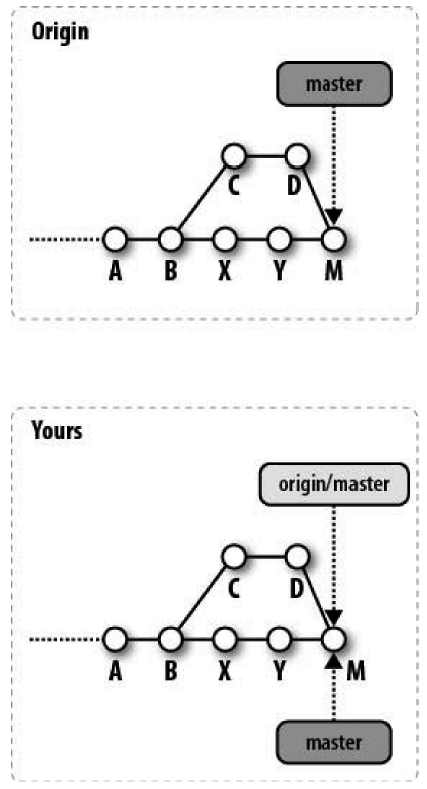
(3)图解远程版本库开发周期
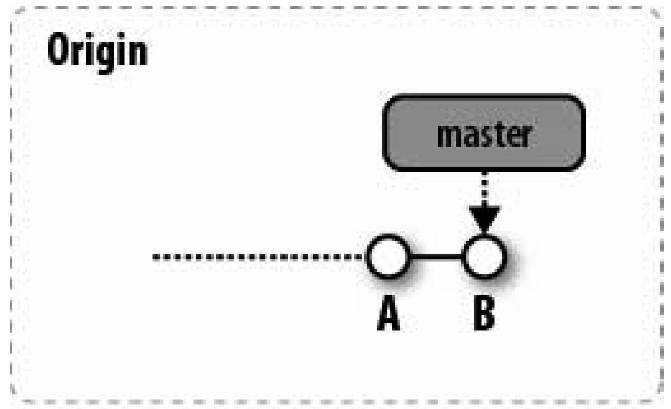
最初的开发
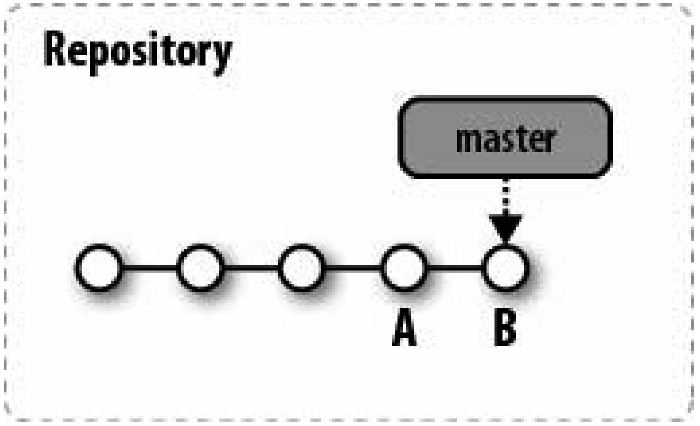
克隆产生两个单独的版本库

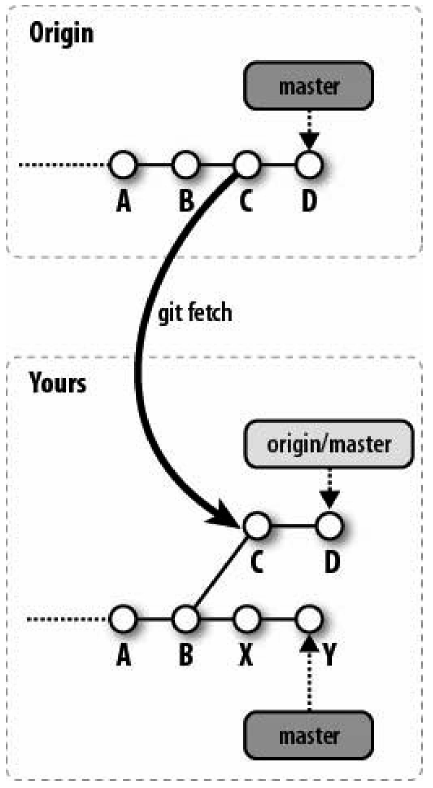
交替的历史记录

获取交替记录
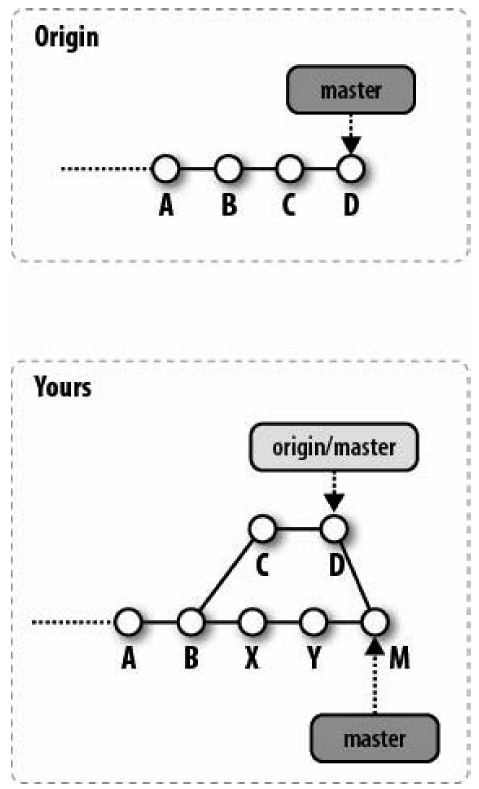
合并历史记录
推送合并后的历史记录
GIT使用—创建并使用远程版本库的更多相关文章
- Git远程版本库
目前为止,所有的Git操作都是在一个本地版本库中.现在是时候来体验Git分布式的特性了. 说到远程版本库,大家最为熟悉的就是GitHub了,它实际上就相当于一个远程版本库,托管着所有的本地版本库的提交 ...
- git 创建远程版本库(亲测有效)
一.github远程版本库 1.创建SSH Key(windows) ssh-keygen -t rsa -C "youremail@example.com" 2.连接版本 ...
- 关于Git远程版本库
Git作为分布式版本库控制系统,每个人都是本地版本库的主人,可以在本地的版本库中随心所欲的创建分支和里程碑. 当需要多人协作时,问题就出现了: 1.如何避免因为用户把所有的本地分支都推送到了共享版本库 ...
- Git学习笔记---安装与初始化 连接远程版本库
1.Git的安装 sudo apt-get install git 用的是linux(ubuntu)系统,安装非常简单,上面一条命令就够了. 2.初次运行的配置 Git 提供了一个叫做 git con ...
- Git的使用(3) —— 远程版本库的操作(GitHub)
1. 配置SSH (1) GitHub 登陆GitHub后,点击右上角头像,选择 Setting . 在左面栏目中选择"SSH and GPG keys". 打开生成的SSH公钥文 ...
- GitHub学习三-远程版本库更新与提交
1.远程版本库更新 一般来说,将本地与远程相关联之后,首先将数据从远程更新下来再上传比较好. 输入 git pull origin master 如果新建版本库的话勾选了初始化包含readme.md, ...
- git 远程版本库,github提供服务原理,git自动更新发送邮件
1.安装好Linux,安装好Git(192.168.1.239) 2.创建一个用户zph(让此用户提供git on server),密码设置为12345678 # useradd zph # pass ...
- 关于git远程版本库的一些问题之解决
Part1:CentOS6.5免密码登录 修改/etc/ssh/sshd_config RSAAuthentication yesPubkeyAuthentication yesAuthorizedK ...
- git 远程版本库
[root@localhost workspace]# cd repos/ [root@localhost repos]# ll 总用量 drwxr-xr-x root root 12月 : hell ...
随机推荐
- 如何优化JAVA代码及提高执行效率
可供程序利用的资源(内存.CPU时间.网络带宽等)是有限的,优化的目的就是让程序用尽可能少的资源完成预定的任务.优化通常包含两方面的内容:减小代码的体积,提高代码的运行效率.本文讨论的主要是如何提高代 ...
- Tiny4412 Android 5.0 编译系统学习笔记
1.Android 编译系统概述 Build 系统中最主要的处理逻辑都在 Make 文件中,而其他的脚本文件只是起到一些辅助作用. 整个 Build 系统中的 Make 文件可以分为三类: ① Bui ...
- 【黑金原创教程】【Modelsim】【第三章】理想就是美丽
声明:本文为黑金动力社区(http://www.heijin.org)原创教程,如需转载请注明出处,谢谢! 黑金动力社区2013年原创教程连载计划: http://www.cnblogs.com/al ...
- 【BZOJ3881】[Coci2015]Divljak fail树+树链的并
[BZOJ3881][Coci2015]Divljak Description Alice有n个字符串S_1,S_2...S_n,Bob有一个字符串集合T,一开始集合是空的. 接下来会发生q个操作,操 ...
- Python全栈day17(文件处理)
一,文件处理流程 打开文件,得到文件句柄并赋值给一个变量 通过句柄对文件进行操作 关闭文件 二,文件打开模式 r只读 (默认打开模式是只读) w只写 a追加 三,文件操作实例 1.r读 read读取文 ...
- Tomcat----->软件密码学基础配置tomcat http连接器 https
公钥只能私钥解开,私钥只能公钥解开. 类似于别人给你一个盒子,你用他的盒子和自己盒子加密,他手中有他的钥匙和自己的钥匙,可以解开就既能证明是你发的也能相信内容. 每个数据有自己的数据指纹,数据指纹是由 ...
- Java/android 里ClassName.this和this的使用
如果在内部类里面用this就是指这个内部类的实例,而如果用OuterClassName.this就是它外面的那个类的实例 ClassName.this这个用法多用于在nested class(内部类) ...
- php格式化输出数组
写网页的时候经常需要在页面中打印数组,但格式特别难看,看看一个html神器吧<pre>标签,能非常标准的显示数组格式 使用的时候只需要这样打印你的数组就OK了,太好用了,神器! echo ...
- 监控之snmpd 服务
监控离不开数据采集,经常使用的Mrtg ,Cacti,Zabbix,等等监控软件都是通过snmp 协议进行数据采集的! 1 什么是snmp 协议? 简单网络管理协议(SNMP,Simple Netwo ...
- Django系列
1.Django框架 2.Django restframework 其他 django之contenttype