
OpenCV中OpenMP的使用
vs2010中调用openMP,并添加头文件#include<omp.h>
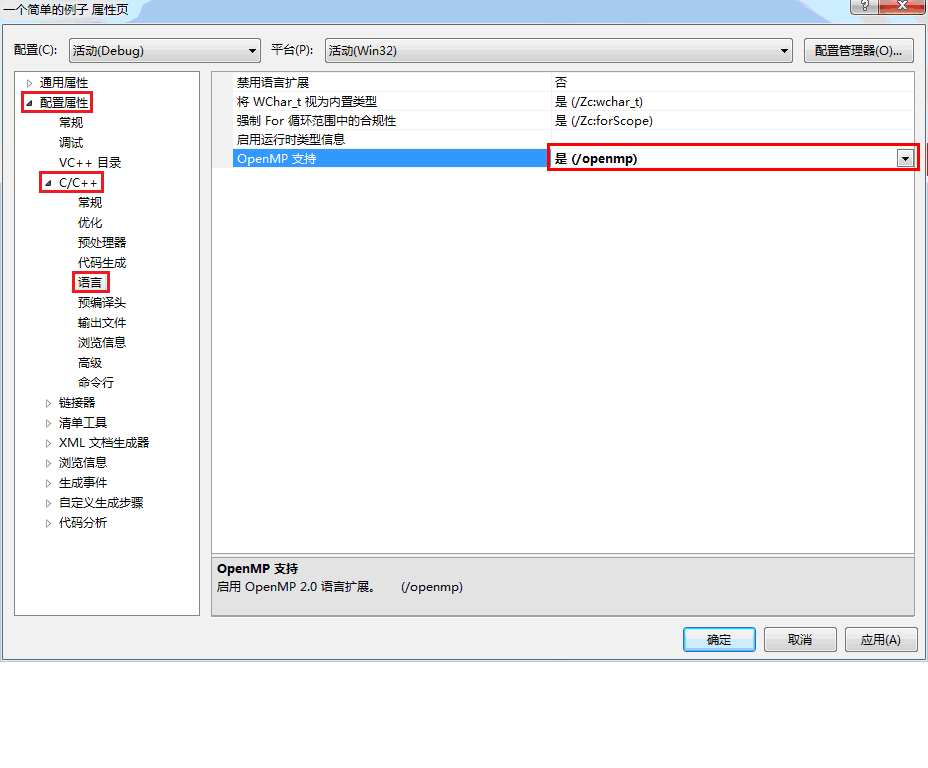
代码来源:
作者:gnuhpc
出处:http://www.cnblogs.com/gnuhpc/
#include "stdafx.h"

#include "cv.h"

#include "highgui.h"

#include <stdio.h>

#include <stdlib.h>

#include <omp.h>

#pragma comment(lib,"opencv_core2410d.lib")

#pragma comment(lib,"opencv_highgui2410d.lib")

#pragma comment(lib,"opencv_imgproc2410d.lib")

void EdgeOpenMP(IplImage *src,IplImage *dst,int thresh)

{

    int height    = src->height;

    int width     = src->width;

    int step      = src->widthStep;

    uchar *data1      = (uchar *)src->imageData;

    uchar *data2      = (uchar *)dst->imageData;

    int i=step;

    #pragma omp parallel for

    for(i=step+1;i<height*width;i++){

         if(abs(data1[i]-data1[i-1])>thresh || abs(data1[i]-data1[i-step])>thresh)

            data2[i]=255;/* 对于单通道,前后两帧差分大于门限

            或者对于多通道前后两帧的一个指标差分大于门限,则视为边缘*/

         else

            data2[i]=0;

    }

}

void Edge(IplImage *src,IplImage *dst,int thresh)

{

    int height    = src->height;

    int width     = src->width;

    int step      = src->widthStep;

    uchar *data1      = (uchar *)src->imageData;

    uchar *data2      = (uchar *)dst->imageData;

   int i=step;

    for(i=step+1;i<height*width;i++){

         if(abs(data1[i]-data1[i-1])>thresh || abs(data1[i]-data1[i-step])>thresh)

            data2[i]=255;

         else

            data2[i]=0;

    }

}

int main()

{

  char filename[512];

  IplImage *src,*edge1,*edge2;

  puts("File name:");

  gets(filename);

  src = cvLoadImage(filename,CV_LOAD_IMAGE_GRAYSCALE );

  edge1=cvCloneImage(src);

  edge2=cvCloneImage(src);

  cvNamedWindow("src", CV_WINDOW_AUTOSIZE);

  cvMoveWindow("src", 100, 100);

  cvShowImage( "src", src);

  cvNamedWindow("Edge", CV_WINDOW_AUTOSIZE);

  cvMoveWindow("Edge", 200, 100);

  cvNamedWindow("EdgeOpenMP", CV_WINDOW_AUTOSIZE);

  cvMoveWindow("EdgeOpenMP", 300, 100);

  /* 以上都是准备一些窗口和图形基本数据 */

  int tekrar=100;//运行次数

  int thresh=30;

  double start, end,t1, t2;

  /* 计算没有使用OpenMP优化的时间 */

  start= (double)cvGetTickCount();//记下开始的时钟计数,以便计算函数或用户代码执行时间

  for(int i=0;i<tekrar;i++)

    Edge(src,edge1,thresh);

  end= (double)cvGetTickCount();//记下结束的时钟计数

  t1= (end-start)/((double)cvGetTickFrequency()*1000.);//计算运行时间,以毫秒为单位

  printf( "Run time without OpenMP = %g ms\n", t1 );

  /* 计算使用了OpenMP优化的时间 */

  start= (double)cvGetTickCount();

  for(int i=0;i<tekrar;i++)

    EdgeOpenMP(src,edge2,thresh);

  end= (double)cvGetTickCount();

  t2= (end-start)/((double)cvGetTickFrequency()*1000.);

  printf( "Run time with OpenMP = %g ms\n", t2 );

  printf( "Performance ratio (%%) = %% %.1f \n", 100*(t1/t2-1) );

  cvShowImage( "Edge", edge1);

  cvShowImage( "EdgeOpenMP", edge2);

  cvWaitKey();

  cvDestroyWindow("Edge");

  cvDestroyWindow("EdgeOpenMP");

  cvReleaseImage(&src);

  cvReleaseImage(&edge1);

  cvReleaseImage(&edge2);

}
这是我的结果:


这里的测试结果:

http://blog.csdn.net/augusdi/article/details/8808226

  在cpp文件中添加如下代码:
- #include "stdafx.h"
- #include<omp.h>
- #include<iostream>
- usingnamespace std;
- //循环测试函数
- void test()
- {
- for(int i=0;i<10000;i++)
- {
- }
- }
- int _tmain(int argc,_TCHAR* argv[])
- {
- cout<<"这是一个串行测试程序!\n";
- double start = omp_get_wtime( );//获取起始时间
- for(int i = 0; i < 10000; i++)
- {
- test();
- }
- double end = omp_get_wtime( );
- cout<<"计算耗时为:"<<end -start<<"\n";
- cin>>end;
- return 0;
- }
#include "stdafx.h"

#include<omp.h>

#include<iostream>

usingnamespace std;

//循环测试函数

void test()

{

for(int i=0;i<10000;i++)

{

}

}

int _tmain(int argc,_TCHAR* argv[])

{

cout<<"这是一个串行测试程序!\n";

double start = omp_get_wtime( );//获取起始时间

for(int i = 0; i < 10000; i++)

{

test();

}

double end = omp_get_wtime( );

cout<<"计算耗时为:"<<end -start<<"\n";

cin>>end;

return 0;

}
以上代码中红色字体为添加的代码,以上程序是一个典型的串行程序,经过随机运行10次,其平均耗时约0.283273s(具体所耗时间跟测试计算机有密切的关系,测试电脑CPU采用Core I7 2630QM,4核)。
下面将其转换成并行程序,只需要在for循环加上#pragma omp parallel for即可,如下代码(注意红色部分):
- #include "stdafx.h"
- #include<omp.h>
- #include <iostream>
- using namespace std;
- //循环测试函数
- void test()
- {
- for(inti=0;i<10000;i++)
- {
- }
- }
- int _tmain(int argc, _TCHAR* argv[])
- {
- cout<<"这是一个并行测试程序!\n";
- doublestart = omp_get_wtime( );//获取起始时间
- #pragma ompparallel for
- for(inti = 0; i < 10000; i++)
- {
- test();
- }
- doubleend = omp_get_wtime( );
- cout<<"计算耗时为:"<<end -start<<"\n";
- cin>>end;
- return0;
- }
#include "stdafx.h"

#include<omp.h>

#include <iostream>

using namespace std;

//循环测试函数

void test()

{

for(inti=0;i<10000;i++)

{

}

}

int _tmain(int argc, _TCHAR* argv[])

{

cout<<"这是一个并行测试程序!\n";

doublestart = omp_get_wtime( );//获取起始时间

#pragma ompparallel for

for(inti = 0; i < 10000; i++)

{

test();

}

doubleend = omp_get_wtime( );

cout<<"计算耗时为:"<<end -start<<"\n";

cin>>end;

return0;

}
|
次数 |
串行 |
并行 |
|
1 |
0.283382 |
0.0746704 |
|
2 |
0.283654 |
0.0686404 |
|
3 |
0.283212 |
0.0536631 |
|
4 |
0.280234 |
0.0517737 |
|
5 |
0.283041 |
0.0717588 |
|
6 |
0.283126 |
0.0524264 |
|
7 |
0.281881 |
0.0580316 |
|
8 |
0.283301 |
0.0730386 |
|
9 |
0.284545 |
0.0745088 |
|
10 |
0.286353 |
0.0572926 |
|
平均值 |
0.283273 |
0.06358044 |
两种运行方式的结果如下图所示:

从上面的分析结果可见,采用OpenMP并行所耗时间仅为串行的22.44%,节约近4.5倍的时间。
OpenCV中OpenMP的使用的更多相关文章
- 立体视觉-opencv中立体匹配相关代码
三种匹配算法比较 BM算法: 该算法代码: view plaincopy to clipboardprint? CvStereoBMState *BMState = cvCreateStereoBMS ...
- opencv中Mat与IplImage,CVMat类型之间转换
opencv中对图像的处理是最基本的操作,一般的图像类型为IplImage类型,但是当我们对图像进行处理的时候,多数都是对像素矩阵进行处理,所以这三个类型之间的转换会对我们的工作带来便利. Mat类型 ...
- 解析opencv中Box Filter的实现并提出进一步加速的方案(源码共享)。
说明:本文所有算法的涉及到的优化均指在PC上进行的,对于其他构架是否合适未知,请自行试验. Box Filter,最经典的一种领域操作,在无数的场合中都有着广泛的应用,作为一个很基础的函数,其性能的好 ...
- OpenCV中IplImage图像格式与BYTE图像数据的转换
最近在将Karlsruhe Institute of Technology的Andreas Geiger发表在ACCV2010上的Efficent Large-Scale Stereo Matchin ...
- opencv中的SIFT,SURF,ORB,FAST 特征描叙算子比较
opencv中的SIFT,SURF,ORB,FAST 特征描叙算子比较 参考: http://wenku.baidu.com/link?url=1aDYAJBCrrK-uk2w3sSNai7h52x_ ...
- 混合高斯模型:opencv中MOG2的代码结构梳理
/* 头文件:OurGaussmix2.h */ #include "opencv2/core/core.hpp" #include <list> #include&q ...
- opencv中的.at方法
opencv中的.at方法是用来获取图像像素值得函数: interpolation:差值 histogram:直方图
- 【OpenCV】OpenCV中GPU模块使用
CUDA基本使用方法 在介绍OpenCV中GPU模块使用之前,先回顾下CUDA的一般使用方法,其基本步骤如下: 1.主机代码执行:2.传输数据到GPU:3.确定grid,block大小: 4.调用内核 ...
- openCV中IplImage的使用
http://blog.csdn.net/welcome_xu/article/details/7650680 IplImage结构详细分析 IplImage 结构解读: typedef stru ...
随机推荐
- VirtualBox: Resize a Fedora, CentOS, or Windows Dynamic Guest Virtual Disk (VDI) in VirtualBox
Here's the scenario: you've set up Dynamically Allocated Storage for the hard drive on your Guest VM ...
- 设子数组A[0:k]和A[k+1:N-1]已排好序(0≤K≤N-1)。试设计一个合并这2个子数组为排好序的数组A[0:N-1]的算法。
设子数组A[0:k]和A[k+1:N-1]已排好序(0≤K≤N-1).试设计一个合并这2个子数组为排好序的数组A[0:N-1]的算法.要求算法在最坏情况下所用的计算时间为O(N),只用到O(1)的辅助 ...
- iOS网络基础
转载请标明出处: http://blog.csdn.net/xmxkf/article/details/51376048 本文出自:[openXu的博客] 常用类 get请求 post请求 NSURL ...
- Freemarker 浅析
今天分享一下一个模板语言的使用,它就是Freemarker,有点类似与前些日子做Python的Django中的模板语言,其实原理上都是相似的.所以这里就不对那些基础性的语法类的直至进行讲解了,就拿几个 ...
- 剑指Offer——CVTE校招笔试题+知识点总结(Java岗)
剑指Offer(Java岗)--CVTE校招笔试题+知识点总结 2016.9.3 19:00参加CVTE笔试,笔试内容如下: 需要掌握的知识:Linux基本命令.网络协议.数据库.数据结构. 选择题 ...
- 1091. Acute Stroke (30)
题目如下: One important factor to identify acute stroke (急性脑卒中) is the volume of the stroke core. Given ...
- 【Unity技巧】四元数(Quaternion)和旋转
四元数介绍 旋转,应该是三种坐标变换--缩放.旋转和平移,中最复杂的一种了.大家应该都听过,有一种旋转的表示方法叫四元数.按照我们的习惯,我们更加熟悉的是另外两种旋转的表示方法--矩阵旋转和欧拉旋转. ...
- 01_MyBatis EHCache集成及所需jar包,ehcache.xml配置文件参数配置及mapper中的参数配置
1 与mybatis集成时需要的jar ehcache-core-2.6.5.jar mybatis-ehcache-1.0.2.jar Mybatis.日志.EHCache所需要的jar包如下 ...
- tomcat请求路由映射核心组件Mapper
Mapper组件的核心功能是提供请求路径的路由映射,根据某个请求路径通过计算得到相应的Servlet(Wrapper).这节看下Mapper的实现细节,包括Host容器.Context容器.Wrapp ...
- iOS中 动态启动图GIF的简单设置 韩俊强的博客
// 设定位置和大小 CGRect frame = CGRectMake(50,340,[UIScreen mainScreen].bounds.size.width / 2,[UIScreen ma ...