
微服务(入门三):netcore ocelot api网关结合consul服务发现
简介
api网关是提供给外部调用的统一入口,类似于dns,所有的请求统一先到api网关,由api网关进行指定内网链接。
ocelot是基于netcore开发的开源API网关项目,功能强大,使用方便,它包含了负载均衡、路由、请求聚合、服务发现、权限认证等功能。
基础准备
开发环境:vs2017
netcore:2.1
新建项目
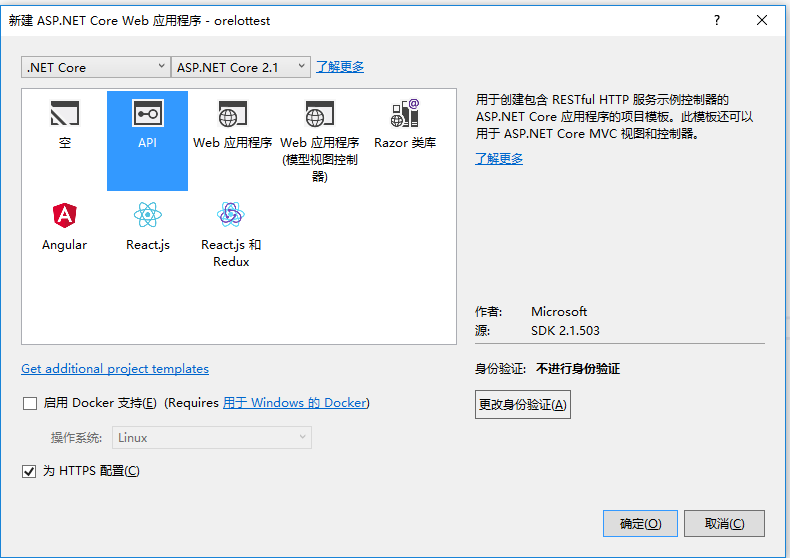
netcore安装ocelot
- install-package Ocelot 安装ocelot组件
配置ocelot
1.添加ocelotSettings.json文件,并且在program.cs文件当中添加配置信息
using System;

using System.Collections.Generic;

using System.IO;

using System.Linq;

using System.Threading.Tasks;

using Microsoft.AspNetCore;

using Microsoft.AspNetCore.Hosting;

using Microsoft.Extensions.Configuration;

using Microsoft.Extensions.Logging;

namespace ocelotTest

{

    public class Program

    {

        public static void Main(string[] args)

        {

            BuildWebHost(args).Run();

        }

        public static IWebHost BuildWebHost(string[] args) =>

         WebHost.CreateDefaultBuilder(args)

             .UseStartup<Startup>()

            .UseUrls("http://localhost:8683")

         .ConfigureAppConfiguration(conf => {

             conf.AddJsonFile("OcelotSettings.json", optional: false, reloadOnChange: true);

         })

             .Build();

    }

}
2.注入ocelot服务
using System;

using System.Collections.Generic;

using System.Linq;

using System.Threading.Tasks;

using Microsoft.AspNetCore.Builder;

using Microsoft.AspNetCore.Hosting;

using Microsoft.AspNetCore.Mvc;

using Microsoft.Extensions.Configuration;

using Microsoft.Extensions.DependencyInjection;

using Microsoft.Extensions.Logging;

using Microsoft.Extensions.Options;

using Ocelot.DependencyInjection;

using Ocelot.Middleware;

using Ocelot.Provider.Consul;

using Ocelot.Provider.Polly;

namespace ocelotTest

{

    public class Startup

    {

        public Startup(IConfiguration configuration)

        {

            Configuration = configuration;

        }

        public IConfiguration Configuration { get; }

        // This method gets called by the runtime. Use this method to add services to the container.

        public void ConfigureServices(IServiceCollection services)

        {

            //注入ocelot服务

            services.AddOcelot(Configuration).AddConsul().AddPolly();

        }

        // This method gets called by the runtime. Use this method to configure the HTTP request pipeline.

        public void Configure(IApplicationBuilder app, IHostingEnvironment env)

        {

            if (env.IsDevelopment())

            {

                app.UseDeveloperExceptionPage();

            }

            app.UseOcelot().Wait();

        }

    }

}
3.配置ocelotSettings.json
{

  "ReRoutes": [

    {

      //下游路由模板,真实请求的路径

      "DownstreamPathTemplate": "/api/{everything}",

      //请求的方式,例如:http,https

      "DownstreamScheme": "http",

      //服务器名称

      "ServiceName": "zyz",

      //启用consul服务

      "UseServiceDiscovery": true,

      //服务熔断

      "QoSOptions": {

        "ExceptionsAllowedBeforeBreaking": , //允许多少次异常请求

        "DurationOfBreak": , //熔断时间,单位为秒

        "TimeoutValue":  //如果下游请求的处理时间超过多少则自动设置超时

      },

      "HttpHandlerOptions": {

        "AllowAutoRedirect": false,

        "UseCookieContainer": false,

        "UseTracing": false

      },

      "ReRouteIsCaseSensitive": false,

      //负载均衡:

      //RoundRobin轮流发送;

      //LeastConnection – 将请求发往最空闲的那个服务器

      //NoLoadBalance – 总是发往第一个请求或者是服务发现

      "LoadBalancerOptions": {

        "Type": "RoundRobin"

      },

      //上游地址配置

      "UpstreamPathTemplate": "/test/{everything}",

      //上游支持的请求类型

      "UpstreamHttpMethod": [ "Post", "Get" ]

    }

  ],

  "GlobalConfiguration": {

    "BaseUrl": "https://localhost:8683",

    //consul服务器地址和ip

    "ServiceDiscoveryProvider": {

      "Host": "localhost",

      "Port":

    }

  }

}
4.启动ocelot项目和consul服务。
把服务注册到consul当中,通过postman发送请求测试,成功转发消息,并且实现负载均衡。
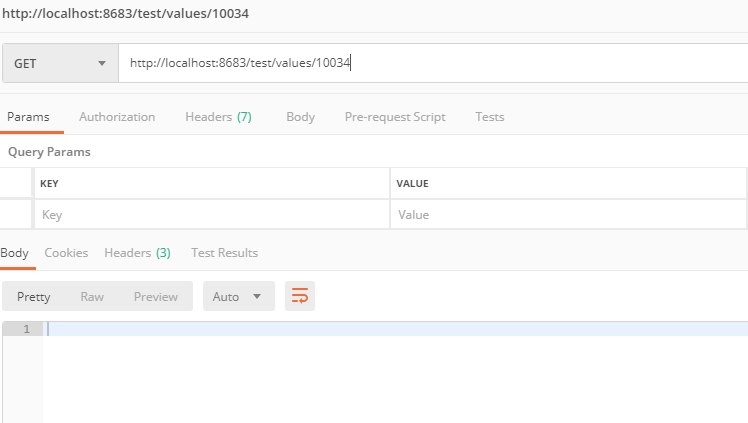
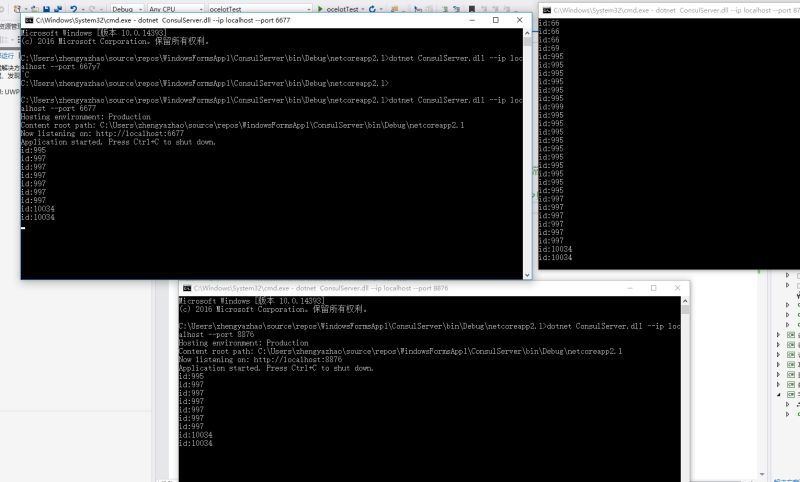
小结:简单的ocelot搭建完成,后续的一些扩展功能慢慢在研究。
快速入口:微服务(入门一):netcore安装部署consul
快速入口: 微服务(入门二):netcore通过consul注册服务
快速入口: 微服务(入门三):netcore ocelot api网关结合consul服务发现
快速入口:微服务(入门四):identityServer的简单使用(客户端授权)
微服务(入门三):netcore ocelot api网关结合consul服务发现的更多相关文章
- .NET Core微服务二:Ocelot API网关
.NET Core微服务一:Consul服务中心 .NET Core微服务二:Ocelot API网关 .NET Core微服务三:polly熔断与降级 本文的项目代码,在文章结尾处可以下载. 本文使 ...
- .Netcore 2.0 Ocelot Api网关教程(2)- 路由
.Netcore 2.0 Ocelot Api网关教程(1) 路由介绍 上一篇文章搭建了一个简单的Api网关,可以实现简单的Api路由,本文介绍一下路由,即配置文件中ReRoutes,ReRoutes ...
- Angular SPA基于Ocelot API网关与IdentityServer4的身份认证与授权(三)
在前面两篇文章中,我介绍了基于IdentityServer4的一个Identity Service的实现,并且实现了一个Weather API和基于Ocelot的API网关,然后实现了通过Ocelot ...
- 微服务基础——厉害了!API网关
微服务刚刚诞生的时候,人们将服务进行拆分,实现服务之间的松耦合,并且每个服务有专门的团队维护,然后客户端直接和各个子服务进行交互.比如,订单,商品,会员服务. 那么这种客户端直接和后端服务交互的方式会 ...
- .Netcore 2.0 Ocelot Api网关教程(7)- 限流
本文介绍Ocelot中的限流,限流允许Api网关控制一段时间内特定api的总访问次数.限流的使用非常简单,只需要添加配置即可. 1.添加限流 修改 configuration.json 配置文件,对 ...
- .Netcore 2.0 Ocelot Api网关教程(6)- 配置管理
本文介绍Ocelot中的配置管理,配置管理允许在Api网关运行时动态通过Http Api查看/修改当前配置.由于该功能权限很高,所以需要授权才能进行相关操作.有两种方式来认证,外部Identity S ...
- Angular SPA基于Ocelot API网关与IdentityServer4的身份认证与授权(四)
在上一讲中,我们已经完成了一个完整的案例,在这个案例中,我们可以通过Angular单页面应用(SPA)进行登录,然后通过后端的Ocelot API网关整合IdentityServer4完成身份认证.在 ...
- Angular SPA基于Ocelot API网关与IdentityServer4的身份认证与授权(二)
上文已经介绍了Identity Service的实现过程.今天我们继续,实现一个简单的Weather API和一个基于Ocelot的API网关. 回顾 <Angular SPA基于Ocelot ...
- ASP.NET Core on K8S学习之旅(13)Ocelot API网关接入
本篇已加入<.NET Core on K8S学习实践系列文章索引>,可以点击查看更多容器化技术相关系列文章. 上一篇介绍了Ingress的基本概念和Nginx Ingress的基本配置和使 ...
随机推荐
- Python之命名空间、闭包、装饰器
一.命名空间 1. 命名空间 命名空间是一个字典,key是变量名(包括函数.模块.变量等),value是变量的值. 2. 命名空间的种类和查找顺序 - 局部命名空间:当前函数 - 全局命名空间:当前模 ...
- 航遇项目react踩坑
1.iconfont应用: a.正常用法如下 <span className='iconfont' > iconfont的代码,例如: </span> b.react不能动态 ...
- 初学JSP
一. 基本了解 JSP是应用最广泛的表现层技术,它和Servlet是Java EE的两个基本成员.JSP和Servlet本质是一样的,因为JSP最终编译成ServLet才能运行. 1.1 we ...
- 如何通俗的理解spring的控制反转、依赖注入、面向切面编程等等
之前一直不理解spring的一些基础特性是什么意思,虽然网上的解释也很多,但是由于我比较笨,就是看不懂,知道最近才稍微了解,下面就以通俗讲解的方式记录下来. 前言 假设我是一个没有开店经验的小老板,准 ...
- Oracle-11:联合查询
------------吾亦无他,唯手熟尔,谦卑若愚,好学若饥------------- 联合查询的实际上的意义就是从俩个结果集中拿有特定联系的结果封装为一个结果集 数据库脚本给放一份,供测试使用 c ...
- 架构选型之Nodejs与Java
前言: 身边越来越多的同事谈论Nodejs,谈其异步IO.事件回调.前后台统一一门语言,创业的朋友的第一个创业项目也选择了Nodejs,期望能够使用一种语言节省成本快速完成需求开发.与其他项目组的同事 ...
- WinForm时间选择控件(DateTimePicker)如何选择(显示)时分秒
C# Windows窗体应用中,用到时间选择控件DateTimePicker,发现不能选择时分秒,难道要自己写一个控件?! 答案是否定的,通过属性修改是可以选择时间的,DateTimePicker完全 ...
- Android 带你玩转实现游戏2048 其实2048只是个普通的控件
转载请标明出处:http://blog.csdn.net/lmj623565791/article/details/40020137,本文出自:[张鸿洋的博客] 1.概述 博主本想踏入游戏开放行业,无 ...
- TestNG失败自动截图
转自:https://www.cnblogs.com/tobecrazy/p/4814813.html
- 关于Flask-Login中session失效时间的处理
最近需要使用Python开发web系统,主要用到的框架就是Flask,前端使用Jinja2模板引擎和Bootstrap,web容器使用Cherrypy,其中关于Login管理的使用了Flask-Log ...