
FastReport报表MVC显示步骤
FastReport报表MVC使用步骤如下:
1、创建MVC网站项目
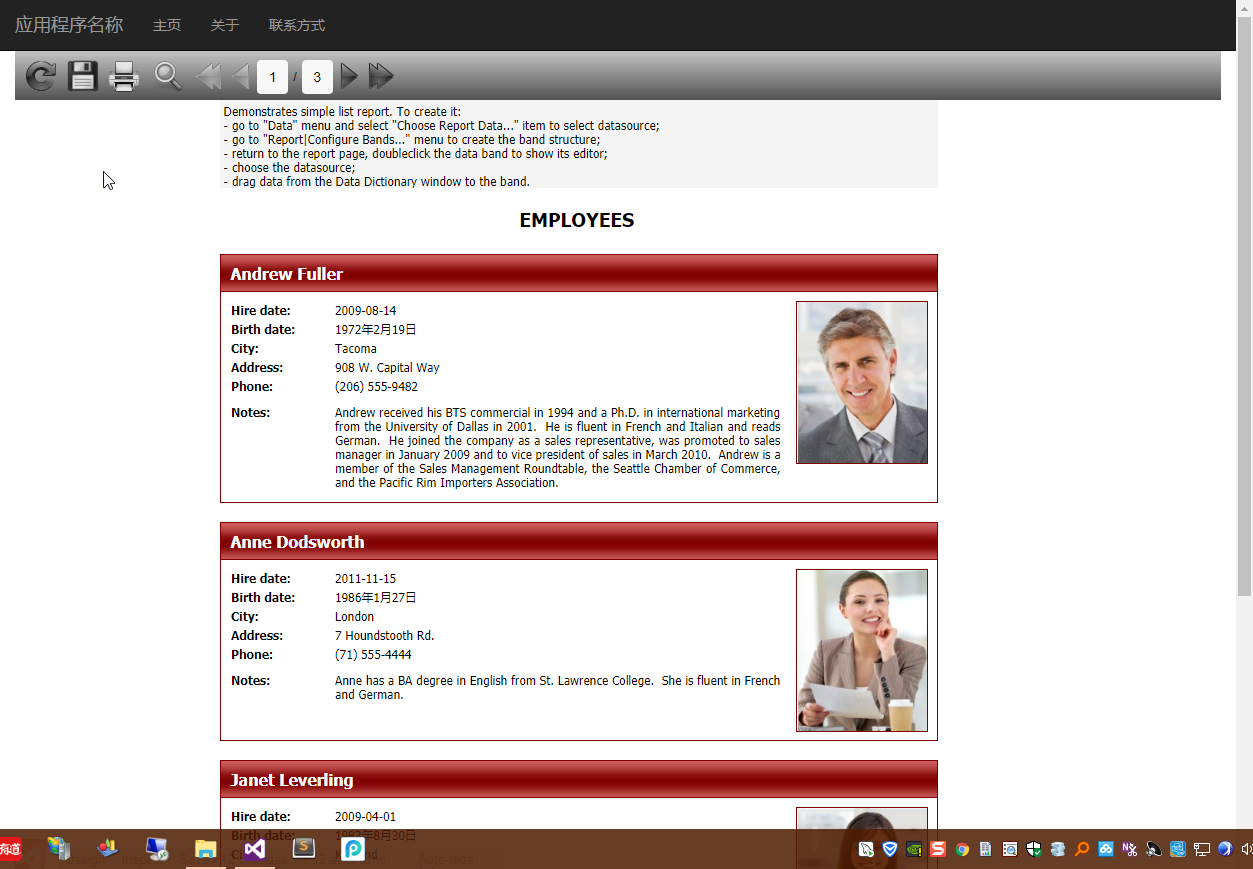
最终DEMO如下图所示
2、引用相关DLL
FastReport.dll
FastReport.Web.dll
3、Web.config中增加配置
<system.webServer>

    <handlers>

        <add name="FastReport-Export" path="FastReport.Export.axd" verb="*" type="FastReport.Web.Handlers.WebExport" />

    </handlers>

</system.webServer>
4、Action代码
     public class HomeController : Controller

     {

         public ActionResult Index()

         {

             var webReport = new WebReport();

             var dataPath= Server.MapPath("~/frAssets/Reports/nwind.xml");

             var dataSet = new System.Data.DataSet();

             dataSet.ReadXml(dataPath);

             webReport.Report.RegisterData(dataSet, "NorthWind");

             var reportPath = Server.MapPath("~/frAssets/Reports/SimpleList.frx");

             webReport.Report.Load(reportPath);

             webReport.Width = Unit.Percentage();

             webReport.Height = Unit.Percentage();

             //设置Toobar图标样式

             webReport.ToolbarIconsStyle = ToolbarIconsStyle.Black;//ToolbarIconsStyle.Custom;

             //设置Background样式

             webReport.ToolbarBackgroundStyle = ToolbarBackgroundStyle.Medium;

             //设置自定义按钮图片路径

             webReport.ButtonsPath = "/frAssets/Buttons/";

             //本地化文件

             webReport.LocalizationFile = "/frAssets/Localization/Chinese (Simplified).frl";

             webReport.PrintInPdf = false;

             ViewBag.WebReport = webReport;

             return View();

         }

     }
5、View中引入样式
 @WebReportGlobals.Scripts()

 @WebReportGlobals.Styles()
6、View中添加报表呈现代码
 <div id="report-wrapper">

     @ViewBag.WebReport.GetHtml()

 </div>
7、报表居中样式处理
    <style type="text/css">

        html > /**/ body .container {

            margin:;

            max-width: 100%;

        }

        #report-wrapper .frtoolbar {

            width: 100%;

        }

        #report-wrapper #frbody {

            text-align: center;

        }

            #report-wrapper #frbody > div {

                margin: 0 auto;

            }

        html > /**/ body #report-wrapper span > div > div {

            display: block;

            text-align: center;

        }

    </style>
8、项目Demo源码
https://files.cnblogs.com/files/WangHuaiSheng/FastReportMvcDemo.7z
 |
文章作者:花生(OutMan)
发布地址:http://www.cnblogs.com/WangHuaiSheng/ 发布时间:2018年3月15日 本文版权归作者和博客园共有,欢迎转载, 但未经作者同意必须保留此段声明, 且在文章页面明显位置给出原文连接。 |
FastReport报表MVC显示步骤的更多相关文章
- 使用FastReport报表工具生成报表PDF文档
在我们开发某个系统的时候,客户总会提出一些特定的报表需求,固定的报表格式符合他们的业务处理需要,也贴合他们的工作场景,因此我们尽可能做出符合他们实际需要的报表,这样我们的系统会得到更好的认同感.本篇随 ...
- FastReport报表控件使用技巧总结
FastReport报表控件使用技巧总结 1.FastReport中如何访问报表中的对象? 可以使用FindObject方法. TfrxMemoView(frxReport1.FindObject(' ...
- FastReport报表设计(仔细看)
FastReport报表设计 2011-06-16 16:56:19| 分类: 系统开发|举报|字号 订阅 下载LOFTER我的照片书 | 目录 5.1 前言 5.2 基本概念及操 ...
- FastReport报表设计
[转载]FastReport报表设计 (2012-10-24 20:37:26) 转载▼ 标签: 转载 原文地址:FastReport报表设计作者:小黑 FastReport报表设计 目录 5.1 ...
- 使用FastReport报表工具生成图片格式文档
之前我在随笔<使用FastReport报表工具生成报表PDF文档>介绍过使用FastReport.Net来根据报表模板进行生成PDF,以及随笔<使用FastReport报表工具生成标 ...
- FastReport报表对象介绍一:“Text”对象
FastReport中文网 http://www.fastreportcn.com/Article/70.html ------------------------------------------ ...
- unigui+fastreport报表打印
unigui+fastreport报表打印 unigui+fastreport报表打印 FASTREPORT导出成PDF报表,UNIGUI的TUniURLFrame显示PDF报表并打印. func ...
- Delphi FastReport报表常用方法
Delphi FastReport报表常用方法 作者及来源: EasyPass - 博客园 收藏到→_→: 摘要: Delphi FastReport报表常用方法 点击这里! ...
- 如何让Spring MVC显示自定义的404 Not Found页面
不知道大家对千篇一律的404 Not Found的错误页面是否感到腻歪了?其实通过很简单的配置就能够让Spring MVC显示您自定义的404 Not Found错误页面. 在WEB-INF的web. ...
随机推荐
- ELK学习总结(4-1)elasticsearch更改mapping(不停服务重建索引)
elasticsearch更改mapping(不停服务重建索引)原文 http://donlianli.iteye.com/blog/1924721Elasticsearch的mapping一旦创建, ...
- HTTP协议扫盲(二)HTTP协议的请求方法、请求头和响应头
一.HTTP请求方法 Http协议定义了很多与服务器交互的方法,最基本的有4种,分别是GET,POST,PUT,DELETE. 一个URL地址用于描述一个网络上的资源,而HTTP中的GET, POST ...
- window.open()参数详解及对浏览器的兼容性
因为篇幅,window.open()浏览器的兼容性请点击 这里 Part1:参数详解 window.open(url,name,param) url:即将打开的子窗口的地址:比如 "http ...
- JSON(二)——JavaScript中js对象与JSON格式字符串的相互转换
首先我们来看一下js中JSON格式的字符串 var JSONStr1 = "{\"name\" : \"张三\"}"; 注意以下的写法不是j ...
- RxJava系列6(从微观角度解读RxJava源码)
RxJava系列1(简介) RxJava系列2(基本概念及使用介绍) RxJava系列3(转换操作符) RxJava系列4(过滤操作符) RxJava系列5(组合操作符) RxJava系列6(从微观角 ...
- 安装shellinabox-master
安装shellinabox-master 1 插件介绍:通过web页面管理linux主机(电脑版) a. 安装 1 2 3 4 5 6 7 8 9 10 11 12 13 14 15 16 17 18 ...
- c# IPC实现本机进程之间的通信
IPC可以实现本地进程之间通信.这种用法不是太常见,常见的替代方案是使用wcf,remoting,web service,socket(tcp/pipe/...)等其他分布式部署方案来替代进程之间的通 ...
- Spring Cloud学习笔记-005
服务消费者 之前已经搭建好了微服务中的核心组件——服务注册中心(包括单节点模式和高可用模式).也有了服务提供者,接下来搭建一个服务消费者,它主要完成两个目标,发现服务以及消费服务.其中,服务发现的任务 ...
- python字符串-内置方法用法分析
1.字母大小写相关(中文无效) 1.1 S.upper() -> string 返回一个字母全部大写的副本
- UVALive - 3530:Martian Mining
dp 可以发现,对于(i,j),要么把它运上去,那么把它运到左边,枚举一下即可 #include<cstdio> #include<cstdlib> #include<a ...