
Python 【第十一章】 Django模版
1、直接传值
urls.py
"""mysite URL Configuration

The `urlpatterns` list routes URLs to views. For more information please see:

    https://docs.djangoproject.com/en/1.10/topics/http/urls/

Examples:

Function views

    1. Add an import:  from my_app import views

    2. Add a URL to urlpatterns:  url(r'^$', views.home, name='home')

Class-based views

    1. Add an import:  from other_app.views import Home

    2. Add a URL to urlpatterns:  url(r'^$', Home.as_view(), name='home')

Including another URLconf

    1. Import the include() function: from django.conf.urls import url, include

    2. Add a URL to urlpatterns:  url(r'^blog/', include('blog.urls'))

"""

from django.conf.urls import url

from django.contrib import admin

from cmdb import views

from django.conf.urls import url, include

urlpatterns = [

    # url(r'^web/', include('cmdb.urls')),

    url(r'^template/',views.template),

]
views.py
def template(request):

    return render(request,'template.html',

                  {'k1':'v1',

                   'k2':[11,22,33,44,55],

                   'k3':{'nid':12,'name':'alex'}})
template.html
<!DOCTYPE html>

<html lang="en">

<head>

    <meta charset="UTF-8">

    <title></title>

</head>

<body>

{{ k1 }}

{{ k2.0 }}

{{ k3.nid }}

</body>

</html>
备注:例如以上单值传递时 索引 要使用 点 再加 一个索引值来取值。
上面列表通过for循环来取值
template.html
<!DOCTYPE html>

<html lang="en">

<head>

    <meta charset="UTF-8">

    <title></title>

</head>

<body>

{{ k1 }}

{{ k2.0 }}

{{ k3.nid }}

{% for item in k2 %}

    <p>{{ item }}</p>

{% endfor %}

</body>

</html>
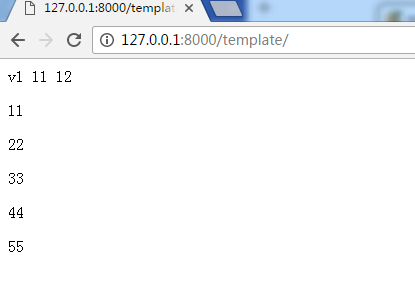
一些例子
重复输出item内容
<!DOCTYPE html>

<html lang="en">

<head>

    <meta charset="UTF-8">

    <title></title>

</head>

<body>

{{ k1 }}

{{ k2.0 }}

{{ k3.nid }}

{% for item in k2 %}

    <p>{{ item }},{{ item }}</p>

{% endfor %}

</body>

</html>
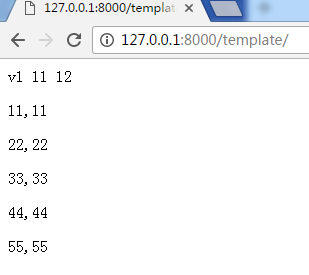
输出循环序号
<!DOCTYPE html>

<html lang="en">

<head>

    <meta charset="UTF-8">

    <title></title>

</head>

<body>

{{ k1 }}

{{ k2.0 }}

{{ k3.nid }}

{% for item in k2 %}

    <p>{{ item }},{{ forloop.counter }}</p>

{% endfor %}

</body>

</html>

循环序号从0开始
<!DOCTYPE html>

<html lang="en">

<head>

    <meta charset="UTF-8">

    <title></title>

</head>

<body>

{{ k1 }}

{{ k2.0 }}

{{ k3.nid }}

{% for item in k2 %}

    <p>{{ item }},{{ forloop.counter }} {{ forloop.counter0 }}</p>

{% endfor %}

</body>

</html>
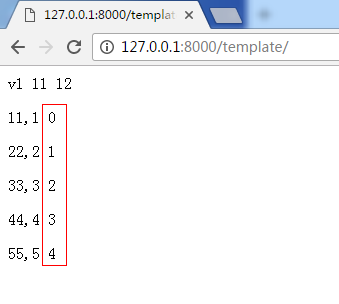
循环取第一个,或最后一个
<!DOCTYPE html>

<html lang="en">

<head>

    <meta charset="UTF-8">

    <title></title>

</head>

<body>

{{ k1 }}

{{ k2.0 }}

{{ k3.nid }}

{% for item in k2 %}

    <p>{{ item }},{{ forloop.counter }}, {{ forloop.counter0 }},{{ forloop.first }},{{ forloop.last }}</p>

{% endfor %}

</body>

</html>
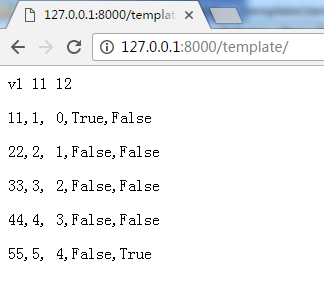
2、判断语句在模版中
{% if 1 == 1  %}

    <h1>123</h1>

{% endif %}
{% if k1 == 'v1'  %}

    <h1>V1</h1>

{% elif k2 == 'v2' %}

    <h1>V2</h1>

{% else %}

    <h1>777</h1>

{% endif %}
模版语言内置方法(Django自带函数)
{{ item.event_start|date:"Y-m-d H:i:s"}}   #时间格式

{{ bio|truncatewords:"30" }}          #显示前30个字符

{{ my_list|first|upper }}          #字符串第一个字符大写

{{ name|lower }}                #字符串变小字
模版语言自定义方法
filter
simple_tag
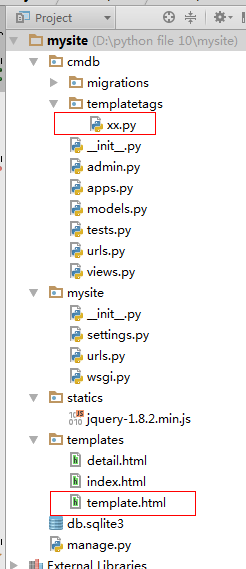
        1、创建指定文件,名称不能改 templatetags

        2、创建任意 .py 文件,如:xx.py

            from django import template

            from django.utils.safestring import mark_safe
       #下面一句 在3.5.2要屏蔽,否则不能正常运行自定义方法#

            #from django.template.base import resolve_variable, Node, TemplateSyntaxError

            # 必须不变

            register = template.Library()

            # 创建函数

            @register.filter

            def f1(value):

                return value + "666"

        3、在html模版的头部执行

            {% load xx %}

        4、

            k1 = 'VVV'

            {{k1}}    => vvv

        #在html中生成 对应值

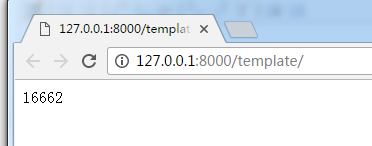
            {{k1|f1}} => vvv666

        5、 settings.py 中注册app

        总结:

            filter

                限制:传参

                支持:模版语言的 if 条件

            simple_tag

                不支持:模版语言的 if 条件
备注:
filter 只能传递一个参数。

例如
xx.py
#!/usr/bin/env python

#coding:utf-8

from django import template

from django.utils.safestring import mark_safe

# from django.template.base import resolve_variable, Node, TemplateSyntaxError

register = template.Library()

@register.filter

def f1(value,arg):

    return value + ''+arg
html模版文件中
{% load xx %}

<!DOCTYPE html>

<html lang="en">

<head>

    <meta charset="UTF-8">

    <title></title>

</head>

<body>

#传入alex参数

{{ k1 | f1:'alex' }}

</body>

</html>

simple_tag用法
xx.py
装饰器修改为
simple_tag
@register.simple_tag

def f2(value,arg):

    return value + ''+arg
html模版中可以传入多个参数
{% load xx %}
<!DOCTYPE html>
<html lang="en">
<head>
    <meta charset="UTF-8">
    <title></title>
</head>
<body>

{%  f2 '1' '2' %}

</body>
</html>
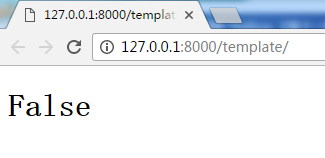
fitler 可以使用if条件判断
在html模版中
注意k1与f3之间管道不要有空格
{% if k1|f3 %}

<h1>True</h1>

{% else %}

<h1>False</h1>

{% endif %}
xx.py
@register.filter

def f3(value):

    if value=="VVV":

        return True

    return False
母版:
母版html文件:loyout.html
<!DOCTYPE html>

<html lang="en">

<head>

    <meta charset="UTF-8">

    <title></title>

    <link rel="stylesheet" href="..." />

    <style>

        .pg-header{

            height: 48px;

            background-color: cadetblue;

        }

        .pg-body{

            min-height: 500px;

        }

        .pg-body .body-menu{

            width: 20%;

            float: left;

        }

        .pg-body .body-content{

            width: 80%;

            float: left;

        }

        .pg-footer{

            height: 100px;

            background-color: brown;

        }

        .active{

            background-color: aquamarine;

            color: white;

        }

    </style>

    {% block css %}{% endblock %}

</head>

<body>

    <div class="pg-header">

        后台系统V1

    </div>

    <div class="pg-body">

        <div class="body-menu">

            <ul>

                <li><a id="userinfo" href="/web/userinfo">用户管理</a></li>

                <li><a id="assets" href="/web/assets">资产管理</a></li>

            </ul>

        </div>

        <div class="body-content">

            {% block body %}{% endblock %}

        </div>

    </div>

    <div class="pg-footer"></div>

    <script src="xxx"></script>

    {% block js %}{% endblock %}

</body>

</html>
导入母版html文件
{% extends 'layout.html' %}

{% block css %}

    <style></style>

{% endblock %}

{% block body %}

    <ul>

    {% for item in user_list %}

        <li>{{ item.username }},{{ item.salary }}</li>

    {% endfor %}

    </ul>

{% endblock %}

{% block js %}

    <script>

        document.getElementById('userinfo').className = 'active';

    </script>

{% endblock %}
备注:做母版中重要以下几部分
{% block css %}{% endblock %}  #允许子版自己定义css

{% block body %}{% endblock %}   #子版实际内容

{% block js %}{% endblock %}    #允许子版 自己定义js
在子版中 以下格式导入母版
{% extends 'layout.html' %}

{% block css %}

    #子版自己定义CSS

{% endblock %}

{% block body %}

  # 子版内容

{% endblock %}

{% block js %}

     #子版自己定义js

{% endblock %}
Python 【第十一章】 Django模版的更多相关文章
- 第二十一章 Django的分页与cookie
第二十一章 Django的分页与cookie 第一课 模板 1.模板的继承 在Template目录下新建模板master.html <!DOCTYPE html> <html lan ...
- Python第十一章-常用的核心模块01-collections模块
python 自称 "Batteries included"(自带电池, 自备干粮?), 就是因为他提供了很多内置的模块, 使用这些模块无需安装和配置即可使用. 本章主要介绍 py ...
- Python第十一章-常用的核心模块03-json模块
python 自称 "Batteries included"(自带电池, 自备干粮?), 就是因为他提供了很多内置的模块, 使用这些模块无需安装和配置即可使用. 本章主要介绍 py ...
- Python第十一章-常用的核心模块04-datetime模块
python 自称 "Batteries included"(自带电池, 自备干粮?), 就是因为他提供了很多内置的模块, 使用这些模块无需安装和配置即可使用. 本章主要介绍 py ...
- 流畅的python第十一章接口学习记录
鸭子协议(忽略对象真正类型,转而关注对象有没有实现所需的方法,签名和语义) 标准库中的抽象基类 collections.abc模块中的抽象基类 抽象方法是抽象基类中用来强制子类必须实现的方法,如果子类 ...
- 《Django By Example》第十一章 中文 翻译 (个人学习,渣翻)
第十一章 缓存内容 (译者 @ucag 注:这是倒数第二章,最后一个项目即将完成. @夜夜月 将会接过翻译的最后一棒.这本书的翻译即将完成.这也是我翻译的最后一章,作为英语专业的学生,我对于翻译有了更 ...
- python 教程 第二十一章、 扩展Python
第二十一章. 扩展Python /* D:\Python27\Lib\Extest-1.0\Extest2.c */ #include <stdio.h> #include <std ...
- 第十一章:Python高级编程-协程和异步IO
第十一章:Python高级编程-协程和异步IO Python3高级核心技术97讲 笔记 目录 第十一章:Python高级编程-协程和异步IO 11.1 并发.并行.同步.异步.阻塞.非阻塞 11.2 ...
- 第三章:模版层 - 1:Django模板语言详解
本节将介绍Django模版系统的语法.Django模版语言致力于在性能和简单性上取得平衡. 如果你有过其它编程背景,或者使用过一些在HTML中直接混入程序代码的语言,那么你需要记住,Django的模版 ...
随机推荐
- 给jquery-validation插件添加控件的验证回调方法
jquery-validation.js在前端验证中使用起来非常方便,提供的功能基本上能满足大部分验证需求,例如:1.内置了很多常用的验证方法:2.可以自定义错误显示信息:3.可以自定义错误显示位置: ...
- Apache Hadoop2.x 边安装边入门
完整PDF版本:<Apache Hadoop2.x边安装边入门> 目录 第一部分:Linux环境安装 第一步.配置Vmware NAT网络 一. Vmware网络模式介绍 二. NAT模式 ...
- LINQ to SQL语句(20)之存储过程
在我们编写程序中,往往需要一些存储过程,在LINQ to SQL中怎么使用呢?也许比原来的更简单些.下面我们以NORTHWND.MDF数据库中自带的几个存储过程来理解一下. 1.标量返回 在数据库中, ...
- 使用Adminlite + ASP.NET MVC5(C#) + Entityframework + AutoFac + AutoMapper写了个api接口文档管理系统
一.演示: 接口查看:http://apidoc.docode.top/ 接口后台:http://apiadmin.docode.top/ 登录:administrator,123456 二.使用到的 ...
- arcengine中自定义工具和自带工具条(ICommand)点击后和其他工具使用的冲突
自己系统中本身对于放大缩小等功能直接是单独重写的,但是如果在加一个工具条具有相同功能的话两者之间会有一些冲突,为解决该冲突可以重写工具条的OnItemClick事件 该工具条命名为axTool 我本身 ...
- CentOS 7 下安装redis步骤
1. 从redis官网下载redis源码,本例安装在/usr/opt下 [root@localhost opt]# pwd /usr/opt [root@localhost opt]# wget ht ...
- Mac入门 (二) 使用VMware Fusion虚拟机
有了Mac机,还是需在Mac上用Windows怎么办?, VMware Fusion 是运行在Mac机上的虚拟机软件, 类似于VMware workstation. 这样就可以在Mac上运行Windo ...
- Easyui dialog中嵌入iframe
如果easyui dialog的地址属性用href超链接,easyui 不会加载整个url页面,只会截取url目标页的body体间的html, 如果想加载把其他页面 加载进dialog的iframe中 ...
- HTTPS和HTTP的概念和区别
HTPPS和HTTP的概念 HTTPS(全称:Hypertext Transfer Protocol over Secure Socket Layer),是以安全为目标的HTTP通道,简单讲是HTTP ...
- 《Javascript、jQuery获取各种屏幕的宽度和高度方法》
Javascript获取屏幕宽度和高度方法: document.body.clientWidth; //网页可见区域宽 document.body.clientHeight; //网页可见区域高 do ...