
Thrift入门
简介
Thrift最初由Facebook研发,主要用于各个服务之间的RPC通信,支持跨语言,常用的语言比如C++, Java, Python, PHP, Ruby, Erlang, Perl, Haskell, C#, Cocoa, JavaScript, Node.js, Smalltalk, and OCaml都支持。Thrift是一个典型的CS(客户端/服务端)结构,客户端和服务端可以使用不同的语言开发。既然客户端和服务端能使用不同的语言开发,那么一定就要有一种中间语言来关联客户端和服务端的语言,没错,这种语言就是IDL(Interface Description Language)。
下载配置
下载地址
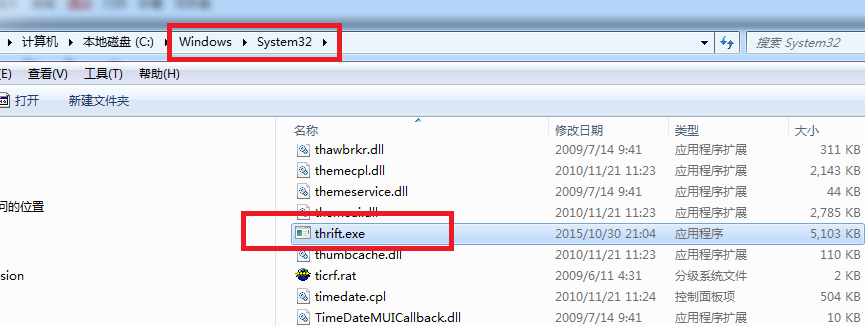
windows 下面下载exe,thrift在linux下面也有对应的安装方式。将thrift-0.9.3.exe 下载下来重命名为thrift.exe,并拷贝到windows--->system32里面。
Maven artifact
<dependency>

  <groupId>org.apache.thrift</groupId>

  <artifactId>libthrift</artifactId>

  <version>0.9.3</version>

</dependency>
GIT Checkout
git clone https://git-wip-us.apache.org/repos/asf/thrift.git thrift

cd thrift
基本概念
1.数据类型
- bool:布尔值,true 或 false,对应 Java 的 boolean
- byte:8 位有符号整数,对应 Java 的 byte
- i16:16 位有符号整数,对应 Java 的 short
- i32:32 位有符号整数,对应 Java 的 int
- i64:64 位有符号整数,对应 Java 的 long
- double:64 位浮点数,对应 Java 的 double
- string:utf-8编码的字符串,对应 Java 的 String
结构体类型: - struct:定义公共的对象,类似于 C 语言中的结构体定义,在 Java 中是一个 JavaBean
容器类型: - list:对应 Java 的 ArrayList
- set:对应 Java 的 HashSet
- map:对应 Java 的 HashMap
异常类型: - exception:对应 Java 的 Exception
服务类型: - service:对应服务的类
2.服务端编码基本步骤:
- 实现服务处理接口impl
- 创建TProcessor
- 创建TServerTransport
- 创建TProtocol
- 创建TServer
- 启动Server
3.客户端编码基本步骤:
- 创建Transport
- 创建TProtocol
- 基于TTransport和TProtocol创建 Client
- 调用Client的相应方法
4.数据传输协议
- TBinaryProtocol : 二进制格式.
- TCompactProtocol : 压缩格式
- TJSONProtocol : JSON格式
- TSimpleJSONProtocol : 提供JSON只写协议, 生成的文件很容易通过脚本语言解析
- tips:客户端和服务端的协议要一致
代码测试
1.创建文件,在D:\thrift下建立hello.thrift文件
namespace java com.tony.thrift.demo

service  HelloWorldService {

  string sayHello(1:string username)

}
thrift -r -gen java hello.thrift
根据thrift 文件自动生成
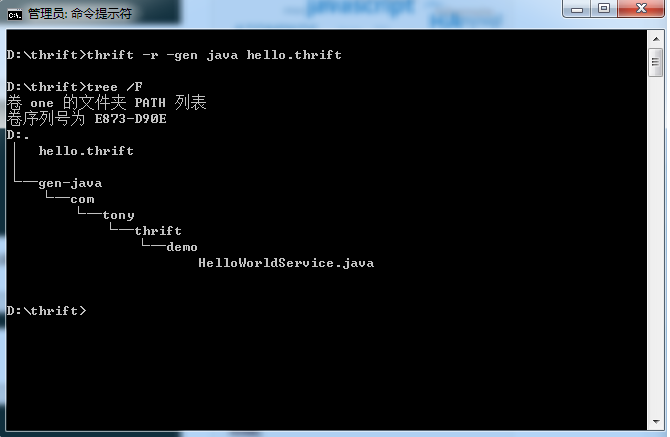
2,将上述截图生成的文件拷贝到工程中。
HelloWorldService
public class HelloWorldService {

  public interface Iface {

    public String sayHello(String username) throws org.apache.thrift.TException;

  }

}
HelloWorldImpl
public class HelloWorldImpl implements HelloWorldService.Iface{

	@Override

	public String sayHello(String username) throws TException {

		return "Hi," + username + " welcome to thrift";

	}

}
HelloServerDemo
public class HelloServerDemo {

	public static final int SERVER_PORT = 7911;

	public void startServer() {

		try {

			System.out.println("Server start ....");

			TProcessor tprocessor = new HelloWorldService.Processor<HelloWorldService.Iface>(new HelloWorldImpl());

			TServerSocket serverTransport = new TServerSocket(SERVER_PORT);

			TServer.Args tArgs = new TServer.Args(serverTransport);

			tArgs.processor(tprocessor);

			tArgs.protocolFactory(new TBinaryProtocol.Factory());

			TServer server = new TSimpleServer(tArgs);

			server.serve();

		} catch (Exception e) {

			System.out.println("Server start error!!!");

			e.printStackTrace();

		}

	}

	/**

	 * @param args

	 */

	public static void main(String[] args) {

		HelloServerDemo server = new HelloServerDemo();

		server.startServer();

	}

}
HelloClientDemo
public class HelloClientDemo

{

	public static final String SERVER_IP = "localhost";

	public static final int SERVER_PORT = 7911;

	public static final int TIMEOUT = 30000;

	public void startClient(String userName) {

		TTransport transport = null;

		try {

			transport = new TSocket(SERVER_IP, SERVER_PORT, TIMEOUT);

			TProtocol protocol = new TBinaryProtocol(transport);

			HelloWorldService.Client client = new HelloWorldService.Client(protocol);

			transport.open();

			String result = client.sayHello(userName);

			System.out.println(result);

		} catch (TTransportException e) {

			e.printStackTrace();

		} catch (TException e) {

			e.printStackTrace();

		} finally {

			if (null != transport) {

				transport.close();

			}

		}

	}

	public static void main(String[] args) {

		HelloClientDemo client = new HelloClientDemo();

		client.startClient("tony");

	}

}
服务端启动后,可以测试客户端。

https://thrift.apache.org/download
Thrift入门的更多相关文章
- 2016windows(10) wamp 最简单30分钟thrift入门使用讲解,实现php作为服务器和客户端的hello world
2016最简单windows(10) wamp 30分钟thrift入门使用讲解,实现php作为服务器和客户端的hello world thrift是什么 最简单解释 thrift是用来帮助各个编程语 ...
- Thrift入门及Java实例演示<转载备用>
Thrift入门及Java实例演示 作者: Michael 日期: 年 月 日 •概述 •下载配置 •基本概念 .数据类型 .服务端编码基本步骤 .客户端编码基本步骤 .数据传输协议 •实例演示(ja ...
- Thrift入门 (一)
Install Go to thrift page download thrift. 1 2 3 4 brew install boost ./configure --without-python s ...
- Thrift入门初探--thrift安装及java入门实例
什么是thrift? 简单来说,是Facebook公布的一款开源跨语言的RPC框架. 那么问题来了. 什么是RPC框架? RPC全称为Remote Procedure Call,意为远程过程调用. 假 ...
- Thrift入门初探(2)--thrift基础知识详解
昨天总结了thrift的安装和入门实例,Thrift入门初探--thrift安装及java入门实例,今天开始总结一下thrift的相关基础知识. Thrift使用一种中间语言IDL,来进行接口的定义, ...
- RPC远程协议之Thrift入门
在上一篇文章<RPC远程协议之原理分析>中,我介绍了RPC的工作原理及欲实现RPC框架功能应该做哪些事情,因为要做的事情太多,完全由开发人员研发实现,不是很现实,所以市面上出现了诸多RPC ...
- 【thrift】thrift入门初探--thrift安装及java入门实例
转载:https://www.cnblogs.com/fingerboy/p/6424248.html 公司的一些平台服务框架底层封装了thrift提供服务,最近项目不是很紧,于是研究了一下,刚刚入门 ...
- Thrift入门及Java实例演示
目录: 概述 下载配置 基本概念 数据类型 服务端编码基本步骤 客户端编码基本步骤 数据传输协议 实例演示(java) thrift生成代码 实现接口Iface TSimpleServer服务模型 T ...
- Apache Thrift入门(安装、测试与java程序编写)
安装Apache Thrift ubuntu linux运行: #!/bin/bash #下载 wget http://mirrors.cnnic.cn/apache/thrift/0.9.1/thr ...
随机推荐
- APACHE 服务器开启URL REWRITE模块的方法
最近做wordpress,发现固定链接总是设置不了.后来发现是由于apache服务器的URL REWIRITE模块没有开启导致. 查询了资料之后终于设置成功,记录下步骤: 1:开启apache的url ...
- mysql批量数据脚本
mysql批量数据脚本 1 建表 create table dept( id int unsigned primary key auto_increment, deptno mediumint uns ...
- 关于MacOS升级10.13系统eclipse菜单灰色无法使用解决方案
最近,苹果发布了macOS High Sierra,版本为10.13,专门针对mac pro的用户来着,至于好处大家到苹果官网看便是,我就是一个升级新版本系统的受益者,同时也变成了一个受害者:打开ec ...
- Selenium自动化测试脚本中三种等待时间简介
为了提高脚本的稳定性,我们需要在脚本中增加等待时间 第一种:强制等待 Thread.sleep():固定休眠时间设置,Java的Thread类里提供了休眠方法sleep,导入包后就能使用 sleep( ...
- django下命令行工具
django-admin.py是Django的一个用户管理任务的命令行工具,manage.py是对django-admin.py的简单包装,每个Django Project里面都包含一个manage. ...
- html5移动端meta自动适应标签
控制显示区域各种属性: <meta content="width=device-width, initial-scale=1.0, maximum-scale=1.0, user-sc ...
- Altium designer知识总结
原理图库文件 =原理图元件库 .schlibPCB库文件=封装库.pcblib 集成库=原理图库文件+封装库 .intlib
- Log4j扩展使用--日志记录器Logger
OK,现在我们认真的研究下Logger的配置,进行相关配置扩展. Log4j有三个主要的组件:Loggers(记录器),Appenders(输出源)和Layouts(布局).其中,Logger负责记录 ...
- grails项目中(DB的相关操作)
grails项目中(DB的相关操作) save:保存Domain对象的数据到对应的库表中(可能是insert也可能是update) findBy: 动态方法,查找并返回第一条记录,方法名可以变化 eg ...
- getRequestDispatcher()和response.sendRedirect()
request.getRequestDispatcher()是请求转发,前后页面共享一个request response.sendRedirect()是重新定向,前后页面不是一个request.