
使用基本MVC2模式创建新闻网站
MVC简介
所谓MVC,即Model-View-Controller。
(1)Model层:Model指模型部分,一般在应用中Model层包括业务处理层和数据访问层。数据访问层主要是对数据库的一些操作的封装。业务处理层应用JavaBean构建, JavaBean主要是用作将从View层获取的数据和数据库的数据进行桥接。除却JavaBean以外,若想构建分布式应用系统,可以应用EJB组件进行业务逻辑层的构建。
(2)Controller层:Controller指控制部分,一般是对View层提交的请求为其设置对应的Servlet进行特定功能的处理,这里的进行特定功能的处理一般是编写在Model中的业务处理层中的。Controller一般只是在Web应用中充当一个中介者的作用。
(3)View层:View指视图部分,这一部分的内容是展示给用户实际进行交互的,通常使用JSP和HTML进行构建(个人比较喜欢以HTML嵌入JSP的方式来构建网页)。
综上来说,一个小型完整的基于MVC设计模式的Web应用程序的处理流程应该如下:
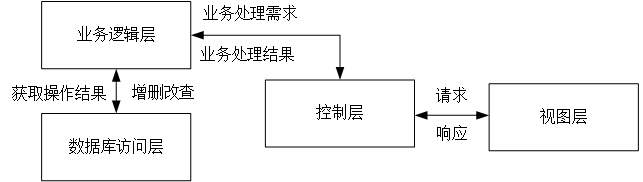
由上面的图中我们可以看出,用户在客户端(Web应用的客户端即为浏览器)中发出请求的时候,请求首先由View层的JSP/HTML将HTTP请求传给控制器中对应的Servlet,然后由Servlet负责调用Model层中的业务逻辑处理部分进行要求的处理,处理期间如果设计数据库的操作,则与数据库进行操作,最后全部操作结束之后,由业务逻辑层将结果发给控制层,控制层以HTTP响应的形式将结果发送回客户端。
简单的基于MVC2的增删改查
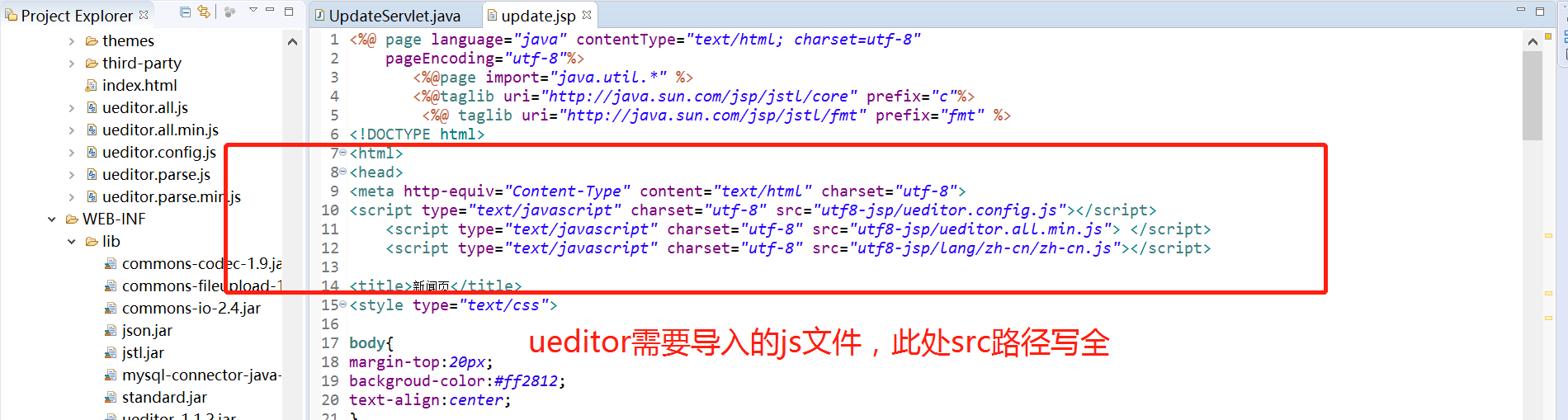
基本的操作就是连接数据库的进行简单的增删改查,然后数据的回显。此处遇到的主要的问题一个是使用ueditor富文本编辑的时候,需要配置。
其次最需要注意的就是数据库的操作语句以及数据库的连接,新闻表的代码,由于之前已经做过登录,不在附上该操作代码。在操作数据库时,如果频繁的需要连接数据库,那么可以将连接的代码单独写到一个类中去。
 package dao;

 import java.sql.Connection;

 import java.sql.DriverManager;

 import java.sql.PreparedStatement;

 import java.sql.ResultSet;

 import java.sql.SQLException;

 import java.sql.Statement;

 import java.util.ArrayList;

 import java.util.List;

 import bean.News;

 public class Newsdao {

     private static final long serialVersionUID = 1L;

 //    private String driverName="com.mysql.jdbc.Driver";

 //    private String url="jdbc:mysql://localhost:3306/newsdata?useSSL=false&serverTimezone=UTC";

 //    private String name="root";

 //    private String pwd="123456";

     static Connection con=null;

     public static  Connection getCon() {

         String driverName="com.mysql.cj.jdbc.Driver";

         String url="jdbc:mysql://localhost:3306/newsdata?useSSL=false&serverTimezone=UTC&allowPublicKeyRetrieval=true";

         String name="root";

         String pwd="";

                 try {

                     Class.forName(driverName);

                     try {

                         con = DriverManager.getConnection(url, name, pwd);

                     } catch (SQLException e) {

                         e.printStackTrace();

                     }

                 } catch (ClassNotFoundException e) {

                     e.printStackTrace();

                 }

         return con;

     }

     //添加新闻

         public boolean addNews(News news) {

             con=Newsdao.getCon();

             boolean flag=false;

             String sql="insert news(title,type,datetime,content) values('"+news.getTitle()+"','"

             +news.getType()+"','"

                     +news.getDateTime()+"','"

                     +news.getContent()+"')";

             //System.out.println("添加的sql语句"+sql);

             try {

                 PreparedStatement ps=con.prepareStatement(sql);

                 int i=ps.executeUpdate();

                 //System.out.println("i的值"+i);

                 ps.close();

                 con.close();

                 if(i>) {

                     flag =true;

                 }

             } catch (SQLException e) {

                 System.out.println("添加出错啦");

                 e.printStackTrace();

             }

             return flag;

         }

         public List<News> selectByID(int id){

             con=Newsdao.getCon();

             List<News> list=new ArrayList<>();

             String sql="select * from news where id="+id+"";

             System.out.println(sql);

             Statement state;

             ResultSet rs;

             try {

                 state = con.createStatement();

                 rs=state.executeQuery(sql);

                 while(rs.next()) {

                     News news=new News();

                     news.setTitle(rs.getString("title"));

                     news.setContent(rs.getString("content"));

                     news.setDateTime(rs.getString("dateTime"));

                     news.setType(rs.getString("type"));

 ;                    news.setId(id);

                     list.add(news);

                     //System.out.println(news.getTitle());

                 }

                 rs.close();

                 state.close();

                 con.close();

             } catch (SQLException e) {

                 System.out.println("查询出错啦");

                 e.printStackTrace();

             }

             return list;

         }

         //删除新闻

         public List<News> selectAll(){

             con=Newsdao.getCon();

             List<News> list=new ArrayList<News>();

             String sql="select * from news";

             Statement state;

             ResultSet rs;

             try {

                 state = con.createStatement();

                 rs=state.executeQuery(sql);

                 while(rs.next()) {

                     News news=new News();

                     news.setId(rs.getInt("id"));

                     news.setTitle(rs.getString("title"));

                     news.setContent(rs.getString("content"));

                     news.setDateTime(rs.getString("dateTime"));

                     news.setType(rs.getString("type"));

                     list.add(news);

                     //System.out.println(news.getType());

                 }

                 rs.close();

                 state.close();

                 con.close();

             } catch (SQLException e) {

                 System.out.println("查询出错啦");

                 e.printStackTrace();

             }

             return list;

         }

         //修改新闻

         public boolean update(News news) {

             con=Newsdao.getCon();

             boolean flag=false;

             String sql="update news set title='"+news.getTitle()+"',type='"+news.getType()

                     +"',dateTime='"+news.getDateTime()

                     +"',content='"+news.getContent()+"' where id="+news.getId()+"";

             System.out.println(sql);

             Statement state=null;

             try {

                 state = con.createStatement();

                 int i=state.executeUpdate(sql);

                 System.out.println(i);

                 if(i>) {

                     flag=true;

                 }

             } catch (SQLException e) {

                 System.out.println("更新错误啦");

                 e.printStackTrace();

             }

             return false;

         }

         //删除

         public boolean delete(int  id) {

             con=Newsdao.getCon();

             boolean flag=false;

             String sql="delete from news where id='"+id+"'";

            // System.out.println(sql);

             PreparedStatement ps;

             try {

                 ps = con.prepareStatement(sql);

                 int i=ps.executeUpdate();

                 if(i>){

                     flag=true;

                 }

             } catch (SQLException e) {

                 System.out.println("删除出错啦");

                 e.printStackTrace();

             }

             return flag;

         }

 }
新闻的添加
 package servlet;

 import java.io.IOException;

 import javax.servlet.ServletException;

 import javax.servlet.annotation.WebServlet;

 import javax.servlet.http.HttpServlet;

 import javax.servlet.http.HttpServletRequest;

 import javax.servlet.http.HttpServletResponse;

 import bean.News;

 import dao.Newsdao;

 /**

  * Servlet implementation class AddServlet

  */

 @WebServlet("/AddServlet")

 public class AddServlet extends HttpServlet {

     public AddServlet() {

         super();

     }

     protected void doGet(HttpServletRequest request, HttpServletResponse response) throws ServletException, IOException {

         doPost(request,response);

     }

     protected void doPost(HttpServletRequest request, HttpServletResponse response) throws ServletException, IOException {

         request.setCharacterEncoding("utf-8");

         response.setContentType("text/html;charset=UTF-8");

         String title=request.getParameter("title");

         String type=request.getParameter("type");

         String datetime=request.getParameter("datetime");

         String content=request.getParameter("ueditor");

         System.out.println("这是ueditor的内容"+title+content);

         News news=new News();

         news.setTitle(title);

         news.setContent(content);

         news.setDateTime(datetime);

         news.setType(type);

         Newsdao nd=new Newsdao();

         try{

             nd.addNews(news);

             response.sendRedirect("newslistServlet");

             //request.getRequestDispatcher("/newslist.jsp").forward(request, response);

         }catch(Exception e) {

             System.out.println("添加失败");

         }

     }

 }
<%@ page language="java" contentType="text/html; charset=utf-8"

    pageEncoding="utf-8"%>

       <%@page import="java.util.*" %>

       <%@taglib uri="http://java.sun.com/jsp/jstl/core" prefix="c"%>

        <%@ taglib uri="http://java.sun.com/jsp/jstl/fmt" prefix="fmt" %>

<!DOCTYPE html>

<html>

<head>

<meta http-equiv="Content-Type" content="text/html" charset="utf-8">

<script type="text/javascript" charset="utf-8" src="utf8-jsp/ueditor.config.js"></script>

    <script type="text/javascript" charset="utf-8" src="utf8-jsp/ueditor.all.min.js"> </script>

    <script type="text/javascript" charset="utf-8" src="utf8-jsp/lang/zh-cn/zh-cn.js"></script>

<title>新闻页</title>

<style type="text/css">

body{

margin-top:20px;

backgroud-color:#ff2812;

text-align:center;

}

.text{

    width:500px;

    height:20px;

}

.btn{

  right: 35px;

  bottom: 25px;

  width: 100px;

  height: 30px;

  background: #759fc7;

  font-size: 15px;

  color: #fff;

  letter-spacing: 10px;

  margin-left:40px;

  text-align: center;

}

</style>

</head>

<body>

<div >

<h2>添加新闻</h2>

<form action="addServlet" method="POST" >

新闻标题     <input class="text" type="text" name="title" ><br><br>

新闻类别

 <input type="radio" name="type" value="娱乐" checked="checked"/>娱乐

                     <input type="radio" name="type" value="体育"/>体育

                     <input type="radio" name="type" value="国际"/>国际

                     <input type="radio" name="type" value="社会"/>社会

                     <input type="radio" name="type" value="财经"/>财经

                     <input type="radio" name="type " value="科技"/>科技

<br><br>

发布时间       <input class="text" type="text" name="datetime"  ><br><br>

正文编辑

<script id="editor" type="text/plain" name="ueditor" style="width:1024px;height:500px;margin-left:100px"></script>

<button class="btn" type="submit">保存</button >

<!-- <button class="btn" type="submit">退出</button> -->

</form>

</div>

<script type="text/javascript">

    var ue=UE.getEditor('editor');

     function getPlainTxt() {

            var arr = [];

            arr.push("使用editor.getPlainTxt()方法可以获得编辑器的带格式的纯文本内容");

            arr.push("内容为:");

            arr.push(UE.getEditor('editor').getPlainTxt());

            alert(arr.join('\n'))

        }

</script>

</body>

</html>
删除
 package servlet;

 import java.io.IOException;

 import javax.servlet.ServletException;

 import javax.servlet.annotation.WebServlet;

 import javax.servlet.http.HttpServlet;

 import javax.servlet.http.HttpServletRequest;

 import javax.servlet.http.HttpServletResponse;

 import dao.Newsdao;

 /**

  * Servlet implementation class DeleteServlet

  */

 @WebServlet("/DeleteServlet")

 public class DeleteServlet extends HttpServlet {

     private static final long serialVersionUID = 1L;

     public DeleteServlet() {

         super();

     }

     protected void doGet(HttpServletRequest request, HttpServletResponse response) throws ServletException, IOException {

         doPost(request,response);

     }

     protected void doPost(HttpServletRequest request, HttpServletResponse response) throws ServletException, IOException {

         request.setCharacterEncoding("utf-8");

         response.setContentType("text/html;charset=utf-8");

         String id=(String)request.getParameter("id");

         System.out.println("被删除的新闻");

         int nid=Integer.parseInt(id);

         Newsdao nd=new Newsdao();

         nd.delete(nid);

         response.sendRedirect("newslistServlet");

         //request.getRequestDispatcher("/newslist.jsp").forward(request, response);

     }

 }
修改
注意:此处我是用的先回显需要修改的新闻内容,在进行修改操作。
<%@ page language="java" contentType="text/html; charset=utf-8"

    pageEncoding="utf-8"%>

       <%@page import="java.util.*" %>

       <%@taglib uri="http://java.sun.com/jsp/jstl/core" prefix="c"%>

        <%@ taglib uri="http://java.sun.com/jsp/jstl/fmt" prefix="fmt" %>

<!DOCTYPE html>

<html>

<head>

<meta http-equiv="Content-Type" content="text/html" charset="utf-8">

<script type="text/javascript" charset="utf-8" src="utf8-jsp/ueditor.config.js"></script>

    <script type="text/javascript" charset="utf-8" src="utf8-jsp/ueditor.all.min.js"> </script>

    <script type="text/javascript" charset="utf-8" src="utf8-jsp/lang/zh-cn/zh-cn.js"></script>

<title>新闻页</title>

<style type="text/css">

body{

margin-top:20px;

backgroud-color:#ff2812;

text-align:center;

}

.text{

    width:500px;

    height:20px;

}

.btn{

  right: 35px;

  bottom: 25px;

  width: 100px;

  height: 30px;

  background: #759fc7;

  font-size: 15px;

  color: #fff;

  letter-spacing: 10px;

  margin-left:40px;

  text-align: center;

}

</style>

</head>

<body>

<div >

<h2>修改新闻</h2>

<form action="updateServlet" method="GET" >

<c:forEach var="s" items="${item}">

新闻编号          <input class="text" type="text" name="id" value="${s.id }"><br><br>

新闻标题     <input class="text" type="text" name="title" value="${s.title }"><br><br>

新闻类别

         <input type="radio" name="type" value="娱乐"  ${("娱乐"eq s.type)?"checked":""}/>娱乐

        <input type="radio" name="type" value="体育" ${("体育"eq s.type)?"checked":""}/>体育

        <input type="radio" name="type" value="国际"  ${("国际"eq s.type)?"checked":""}/>国际

        <input type="radio" name="type" value="社会"  ${("社会"eq s.type)?"checked":""}/>社会

        <input type="radio" name="type" value="财经"  ${("财经"eq s.type)?"checked":""}/>财经

        <input type="radio" name="type" value="科技"  ${("科技"eq s.type)?"checked":""}/>科技

<br><br>

发布时间       <input class="text" type="text" name="datetime" value="${s.dateTime }" ><br><br>

正文编辑

<script id="editor" type="text/plain" name="editor" style="width:1024px;height:500px;margin-left:100px">${s.content}</script>

<button class="btn" type="submit">保存</button >

<!-- <button class="btn" type="submit">退出</button> -->

</form>

</div>

</c:forEach>

<script type="text/javascript">

    var ue=UE.getEditor('editor');

    UE.getEditor('editor').setContent('${s.content}');

    /* function setContent(isAppendTo) {

        var arr = [];

        arr.push("使用editor.setContent('欢迎使用ueditor')方法可以设置编辑器的内容");

        ue.getEditor('editor').setContent('欢迎使用ueditor', isAppendTo);

        alert(arr.join("\n"));

    }  */

    //alter("gg");

    //UE.getEditor('editor').setContent('${s.content}');

        function getContent() {

            var arr = [];

            arr.push(UE.getEditor('editor').getContent());

            alert(arr.join("\n"));

        }

</script>

</body>

</html>
 package servlet;

 import java.io.IOException;

 import javax.servlet.ServletException;

 import javax.servlet.annotation.WebServlet;

 import javax.servlet.http.HttpServlet;

 import javax.servlet.http.HttpServletRequest;

 import javax.servlet.http.HttpServletResponse;

 import bean.News;

 import dao.Newsdao;

 /**

  * Servlet implementation class UpnewsServlet

  */

 @WebServlet("/UpdateServlet")

 public class UpdateServlet extends HttpServlet {

     private static final long serialVersionUID = 1L;

     public UpdateServlet() {

         super();

     }

     protected void doGet(HttpServletRequest request, HttpServletResponse response) throws ServletException, IOException {

         doPost(request,response);

     }

     protected void doPost(HttpServletRequest request, HttpServletResponse response) throws ServletException, IOException {

         response.setContentType("text/html;charset=UTF-8");

         request.setCharacterEncoding("utf-8");

         String id=request.getParameter("id");

         System.out.println("id的值为"+id);

         int nid=Integer.parseInt(id);

         String title=request.getParameter("title");

         String type=request.getParameter("type");

         String datetime=request.getParameter("datetime");

         String content=request.getParameter("editor");

         News news=new News();

         news.setId(nid);

         news.setTitle(title);

         news.setContent(content);

         news.setDateTime(datetime);

         news.setType(type);

         Newsdao nd=new Newsdao();

         try{

             nd.update(news);

             response.sendRedirect("newslistServlet");

         }catch(Exception e) {

             System.out.println("修改失败");

         }

     }

 }
 package servlet;

 import java.io.IOException;

 import java.util.List;

 import javax.servlet.ServletException;

 import javax.servlet.annotation.WebServlet;

 import javax.servlet.http.HttpServlet;

 import javax.servlet.http.HttpServletRequest;

 import javax.servlet.http.HttpServletResponse;

 import bean.News;

 import dao.Newsdao;

 /**

  * Servlet implementation class ShowServlet

  */

 @WebServlet("/ShowServlet")

 public class ShowServlet extends HttpServlet {

     private static final long serialVersionUID = 1L;

     public ShowServlet() {

         super();

     }

     protected void doGet(HttpServletRequest request, HttpServletResponse response) throws ServletException, IOException {

         doPost(request,response);

     }

     protected void doPost(HttpServletRequest request, HttpServletResponse response) throws ServletException, IOException {

         request.setCharacterEncoding("utf-8");

         response.setContentType("text/html;cahrset=utf-8");

         String id=request.getParameter("id");

         int nid=Integer.parseInt(id);

         Newsdao nd=new Newsdao();

         List<News> list=nd.selectByID(nid);

         request.setAttribute("item", list);

         System.out.println(list.size());

         request.getRequestDispatcher("/update.jsp").forward(request, response);

     }

 }
查找
 package servlet;

 import java.io.IOException;

 import java.util.List;

 import javax.servlet.ServletException;

 import javax.servlet.annotation.WebServlet;

 import javax.servlet.http.HttpServlet;

 import javax.servlet.http.HttpServletRequest;

 import javax.servlet.http.HttpServletResponse;

 import bean.News;

 import dao.Newsdao;

 @WebServlet("/SelectServlet")

 public class SelectServlet extends HttpServlet {

     private static final long serialVersionUID = 1L;

     public SelectServlet() {

         super();

     }

     protected void doGet(HttpServletRequest request, HttpServletResponse response) throws ServletException, IOException {

         doPost(request,response);

     }

     protected void doPost(HttpServletRequest request, HttpServletResponse response) throws ServletException, IOException {

         request.setCharacterEncoding("utf-8");

         response.setContentType("text/html;cahrset=utf-8");

         String id=request.getParameter("id");

         int nid=Integer.parseInt(id);

         Newsdao nd=new Newsdao();

         List<News> list=nd.selectByID(nid);

         request.setAttribute("news", list);

         System.out.println(list.size());

         request.getRequestDispatcher("/content.jsp").forward(request, response);

     }

 }
以下是具体的运行截图,和一些需要的说明

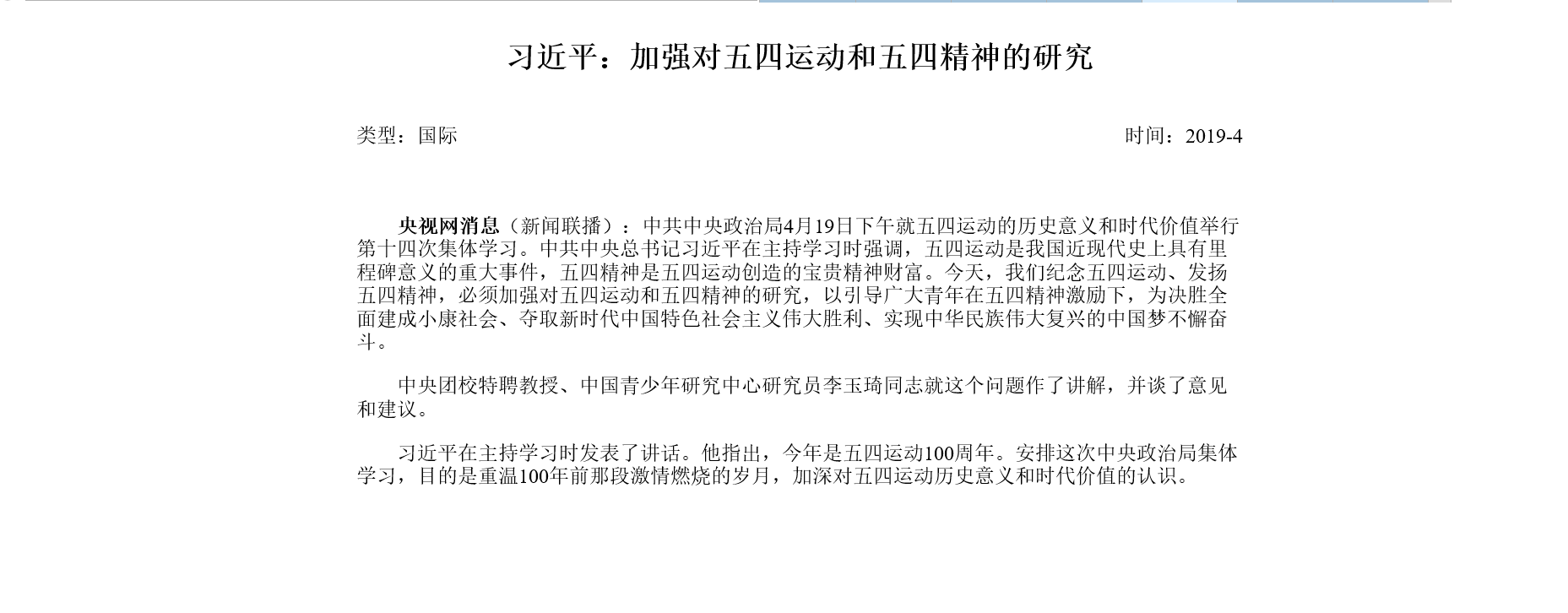
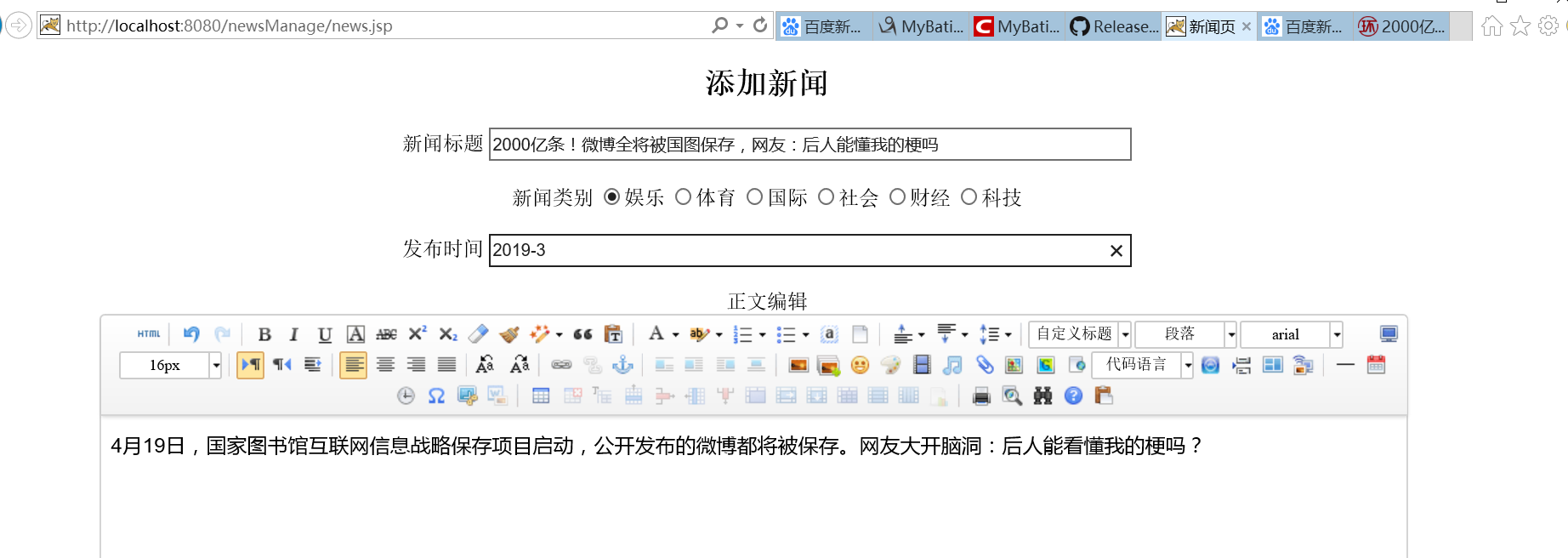

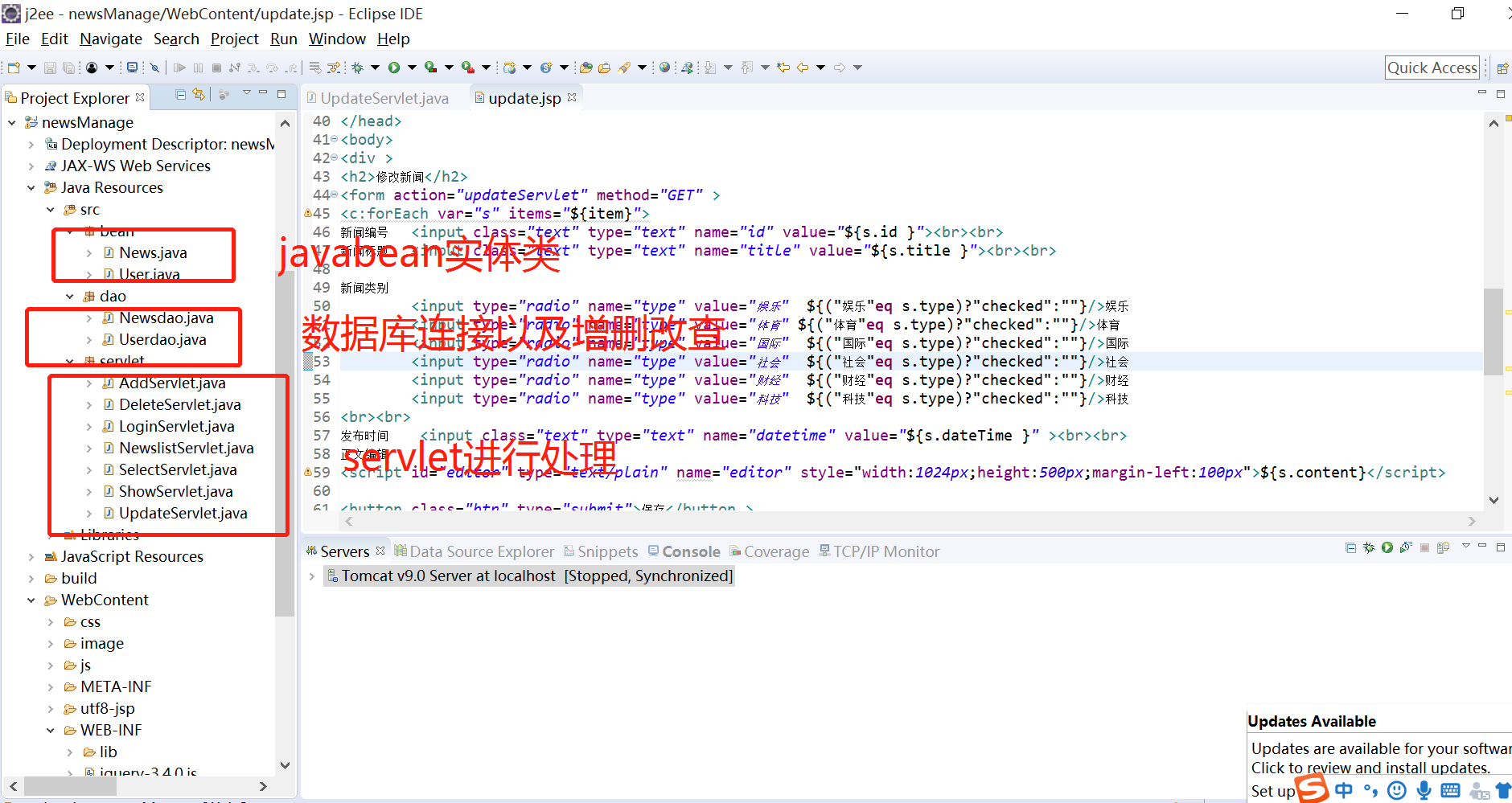


具体的代码已上传云盘:链接: https://pan.baidu.com/s/1puSGXg5eOmiegHRimThAgQ 提取码: ikdm 复制这段内容后打开百度网盘手机App,操作更方便哦
使用基本MVC2模式创建新闻网站的更多相关文章
- 使用基于MVC2模式创建新闻网站
1.什么是MVC MVC全名是Model View Controller,是模型(model)-视图(view)-控制器(controller)的缩写,一种软件设计典范,用一种业务逻辑.数据.界面显示 ...
- 基本MVC2模式创建新闻网站
一.介绍 这实现比较简单,就是对两张表的操作,登录利用session验证用户信息. 2.效果
- 关于Entity Framework采用DB First模式创建后的实体批量修改相关属性技巧
Entity Framework采用DB First模式创建实体是比较容易与方便的,修改已创建的实体在个数不多的情况下也是没问题的,但如果已创建的实体比较多,比如10个实体以上,涉及修改的地方比较多的 ...
- JavaScript之面向对象学习七(动态原型模式、寄生构造函数模式、稳妥构造函数模式创建自定义类型)
一.动态原型模式 在面向对象学习六中的随笔中,了解到组合构造函数模式和原型模式创建的自定义类型可能最完善的!但是人无完人,代码亦是如此! 有其他oo语言经验的开发人员在看到独立的构造函数和原型时,很可 ...
- WCF技术剖析之五:利用ASP.NET兼容模式创建支持会话(Session)的WCF服务
原文:WCF技术剖析之五:利用ASP.NET兼容模式创建支持会话(Session)的WCF服务 在<基于IIS的WCF服务寄宿(Hosting)实现揭秘>中,我们谈到在采用基于IIS(或者 ...
- FactoryMethod工厂方法模式(创建型模式)
1.工厂方法模式解决的问题 现在有一个抽象的游戏设施建造系统,负责构建一个现代风格和古典风格的房屋和道路. 前提:抽象变化较慢,实现变化较快(不稳定) 整个抽象的游戏设施建造系统相对变化较慢,本例中只 ...
- Prototype原型模式(创建型模式)
1.原型模式解决的问题 现在有一个抽象的游戏设施建造系统,负责构建一个现代风格和古典风格的房屋和道路. 前提:抽象变化较慢,实现变化较快(不稳定) 整个抽象的游戏设施建造系统相对变化较慢,本例中只有一 ...
- Android 开发学习进程0.30 builder模式创建popwindow
builder模式创建自定义popwindow builder设计模式 将一个复杂的对象构建与它的表示分离,简化代码的使用方式.当对象有多个参数或多个零件同时初始化方法同时初始化方法有默认值时,采用此 ...
- 工厂方法模式——创建型模式02
1. 简单工厂模式 在介绍工厂方法模式之前,先介绍一下简单工厂模式.虽然简单工厂模式不属于GoF 23种设计模式,但通常将它作为学习其他工厂模式的入门,并且在实际开发中使用的也较为频繁. (1 ...
随机推荐
- MySQL事务及ACID特性
一.事物 1.定义:事务是访问和更新数据库的程序执行单元,事务中包含一条或者多条SQL语句,这些语句要么全部执行成功,要么都不执行. 在MySQL中,事务支持是在引擎层实现的,MySQL是一个支持多引 ...
- C#中try catch finally 用法
1.将预见可能引发异常的代码包含在try语句块中. 2.如果发生了异常,则转入catch的执行. catch有几种写法: catch 这将捕获任何发生的异常. catch(Exception e) ...
- 安卓投屏助手(B1358)之辅助调试
Android远程桌面助手的中文版——安卓投屏助手正式上线.安卓投屏和远程控制的软件其实已经非常多了,如Vysor.Total Control.Mobizen.ApowerMirror.TeamVie ...
- Vue+Element的动态表单,动态表格(后端发送配置,前端动态生成)
Vue+Element的动态表单,动态表格(后端发送配置,前端动态生成) 动态表单生成 ElementUI官网引导 Element表单生成 Element动态增减表单,在线代码 关键配置 templa ...
- MySQL 基础知识梳理学习(七)----sync_binlog
一般在生产环境中,很少用MySQL单实例来支撑业务,大部分的MySQL应用都是采用搭建集群的方法.搭建MySQL集群,可以进行数据库层面的读写分离.负载均衡或数据备份.基于MySQL原生的Replic ...
- HTML 、XHTML、H5的区别:
概括: HTML指的是HTML4.01:HTML是标记/设计语言.XHTML是HTML的过渡版:XHTML是可扩展的标记语言. H5是HTML的升级版.H5是一门编程语言. 区别: 1.XHTML标签 ...
- June. 26th 2018, Week 26th. Tuesday
No affection but interests can be found in the world of animals. 在动物的世界里,只有利益,没有感情. From Animal Worl ...
- Android高版本联网失败报错:Cleartext HTTP traffic to xxx not permitted解决方法
前言:为保证用户数据和设备的安全,Google针对下一代 Android 系统(Android P) 的应用程序,将要求默认使用加密连接,这意味着 Android P 将禁止 App 使用所有未加密的 ...
- 了解基本的bash shell命令
本节内容主要介绍如何使用bash shell提供的基本命令处理Linux文件和目录: 1.启动shell shell是一个可以交互访问的Linux系统程序,它的运行与普通程序相同,系统启动的shell ...
- ASP.NET Core 2.2 : 十六.扒一扒新的Endpoint路由方案
ASP.NET Core 从2.2版本开始,采用了一个新的名为Endpoint的路由方案,与原来的方案在使用上差别不大,但从内部运行方式上来说,差别还是很大的.上一篇详细介绍了原版路由方案的运行机制, ...