
解决C++ builder 4.0编译后的程序在某些计算机上运行出现"EAccessViolation" 的错误
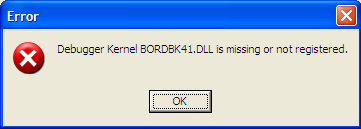
1. bordbk41.dll is missing or not registered.
regsvr32 "C:\Program Files (x86)\Common Files\Borland Shared\Debugger\bordbk41.dll"
This issue also can cause "EAccessViolation" error when run the application in the computer which didn't register this dll.
2. "1 transfer item(s) contain syntax errors"
a. Click on Tools,Configure Tools.
b. Select Visual C++ Project Conversion Utility.Click on Edit.
c. Remove the quotation marks from the "Parameters" entry; Leaving a space between -i and C at the beginning of the entry.Click OK.
3. Any error in win10, try run as Administrator.
4. unable to rename C:\Program Files\Borland\Cbuilder6\bin\bcb.$$$" to "C:\Program Files\Borland\Cbuilder6\Bin\bcb.dro"
Run as administrator bcb.exe
Go to the Start Menu and choose Run. Then type in the following command:
regsvr32 <full_path_to>\BORDBK41.DLL
Where <full_path_to> is the path to the file. It's located in the "Borland
Shared\Debugger" folder where you have Builder installed.
<full_path_to> = D:\Software\Broland.c++\Broland.c++4.0\Runimage\Borland Shared\Debugger
解决C++ builder 4.0编译后的程序在某些计算机上运行出现"EAccessViolation" 的错误的更多相关文章
- VS 设置编译后的程序可以以管理员身份运行
1.首先,创建一个文件命名为 XXX.exe.manifest, 并将以下内容复制到文件 <?xml version="1.0" encoding="UTF-8&q ...
- 解决Atom的 gpp compiler,编译后在Windows的命令行终端运行,中文乱码
按下快捷键Win+R,输入regedit打开注册变编辑器,依次找到 HKEY_LOCAL_MACHINE\Software\Microsoft\Command Processor\,右键新建一个字符串 ...
- Delphi XE2及以后的版本编译后的程序大小问题
说说Delphi XE2及以后的版本编译后的程序大小问题. 其实最终得到的程序并不大,由于编译器的变化,XE2里Debug版程序比Release版程序大很多,要减小程序体积,就使用Release版.下 ...
- 运行编译后的程序报错 error while loading shared libraries: lib*.so: cannot open shared object file: No such file or directory
运行编译后的程序报错 error while loading shared libraries: lib*.so: cannot open shared object file: No such f ...
- 【转】VS2012编译出来的程序,在XP上运行,出现“.exe 不是有效的 win32 应用程序” “not a valid win32 application”
原文网址:http://www.cnblogs.com/Dageking/archive/2013/05/15/3079394.html VS2012编译出来的程序,在XP上运行,出现“.exe 不是 ...
- 如何解决-win7系统打开截图工具显示“截图工具当前未在计算机上运行”
打开win7系统自带截图工具,显示"截图工具当前未在计算机上运行.请重新启动计算机,然后重试", 解决方法 1.首先在C盘中搜索tpcps.dll: 2.将数据最大那个tpcp ...
- vc++ 6.0编译后生成的文件
程序在编译后,在目标路径下会生成多个文件 Debug文件夹(*.exe,*.ilk,*.obj,*.pch,*.pdb,*.idb,*,pdb),*.cpp,*.dsp,*.ncb,*.plg ...
- 让VC6.0编译出来的程序支持XP样式或XP风格
(1)VC6.0编译出来的win32程序不支持winxp样式的原因:微软WINXP系统更新了Comctl32.dll(ver 6.0)这个“XP风格”的控件.为了保留传统的Windows界面风格,特地 ...
- 【解决】若要使用报表生成器,必须在此计算机上安装 .Net Framework 3.5
在报表库中试图通过点击菜单“在报表生成器中编辑”编辑报表时,会跳转到错误信息页面,提示: 若要使用报表生成器,必须在此计算机上安装 .Net Framework 3.5. 一般情况下并不是因为没有安装 ...
随机推荐
- while语句结构(for循环)
while语句结构(for循环) python for 循环可以遍历任何序列的项目,如一个列表或一个字符串 for循环的一般形式 for 条件判断 in 一个序列: 执行语句 else: 执行语句 可 ...
- raw_input和sys.stdin.readline()
sys.stdin.readline( )会将标准输入全部获取,包括末尾的'\n',因此用len计算长度时是把换行符'\n'算进去了的; raw_input( )获取输入时返回的结果是不包含末尾的换行 ...
- 微软云数据库SQL Azure
- SoapUI测试接口【转】
下载安装soapUI工具,具体安装按照提示往下走就可以,这里不着重说明,下面是我打开soapUI工具的起始窗口: 在Projects上鼠标右键点击,选择new soap project(新建一个SO ...
- HTML - 表格标签相关
<html> <head></head> <body> <!-- table (表格) border : 表格的边框 width : 表格的宽 h ...
- CF148D Bag of mice (期望dp)
传送门 # 解题思路 ~~这怕是本蒟蒻第一个独立做出来的期望$dp$的题,发篇题解庆祝一下~~.首先,应该是能比较自然的想出状态设计$f[i][j][0/1]$ 表示当前还剩 $i$个白老鼠 ...
- mybatis接口映射
通过sqlSession.getMapper();方法获取映射的接口及方法 sqlSession调用Configuration的getMapper方法,方法中使用了mapperRegistry.get ...
- webpack新手名词解释……妈妈再也不担心我看不懂webpack官方文档了
__dirname : 在任何模块文件内部,可以使用__dirname变量获取当前模块文件所在目录的完整绝对路径. path.resolve(): 方法将一系列路径或路径段解析为绝对路径. 语法: p ...
- (转)第02节:在Canvas上画简单的图形
我们现在已经可以在HTML中使用Fabric.js库了,那这节我们就详细的学习一下如何在canvas上画出简单的图形. 在画东西之前我们需要了解画任何东西的基本三个步骤: 声明画布(canvas),用 ...
- JDK源码阅读--Object
在java.lang包下 Object类:是所有类的基类(父类) public final native Class<?> getClass(); 返回这个Object所代表的的运行时类 ...