
13 -3 jquery选择器和 jquery动画
一 选择器:
1 基本选择器
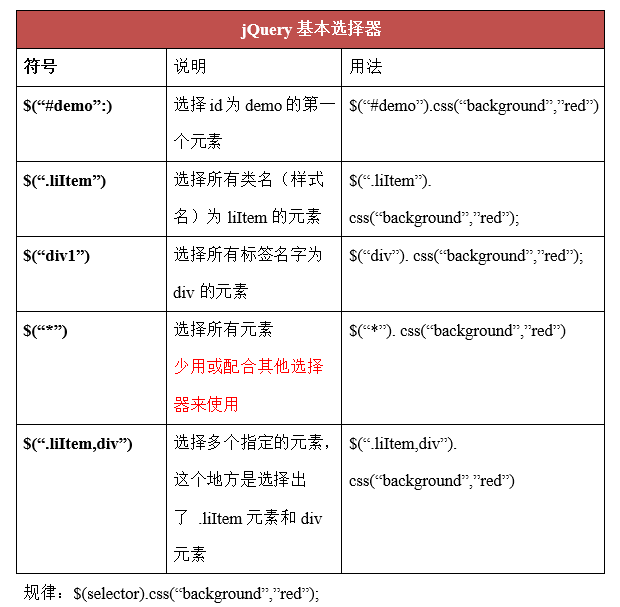
例子:
 <!--id  类  标签-->

 <!DOCTYPE html>

 <html lang="en">

 <head>

     <meta charset="UTF-8">

     <title>基本选择器</title>

 </head>

 <body>

     <div></div>

     <div id="box"></div>

     <div class="box"></div>

     <div class="box"></div>

     <div></div>

     <script src="jquery-3.3.1.min.js"></script>

     <script>

         $(function () {

             //三种获取方式

             var jqbox1=$("#box");

             var jqbox2=$(".box");

             var jqbox3=$("div");

             //操作标签选择器

             jqbox3.css('width',100);

             jqbox3.css('height',100);

             jqbox3.css('backgroundColor','red');

             jqbox3.css('margin-top',10);

             //操作类选择器

             jqbox2.css({

                 'background':'green'

             });

             jqbox2.text('哈哈哈');

             //操作id选择器

             jqbox1.css('backgroundColor','yellow');

      })

     </script>

 </body>

 </html>
2 层级选择器
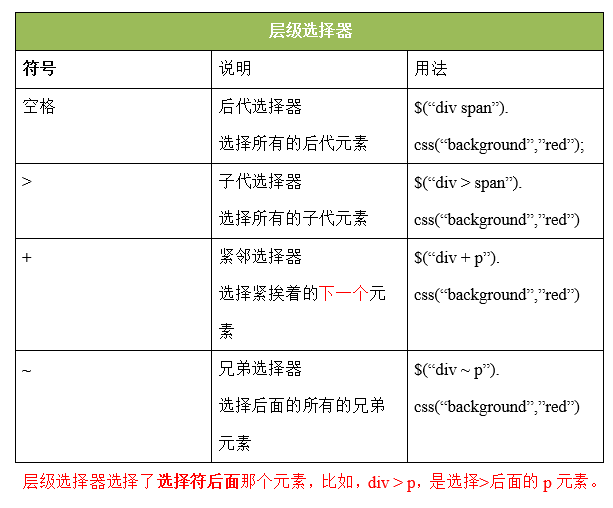
例子:
 <!--$(".outer div")  $(".outer>div")   $(".outer+div")  $(".outer~div")-->

 <!--层级选择器就是选择符后面的那个元素,比如div>p是选择>后面的p元素-->

 <!DOCTYPE html>

 <html lang="en">

 <head>

     <meta charset="UTF-8">

     <title>层级选择器</title>

 </head>

 <body>

 <script src="jquery-3.3.1.min.js"></script>

 <script>

     $(function () {

         //后代选择器,空格

         var jqli=$("ul li");

         jqli.css('margin',5);

         jqli.css('background','pink');

         //子代选择器,只应用于亲儿子

         var jqli1=$('ul >li');

         jqli1.css('background','red');

         //紧邻选择器

         var jqli2=$("ul + p");

         jqli2.css('color','blue');

         //兄弟选择器

         var jqli3=$('ul ~p');

         jqli3.css('color','red');

     })

 </script>

 <ul>

     <li>111</li>

     <li>222</li>

     <li>333</li>

     <ol>

         <li>aaa</li>

         <li>bbb</li>

         <li>ccc</li>

     </ol>

 </ul>

 <p>我是p标签</p>

 <p>风卷残云</p>

 </body>

 </html>
3 基本过滤选择器
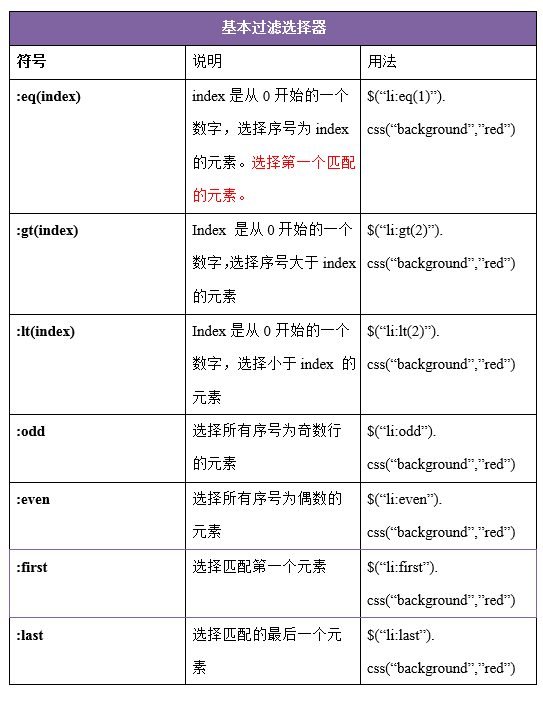
例子:
 <!DOCTYPE html>

 <html lang="en">

 <head>

     <meta charset="UTF-8">

     <title>基本过滤选择器</title>

     <style>

         li{

             list-style-type: none

         }

     </style>

 </head>

 <body>

   <ul>

             <li>哈哈哈哈,基本过滤选择器</li>

             <li>嘿嘿嘿</li>

             <li>天王盖地虎</li>

             <li>小鸡炖蘑菇</li>

   </ul>

   <script src="jquery-3.3.1.min.js"></script>

   <script>

       $(function () {

           //奇数

           $('li:odd').css('color','red');

           //选择索引值为0的元素

           $('li:eq(0)').css('font-size','40px');

           //选择索引值大于1的

           $('li:gt(1)').css('font-size','30px');

           //选择索引值小于1的

            $('li:lt(1)').css('font-size','20px');

       })

   </script>

 </body>

 </html>
4 属性选择器
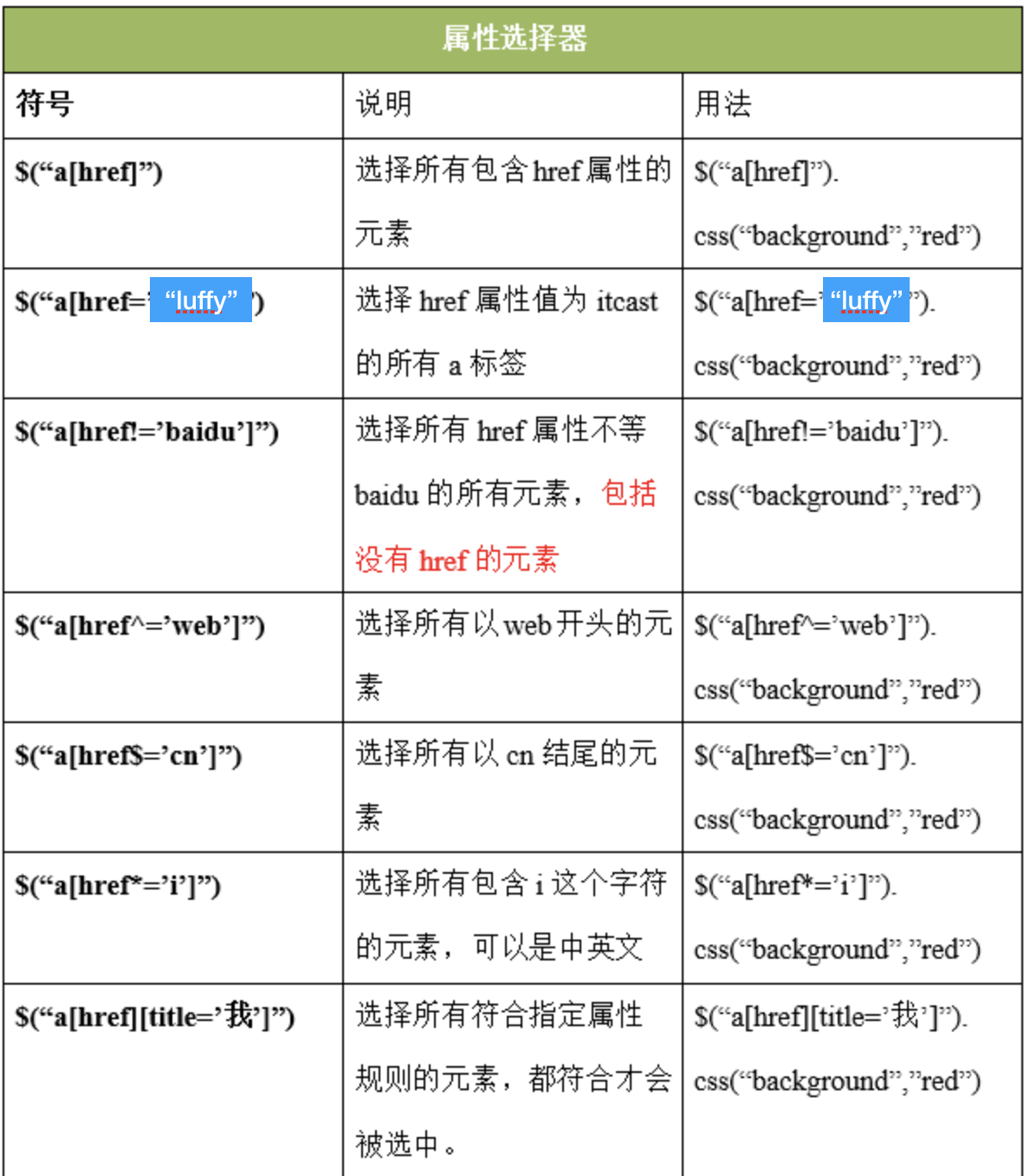
例子:
 <!DOCTYPE html>

 <html lang="en">

 <head>

     <meta charset="UTF-8">

     <title>属性选择器</title>

 </head>

 <body>

 <script src="jquery-3.3.1.min.js"></script>

 <script>

     //标签名[属性名] 查找所有含有id属性的该标签名的元素

     $(function () {

         $('li[id]').css('color','red');

         //匹配li标签属性是what的元素

         $('li[class=what]').css('font-size','30px');

         //匹配li标签class 不等于waht的元素

         $('li[class!=what]').css('font-size','40px');

         //匹配以username开头的元素

         $('input[name^=username]').css('background','gray');

         //匹配以222结尾的元素

         $('input[name$=222]').css('background','greenyellow');

          //匹配给定的属性是以包含某些值的元素

         $('button[class*=btn]').css('background','red')

     })

 </script>

 <div id="box">

             <h2 class="title">属性选择器</h2>

             <!--<p class="p1">我是一个段落</p>-->

             <ul>

                 <li id="li1">分手应该体面</li>

                 <li class="what" id="li2">分手应该体面</li>

                 <li class="what">分手应该体面</li>

                 <li class="heihei">分手应该体面</li>

             </ul>

             <form action="" method="post">

                 <input name="username" type='text' value="" checked="checked"></input>

                 <input name="username1111" type='text' value=""></input>

                 <input name="username2222" type='text' value=""></input>

                 <input name="abcusername3333" type='text' value=""></input>

                 <button class="btn-default">按钮1</button>

                 <button class="btn-info">按钮1</button>

                 <button class="bt-success">按钮1</button>

                 <button class="btn-danger">按钮1</button>

             </form>

 </div>

 </body>

 </html>
5 筛选选择器
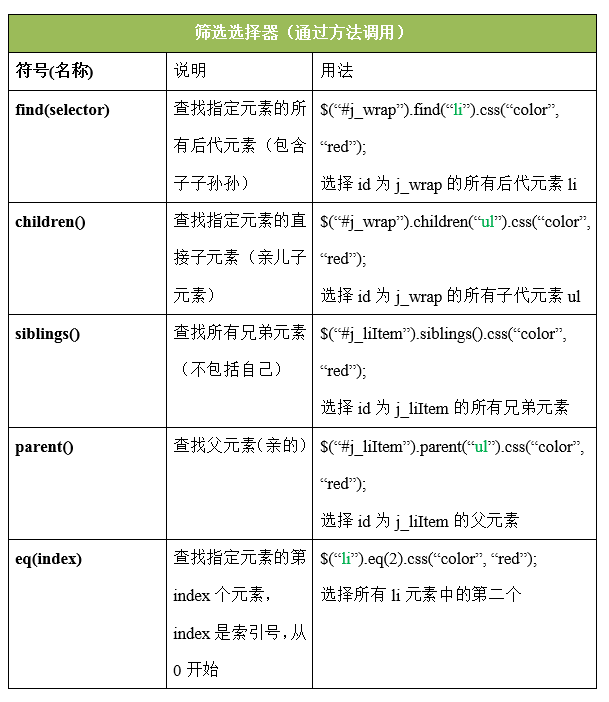
例子:
 <!DOCTYPE html>

 <html lang="en">

 <head>

     <meta charset="UTF-8">

     <title>筛选选择器</title>

 </head>

 <body>

 <script src="jquery-3.3.1.min.js"></script>

 <script>

     $(function () {

         //获取第n个元素 数值从0开始

         $('span').eq(1).css('color','green');

           //获取第一个元素和最后一个元素 :first :last

         $('span').last().css('color','greenyellow');

          $('span').first().css('color','black');

          //查找span标签的父元素(亲的)

          $('span').parent('.p1').css({"width":'200px','height':'200px',"background":'red'});

          //选择所有的兄弟元素(不包括自己)

          $('.list').siblings('li').css('color','red');

          //查找所有的后代元素

         $('div').find('button').css('background','yellow');

          //不写参数代表获取所有子元素。

        $('ul').children().css("background", "green");

        $('ul').children("li").css("margin-top", 10);

     })

 </script>

   <div id="box">

             <p class="p1">

                 <span>我是第一个span标签</span>

                 <span>我是第二个span标签</span>

                 <span>我是第三个span标签</span>

             </p>

             <button>按钮</button>

   </div>

         <ul>

             <li class="list">2</li>

             <li>3</li>

             <li>4</li>

             <li>5</li>

         </ul>

 </body>

 </html>
二 动画
1 显示动画
方式一:
$("div").show();
解释:无参数,表示让指定的元素直接显示出来。其实这个方法的底层就是通过display: block;实现的。
方式二:
$('div').show(3000);
解释:通过控制元素的宽高、透明度、display属性,逐渐显示,2秒后显示完毕。
方式三:
$("div").show("slow");
参数可以是:
slow 慢:600ms
normal 正常:400ms
fast 快:200ms
2 隐藏动画
 $(selector).hide();

     $(selector).hide(1000);

     $(selector).hide("slow");

     $(selector).hide(1000, function(){});
例子:
 <!DOCTYPE html>

 <html>

     <head>

         <meta charset="UTF-8">

         <title></title>

         <style type="text/css">

             #box{

                 width: 200px;

                 height: 200px;

                 background-color: green;

                 border: 1px solid red;

                 display: none;

             }

         </style>

     </head>

     <body>

         <div id="box">

         </div>

         <button id="btn">隐藏</button>

     </body>

     <script src="jquery-3.3.1.js"></script>

     <script type="text/javascript">

         //jquery 提供了一些方法 show() hide() 控制元素显示隐藏

         var isShow = true;

         $('#btn').click(function(){

             if(isShow){

                 $('#box').show('slow',function(){

                     $(this).text('盒子出来了');

                     $('#btn').text('显示');

                     isShow = false;

                 })

             }else{

                 $('#box').hide(2000,function(){

                     $(this).text('');

                     $('#btn').text('隐藏');

                     isShow = true;

                 })

             }

         })

     </script>

 </html>
3 开关式 显示隐藏动画
$('#box').toggle(3000,function(){});
显示和隐藏的来回切换采用的是toggle()方法:就是先执行show(),再执行hide()。
例子:
 $('#btn').click(function(){

             $('#box').toggle(3000,function(){

                 $(this).text('盒子出来了');

                 if ($('#btn').text()=='隐藏') {

                     $('#btn').text('显示');

                 }else{

                     $('#btn').text('隐藏');

                 }

             });

         })
4 滑入滑出
$(selector).slideToggle(speed, 回调函数);
5 淡入淡出
$(selector).fadeToggle('fast', callback);
例子:
 <!DOCTYPE html>

 <html lang="en">

 <head>

     <meta charset="UTF-8">

     <title>动画效果</title>

     <style>

     .box{

              position: absolute;

             left: 20px;

             top: 30px;

             width: 100px;

             height: 100px;

             background-color: green;

         display: none;

         }

     </style>

 </head>

 <body>

 <button id="btn">显示</button>

 <div class="box"></div>

 <script src="jquery-3.3.1.min.js"></script>

 <script>

     $(function () {

         // var isShow =true;

         // $('#btn').click(function () {

         //     var _this=$(this);

         //     if (isShow){

         //          $('.box').show(2000,function () {

         //               _this.text('隐藏');

         //

         //          });

         //

         //          isShow=false;

         //     }else{

         //         $('.box').hide(2000);

             //         isShow = true;

             //         $(this).text('显示');

         //     }

         // })

         //第二种简单写法

         $('#btn').click(function () {

             // // $('.box').stop().toggle('');

             //滑入滑出

             // $('.box').stop().slideToggle(2000,function () {

             //

             // })

             //淡入淡出动画效果

             $('.box').stop().fadeToggle(1000, function() {

             });

         })

     })

 </script>

 </body>

 </html>
三 自定义动画
语法:
$(selector).animate({params}, speed, callback);
作用:执行一组CSS属性的自定义动画。
第一个参数表示:要执行动画的CSS属性(必选)
第二个参数表示:执行动画时长(可选)
第三个参数表示:动画执行完后,立即执行的回调函数(可选)
例子:
 <!DOCTYPE html>

 <html>

 <head lang="en">

     <meta charset="UTF-8">

     <title></title>

     <style>

         div {

             position: absolute;

             left: 20px;

             top: 30px;

             width: 100px;

             height: 100px;

             background-color: green;

         }

     </style>

     <script src="jquery-3.3.1.min.js"></script>

     <script>

         jQuery(function () {

             $("button").click(function () {

                 var json = {"width": 500, "height": 500, "left": 300, "top": 300, "border-radius": 100};

                 var json2 = {

                     "width": 100,

                     "height": 100,

                     "left": 100,

                     "top": 100,

                     "border-radius": 100,

                     "background-color": 'red'

                 };

                 //自定义动画

                 $("div").animate(json, 1000, function () {

                     $("div").animate(json2, 1000, function () {

                         alert("动画执行完毕!");

                     });

                 });

             })

         })

     </script>

 </head>

 <body>

 <button>自定义动画</button>

 <div></div>

 </body>

 </html>
停止动画
$(selector).stop(true, false);一般直接写stop()
鼠标放上显示下拉菜单
例子:
 <!DOCTYPE html>

 <html>

 <head lang="en">

     <meta charset="UTF-8">

     <title></title>

     <style type="text/css">

         * {

             margin: 0;

             padding: 0;

         }

         ul {

             list-style: none;

         }

         .wrap {

             width: 330px;

             height: 30px;

             margin: 100px auto 0;

             padding-left: 10px;

             background-color: pink;

         }

         .wrap li {

             background-color: green;

         }

         .wrap > ul > li {

             float: left;

             margin-right: 10px;

             position: relative;

         }

         .wrap a {

             display: block;

             height: 30px;

             width: 100px;

             text-decoration: none;

             color: #000;

             line-height: 30px;

             text-align: center;

         }

         .wrap li ul {

             position: absolute;

             top: 30px;

             display: none;

         }

     </style>

     <script src="jquery-3.3.1.min.js"></script>

     <script>

         //入口函数

         $(document).ready(function () {

             //需求:鼠标放入一级li中,让他里面的ul显示。移开隐藏。

             var jqli = $(".wrap>ul>li");

             //绑定事件

             jqli.mouseenter(function () {

                 $(this).children("ul").stop().slideDown(1000);

             });

             //绑定事件(移开隐藏)

             jqli.mouseleave(function () {

                 $(this).children("ul").stop().slideUp(1000);

             });

         });

     </script>

 </head>

 <body>

 <div class="wrap">

     <ul>

         <li>

             <a href="javascript:void(0);">一级菜单1</a>

             <ul>

                 <li><a href="javascript:void(0);">二级菜单2</a></li>

                 <li><a href="javascript:void(0);">二级菜单3</a></li>

                 <li><a href="javascript:void(0);">二级菜单4</a></li>

             </ul>

         </li>

         <li>

             <a href="javascript:void(0);">二级菜单1</a>

             <ul>

                 <li><a href="javascript:void(0);">二级菜单2</a></li>

                 <li><a href="javascript:void(0);">二级菜单3</a></li>

                 <li><a href="javascript:void(0);">二级菜单4</a></li>

             </ul>

         </li>

         <li>

             <a href="javascript:void(0);">三级菜单1</a>

             <ul>

                 <li><a href="javascript:void(0);">三级菜单2</a></li>

                 <li><a href="javascript:void(0);">三级菜单3</a></li>

                 <li><a href="javascript:void(0);">三级菜单4</a></li>

             </ul>

         </li>

     </ul>

 </div>

 </body>

 </html>
13 -3 jquery选择器和 jquery动画的更多相关文章
- Unit01: jQuery概述 、 jQuery选择器 、 jQuery操作DOM
Unit01: jQuery概述 . jQuery选择器 . jQuery操作DOM 使用jQuery放大字体: <!DOCTYPE html> <html> <head ...
- jQuery入门、jQuery选择器、jQuery操作
一.什么是jQuery及如何使用 1.1 jQuery 简介 jQuery是一个兼容多浏览器的javascript函数库(把我们常用的一些功能进行了封装,方便我们来调用,提高我们的开发效率.),核心理 ...
- jQuery选择器总结 jQuery 的选择器可谓之强大无比,这里简单地总结一下常用的元素查找方法
新年第一编文章 jQuery 的选择器可谓之强大无比,这里简单地总结一下常用的元素查找方法 $("#myELement") 选择id值等于myElement的元素,id值 ...
- python 全栈开发,Day53(jQuery的介绍,jQuery的选择器,jQuery动画效果)
js总结 js: 1.ECMAScript5 ES5语法 2.DOM CRUD 获取 3种方式 id tag className //面向对象 对象 : 属性和方法 某个对象中 function $( ...
- python 全栈开发,Day53(jQuery的介绍,jQuery的选择器,jQuery动画效果)
01-jQuery的介绍 1.为什么要使用jQuery 在用js写代码时,会遇到一些问题: window.onload 事件有事件覆盖的问题,因此只能写一个事件. 代码容错性差. 浏览器兼容性问题. ...
- 《jQuery权威指南》学习笔记之第2章 jQuery选择器
2.1 jQuery选择器概述 2.1.1 什么使选择器 2.1.2 选择器的优势: 代码更简单,完善的检测机制 1.代码更简单 示例2-1 使用javascript实现隔行变色 < ...
- JQuery选择器大全 前端面试送命题:面试题篇 对IOC和DI的通俗理解 c#中关于协变性和逆变性(又叫抗变)帮助理解
JQuery选择器大全 jQuery 的选择器可谓之强大无比,这里简单地总结一下常用的元素查找方法 $("#myELement") 选择id值等于myElement的元素 ...
- 我人生中的jQuery选择器
Jquery选择器 一.Jquery选择器简介 JavaScript只是一种运行于客户端,可以被客户端浏览器解析的一段代码.它和java没有任何关系.JavaScript简称JS.jQuery是对JS ...
- jQuery学习笔记(一)jQuery选择器
目录 jQuery选择器的优点 基本选择器 层次选择器 过滤选择器 表单选择器 第一次写博客,希望自己能够长期坚持,以写博客的方式作为总结与复习. 最近一段时间开始学习jQuery,通过写一个jQue ...
随机推荐
- Eclipse 出现select type (? = any character,*= any String,Tz=TimeZone)
在eclipse中想运行project的时候,往往是右键项目名称---->run As --->Java Application 但是会弹出窗口显示select type (? = any ...
- 洛谷 P1217 [USACO1.5]回文质数 Prime Palindromes【取回文数/数论/字符串】
题目描述 因为151既是一个质数又是一个回文数(从左到右和从右到左是看一样的),所以 151 是回文质数. 写一个程序来找出范围[a,b](5 <= a < b <= 100,000 ...
- C#如何检测网络端口连接的状态
原文:C#如何检测网络端口连接的状态 C#如何检测/监控远程连接网络端口的情况(例如:3389端口是否处于监听状态,是否建立了连接等). using System; using System.Coll ...
- 【洛谷P1204】【USACO1.2】挤牛奶Milking Cows
P1204 [USACO1.2]挤牛奶Milking Cows 题目描述 三个农民每天清晨5点起床,然后去牛棚给3头牛挤奶.第一个农民在300秒(从5点开始计时)给他的牛挤奶,一直到1000秒.第二个 ...
- 配置管理 ACM 在高可用服务 AHAS 流控降级组件中的应用场景
应用配置管理(Application Configuration Management,简称 ACM)是一款应用配置中心产品.基于ACM您可以在微服务.DevOps.大数据等场景下极大地减轻配置管理的 ...
- html 遮罩层以及弹出框的制作
<!DOCTYPE html PUBLIC "-//W3C//DTD XHTML 1.0 Transitional//EN" "http://www.w3.org/ ...
- 【linux配置】在VMware中为Redhat HAT配置本地yum源
在VMware中为Redhat HAT配置本地yum源 今天准备使用CM安装大数据环境,到需要几台机器都使用同一套yum源才可以,所以想到将Redhat镜像文件拷贝到虚拟机中,在挂起使用,最后通过ht ...
- BP神经网络分类应用
DNA序列分类 作为研究DNA序列结构的尝试,提出以下对序列集合进行分类的问题:有20个已知类别的人工制造序列,其中序列标号1-10为A类,11-20为B类.请从中提取特征,构造分类方法,并用这些已 ...
- JDBC的事务处理 JDBC事务处理 JDBC教程
JDBC的事务基本知识 事务的定义:一个事务是由一条或多条对数据库操作的sql语句所组成的一个不可分割的工作单元,只有当事务中的所有操作都正常执行后,整个事务才会提交给数据库. 结束事务的操作:com ...
- JQuery--mouseover()与moseout()的区别
mouseover()与mouseout()区别 普通鼠标移入移出事件 语法: mouseover()/mouseout() 功能: 当鼠标移入/移出到添加事件的元素或其子元素的时候,都会被触发!!m ...