
jenkins+maven配置findbugs+checkstyle+pmd
一、findbugs+checkstyle+pmd介绍
|
工具 |
目的 |
检查项 |
|
FindBugs 检查.class |
基于Bug Patterns概念,查找javabytecode(.class文件)中的潜在bug |
主要检查bytecode中的bug patterns,如NullPoint空指针检查、没有合理关闭资源、字符串相同判断错(==,而不是equals)等 |
|
PMD 检查源文件 |
检查Java源文件中的潜在问题 |
主要包括: 空try/catch/finally/switch语句块 未使用的局部变量、参数和private方法 空if/while语句 过于复杂的表达式,如不必要的if语句等 复杂类 |
|
CheckStyle 检查源文件 主要关注格式 |
检查Java源文件是否与代码规范相符 |
主要包括: Javadoc注释 命名规范 多余没用的Imports Size度量,如过长的方法 缺少必要的空格Whitespace 重复代码 |
二、jenkins配置
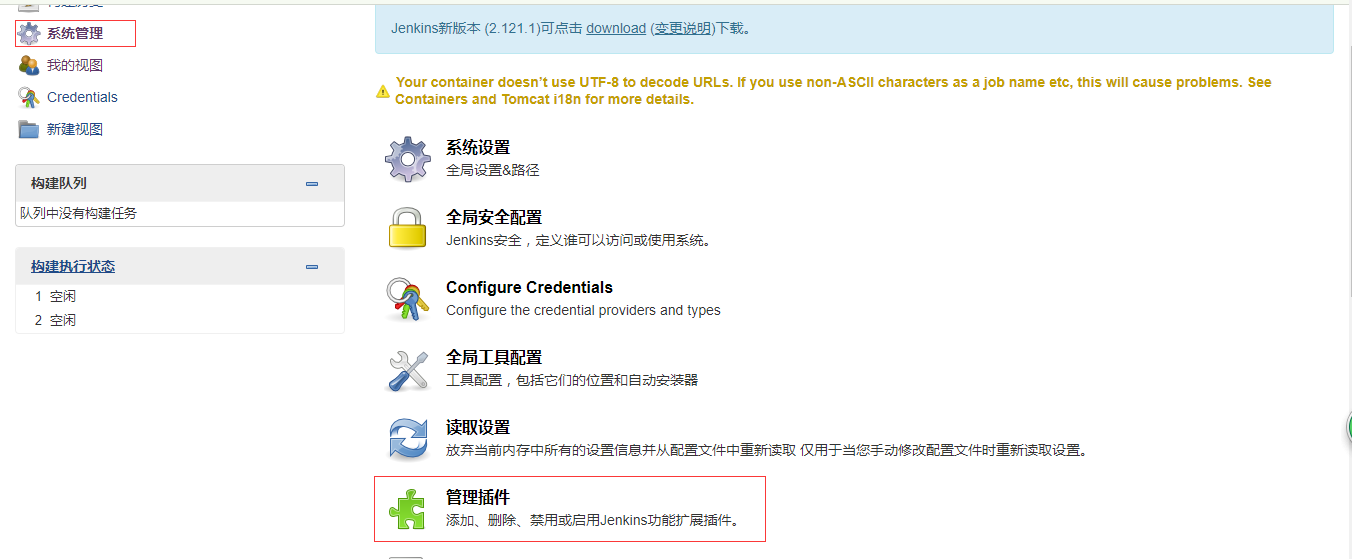
1.下载对应插件FindBugs、PMD、CheckStyle
2.在maven中设置插件(pom.xml)
 <project ...>

     <properties>

         <project.build.sourceEncoding>UTF-8</project.build.sourceEncoding>

         <project.reporting.outputEncoding>UTF-8</project.reporting.outputEncoding>

     </properties>

     <!-- ...... -->

     <reporting>

         <plugins>

             <plugin>

                 <groupId>org.codehaus.mojo</groupId>

                 <artifactId>findbugs-maven-plugin</artifactId>

                 <version>3.0.4</version>

                 <configuration>

                     <xmlOutput>true</xmlOutput>

                     <findbugsXmlOutput>true</findbugsXmlOutput>

                     <findbugsXmlWithMessages>true</findbugsXmlWithMessages>

                 </configuration>

             </plugin>

             <plugin>

                 <groupId>org.apache.maven.plugins</groupId>

                 <artifactId>maven-checkstyle-plugin</artifactId>

                 <version>2.17</version>

                 <configuration>

                     <linkXRef>false</linkXRef>

                     <failsOnError>true</failsOnError>

                     <consoleOutput>true</consoleOutput>

                     <configLocation>checkstyle.xml</configLocation>

                 </configuration>

             </plugin>

             <plugin>

                 <groupId>org.apache.maven.plugins</groupId>

                 <artifactId>maven-pmd-plugin</artifactId>

                 <version>3.7</version>

                 <configuration>

                     <linkXref>false</linkXref>

                 </configuration>

             </plugin>

         </plugins>

     </reporting>

 </project>
3.在pom.xml同目录下新增checkstyle.xml文件(可以放置其他目录,修改pom文件中此行:<configLocation>checkstyle.xml</configLocation>)
此处提供一个checksyle.xml文件模板,可根据具体所需进行配置
 <?xml version="1.0" encoding="UTF-8"?>

 <!DOCTYPE module PUBLIC "-//Puppy Crawl//DTD Check Configuration 1.2//EN" "http://www.puppycrawl.com/dtds/configuration_1_2.dtd">

 <!-- Generated by RHY @will_awoke -->

 <module name="Checker">

     <property name="charset" value="UTF-8"/>

     <property name="severity" value="warning"/>

     <!-- Checks for Size Violations.  -->

     <!-- 检查文件的长度(行) default max=2000 -->

     <module name="FileLength">

      <property name="max" value="2500"/>

   </module>

   <!-- Checks that property files contain the same keys. -->

   <!-- 检查**.properties配置文件 是否有相同的key

   <module name="Translation">

   </module>

   -->

   <module name="TreeWalker">

     <!-- Checks for imports    -->

     <!-- 必须导入类的完整路径,即不能使用*导入所需的类 -->

     <!--<module name="AvoidStarImport"/>  -->

     <!-- 检查是否从非法的包中导入了类 illegalPkgs: 定义非法的包名称-->

     <module name="IllegalImport"/> <!-- defaults to sun.* packages -->

     <!-- 检查是否导入了不必显示导入的类-->

     <module name="RedundantImport"/>

     <!-- 检查是否导入的包没有使用-->

     <module name="UnusedImports"/>

     <!-- Checks for whitespace

     <module name="EmptyForIteratorPad"/>

     <module name="MethodParamPad"/>

     <module name="NoWhitespaceAfter"/>

     <module name="NoWhitespaceBefore"/>

     <module name="OperatorWrap"/>

     <module name="ParenPad"/>

     <module name="TypecastParenPad"/>

     <module name="WhitespaceAfter"/>

     <module name="WhitespaceAround"/>

     -->

     <!-- 检查类和接口的javadoc 默认不检查author 和version tags

       authorFormat: 检查author标签的格式

             versionFormat: 检查version标签的格式

             scope: 可以检查的类的范围,例如:public只能检查public修饰的类,private可以检查所有的类

             excludeScope: 不能检查的类的范围,例如:public,public的类将不被检查,但访问权限小于public的类仍然会检查,其他的权限以此类推

             tokens: 该属性适用的类型,例如:CLASS_DEF,INTERFACE_DEF -->

     <module name="JavadocType">

         <property name="authorFormat" value="\S"/>

       <property name="scope" value="protected"/>

       <property name="tokens" value="CLASS_DEF,INTERFACE_DEF"/>

     </module>

     <!-- 检查方法的javadoc的注释

             scope: 可以检查的方法的范围,例如:public只能检查public修饰的方法,private可以检查所有的方法

             allowMissingParamTags: 是否忽略对参数注释的检查

             allowMissingThrowsTags: 是否忽略对throws注释的检查

             allowMissingReturnTag: 是否忽略对return注释的检查 -->

     <module name="JavadocMethod">

         <property name="scope" value="private"/>

       <property name="allowMissingParamTags" value="false"/>

       <property name="allowMissingThrowsTags" value="false"/>

       <property name="allowMissingReturnTag" value="false"/>

       <property name="tokens" value="METHOD_DEF"/>

       <property name="allowUndeclaredRTE" value="true"/>

       <property name="allowThrowsTagsForSubclasses" value="true"/>

       <!--允许get set 方法没有注释-->

         <property name="allowMissingPropertyJavadoc" value="true"/>

     </module>

     <!-- 检查类变量的注释

             scope: 检查变量的范围,例如:public只能检查public修饰的变量,private可以检查所有的变量 -->

     <module name="JavadocVariable">

       <property name="scope" value="private"/>

     </module>

     <!--option: 定义左大括号'{'显示位置,eol在同一行显示,nl在下一行显示

       maxLineLength: 大括号'{'所在行行最多容纳的字符数

       tokens: 该属性适用的类型,例:CLASS_DEF,INTERFACE_DEF,METHOD_DEF,CTOR_DEF -->

     <!--<module name="LeftCurly">

         <property name="option" value="nl"/>

     </module>  -->

     <!-- NeedBraces 检查是否应该使用括号的地方没有加括号

       tokens: 定义检查的类型 -->

     <module name="NeedBraces"/>

     <!-- Checks the placement of right curly braces ('}') for  else, try, and catch tokens. The policy to verify is specified using property  option.

       option: 右大括号是否单独一行显示

       tokens: 定义检查的类型  -->

     <module name="RightCurly">

         <property name="option" value="alone"/>

     </module>

     <!-- 检查在重写了equals方法后是否重写了hashCode方法 -->

     <module name="EqualsHashCode"/>

     <!--  Checks for illegal instantiations where a factory method is preferred.

       Rationale: Depending on the project, for some classes it might be preferable to create instances through factory methods rather than calling the constructor.

       A simple example is the java.lang.Boolean class. In order to save memory and CPU cycles, it is preferable to use the predefined constants TRUE and FALSE. Constructor invocations should be replaced by calls to Boolean.valueOf().

       Some extremely performance sensitive projects may require the use of factory methods for other classes as well, to enforce the usage of number caches or object pools. -->

     <!--<module name="IllegalInstantiation">

         <property name="classes" value="java.lang.Boolean"/>

     </module>  -->

     <!-- Checks for Naming Conventions.   命名规范   -->

     <!-- 局部的final变量,包括catch中的参数的检查 -->

     <module name="LocalFinalVariableName"/>

     <!-- 局部的非final型的变量,包括catch中的参数的检查 -->

     <module name="LocalVariableName"/>

     <!-- 仅仅是static型的变量(不包括static final型)的检查 -->

     <module name="StaticVariableName">

         <property name="format" value="(^[A-Z0-9_]{0,19}$)"/>

     </module>

     <!-- 包名的检查(只允许小写字母) -->

     <module name="PackageName">

     <property name="format" value="^[a-z]+(\.[a-z][a-z0-9]*)*$"/>

     <message key="name.invalidPattern" value="Package name ''{0}'' must match pattern ''{1}''."/>

     </module>

     <!-- 类型(Class或Interface)名的检查 -->

     <module name="TypeName">

         <property name="format" value="(^[A-Z][a-zA-Z0-9]{0,19}$)"/>

     </module>

     <!-- methods -->

     <module name="MethodName">

       <property name="format" value="(^[a-z][a-zA-Z0-9]{0,19}$)"/>

     </module>

     <!-- non-static fields -->

     <module name="MemberName">

         <property name="format" value="(^[a-z][a-z0-9][a-zA-Z0-9]{0,19}$)"/>

     </module>

     <!-- parameters -->

     <module name="ParameterName">

         <property name="format" value="(^[a-z][a-zA-Z0-9_]{0,19}$)"/>

     </module>

     <!-- 常量名的检查,忽略log -->

     <module name="ConstantName">

         <property name="format" value="^logger$|^[A-Z][A-Z0-9]*(_[A-Z0-9]+)*$"/>

     </module>

     <!-- 检查java代码的缩进 默认配置:基本缩进 4个空格,新行的大括号:0。新行的case 4个空格 -->

     <module name="Indentation">

     <property name="basicOffset" value="4"/>

     <property name="braceAdjustment" value="0"/>

     <property name="caseIndent" value="2"/>

     <property name="throwsIndent" value="4"/>

     <property name="lineWrappingIndentation" value="4"/>

     <property name="arrayInitIndent" value="2"/>

     </module>

     <!-- Checks for redundant exceptions declared in throws clause such as duplicates, unchecked exceptions or subclasses of another declared exception.

       检查是否抛出了多余的异常

     <module name="RedundantThrows">

         <property name="logLoadErrors" value="true"/>

         <property name="suppressLoadErrors" value="true"/>

     </module>

     -->

      <!--  Checks for overly complicated boolean expressions. Currently finds code like  if (b == true), b || true, !false, etc.

        检查boolean值是否冗余的地方

        Rationale: Complex boolean logic makes code hard to understand and maintain. -->

     <module name="SimplifyBooleanExpression"/>

     <!--  Checks for overly complicated boolean return statements. For example the following code

        检查是否存在过度复杂的boolean返回值

        if (valid())

           return false;

        else

           return true;

        could be written as

           return !valid();

        The Idea for this Check has been shamelessly stolen from the equivalent PMD rule. -->

     <module name="SimplifyBooleanReturn"/>

     <!-- Checks that a class which has only private constructors is declared as final.只有私有构造器的类必须声明为final-->

     <module name="FinalClass"/>

      <!--  Make sure that utility classes (classes that contain only static methods or fields in their API) do not have a public constructor.

        确保Utils类(只提供static方法和属性的类)没有public构造器。

        Rationale: Instantiating utility classes does not make sense. Hence the constructors should either be private or (if you want to allow subclassing) protected. A common mistake is forgetting to hide the default constructor.

        If you make the constructor protected you may want to consider the following constructor implementation technique to disallow instantiating subclasses:

        public class StringUtils // not final to allow subclassing

        {

            protected StringUtils() {

                throw new UnsupportedOperationException(); // prevents calls from subclass

            }

            public static int count(char c, String s) {

                // ...

            }

        }

     <module name="HideUtilityClassConstructor"/>

     -->

     <!--  Checks visibility of class members. Only static final members may be public; other class members must be private unless property protectedAllowed or packageAllowed is set.

       检查class成员属性可见性。只有static final 修饰的成员是可以public的。其他的成员属性必需是private的,除非属性protectedAllowed或者packageAllowed设置了true.

        Public members are not flagged if the name matches the public member regular expression (contains "^serialVersionUID$" by default). Note: Checkstyle 2 used to include "^f[A-Z][a-zA-Z0-9]*$" in the default pattern to allow CMP for EJB 1.1 with the default settings. With EJB 2.0 it is not longer necessary to have public access for persistent fields, hence the default has been changed.

        Rationale: Enforce encapsulation. 强制封装 -->

     <module name="VisibilityModifier"/>

     <!-- 每一行只能定义一个变量 -->

     <module name="MultipleVariableDeclarations">

     </module>

      <!-- Checks the style of array type definitions. Some like Java-style: public static void main(String[] args) and some like C-style: public static void main(String args[])

        检查再定义数组时,采用java风格还是c风格,例如:int[] num是java风格,int num[]是c风格。默认是java风格-->

     <module name="ArrayTypeStyle">

     </module>

     <!-- Checks that there are no "magic numbers", where a magic number is a numeric literal that is not defined as a constant. By default, -1, 0, 1, and 2 are not considered to be magic numbers.

     <module name="MagicNumber">

     </module>

     -->

     <!-- A check for TODO: comments. Actually it is a generic regular expression matcher on Java comments. To check for other patterns in Java comments, set property format.

        检查是否存在TODO(待处理) TODO是javaIDE自动生成的。一般代码写完后要去掉。

      -->

     <module name="TodoComment"/>

     <!--  Checks that long constants are defined with an upper ell. That is ' L' and not 'l'. This is in accordance to the Java Language Specification,  Section 3.10.1.

       检查是否在long类型是否定义了大写的L.字母小写l和数字1(一)很相似。

       looks a lot like 1. -->

     <module name="UpperEll"/>

     <!--  Checks that switch statement has "default" clause. 检查switch语句是否有‘default’从句

        Rationale: It's usually a good idea to introduce a default case in every switch statement.

        Even if the developer is sure that all currently possible cases are covered, this should be expressed in the default branch,

         e.g. by using an assertion. This way the code is protected aginst later changes, e.g. introduction of new types in an enumeration type. -->

     <module name="MissingSwitchDefault"/>

     <!--检查switch中case后是否加入了跳出语句,例如:return、break、throw、continue -->

     <module name="FallThrough"/>

     <!-- 方法的参数个数不超过6个。只所有有这么多参数,是因为Swing里面有可能就有这么长-->

     <module name="ParameterNumber">

       <property name="max" value="5"/>

     </module>

     <!-- 每行字符数 -->

     <module name="LineLength">

       <property name="max" value="1000"/>

     </module>

     <!-- Checks for long methods and constructors. max default 150行. max=300 设置长度300 -->

     <module name="MethodLength">

       <property name="max" value="300"/>

     </module>

     <!-- ModifierOrder 检查修饰符的顺序,默认是 public,protected,private,abstract,static,final,transient,volatile,synchronized,native -->

     <module name="ModifierOrder">

     </module>

     <!-- 检查是否有多余的修饰符,例如:接口中的方法不必使用public、abstract修饰  -->

     <module name="RedundantModifier">

     </module>

     <!--- 字符串比较必须使用 equals() -->

     <module name="StringLiteralEquality">

     </module>

     <!-- if-else嵌套语句个数 最多4层 -->

     <module name="NestedIfDepth">

       <property name="max" value="3"/>

     </module>

     <!-- try-catch 嵌套语句个数 最多2层 -->

     <module name="NestedTryDepth">

       <property name="max" value="2"/>

     </module>

     <!-- 返回个数 -->

     <!--<module name="ReturnCount">

       <property name="max" value="5"/>

       <property name="format" value="^$"/>

     </module>-->

   </module>

 </module>
4.将pom.xml及checkstyle.xml文件上传的svn上,因为jenkins是通过svn地址去拿的代码
5.修改jenkins构建配置
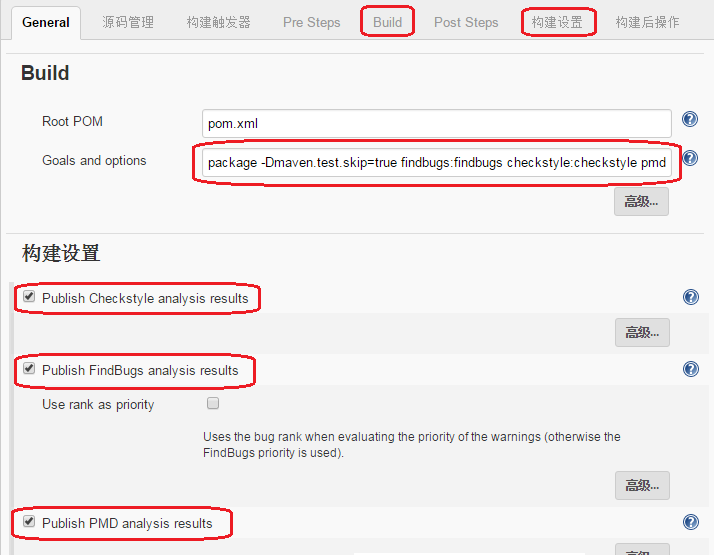
“Build”标签页,Goals and options 设置为: package -Dmaven.test.skip=true findbugs:findbugs checkstyle:checkstyle pmd:pmd
“构建设置”标签页,打开以下三个选项:
- Publish FindBugs analysis results
- Publish Checkstyle analysis results
- Publish PMD analysis results
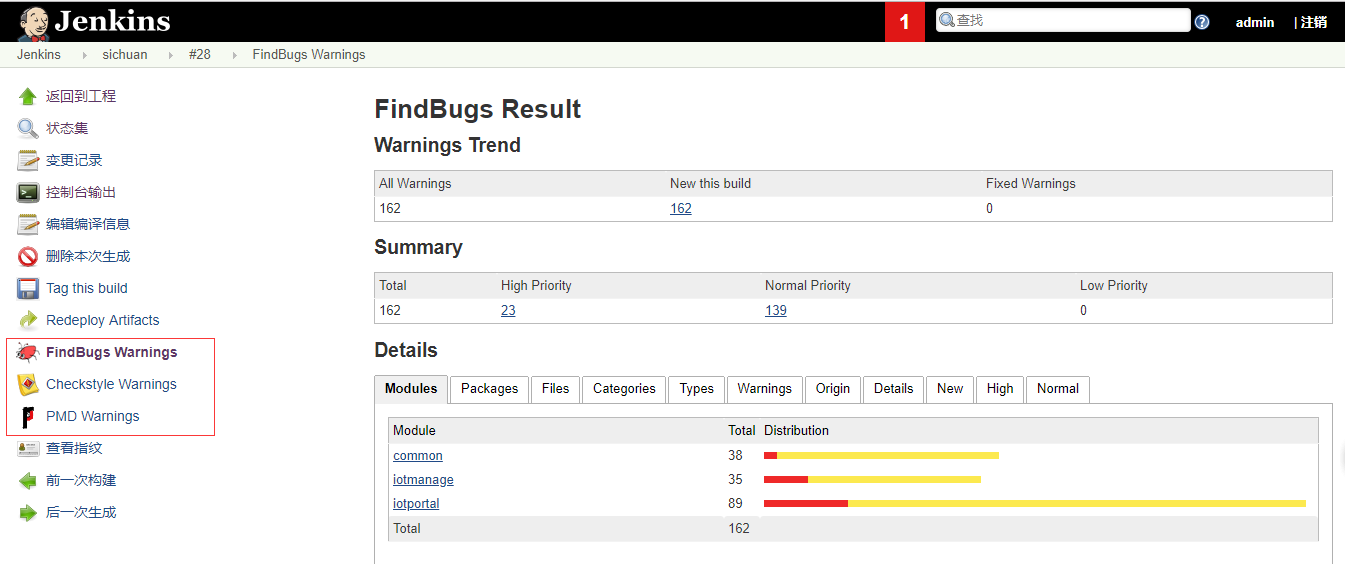
6.构建完成,查看报告
jenkins+maven配置findbugs+checkstyle+pmd的更多相关文章
- 干货!Jenkins下配置findbugs、pmd及checkstyle实现代码自动检测
配置前提: 对于maven项目来说,需要在pom.xml文件的<build><plugins>添加配置</plugins></build> 网上有些地方 ...
- Jenkins安装和配置FindBugs、PMD、CheckStyle等插件
最近研究Jenkins的常用插件的使用,主要使用FindBugs.PMD.CheckStyle.Violations.Emma等插件,主要参考了http://blog.csdn.net/dc_726/ ...
- jenkins+findbugs+checkstyle+PMD静态代码检查(二)
可以根据自己的需求选中对应的插件进行配置(不一定非要同时配置三个插件) jenkins:持续集成的工具 fundbugs:检测代码静态错误的插件 例如:定义了没有用到的对象,string类型的比较使 ...
- findbugs, checkstyle, pmd的myeclipse7.5+插件安装(转:http://blog.csdn.net/priestmoon/article/details/63941)
CheckStyle (1)下载net.sf.eclipsecs_5.3.0.201012121300-updatesite-.zip (2)打开MyEclipse,Help->Software ...
- Jenkins 简单配置
安装就不说了, 因为安装实在是很简单的. Jenkins基础配置 配置jdk 和maven 进入Global Tool Configuration, 配置JDK: 一般不要选择自动安装, 否则下载 ...
- Jenkins 配置 FindBugs,Checkstyle,PMD 实现代码的静态检查 (14)
一.插件介绍 FindBugs:静态分析工具,它检查类或者 JAR 文件,将字节码与一组缺陷模式进行对比以发现可能的问题.利用这个工具,就可以在不实际运行程序的情况对软件进行分析.它可以帮助改进代码的 ...
- IDEA上安装和使用checkstyle,findbugs,visualVM,PMD插件
##安装插件步骤: 1.打开settings 2.选择plugins 3.点击"Browse repositories" 4.搜索对应内插件,点击"install&quo ...
- jenkins配置findbugs失败---不要随便忽略警告!一个因为文件所有权引发的血案
一:背景交代 这两天组长让我这边搭一个持续集成环境.梳理了需求后,因为我们的项目都是maven项目,所以我选择了jenkins+外置maven(区别于直接从jenkins里面安装)的方案.(cento ...
- DEA上安装和使用checkstyle,findbugs,visualVM,PMD插件
##安装插件步骤: 1.打开settings 2.选择plugins 3.点击"Browse repositories" 4.搜索对应内插件,点击"install&quo ...
随机推荐
- git pull报错you do not have permission to pull from the repository
you do not have permission to pull from the repository解决方法 使用git进行项目的版本管理,换了台电脑,配置了账号和邮箱后,pull一个项目 ...
- 深入浅出Mybatis系列六-objectFactory、plugins、mappers简介与配置
注:本文转载自南轲梦 注:博主 Chloneda:个人博客 | 博客园 | Github | Gitee | 知乎 上篇文章<深入浅出Mybatis系列(五)---TypeHandler简介及配 ...
- flex布局 居中
display:flex;justify-content: center;检查侧轴是否居中,比如古代竖着写字,检查字是否在每条竹简的中央. display:flex;align-items: cent ...
- 批量获取mysql数据库实例指定参数的值
需求:需要对比所有mysql数据库实例上面的指定参数配置情况,同时需要需要能看到如ip,端口,master or slave,毕竟主和从参数不一样还是有可能的. 说明:必须要有个数据库存储所有是数据库 ...
- java - GC垃圾收集器详解(三)
以前收集器的特点 年轻代和老年代是各自独立且连续的内存块 年轻代收集必须使用单个eden+S0+S1进行复制算法 老年代收集扫描整个老年代区域 都是以尽可能少而快速地执行GC为设计原则 G1是什么 G ...
- FatMouse's Speed HDU - 1160 最长上升序列, 线性DP
#include<cstdio> #include<cstdlib> #include<cstring> #include<algorithm> usi ...
- Java枚举类型的使用,数值的二进制表示
一.Java枚举类型的使用 首先请看这段代码: package java上课; public class EnumTest { public static void main(String[] arg ...
- layer.open获取弹出层的input框的值
使用top.$('#txtReason').val();获取值: //不通过 function unAuditData(id) { parent.layer.open({ type: , title: ...
- Python之路Day11
函数名的第一类对象及使用 当作值,赋值给变量 def func(): print(1) print(func) #查看函数的内存地址 a=func print(a) a() 可以当作容器中的元素 de ...
- Wannafly Camp 2020 Day 1H 最大公约数 - 质因数分解,高精度
把每个质因子扒出来乱搞一下 #include <bits/stdc++.h> using namespace std; int g[505][505]; int isp[505]; str ...