
WLC-WLC升级(以2504为例)
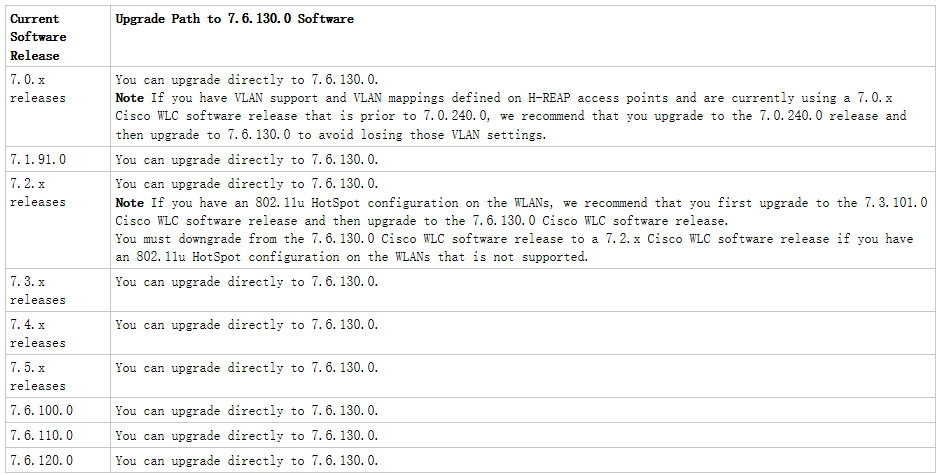
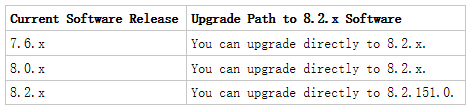
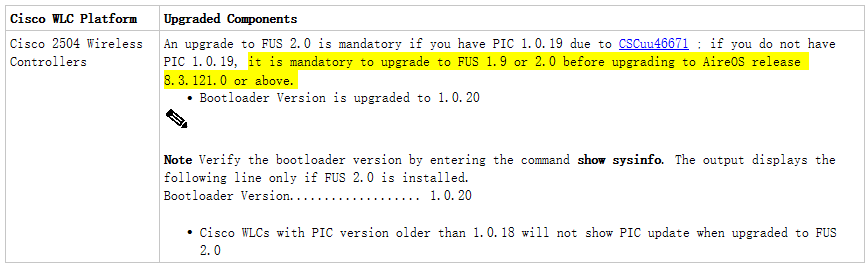
1、WLC升级需要按照升级路径来操作,低版本到高版本的跨度太大,往往需要升级到中间版本,有时候还涉及到FUS。
2、我们升级,一般使用的笔记本上运行的TFTP/FTP server。
需要注意:笔记本防火墙的影响。
如下是一个升级的简单示例:
注意,笔记本防火墙因素。
(Cisco Controller) >show wlan summary >>>>>>查看使用的WLAN状态
Number of WLANs.................................. 2
WLAN ID WLAN Profile Name / SSID Status Interface Name
------- ------------------------------------- -------- --------------------
1 TEST / TEST Enabled management
2 HREAP / HREAP Enabled management
(Cisco Controller) >config wlan disable 1 >>>>>>>>先关闭使用的WLAN
(Cisco Controller) >config wlan disable 2
(Cisco Controller) >ping 10.1.1.1 >>>>>>>>测试是否和server能够通信
Send count=3, Receive count=3 from 10.1.1.1
(Cisco Controller) > >>>>>>>>>>选择下载升级文件的模式,可以使用ftp\http\sftp\tftp
(Cisco Controller) >transfer download datatype code >>>>>>>选择下载的数据类型,code代表下载一个可执行的镜像
(Cisco Controller) >transfer download serverip 10.1.1.1 >>>>>>>>配置下载镜像的server地址
(Cisco Controller) >transfer download filename AIR-CT2500-K9-8-2-166-0.aes >>>>>完整填写要下载的文件名
(Cisco Controller) >transfer download path / >>>>>>>填写下载文件的路径,和server在同一根目录,就选择“/”例
如,server在D盘,只需要将文件放在D盘根目录就可以了
(Cisco Controller) >transfer download start >>>>>>>>开始传输下载
Mode............................................. TFTP
Data Type........................................ Code
TFTP Server IP................................... 10.1.1.1
TFTP Packet Timeout.............................. 6
TFTP Max Retries................................. 5
TFTP Path........................................ /
TFTP Filename.................................... AIR-CT2500-K9-8-2-166-0.aes
This may take some time.
Are you sure you want to start? (y/N) y
TFTP Code transfer starting.
TFTP receive complete... extracting components.
Checking Version Built.
Image version check passed.
Writing new RTOS to flash disk.
Writing new FP to flash disk.
Writing new AP Image Bundle to flash disk.
Executing fini script.
File transfer is successful.
Reboot the controller for update to complete.
Optionally, pre-download the image to APs before rebooting to reduce network downtime.
(Cisco Controller) >reset system
The system has unsaved changes.
Would you like to save them now? (y/N) y
Configuration Saved!
System will now restart! Creating license client restartability thread
Updating license storage ... Done.
Exit Called
Switchdrvr exited!
Restarting system.
WLCNG Boot Loader Version 1.0.20 (Built on Jan 14 2014 at 11:40:45 by cisco)
Board Revision 0.0 (SN: PSJ15320AXR, Type: AIR-CT2504-K9) (P)
Verifying boot loader integrity... OK.
OCTEON CN5230C-SCP pass 2.0, Core clock: 750 MHz, DDR clock: 330 MHz (660 Mhz data rate)
CPU Cores: 4
DRAM: 1024 MB
Flash: 32 MB
Clearing DRAM........ done
Network: octeth0', octeth1, octeth2, octeth3
' - Active interface
E - Environment MAC address override
CF Bus 0 (IDE): OK
IDE device 0:
- Model: 1GB CompactFlash Card Firm: CF B612J Ser#: C321101091A1YB4BJK55
- Type: Hard Disk
- Capacity: 977.4 MB = 0.9 GB (2001888 x 512)
Press <ESC> now to access the Boot Menu...
Loading primary image (8.2.166.0)
100%
36881019 bytes read
Launching...
Launching images...
init started: BusyBox v1.6.0 (2010-05-13 17:50:10 EDT) multi-call binary
starting pid 690, tty '': '/etc/init.d/rcS'
Decompressing... OK
Validating...... OK
Detecting Hardware ...
Installing ether-pow driver - 0x6008
starting pid 907, tty '/dev/ttyS0': '/usr/bin/gettyOrMwar'
Setting up ZVM
Exporting LD_LIBRARY_PATH
Cryptographic library self-test....
Testing SHA1 Short Message 1
Testing SHA256 Short Message 1
Testing SHA1 Short Message 1
SHA1 POST PASSED
passed!
XML config selected
Validating XML configuration
octeon_device_init: found 1 DPs
/dev/fpga: No such device or address
readCPUConfigData: cardid 0x6060001
Node ptr_apfCfgData.apfVAPIDData.dot11rFtSupport value = 2 is out of range for min = 0 and max = 1
Validation for node ptr_apfCfgData.apfVAPIDData.dot11rFtSupport failed, indices for node are 1
Node ptr_apfCfgData.apfVAPIDData.dot11rFtSupport value = 2 is out of range for min = 0 and max = 1
Validation for node ptr_apfCfgData.apfVAPIDData.dot11rFtSupport failed, indices for node are 2
Cisco is a trademark of Cisco Systems, Inc.
Software Copyright Cisco Systems, Inc. All rights reserved.
Cisco AireOS Version 8.2.166.0
Firmware Version PIC 15.0
Initializing OS Services: ok
Initializing Serial Services: ok
Initializing Network Services: ok
Initializing Licensing Services: ok
License daemon start initialization.....
Starting Statistics Service: ok
License daemon running.....
Starting Licensing Services: ok
Starting ARP Services: ok
Starting Trap Manager: ok
Starting Network Interface Management Services: ok
Starting System Services: ok
Starting FIPS Features: ok : Not enabled
Starting SNMP services: ok
Starting Fastpath Hardware Acceleration: ok
Starting Fastpath Console redirect : ok
Starting Fastpath DP Heartbeat : ok
Fastpath CPU0.00: Starting Fastpath Application. SDK-1.8.0, build 269. Flags-[DUTY CYCLE] : ok
Fastpath CPU0.00: Initializing last packet received queue. Num of cores(2)
Fastpath CPU0.00: Init MBUF size: 1856, Subsequent MBUF size: 2040
Fastpath CPU0.00: Core 0 Initialization: ok
Fastpath CPU0.00: Initializing Timer...
Fastpath CPU0.00: Initializing Timer...done.
Fastpath CPU0.00: Initializing Timer...
Fastpath CPU0.00: Initializing NBAR AGING Timer...done.
Fastpath CPU0.01: Core 1 Initialization: ok
Starting Switching Services: ok
Starting QoS Services: ok
Starting Policy Manager: ok
Starting Data Transport Link Layer: ok
Starting Access Control List Services: ok
Starting System Interfaces: ok
Starting Client Troubleshooting Service: ok
Starting Certificate Database: ok
Starting VPN Services: ok
Starting Management Frame Protection: ok
Starting DNS Services: ok
Starting Redundancy: ok
Start rmgrPingTaskok
Starting LWAPP: ok
Starting CAPWAP: ok
Starting LOCP: ok
Starting Security Services: ok
Starting Policy Manager: ok
Starting Authentication Engine: ok
Starting Mobility Management: ok
Starting Ethernet-over-IP: ok
Starting Capwap Ping Component: ok
Starting AVC Services: ok
Starting AVC Flex Services: ok
Starting Virtual AP Services: ok
Starting AireWave Director: ok
Starting Network Time Services: ok
Starting Cisco Discovery Protocol: ok
Starting Broadcast Services: ok
Starting Logging Services: ok
Starting DHCP Server: ok
Starting IDS Signature Manager: ok
Starting RFID Tag Tracking: ok
Starting RF Profiles: ok
Starting Power Supply and Fan Status Monitoring Service: ok
Starting Mesh Services: ok
Starting TSM: ok
Starting CIDS Services: ok
Starting Ethernet-over-IP: ok
Starting DTLS server: enabled in CAPWAP
Starting CleanAir: ok
Starting WIPS: ok
Starting SSHPM LSC PROV LIST: ok
Starting RRC Services: ok
Starting SXP Services: ok
Starting Alarm Services: ok
Starting FMC HS: ok
Starting IPv6 Services: ok
Starting Config Sync Manager : ok
Starting Hotspot Services: ok
Starting Tunnel Services New: ok
Starting Portal Server Services: ok
Starting mDNS Services: ok
Starting Management Services:
Web Server: CLI: Secure Web: ok
(Cisco Controller)
Enter User Name (or 'Recover-Config' this one-time only to reset configuration to factory defaults)
User: cisco123
Password:***************
(Cisco Controller) >
WLC-WLC升级(以2504为例)的更多相关文章
- 如何判断WLC的FUS版本
有些时候,我们在升级WLC的时候,被告知需要升级WLC的FUS,以防止某些漏洞和不必要的情况发生. 1.什么是FUS? Field Upgrade Software (FUS),翻译过来,叫“现场升级 ...
- 基于IAP和Keil MDK的远程升级设计
写在前面:三个周之前,我突然想写一个远程升级的程序.那个时候我只是大概知道IAP的意思是在应用编程,但怎么编,我还一无所知.我给自己定下一个个阶段目标,从最基础的代码一点点写起,解决一个又一个的问题. ...
- SequoiaDB版本在线升级介绍说明
1.前言 在SequoiaDB数据库发展过程中,基本保持每半年对外发行一个正式的Release版本.并且每个新发布的Release版本相对老版本而言,性能方面都有很大的提高,并且数据库也会在新版本中加 ...
- Centos的升级与更新
系统升级(6.5->7.2): 这里拿Centos6升级到Centos7为例: 1.查看当前CentOS版本cat /etc/redhat-release 2.更新源vim /etc/yum.r ...
- 从win10家庭版/中文版升级到win10专业版
发布时间:2015-8-4 很多同学在不了解win10系统版本的情况下,安装了win10家庭版/中文版,不管是win10家庭版,还是win10家庭中文版,或者是win10家庭单语言版,它们都是 ...
- 如何实现蓝牙空中升级BLE OTA
如何实现BLE OTA?什么叫DFU?如何通过UART实现固件升级?又如何通过USB实现固件升级?怎么保证升级的安全性?什么叫双备份(dual bank)DFU?什么叫单备份(single bank) ...
- CentOS7安装CDH 第十一章:离线升级CDH版本
相关文章链接 CentOS7安装CDH 第一章:CentOS7系统安装 CentOS7安装CDH 第二章:CentOS7各个软件安装和启动 CentOS7安装CDH 第三章:CDH中的问题和解决方法 ...
- CP防火墙升级和打补丁
CP防火墙的升级和打补丁可以在命令行下操作,也可以在web ui下进行,CP的升级首先得升级Deployment Agent软件 Step1:升级Deployment Agent ========== ...
- 让 Generator 自启动
文章同步自个人博客:http://www.52cik.com/2016/07/11/generator-co.html 此前只是简单使用而没有真正的去研究 Generator,这次要好好折腾下这货. ...
随机推荐
- 联想小新潮怎么修改fn热键以及怎么进入bios状态
联想小新潮怎么修改fn热键 http://www.ylmfwin100.com/ylmfnew/11129.html 怎么进入bios状态 https://zhidao.baidu.com/que ...
- 转载:声音分贝的概念,dBSPL.dBFS
转自:https://www.cnblogs.com/wangguchangqing/p/5947659.html 分贝 Decibel 分贝(dB)是一个对数单位(logarithmic unit) ...
- Http接口安全设计
1. 完全开放 2. 基本验证 appid(企业唯一标识)+args(请求参数)->sign(摘要). 3. 时效控制 appid+args+timestamp(时间戳)->sign. ...
- IIS7.x经典模式与集成模式
参考文档:http://book.51cto.com/art/200908/146143.htm 个人理解: 经典模式: 在IIS6中aspnet_isapi.dll只是ISAPI的一个实现,对asp ...
- MySQL性能优化---优化方案
1.对查询进行优化,应尽量避免全表查询,首先考虑在where及order by涉及的列上建立索引: 2.应尽量避免where子句中对字段进行null值判断,否则将导致引擎放弃使用索引而进行全表扫描: ...
- Advanced Architecture for ASP.NET Core Web API
转自: https://www.infoq.com/articles/advanced-architecture-aspnet-core ASP.NET Core's new architecture ...
- buuctf wireshark
首先下载文件夹 然后用wireshark进行分析 然后发现啥也不会然后查一下资料https://www.jianshu.com/p/55ec409c739e 然后根据资料找了tcp然后根据解析做出此题 ...
- 快捷键(二):VSCode
1,打开命令板:F1或Ctrl+Chift+P 2,新建文件:Ctrl+N 3,文件间切换:Ctrl+Tab 4,新开界面:Ctrl+Shift+N 5,关闭当前窗口:Ctrl+W 6,关闭界面:Ct ...
- 【原】docker基础(一)
1.架构 2.说明 Docker daemon( Docker守护进程):Docker daemon是一个运行在宿主机( DOCKER-HOST)的后台进程.可通过 Docker客户端与之通信. Cl ...
- ubuntu更换pip源
1.创建pip.conf文件 cd ~/.pip 当提示不存在时,创建它 mkdir ~/.pip 在.pip目录下创建一个pip.conf文件 touch pip.conf 2.编辑pip.conf ...