
Android学习10
SharedPreferences
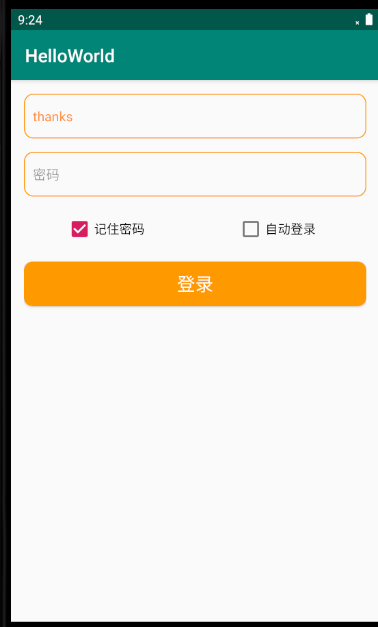
今天练习了利用SharedPreferences保存登录用户名密码;
layout布局:
<?xml version="1.0" encoding="utf-8"?>

<RelativeLayout xmlns:android="http://schemas.android.com/apk/res/android"

    android:layout_width="match_parent"

    android:layout_height="match_parent"

    android:padding="15dp">

    <EditText

        android:id="@+id/et_user"

        android:layout_width="match_parent"

        android:layout_height="50dp"

        android:textSize="15sp"

        android:textColor="#FF8F44"

        android:background="@drawable/bg_username"

        android:hint="用户名"

        android:paddingLeft="10dp"

        android:paddingRight="10dp"/>

    <EditText

        android:id="@+id/et_password"

        android:layout_width="match_parent"

        android:layout_height="50dp"

        android:textSize="15sp"

        android:textColor="#FF8F44"

        android:layout_below="@id/et_user"

        android:background="@drawable/bg_username"

        android:hint="密码"

        android:inputType="textPassword"

        android:layout_marginTop="15dp"

        android:paddingLeft="10dp"

        android:paddingRight="10dp"/>

    <CheckBox

        android:id="@+id/cb_pwd"

        android:layout_width="match_parent"

        android:layout_height="wrap_content"

        android:text="记住密码"

        android:checked="false"

        android:layout_below="@+id/et_password"

        android:layout_marginLeft="46dp"

        android:layout_marginTop="20dp"/>

    <CheckBox

        android:id="@+id/cb_login"

        android:layout_width="match_parent"

        android:layout_height="wrap_content"

        android:text="自动登录"

        android:layout_marginLeft="237dp"

        android:layout_marginTop="20dp"

        android:layout_below="@+id/et_password"/>

    <Button

        android:id="@+id/btn_login"

        android:layout_width="match_parent"

        android:layout_height="50dp"

        android:layout_below="@id/cb_login"

        android:layout_marginTop="20dp"

        android:background="@drawable/bg_btn4"

        android:text="登录"

        android:textSize="20sp"

        android:textColor="#fff"/>

</RelativeLayout>
activity:
package com.example.helloworld.datastorage;

import androidx.appcompat.app.AppCompatActivity;

import android.content.Intent;

import android.content.SharedPreferences;

import android.os.Bundle;

import android.view.View;

import android.widget.Button;

import android.widget.CheckBox;

import android.widget.EditText;

import android.widget.Toast;

import com.example.helloworld.R;

public class SpLoginActivity extends AppCompatActivity {

    private EditText mEtUser;

    private EditText mEtPassword;

    private Button mBtnlogin;

    private CheckBox mCbremember, mCbautomatic;

    private SharedPreferences mSharedPreferences;

    private SharedPreferences.Editor mEditor;

    @Override

    protected void onCreate(Bundle savedInstanceState) {

        super.onCreate(savedInstanceState);

        setContentView(R.layout.activity_sp_login);

        mEtUser = findViewById(R.id.et_user);

        mEtPassword = findViewById(R.id.et_password);

        mBtnlogin = findViewById(R.id.btn_login);

        mCbremember = findViewById(R.id.cb_pwd);

        mCbautomatic = findViewById(R.id.cb_login);

        //获得mSharedPreferences的实例

        mSharedPreferences = getSharedPreferences("logindata", MODE_PRIVATE);

        //获取一个Edit对象,所有对数据的操作都需要经过Edit

        mEditor = mSharedPreferences.edit();

        //从SharedPreferences中取出记住密码的状态值

        boolean isremember = mSharedPreferences.getBoolean("isremember", false);

        //判断状态值

        if (isremember) {

            //取出账号密码

            String names = mSharedPreferences.getString("name", null);

            String passs = mSharedPreferences.getString("pass", null);

            //设置复选框的状态是勾选的状态

            mCbremember.setChecked(true);

            mEtUser.setText(names);

            mEtPassword.setText(passs);

        }

        //取出自动登录的状态值

        boolean isautomatic = mSharedPreferences.getBoolean("isautomatic", false);

        if (isautomatic) {

            //跳转

            Toast.makeText(this, "登陆成功", Toast.LENGTH_LONG).show();

        }

        //对登录按钮添加监听

        mBtnlogin.setOnClickListener(new View.OnClickListener() {

            @Override

            public void onClick(View v) {

                //判断记住密码的复选框是否勾选如果勾选就在SharedPreferences中存入账号片密码,状态值

                if (mCbremember.isChecked()) {

                    mEditor.putString("name", mEtUser.getText().toString());//获取EditText里的文本内容

                    mEditor.putString("password",mEtPassword.getText().toString());

                    //存入状态值,(代表如果已经勾选了,那么就存一个true,的值)

                    mEditor.putBoolean("isremember", true);

                    mEditor.commit();

                }

                //自动登录

                if (mCbautomatic.isChecked()) {

                    //当勾选了自动登录 存一个为true的状态值

                    mEditor.putBoolean("isautomatic", true);

                    mEditor.commit();

                }

                //跳转

                Toast.makeText(SpLoginActivity.this, "登陆成功", Toast.LENGTH_SHORT).show();

            }

        });

    }

}
Android学习10的更多相关文章
- android学习10——对顶点着器和片段着色器的理解
图形都是点,线,面组成的.顶点着器指定了顶点的位置,大小和颜色. 看一个顶点着色器的代码 attribute vec4 a_Position; attribute float a_PointSize; ...
- 10、android学习资源整理
1.github上整理好的开源工程 https://github.com/Trinea/android-open-project 2.最流行的android组件大全 http://colobu.com ...
- Android学习系列(10)--App列表之拖拽ListView(上)
研究了很久的拖拽ListView的实现,受益良多,特此与尔共飨. 鉴于这部分内容网上的资料少而简陋,而具体的实现过程或许对大家才有帮助,为了详尽而不失真,我们一步一步分析,分成两篇文章. ...
- 【转】 Pro Android学习笔记(二二):用户界面和控制(10):自定义Adapter
目录(?)[-] 设计Adapter的布局 代码部分 Activity的代码 MyAdapter的代码数据源和构造函数 MyAdapter的代码实现自定义的adapter MyAdapter的代码继续 ...
- Android学习路线总结,绝对干货
title: Android学习路线总结,绝对干货 tags: Android学习路线,Android学习资料,怎么学习android grammar_cjkRuby: true --- 一.前言 不 ...
- Android学习——第一个NDK程序
在前面的学习中,我们已经讲解了关于NDK编程的环境搭建流程,简单的使用我们也通过官网本身自带的例子进行说明了.可是相信大家一定还存在这么的一个疑惑:“如果我要自己利用NDK编写一个Android应用, ...
- Android学习——windows下搭建Cygwin环境
在上一篇博文<Android学习——windows下搭建NDK_r9环境>中,我们详细的讲解了在windows下进行Android NDK开发环境的配置,我们也讲到了在NDk r7以后,我 ...
- Android学习——windows下搭建NDK_r9环境
1. NDK(Native Development Kit) 1.1 NDK简介 Android NDK是一套允许开发人员使用本地代码(如C/C++)进行Android APP功能开发的工具,通过这个 ...
- 【Android学习】《Android开发视频教程》第一季笔记
视频地址: http://study.163.com/course/courseMain.htm?courseId=207001 课时5 Activity基础概念 1.Android开发技术结构 ...
随机推荐
- 1.mysql卸载重新安装问题
前言:在开发过程中,MySQL数据库是很频繁使用的数据库,但是有时候,数据库一单出错,或者其他原因,想要重装数据库,难免会遇到MySQL重装之后服务启不来,,下面我就跟大家讨论下如何干净的卸载MySQ ...
- MySql 存储大量长字节 Text报错处理办法
今天线上版本的错误: Caused by: com.mysql.jdbc.exceptions.jdbc4.MySQLSyntaxErrorException: Row size too large ...
- spring中实现基于注解实现动态的接口限流防刷
本文将介绍在spring项目中自定义注解,借助redis实现接口的限流 自定义注解类 import java.lang.annotation.ElementType; import java.lang ...
- http接口的调用
1.按照文档先写入参数,这里主要介绍 Json格式的String字符串,包括拼接数组 String sqr_arry [] = new String[rowList.size()]; for(int ...
- python tkinter模版
import tkinter import time import threading from tkinter import ttk event = threading.Event() once=0 ...
- altair package and altair_viewer
pip install altair pip install altair_viewer Altair is a declarative statistical visualization libra ...
- The number of set(位运算+状态dp)一道十分美妙的题目哦!!!!!!
Given you n sets.All positive integers in sets are not less than 1 and not greater than m.If use the ...
- vs2015编译各种库
1.编译libcurl https://www.jianshu.com/p/f82d3d18da93
- LitElement(六)生命周期
1.概述 基于LitElement的组件通过响应观察到的属性更改而异步更新. 属性更改是分批进行的,如果在请求更新后,更新开始之前,发生更多属性更改,则所有更改都将捕获在同一次更新中. 在较高级别上, ...
- Idea实用小Tips
设置keymap 自己根据习惯选择keymap(键位) 插件安装 ###省去set.get方法以及基于注解的日志框架 lombok plugin ###找bug用的 FindBugs-IDEA ### ...