
更改 AWS RDS mysql时区 -摘自网络
AWS RDS
AWS上搭建数据库的时候,不是DB on EC2就是RDS,但是选择RDS时,Timezone怎么处理?
「面向全球提供的AWS来讲理所当然的是UTC」,而RDS也不是例外。把服务器迁移到AWS时,「数据库能不能使用中国时间」是常见的一个问题。 DB on EC2的话,配置一下系统的Timezone就可以,但是RDS是我们无法直接登录的因此需要使用MySQL的功能来实现。
介绍如何修改RDS MySQL的Timezone。
在RDS的Master用户不同于MySQL root用户,因此没有SUPER权限(管理者权限)。因此不能使用SET GLOBAL命令修改Timezone。在这里使用MySQL的init_connect参数里使用SET SESSION命令来修改Timezone。Init_conect参数实在Parameter Group里进行修改。
注意事项
- rdsadmin用户貌似是AWS用来管理RDS实例的用户,无法判断影响范围因此不修改rdsadmin的Timezone。
- 在init_connect参数里直接填写命令会无法正常运行,因此定义Stored Procedure,用CALL方式执行
操作流程如下
- 创建Stored Procedure
- 创建Parameter Group
- Parameter Grouup关联到RDS
- 重启RDS
1.创建Stored Procedure
以Master用户登录到RDS,shared Schema创建Stored Procedure(shared.store_time_zong)。
把时间配置为中国标准时间(Asia/Chongqing)。
|
1
2
3
4
5
6
7
8
9
10
11
|
mysql> CREATE DATABASE shared;
Query OK, 1 row affected (0.00 sec)
mysql> DELIMITER |
mysql> CREATE PROCEDURE shared.`store_time_zone`()
-> IF (POSITION('aws_rds@' IN CURRENT_USER()) = 1) THEN
-> SET SESSION time_zone = 'Asia/Chongqing';
-> END IF |
Query OK, 0 rows affected (0.01 sec)
mysql> DELIMITER ;
|
确认Stored Procedure好不好用
|
1
2
3
4
5
6
7
8
9
10
11
12
13
14
15
16
17
18
|
mysql> select now();
+---------------------+
| now() |
+---------------------+
| 2015-04-09 05:10:41 |
+---------------------+
1 row in set (0.00 sec)
mysql> CALL shared.store_time_zone;
Query OK, 0 rows affected (0.07 sec)
mysql> select now();
+---------------------+
| now() |
+---------------------+
| 2015-04-09 13:10:52 |
+---------------------+
1 row in set (0.00 sec)
|
确认到时间变为中国标准时间(比UTC快8小时)。
2.创建Parameter Group
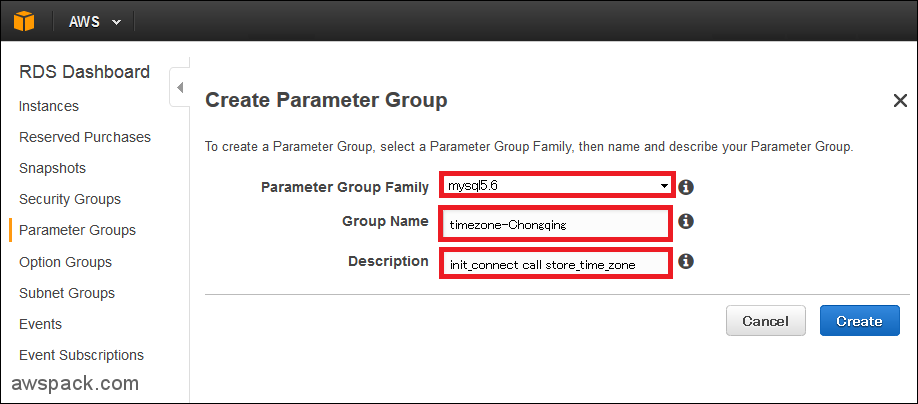
RDS上是以Parameter Group的形式来管理,MySQL的参数,在这里不修改默认的Parameter Group,创建一个Parameter Group。
- 点击:Parameter Groups
- 点击:Create Parameter Group

- Parameter Group Family:选择mysql5.6(因为我们的RDS MySQL版本是5.6.22)
- Group Name:timezone-Chongqing
- Description:init_connect call store_time_zone
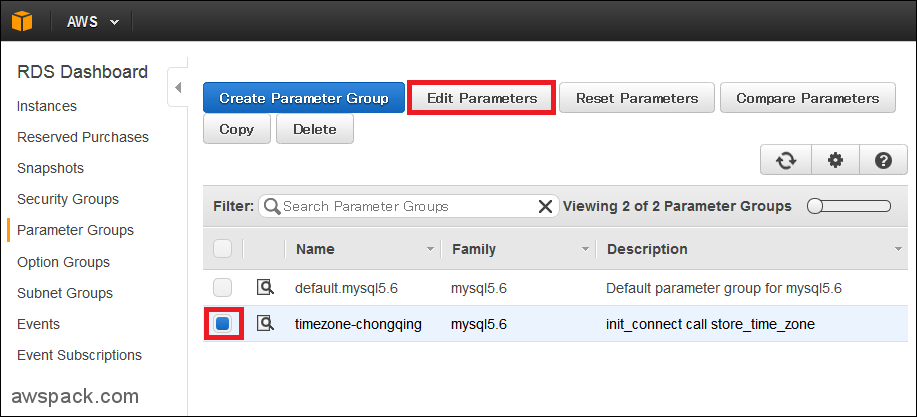
- 选择:timezone-chongqing
- 点击:Edit Parameters
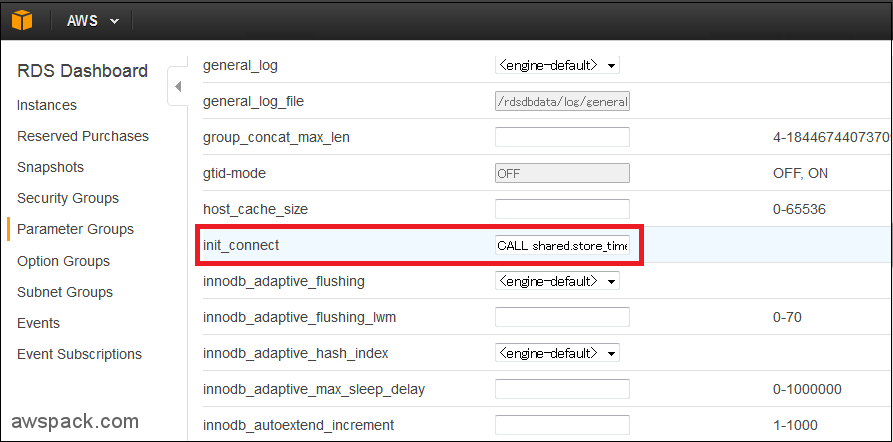
- init_connect:CALL shared.store_time_zone
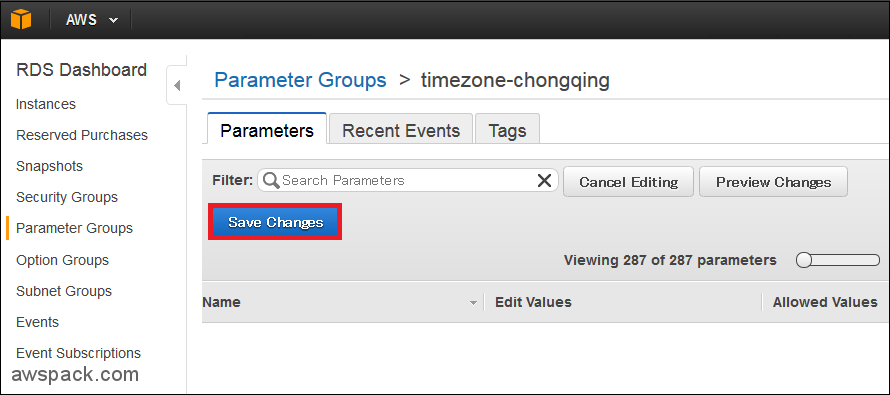
- 点击:Save Changes
- 选择:RDS实例(awspack)
- 点击:Instance Actions
- 点击:Modify

- DB Parameter Group:timezone-chongqing
- 点击:Continue

- 确认:DB Parameter Group为timezone-chongqing
- 点击:Modify DB Instance
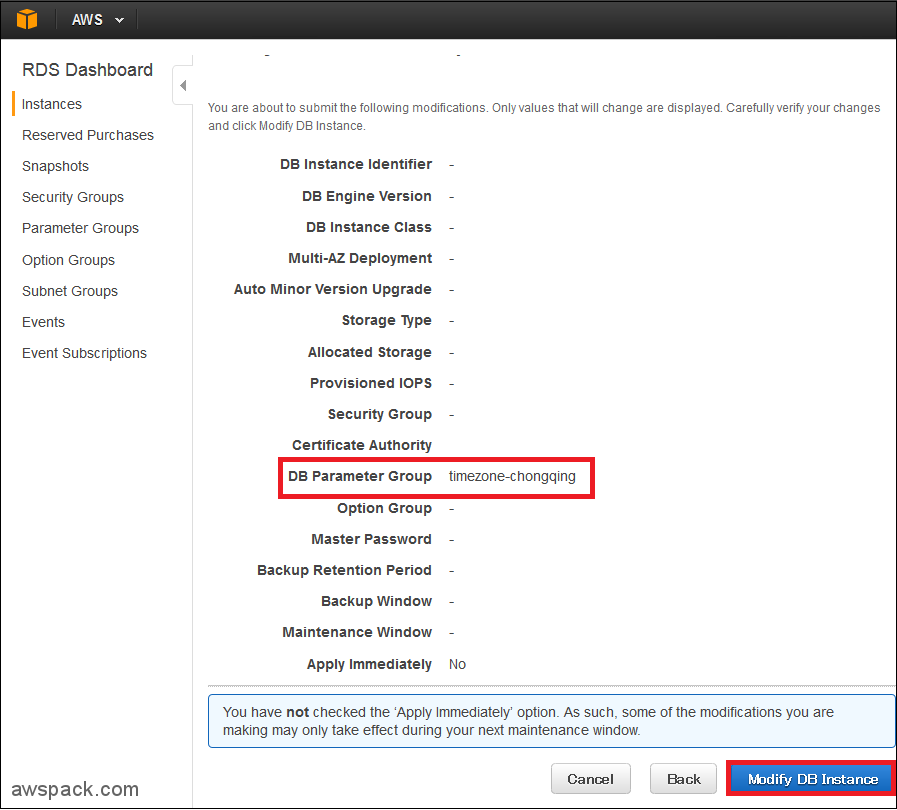
当用户连接到RDS时,通过init_connect调用Stored Procedure。
3. 重启RDS
重启RDS实例之前确认一下,Parameter Group的状态在applying。
- 点击:RDS Dashboard的Instances
- 选择:RDS实例awspack
- 点击:Instance Actions
- 点击:Reboot
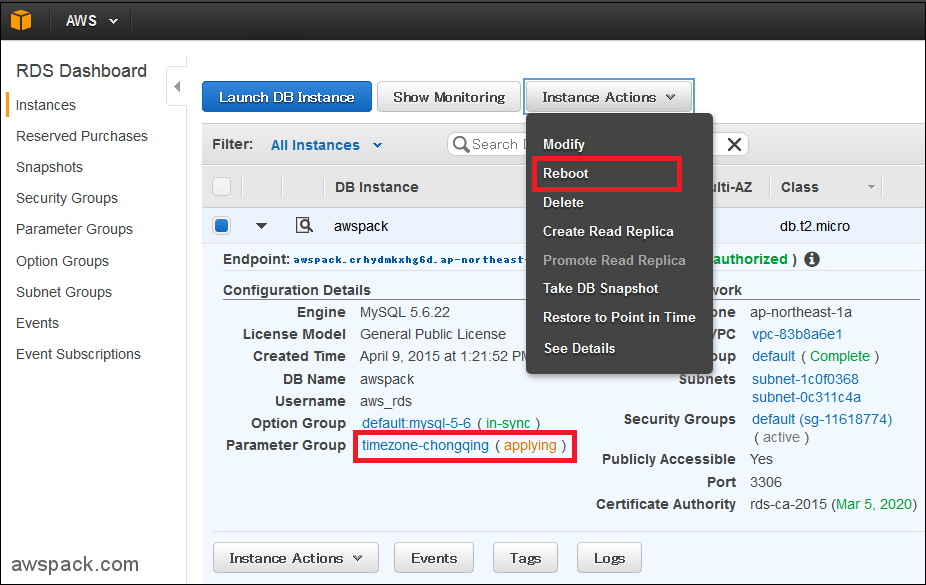
重启RDS实例之后确认,Parameter Group的状态为in-sync

以aws_rds用户登录到MySQL以后查看,时间为中国时间。
|
1
2
3
4
5
6
7
8
9
10
11
12
13
14
15
16
17
18
19
20
21
22
23
24
25
26
27
28
29
|
$ mysql -h awspack.crhydmkxhg6d.ap-northeast-1.rds.amazonaws.com -uaws_rds -p
Enter password:
Welcome to the MySQL monitor. Commands end with ; or \g.
Your MySQL connection id is 7
Server version: 5.6.22-log MySQL Community Server (GPL)
Copyright (c) 2000, 2015, Oracle and/or its affiliates. All rights reserved.
Oracle is a registered trademark of Oracle Corporation and/or its
affiliates. Other names may be trademarks of their respective
owners.
Type 'help;' or '\h' for help. Type '\c' to clear the current input statement.
mysql> show global variables like 'init_connect';
+---------------+-----------------------------+
| Variable_name | Value |
+---------------+-----------------------------+
| init_connect | CALL shared.store_time_zone |
+---------------+-----------------------------+
1 row in set (0.00 sec)
mysql> select now();
+---------------------+
| now() |
+---------------------+
| 2015-04-09 13:44:10 |
+---------------------+
1 row in set (0.00 sec)
|
更改 AWS RDS mysql时区 -摘自网络的更多相关文章
- AWS RDS mysql无法连接的问题
rds创建后,无法连接mysql 检查安全组规则是否配置了 1. 2. 这样你的EC2就可以访问了.如果还不行,检查数据库是否和EC2在同一 VPC内. 官方文档:https://docs.amazo ...
- AWS EC2 MySQL迁移到RDS案例
Amazon Relational Database Service (Amazon RDS) 是一种Web 服务,可让用户更轻松地在云中设置.操作和扩展关系数据库.它可以为行业标准关系数据库提供经济 ...
- 云厂商 RDS MySQL 怎么选
1. 摘要 为了让大家更好的了解各云厂商在RDS MySQL数据库功能上的差异,也为给准备上云的同学做个参考,本文将对阿里云.腾讯云.华为云和AWS 的 RDS MySQL数据库进行对比说明. 从一个 ...
- Configure Amazon RDS mysql to store Chinese Characters
Configure Amazon RDS mysql to store Chinese Characters https://dev.mysql.com/doc/refman/5.7/en/chars ...
- 关于阿里云 RDS mysql索引优化的一点经验
2019年9月5日10:02:34 本地调试 git https://github.com/barryvdh/laravel-debugbar composer require barryvdh/la ...
- 实测:云RDS MySQL性能是自建的1.6倍
1. 摘要 基于之前写的「云厂商 RDS MySQL 怎么选」的文章,为了进一步了解各云厂商在RDS MySQL数据库性能上的差异,本文将对自建MySQL.阿里云.腾讯云.华为云和AWS 的 RDS ...
- 万答17,AWS RDS怎么搭建本地同步库
欢迎来到 GreatSQL社区分享的MySQL技术文章,如有疑问或想学习的内容,可以在下方评论区留言,看到后会进行解答 背景说明 AWS RDS 权限受限,使用 mysqldump 的时候无法添加 - ...
- RDS MySQL 空间问题的原因和解决
来源:https://help.aliyun.com/knowledge_detail/41739.html RDS MySQL 空间问题的原因和解决 更新时间:2016-07-22 17:20:14 ...
- 更改XAMPP中MySQL数据库的端口号
更改XAMPP中MySQL数据库的端口号 如果电脑上已安装MySql数据库,还想用XAMPP中自带的数据库就需要更改XAMPP中数据库的端口号,避免和已安装的数据库冲突.本例以更改为3307端口号为例 ...
随机推荐
- hadoop old API CombineFileInputFormat
来自:http://f.dataguru.cn/thread-271645-1-1.html 简介 本文主要介绍下面4个方面 1.为什么要使用CombineFileInputFormat 2.Comb ...
- C# ListView用法
ListView是个较为复杂的控件 1.定义 把它拽进来,系统会自动在Designer.cs里添加一个 this.listView1 = new System.Windows.For ...
- hdu 3308 LCIS(线段树区间合并)
题目链接:http://acm.hdu.edu.cn/showproblem.php? pid=3308 LCIS Time Limit: 6000/2000 MS (Java/Others) ...
- ThreadLocal MDC
因为MDC底层是用ThreadLocal实现的,所以这里补充一些和ThreadLocal相关的知识点. 1.ThreadLocal的三个层次 关于ThreadLocal有三个层次,可以按照这三个层次去 ...
- 〖Linux〗Kubuntu文件管理器单例的设置(即:一个工作区只一个文件管理器)
有没有一种,情况: 1. 程序A打开了文件管理器: 2. 程序B又打开了文件管理器: 导致开了两个文件管理器,太不舒服了: 搜索下 kubuntu dolphin single instance,果然 ...
- 远程过程调用协议(RPC)
RPC(Remote Procedure Call Protocol)——远程过程调用协议,它是一种通过网络从远程计算机程序上请求服务,而不需要了解底层网络技术的协议.RPC协议假定某些传输协议的 ...
- 1768:最大子矩阵(NOIP2014初赛最后一题)
1768:最大子矩阵 总时间限制: 1000ms 内存限制: 65536kB 描述 已知矩阵的大小定义为矩阵中所有元素的和.给定一个矩阵,你的任务是找到最大的非空(大小至少是1 * 1)子矩阵. 比如 ...
- Unrecognized option: -jrockit
weblogic报错: starting weblogic with Java version: Unrecognized option: -jrockit Error: Could not crea ...
- Openwrt中用iftop查看网络流量情况
iftop可以查看指定网卡上的流量情况, 命令说明 iftop: display bandwidth usage on an interface by host Synopsis: iftop -h ...
- springboot自定义jdbc操作库+基于注解切点AOP
发布时间:2018-11-08 技术:springboot+aop 概述 springBoot集成了自定义的jdbc操作类及AOP,因为spring自带的JdbcTemplate在实际项目中并 ...