
Linux安装ElasticSearch与MongoDB分布式集群环境下数据同步
ElasticSearch有一个叫做river的插件式模块,可以将外部数据源中的数据导入elasticsearch并在上面建立索引。River在集群上是单例模式的,它被自动分配到一个节点上,当这个节点挂掉后,river会被自动分配到另外的一个节点上。目前支持的数据源包括:Wikipedia, MongoDB, CouchDB, RabbitMQ, RSS, Sofa, JDBC, FileSystem,Dropbox等。River有一些指定的规范,依照这些规范可以开发适合于自己的应用数据的插件。
1、安装MongoDB的River:https://github.com/richardwilly98/elasticsearch-river-mongodb、http://blog.csdn.net/huwei2003/article/details/40407555
git clone https://github.com/richardwilly98/elasticsearch-river-mongodb.git

cd elasticsearch-river-mongodb


git tag
git checkout elasticsearch-river-mongodb-2.0.5

mvn clean

mvn compile

mvn package

vim install-local.sh    --把plugin --remove 改成 plugin remove;注释掉最后一行sudo命令,因为没有plugin命令的url参数了。
./install-local.sh
cd target/releases/


cd /usr/share/elasticsearch/plugins/

mkdir mongodb

cd mongodb

mv /data/elasticsearch-river-mongodb/target/releases/elasticsearch-river-mongodb-2.0..zip ./

cd ../head/

cp plugin-descriptor.properties ../mongodb/

cd -

vim plugin-descriptor.properties     --修改description,name的信息为mongo

mkdir _site

cp -r /data/elasticsearch-river-mongodb/src/site/* /usr/share/elasticsearch/plugins/mongodb/_site/   --复制mongo网站目录到plugins/mongodb/_site

cd _site

service elasticsearch restart


2、浏览器输入:http://192.168.7.131:9200/_plugin/mongodb/
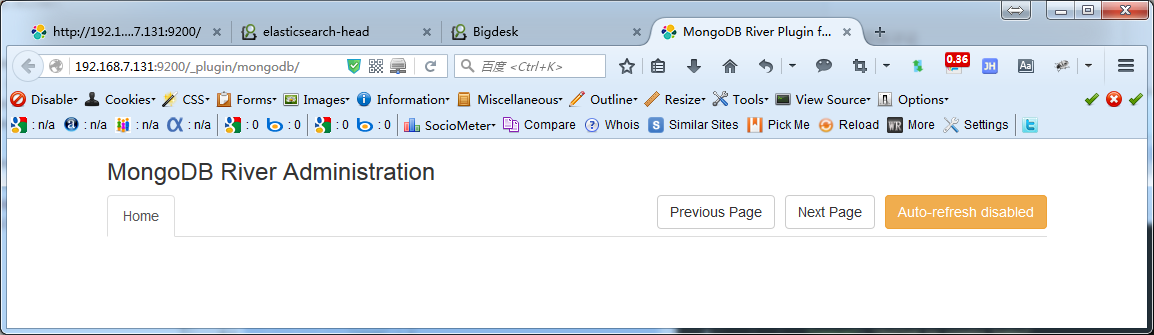
3、配置Mongo&ElasticSearch数据互通:https://github.com/richardwilly98/elasticsearch-river-mongodb/wiki、http://blog.csdn.net/huwei2003/article/details/40407555
创建river并索引的标准模版如下:
$ curl -XPUT "localhost:9200/_river/${es.river.name}/_meta" -d '

{

  "type": "mongodb",

  "mongodb": {

    "servers":

    [

      { "host": ${mongo.instance1.host}, "port": ${mongo.instance1.port} },

      { "host": ${mongo.instance2.host}, "port": ${mongo.instance2.port} }

    ],

    "options": {

      "secondary_read_preference" : true,

      "drop_collection": ${mongo.drop.collection},

      "exclude_fields": ${mongo.exclude.fields},

      "include_fields": ${mongo.include.fields},

      "include_collection": ${mongo.include.collection},

      "import_all_collections": ${mongo.import.all.collections},

      "initial_timestamp": {

        "script_type": ${mongo.initial.timestamp.script.type},

        "script": ${mongo.initial.timestamp.script}

      },

      "skip_initial_import" : ${mongo.skip.initial.import},

      "store_statistics" : ${mongo.store.statistics},

    },

    "credentials":

    [

      { "db": "local", "user": ${mongo.local.user}, "password": ${mongo.local.password} },

      { "db": "admin", "user": ${mongo.db.user}, "password": ${mongo.db.password} }

    ],

    "db": ${mongo.db.name},

    "collection": ${mongo.collection.name},

    "gridfs": ${mongo.is.gridfs.collection},

    "filter": ${mongo.filter}

  },

  "index": {

    "name": ${es.index.name},

    "throttle_size": ${es.throttle.size},

    "bulk_size": ${es.bulk.size},

    "type": ${es.type.name}

    "bulk": {

      "actions": ${es.bulk.actions},

      "size": ${es.bulk.size},

      "concurrent_requests": ${es.bulk.concurrent.requests},

      "flush_interval": ${es.bulk.flush.interval}

    }

  }

}'
一些配置项的解释如下,具体可以查看github的wiki:
- db为同步的数据库名,
- host mongodb的ip地址(默认为localhost)
- port mongodb的端口
- collection 要同步的表名
- fields 要同步的字段名(用逗号隔开,默认全部)
- gridfs 是否是gridfs文件(如果collection是gridfs的话就设置成true)
- local_db_user local数据库的用户名(没有的话不用写)
- local_db_password local数据库的密码(没有的话不用写)
- db_user 要同步的数据库的密码(没有的话不用写)
- db_password 要同步的数据库的密码(没有的话不用写)
- index.name 要建立的索引名,最好是小写(应该是必须小写,并且索引名称必须唯一,之前不能存在,建议使用“数据库名+集合名+index”方式命名)
- index:type collection名,即该索引对应的数据集合名
- type 类型 后面是 mongodb 因为用的是 mongodb 数据库
- bulk_size 批量添加的最大数
- bulk_timeout 批量添加的超时时间
例如添加mongodb数据到elasticsearch里面:
curl -XPUT "http://ip地址:端口号/river_dbname/collectionname/_meta" -d'

{

    "type":"mongodb",

    "mongodb":{

        "servers":[

            {"host":"mongodb的ip地址","port":mongodb的访问端口},

            {"host":"mongodb的ip地址","port":mongodb的访问端口},

            {"host":"mongodb的ip地址","port":mongodb的访问端口}

        ],

        "db":"dbname",   (实际数据库名称)

        "collection":"collectionname",   (实际集合名称)

        "gridfs":false,

        "credentials":[

          { "db": "admin", "user": "user", "password": "user" }

        ],

        "options":{

            "secondary_read_preference":true   (使用副本集)

        }

    },

    "index":{

        "name":"collectionname_index",  (全部小写字母)

        "type":"collectionname"   (实际集合名称)

    }

}'
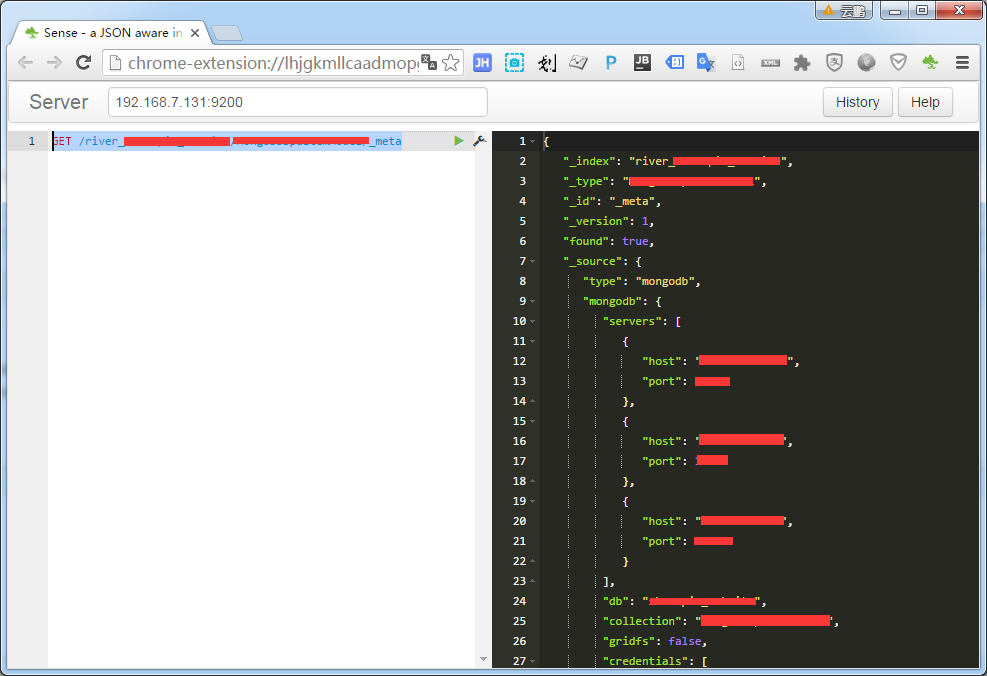
添加成功,如下图:

使用head插件观察结果:


也可以通过get方式获取
GET /river_dbname/collectionname/_meta
转:
http://blog.csdn.net/huwei2003/article/details/40407555
Linux安装ElasticSearch与MongoDB分布式集群环境下数据同步的更多相关文章
- elasticsearch与mongodb分布式集群环境下数据同步
1.ElasticSearch是什么 ElasticSearch 是一个基于Lucene构建的开源.分布式,RESTful搜索引擎.它的服务是为具有数据库和Web前端的应用程序提供附加的组件(即可搜索 ...
- 在Hadoop1.2.1分布式集群环境下安装hive0.12
在Hadoop1.2.1分布式集群环境下安装hive0.12 ● 前言: 1. 大家最好通读一遍过后,在理解的基础上再按照步骤搭建. 2. 之前写过两篇<<在VMware下安装Ubuntu ...
- 分布式集群环境下,如何实现session共享三(环境搭建)
这是分布式集群环境下,如何实现session共享系列的第三篇.在上一篇:分布式集群环境下,如何实现session共享二(项目开发)中,准备好了一个通过原生态的servlet操作session的案例.本 ...
- 分布式集群环境下,如何实现session共享五(spring-session+redis 实现session共享)
这是分布式集群环境下,如何实现session共享系列的第五篇.在上一篇:分布式集群环境下,如何实现session共享四(部署项目测试)中,针对nginx不同的负载均衡策略:轮询.ip_hash方式,测 ...
- 分布式集群环境下,如何实现session共享四(部署项目测试)
这是分布式集群环境下,如何实现session共享系列的第四篇.在上一篇:分布式集群环境下,如何实现session共享三(环境搭建)中,已经准备好了相关的环境:tomcat.nginx.redis.本篇 ...
- 分布式集群环境下,如何实现session共享二(项目开发)
在上一篇分布式集群环境下,如何实现session共享一(应用场景)中,介绍了在分布式集群下,需要实现session共享的应用场景.并且最后留下了一个问题:在集群环境下,如何实现session的共享呢? ...
- 基于HBase Hadoop 分布式集群环境下的MapReduce程序开发
HBase分布式集群环境搭建成功后,连续4.5天实验客户端Map/Reduce程序开发,这方面的代码网上多得是,写个测试代码非常容易,可是真正运行起来可说是历经挫折.下面就是我最终调通并让程序在集群上 ...
- 分布式集群环境下,如何实现session共享一(应用场景)
在web应用中,由于http的请求响应式,无状态.要记录用户相关的状态信息,比如电商网站的购物车,比如用户是否登录等,都需要使用session.我们知道session是由servlet容器创建和管理, ...
- 分布式集群环境下运行Wordcount程序
1.分布式环境的Hadoop提交作业方式与本地安装的Hadoop作业提交方式相似,但有两点不同: 1)作业输入输出都存储在HDFS 2)本地Hadoop提交作业时将作业放在本地JVM执行,而分布式集群 ...
随机推荐
- Docker container常用命令
列出所有的container. docker container ls 启动一个container. docker run –p <host端口>: <container端口> ...
- Android Studio “懒人”必备插件android layout id converter
在一个布局文件里.假设定义了非常多非常多id,代码中一个个findview是一件非常枯燥而且浪费时间的事情. 所以这里向大家推荐一个必备插件android layout id converter. 配 ...
- WinRAR如何批量分别压缩不同的文件夹
全选所有文件夹,然后右击添加到压缩文件,然后在文件选项中勾选把每个文件放到单独的压缩文件中 OK了
- vsphere VAAI介绍
VAAI:让特定的储存作业可以无需透过ESXi主机执行,而由储存设备来担纲 [TechTarget中国原创]目前,VAAI虽然已经成为虚拟化领域的标准语言之一,但是大多数人可能并不了解它还有隐藏的第四 ...
- Codeforces Round #234 (Div. 2) :A. Inna and Choose Options
A. Inna and Choose Options time limit per test 1 second memory limit per test 256 megabytes input st ...
- itextpdf 备忘
加删除线: .setUnderline(Color.BLACK, 2.0f, 0.0f, 6.0f, 0.0f, 1) https://developers.itextpdf.com/examples ...
- requestsManager:didFailRequest:withError: Error Domain=com.albertodebortoli.goldraccoon Code=-1000 "(null)" UserInfo={message=Unknown error!}
场景:最近IOS开发中需要用到FTP上传,最初是用GoldRaccoon 看后台FTPServer日志,一直都是disconnected.自己对FTP也是懂些皮毛,所以只剩下一坑的无奈.FTP服务器是 ...
- Java一个枚举类的2种实现。
实现方式一: public enum Operation { PLUS, MINUS, TIMES, DIVIDE; double apply(double x, double y) { switch ...
- 〖Linux〗Ubuntu14.04安装32位运行库
在终端操作: sudo dpkg --add-architecture i386 echo "deb http://old-releases.ubuntu.com/ubuntu/ rarin ...
- JAVA的驼峰和下划线互转帮助类
实体类: import java.io.Serializable; import lombok.AllArgsConstructor; import lombok.Data; import lombo ...