
SpringBoot整合SpringKafka实现生产者史上最简代码实现
项目源码:https://github.com/xuebus/springkafkaproducer
这是生产者端的代码,消费者请参考另一篇博客:
https://www.cnblogs.com/jun1019/p/7895830.html
该项目是使用的技术:SpringBoot + SpringKafka + Maven
先看pom.xml文件中引入的依赖:
 <?xml version="1.0" encoding="UTF-8"?>

 <project xmlns="http://maven.apache.org/POM/4.0.0" xmlns:xsi="http://www.w3.org/2001/XMLSchema-instance"

     xsi:schemaLocation="http://maven.apache.org/POM/4.0.0 http://maven.apache.org/xsd/maven-4.0.0.xsd">

     <modelVersion>4.0.0</modelVersion>

     <groupId>com.xuebusi.producer</groupId>

     <artifactId>producer</artifactId>

     <version>0.0.1-SNAPSHOT</version>

     <packaging>jar</packaging>

     <name>springkafkaproducer</name>

     <description>Demo project for Spring Boot</description>

     <parent>

         <groupId>org.springframework.boot</groupId>

         <artifactId>spring-boot-starter-parent</artifactId>

         <version>1.5.8.RELEASE</version>

         <relativePath/> <!-- lookup parent from repository -->

     </parent>

     <properties>

         <project.build.sourceEncoding>UTF-8</project.build.sourceEncoding>

         <project.reporting.outputEncoding>UTF-8</project.reporting.outputEncoding>

         <java.version>1.8</java.version>

     </properties>

     <dependencies>

         <dependency>

             <groupId>org.springframework.boot</groupId>

             <artifactId>spring-boot-starter-freemarker</artifactId>

         </dependency>

         <dependency>

             <groupId>org.springframework.kafka</groupId>

             <artifactId>spring-kafka</artifactId>

             <version>1.0.6.RELEASE</version>

         </dependency>

         <dependency>

             <groupId>org.springframework.boot</groupId>

             <artifactId>spring-boot-starter-web</artifactId>

         </dependency>

         <dependency>

             <groupId>org.springframework.boot</groupId>

             <artifactId>spring-boot-starter-test</artifactId>

             <scope>test</scope>

         </dependency>

     </dependencies>

     <build>

         <plugins>

             <plugin>

                 <groupId>org.springframework.boot</groupId>

                 <artifactId>spring-boot-maven-plugin</artifactId>

             </plugin>

         </plugins>

     </build>

 </project>
注意:这里我使用的spring-kafka(它包装了apache的kafka-client)的依赖包版本是 1.0.6.RELEASE, 是因为我Linux服务器上部署的kafka服务器的版本是kafka_2.10-0.9.0.1,使用的kafka的时候要注意,kafka客户端(kafka-client)的版本要和kafka服务器的版本一一对应,否则,消息发送会失败。
Spring官方网站上给出了SpringKafka和kafka-client版本(它的版本号要和kafka服务器的版本保持一致)的对应关系:
https://projects.spring.io/spring-kafka/
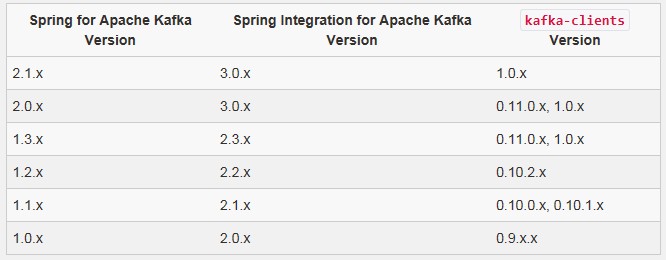
下面是生产者的配置文件,既然使用的是SpringBoot,配置文件就是 application.yml:
server:

  port: 8081

spring:

  kafka:

    producer:

      bootstrap-servers: 192.168.71.11:9092,192.168.71.12:9092,192.168.71.13:9092
在上面的配置中,我们给生产者分配的端口号是8081,服务器有3台,分别对应3个ip地址和端口。
该配置只是配置了kafka服务器的ip地址,这里并没有对生产者做过多的配置。想了解关于kafka生产者相关的更多配置的话,可以自行查阅相关资料进行学习。
下面是kafka生产者的核心代码,实现了消息的发送逻辑:
package com.xuebusi.producer;

import org.springframework.beans.factory.annotation.Autowired;

import org.springframework.kafka.core.KafkaTemplate;

import org.springframework.scheduling.annotation.EnableScheduling;

import org.springframework.scheduling.annotation.Scheduled;

import org.springframework.stereotype.Component;

import org.springframework.util.concurrent.ListenableFuture;

import java.util.UUID;

/**

 * 生产者

 * 使用@EnableScheduling注解开启定时任务

 */

@Component

@EnableScheduling

public class KafkaProducer {

    @Autowired

    private KafkaTemplate kafkaTemplate;

    /**

     * 定时任务

     */

    @Scheduled(cron = "00/1 * * * * ?")

    public void send(){

        String message = UUID.randomUUID().toString();

        ListenableFuture future = kafkaTemplate.send("app_log", message);

        future.addCallback(o -> System.out.println("send-消息发送成功:" + message), throwable -> System.out.println("消息发送失败:" + message));

    }

}
在上面的代码中,负责发送消息的角色就是SpringKafka提供的 KafkaTemplate对象,使用它的 send()方法就可以把自己的消息发送到kafka服务器。send()方法有多个重载的方法,大家可以根据自己的需要来使用不同的send()方法。
这里我们为了方便发送消息进行测试,使用了Spring的定时任务,在类上使用 @EnableScheduling 注解开启定时任务,在方法上使用@Scheduled注解并指定表达式来定义定时规则,这里我们每秒就会向kafka服务器发送一条消息。
当然,你可能不会用到Spring的定时任务,你可以把@EnableScheduling 和 @Scheduled注解去掉。你也可以通过使用Spring的@Controller和@RequestMapping 注解将你的发送消息的方法定义成一个接口。
你可以定义多个不同的方法,每个使用到了 KafkaTemplate 对象的方法都会是一个生产者。
下面就启动SpringBoot项目测试:
package com.xuebusi;

import org.springframework.boot.SpringApplication;

import org.springframework.boot.autoconfigure.SpringBootApplication;

@SpringBootApplication

public class SpringkafkaproducerApplication {

    public static void main(String[] args) {

        SpringApplication.run(SpringkafkaproducerApplication.class, args);

    }

}
使用鼠标右键运行main方法即可启动SpringBoot项目,在控制台你会看到成功连接到kafka服务器,并每隔1秒就会发送一条消息到kafka服务器。
SpringBoot整合SpringKafka实现生产者史上最简代码实现的更多相关文章
- SpringBoot整合SpringKafka实现消费者史上最简代码实现
该项目是使用的技术:SpringBoot + SpringKafka + Maven 先看pom.xml文件中引入的依赖: <?xml version="1.0" enco ...
- springboot整合rabbitmq实现生产者消息确认、死信交换器、未路由到队列的消息
在上篇文章 springboot 整合 rabbitmq 中,我们实现了springboot 和rabbitmq的简单整合,这篇文章主要是对上篇文章功能的增强,主要完成如下功能. 需求: 生产者在启 ...
- SpringBoot整合阿里云OSS文件上传、下载、查看、删除
1. 开发前准备 1.1 前置知识 java基础以及SpringBoot简单基础知识即可. 1.2 环境参数 开发工具:IDEA 基础环境:Maven+JDK8 所用技术:SpringBoot.lom ...
- SpringBoot整合Fastdfs,实现图片上传(IDEA)
我们部署Fastdfs,就是为了实现文件的上传. 现在使用idea整合Fastdfs,实现图片上传 部署环境:Centos7部署分布式文件存储(Fastdfs) 利用Java客户端调用FastDFS ...
- python 穷举法 算24点(史上最简短代码)
本来想用回溯法实现 算24点.题目都拟好了,就是<python 回溯法 子集树模板 系列 -- 7.24点>.无奈想了一天,没有头绪.只好改用暴力穷举法. 思路说明 根据四个数,三个运算符 ...
- SpringBoot整合FastDFS实现图片的上传
文件的上传和预览在web开发领域是随处可见,存储的方式有很多,本文采用阿里巴巴余庆大神开发的FastDFS进行文件的存储,FastDFS是一个分布式文件存储系统,可以看我上一篇博文,有安装和配置教程 ...
- springboot整合项目-商城个人头像上传功能
上传头像的功能 持久层 1.sql语句的规划 avatar varchar(50) str - 字节流 将对象文件保存在操作系统上,然后在把这个文件的路径个记录下来,保存在avatar中,因为相比于字 ...
- SpringBoot整合Mybatis 使用generator自动生成实体类代码、Mapper代码、dao层代码
1.新建一个SpringBoot项目,并引入Mybatis和mybatis-generator相关的依赖. <dependency> <groupId>org.springfr ...
- Protobuf 语法 - 史上最简教程
Protobuf 语法简明教程 疯狂创客圈 死磕Netty 亿级流量架构系列之12 [博客园 总入口 ] 在protobuf中,协议是由一系列的消息组成的.因此最重要的就是定义通信时使用到的消息格式. ...
随机推荐
- fedora开机出现There is a problem with the configuration server. (/usr/libexec/gconf-sanity-check-2 exited with status 256)
Install problem!The configuration defaults for GNOME Power Manager have not been installed correctly ...
- Lua编程笔记
迭代器并没有真正的迭代,真正迭代的是for循环.而迭代器为每次迭代提供成功后的返回值. function allwords(f)for line in io.lines do for word in ...
- 利用Apache配置http expires值提高网站性能
HTTP头中有个expires参数,设置一个未来的时间,在这时间以前,浏览器会先从cache读取,如果没有再从服务器中读取.对于像图片,css,script等静态内容,只需发一次http reques ...
- 【JavaScript】浅析ajax的使用
目录结构: contents structure [+] Ajax简介 Ajax的工作原理 Ajax的使用步骤 使用原生的js代码 使用JQuery代码 JQuery中常用的Ajax函数 $.ajax ...
- 【java】break outer,continue outer的使用
break默认是结束当前循环,有时我们在使用循环时,想通过内层循环里的语句直接跳出外层循环,java提供了使用break直接跳出外层循环,此时需要在break后通过标签指定外层循环.java中的标签是 ...
- JAXBContext处理CDATA
今天做Lucene数据源接口时,遇到一个问题,就是输出xml时将某些数据放在CDATA区输出: 1.依赖的jar包,用maven管理项目的话, <dependency> <group ...
- Swift 封装
前言 封装主要有两大目的:一是为了我们使用数据更加方便,二是为了数据保护. 1.Swift 访问修饰符 在 Swift 语言中,访问修饰符也分为三类,分别是 private.internal.publ ...
- 跟我学SharePoint 2013视频培训课程—— 版本控制以及内容审批(14)
课程简介 第14天,怎样在SharePoint 2013中启用版本控制以及内容审批 视频 SharePoint 2013 交流群 41032413
- Centos 7搭建Gitlab服务器超详细(转)
一. 安装并配置必要的依赖关系 在CentOS系统上安装所需的依赖:ssh,防火墙,postfix(用于邮件通知) ,wget,以下这些命令也会打开系统防火墙中的HTTP和SSH端口访问. 1.安装s ...
- Java项目多数据源配置 (转)
由于种种原因,有的时候可能要连接别人的数据库,或者不同的数据库没法自动转换,重构起来数据量又太大了,我们不得不在一个项目中连接多个数据源.从网上找了各种资料,只有这位大神给出的解决方案一下子就成功了. ...