
关于Storm 中Topology的并发度的理解
来自:https://storm.apache.org/documentation/Understanding-the-parallelism-of-a-Storm-topology.html
http://blog.csdn.net/derekjiang/article/details/9040243
概念理解
原文中用了一张图来说明在一个storm cluster中,topology运行时的并发机制。
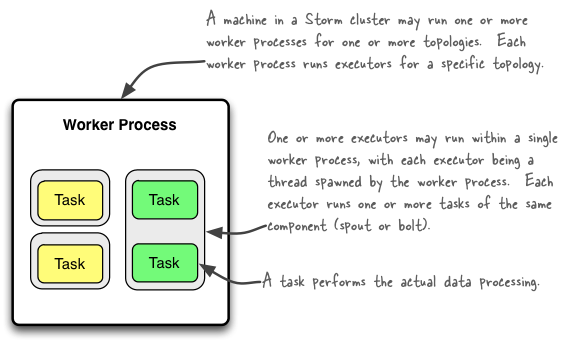
其实说白了,当一个topology在storm cluster中运行时,它的并发主要跟3个逻辑实体想过:worker,executor 和task
1. Worker 是运行在工作节点上面,被Supervisor守护进程创建的用来干活的进程。每个Worker对应于一个给定topology的全部执行任务的一个子集。反过来说,一个Worker里面不会运行属于不同的topology的执行任务。
2.
Executor可以理解成一个Worker进程中的工作线程。一个Executor中只能运行隶属于同一个component(spout/bolt)
的task。一个Worker进程中可以有一个或多个Executor线程。在默认情况下,一个Executor运行一个task。
3.
Task则是spout和bolt中具体要干的活了。一个Executor可以负责1个或多个task。每个component(spout/bolt)
的并发度就是这个component对应的task数量。同时,task也是各个节点之间进行grouping(partition)的单位。
并发度的配置
有多种方法可以进行并发度的配置,其优先级如下:
defaults.yaml < storm.yaml <
topology 私有配置 < component level(spout/bolt) 的私有配置
至于具体怎么配置,至今拷贝过来大家看看便知:
设置worker数量
- Description: 在当前storm cluster中给这个topology创建的worker数量
- Configuration option: TOPOLOGY_WORKERS
- How to set in your code (examples):
设置executor数量
- Description: 给指定component创建的executor数量
- Configuration option: ?
- How to set in your code (examples):
- TopologyBuilder#setSpout()
- TopologyBuilder#setBolt()
- Note that as of Storm 0.8 the
parallelism_hintparameter
now specifies the initial number of executors (not tasks!) for that bolt.
设置task数量
- Description: 给指定 component 创建的task数量
- Configuration option: TOPOLOGY_TASKS
- How to set in your code (examples):
Here is an example code snippet to show these settings in practice:
topologyBuilder.setBolt("green-bolt", new GreenBolt(), 2)

               .setNumTasks(4)

               .shuffleGrouping(blue-spout);
一个运行时的topology的例子
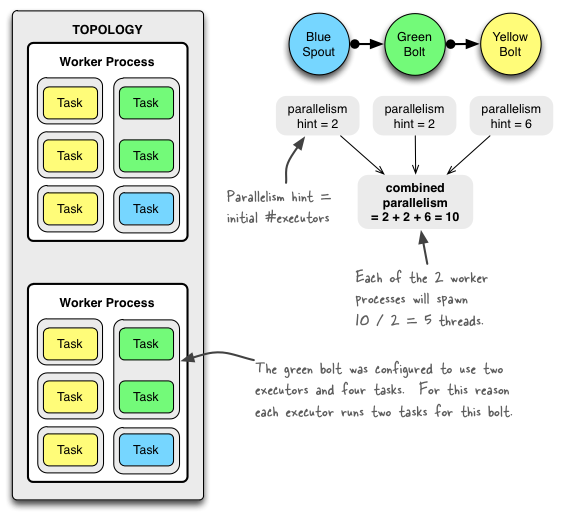
The GreenBolt was configured as per the code snippet above whereas BlueSpout and YellowBolt only set the parallelism hint (number of executors). Here is the relevant code:
Config conf = new Config();

conf.setNumWorkers(2); // use two worker processes

topologyBuilder.setSpout("blue-spout", new BlueSpout(), 2); // set parallelism hint to 2

topologyBuilder.setBolt("green-bolt", new GreenBolt(), 2)

               .setNumTasks(4)

               .shuffleGrouping("blue-spout");

topologyBuilder.setBolt("yellow-bolt", new YellowBolt(), 6)

               .shuffleGrouping("green-bolt");

StormSubmitter.submitTopology(

        "mytopology",

        conf,

        topologyBuilder.createTopology()

    );
And of course Storm comes with additional configuration settings to control the parallelism of a topology, including:
- TOPOLOGY_MAX_TASK_PARALLELISM: This setting puts a ceiling on the number of executors that can be spawned for a single component. It is typically used during testing to limit the number of threads spawned when running a topology in local mode. You can set this option via e.g. Config#setMaxTaskParallelism().
怎么样在运行过程中修改一个topology的并发度
动态的改变(增减)worker processes的数目和executors的数目, 称为rebalancing.
主要有两种方法可以rebalance一个topology:
- 使用Storm web UI 来 rebalance topology.
- 使用CLI 工具 rebalance topology,一个例子如下:
# Reconfigure the topology "mytopology" to use 5 worker processes,

# the spout "blue-spout" to use 3 executors and

# the bolt "yellow-bolt" to use 10 executors.

storm rebalance mytopology -n 5 -e blue-spout=3 -e yellow-bolt=10
关于Storm 中Topology的并发度的理解的更多相关文章
- Storm基本概念以及Topology的并发度
Spouts,流的源头 Spout是Storm里面特有的名词,Stream的源头,通常是从外部数据源读取tuples,并emit到topology Spout可以同时emit多个tupic strea ...
- [Storm] 并发度的理解
Tasks & executors relation Q1. However I'm a bit confused by the concept of "task". Is ...
- Twitter Storm中Topology的状态
Twitter Storm中Topology的状态 状态转换如下,Topology 的持久化状态包括: active, inactive, killed, rebalancing 四个状态. 代码上看 ...
- Java 中 ConcurrentHashMap 的并发度是什么?
ConcurrentHashMap 把实际 map 划分成若干部分来实现它的可扩展性和线程安 全.这种划分是使用并发度获得的,它是 ConcurrentHashMap 类构造函数的一 个可选参数,默认 ...
- storm并发度理解
1. 核心原理 一个运行中的拓扑是由什么组成的:worker进程,executors和tasks.Storm是按照下面3种主要的部分来区分Storm集群中一个实际运行的拓扑的:Worker进程.Exe ...
- storm源码之理解Storm中Worker、Executor、Task关系 + 并发度详解
本文导读: 1 Worker.Executor.task详解 2 配置拓扑的并发度 3 拓扑示例 4 动态配置拓扑并发度 Worker.Executor.Task详解: Storm在集群上运行一个To ...
- storm基础系列之一----storm并发度概念剖析
前言: 学了几天storm的基础,发现如果有hadoop基础,再理解起概念来,容易的多.不过,涉及到一些独有的东西,如调度,如并发度,还是很麻烦.那么,从这一篇开始,力争清晰的梳理这些知识. 在正式学 ...
- 用实例的方式去理解storm的并发度
什么是storm的并发度 一个topology(拓扑)在storm集群上最总是以executor和task的形式运行在suppervisor管理的worker节点上.而worker进程都是运行在jvm ...
- Storm中并发程度的理解
Storm中涉及到了很多组件,例如nimbus,supervisor等等,在参考了这两篇文章之后,对这个有了更好的理解. Understanding the parallelism of a Stor ...
随机推荐
- 【Centos】centos查看磁盘使用情况
1.查看分区和磁盘 lsblk 查看分区和磁盘 2.查看空间使用情况 df -h 查看空间使用情况 3.分区工具查看分区信息 fdisk -l 分区工具查看分区信息 4.查看分区 cfdisk /de ...
- Ubuntu64位下使用eclipse闪退的解决
解决办法: 删除文件 [workspace]/.metadata/.plugins/org.eclipse.e4.workbench/workbench.xmi
- fastjson的日期格式化
//SerializerFeature.WriteDateUseDateFormat 使用日期字段格式序列化(2017-01-01),而不是用时间戳表示日期 JSON.toJSONString(dat ...
- 《图解CSS3:核心技术与案例实战》
<图解CSS3:核心技术与案例实战> 基本信息 作者: 大漠 丛书名: Web开发技术丛书 出版社:机械工业出版社 ISBN:9787111469209 上架时间:2014-7-2 出版日 ...
- 局部响应归一化(Local Response Normalization,LRN)
版权声明:本文为博主原创文章,欢迎转载,注明地址. https://blog.csdn.net/program_developer/article/details/79430119 一.LRN技术介 ...
- source insight 4.0.086破解
source insight 4.0.093 破解: 1. 安装原版软件:Source Insight Version 4.0.0093 - March 20, 2018 2. 替换原主程序:sou ...
- QT 5.12 安装MinGW 7.3.0 32bit
一.下载MinGW 7.3.0 32bit for QT 5.12 链接:https://pan.baidu.com/s/1IKDhvxEbKIgmWyQQhpdnTw提取码:ubxc 二.解压缩并将 ...
- GridControl常见用法【转】
刚接触DevExpress第三方控件,把GridControl的常见用法整理一下,以供参考: 说明: gcTest GridControl gvText GridView //隐藏最上面的G ...
- JS Replace() 高级用法(转)
在很多项目中,我们经常需要使用JS,在页面前面对前台的某些元素做做修改,js 的replace()方法就必不可少. 经常使用"ABCABCabc".replace("A& ...
- C#邮件发送(最坑爹的邮箱-QQ邮箱)
最近工作挺清闲的,有空的时候陪妹子出去玩玩,自己看看小说,看看电影,日子过的挺欢乐的,这个星期幡然悔悟,代码才是我的最爱,做点小东西,就写个邮件发送程序.说的邮件发送相信工作过基本上都会用到过,用户注 ...