
elastic-job 分布式定时任务框架 在 SpringBoot 中如何使用(一)初始化任务并定时执行
第一篇需要实现一个最简单的需求:某个任务定时执行,多台机子只让其中一台机子执行任务
一、安装 分布式应用程序协调服务 zookeeper,安装步骤在链接里面
Linux(Centos7)下安装 zookeeper docker版 集群
二、在springboot项目中引入 elastic-job 依赖,我这里用的 springboot 2.0.5 版本
整合代码参考官方的springboot demo
https://github.com/elasticjob/elastic-job-example
对应的 elastic-job 版本
<elastic-job.version>2.1.5</elastic-job.version>
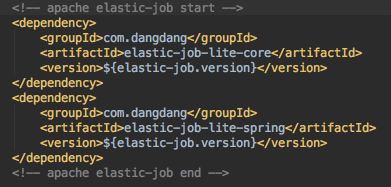
        <!-- apache elastic-job start -->

        <dependency>

            <groupId>com.dangdang</groupId>

            <artifactId>elastic-job-lite-core</artifactId>

            <version>${elastic-job.version}</version>

        </dependency>

        <dependency>

            <groupId>com.dangdang</groupId>

            <artifactId>elastic-job-lite-spring</artifactId>

            <version>${elastic-job.version}</version>

        </dependency>

        <!-- apache elastic-job end -->
依赖XML代码
application.yaml 加入配置
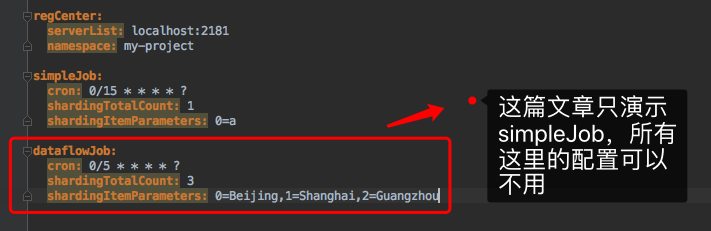
regCenter:

  serverList: localhost:2181

  namespace: my-project

simpleJob:

  cron: 0/15 * * * * ?

  shardingTotalCount: 1

  shardingItemParameters: 0=a

dataflowJob:

  cron: 0/5 * * * * ?

  shardingTotalCount: 3

  shardingItemParameters: 0=Beijing,1=Shanghai,2=Guangzhou
application.yaml 配置代码
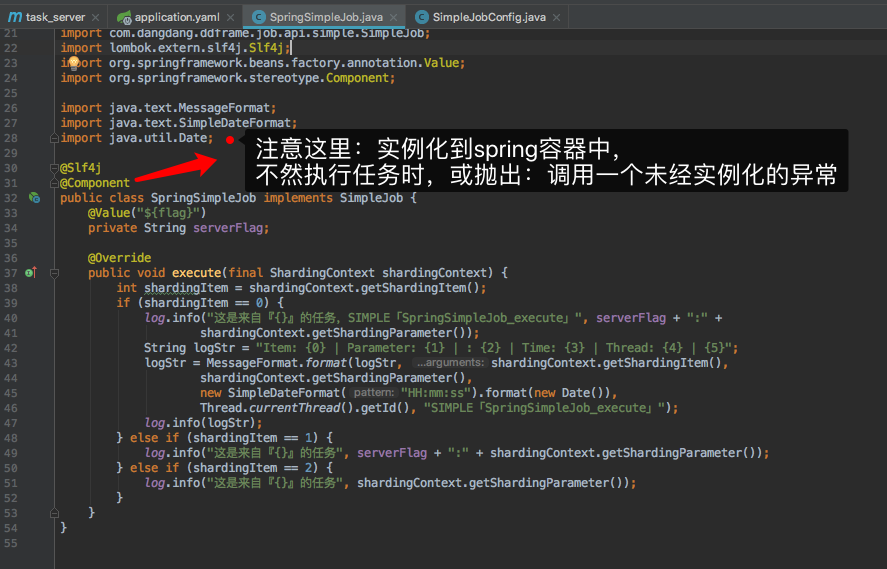
三、作业代码(simpleJob类型的任务),把官方的demo拿到自己的项目中来就行,注意添加一个@Component注解在类上
/*

 * Copyright 1999-2015 dangdang.com.

 * <p>

 * Licensed under the Apache License, Version 2.0 (the "License");

 * you may not use this file except in compliance with the License.

 * You may obtain a copy of the License at

 *

 *     http://www.apache.org/licenses/LICENSE-2.0

 *

 * Unless required by applicable law or agreed to in writing, software

 * distributed under the License is distributed on an "AS IS" BASIS,

 * WITHOUT WARRANTIES OR CONDITIONS OF ANY KIND, either express or implied.

 * See the License for the specific language governing permissions and

 * limitations under the License.

 * </p>

 */

package com.dianji.task_server.job.exec;

import com.dangdang.ddframe.job.api.ShardingContext;

import com.dangdang.ddframe.job.api.simple.SimpleJob;

import lombok.extern.slf4j.Slf4j;

import org.springframework.beans.factory.annotation.Value;

import org.springframework.stereotype.Component;

import java.text.MessageFormat;

import java.text.SimpleDateFormat;

import java.util.Date;

@Slf4j

@Component

public class SpringSimpleJob implements SimpleJob {

    @Value("${flag}")

    private String serverFlag;

    @Override

    public void execute(final ShardingContext shardingContext) {

        int shardingItem = shardingContext.getShardingItem();

        if (shardingItem == 0) {

            log.info("这是来自『{}』的任务,SIMPLE「SpringSimpleJob_execute」", serverFlag + ":" +

                    shardingContext.getShardingParameter());

            String logStr = "Item: {0} | Parameter: {1} | : {2} | Time: {3} | Thread: {4} | {5}";

            logStr = MessageFormat.format(logStr, shardingContext.getShardingItem(),

                    shardingContext.getShardingParameter(),

                    new SimpleDateFormat("HH:mm:ss").format(new Date()),

                    Thread.currentThread().getId(), "SIMPLE「SpringSimpleJob_execute」");

            log.info(logStr);

        } else if (shardingItem == 1) {

            log.info("这是来自『{}』的任务", serverFlag + ":" + shardingContext.getShardingParameter());

        } else if (shardingItem == 2) {

            log.info("这是来自『{}』的任务", shardingContext.getShardingParameter());

        }

    }

}
作业任务代码
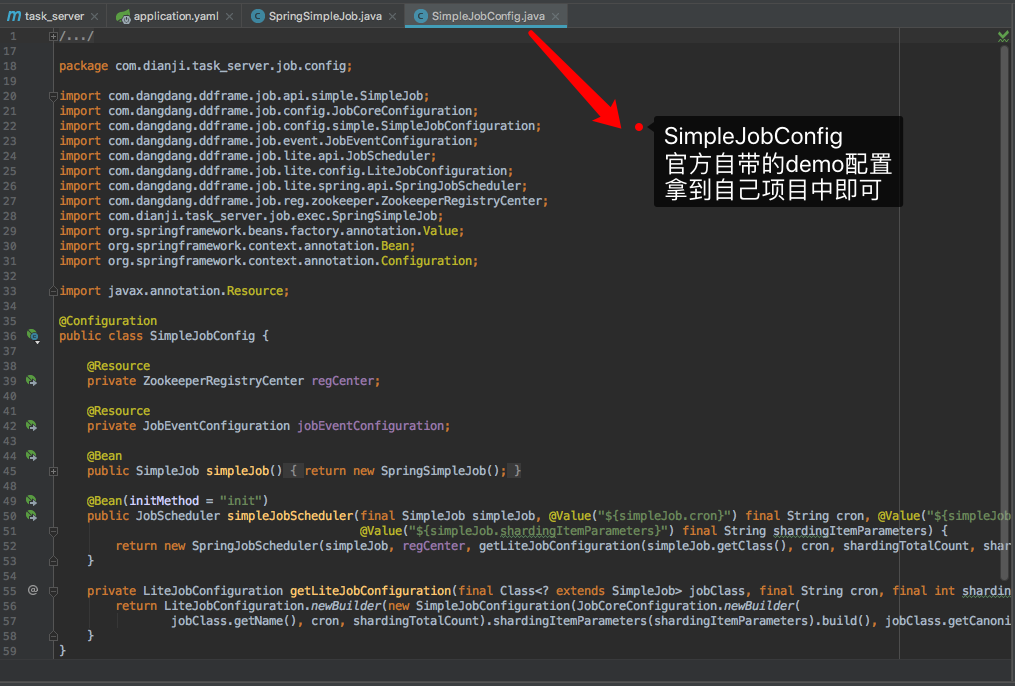
四、配置作业(直接将官方的配置代码拿进自己的项目中)
/*

 * Copyright 1999-2015 dangdang.com.

 * <p>

 * Licensed under the Apache License, Version 2.0 (the "License");

 * you may not use this file except in compliance with the License.

 * You may obtain a copy of the License at

 *

 *     http://www.apache.org/licenses/LICENSE-2.0

 *

 * Unless required by applicable law or agreed to in writing, software

 * distributed under the License is distributed on an "AS IS" BASIS,

 * WITHOUT WARRANTIES OR CONDITIONS OF ANY KIND, either express or implied.

 * See the License for the specific language governing permissions and

 * limitations under the License.

 * </p>

 */

package com.dianji.task_server.job.config;

import com.dangdang.ddframe.job.api.simple.SimpleJob;

import com.dangdang.ddframe.job.config.JobCoreConfiguration;

import com.dangdang.ddframe.job.config.simple.SimpleJobConfiguration;

import com.dangdang.ddframe.job.event.JobEventConfiguration;

import com.dangdang.ddframe.job.lite.api.JobScheduler;

import com.dangdang.ddframe.job.lite.config.LiteJobConfiguration;

import com.dangdang.ddframe.job.lite.spring.api.SpringJobScheduler;

import com.dangdang.ddframe.job.reg.zookeeper.ZookeeperRegistryCenter;

import com.dianji.task_server.job.exec.SpringSimpleJob;

import org.springframework.beans.factory.annotation.Value;

import org.springframework.context.annotation.Bean;

import org.springframework.context.annotation.Configuration;

import javax.annotation.Resource;

@Configuration

public class SimpleJobConfig {

    @Resource

    private ZookeeperRegistryCenter regCenter;

    @Resource

    private JobEventConfiguration jobEventConfiguration;

    @Bean

    public SimpleJob simpleJob() {

        return new SpringSimpleJob();

    }

    @Bean(initMethod = "init")

    public JobScheduler simpleJobScheduler(final SimpleJob simpleJob, @Value("${simpleJob.cron}") final String cron, @Value("${simpleJob.shardingTotalCount}") final int shardingTotalCount,

                                           @Value("${simpleJob.shardingItemParameters}") final String shardingItemParameters) {

        return new SpringJobScheduler(simpleJob, regCenter, getLiteJobConfiguration(simpleJob.getClass(), cron, shardingTotalCount, shardingItemParameters), jobEventConfiguration);

    }

    private LiteJobConfiguration getLiteJobConfiguration(final Class<? extends SimpleJob> jobClass, final String cron, final int shardingTotalCount, final String shardingItemParameters) {

        return LiteJobConfiguration.newBuilder(new SimpleJobConfiguration(JobCoreConfiguration.newBuilder(

                jobClass.getName(), cron, shardingTotalCount).shardingItemParameters(shardingItemParameters).build(), jobClass.getCanonicalName())).overwrite(true).build();

    }

}
作业配置代码
五、最简单的整合步骤就完成了,启动应用(分别启动三个进程),看见任务开始执行了
最简单的任务需求得到了满足,定时执行,多台机子只让其中一台机子执行任务

关于分片的数量设置,实际操作了一把
分片 1 时:3个进程只有1一个进程执行1次任务,共执行1次任务
分片 2 时:3个进程中的2个进程一共执行2次任务,共执行2次任务
分片 3 时:3个进程每个执行1次任务,共执行3次任务
分片 4 时:3个进程同时一共执行4次任务,共执行4次任务
分片 5 时:3个进程同时一共执行5次任务,共执行5次任务
elastic-job 分布式定时任务框架 在 SpringBoot 中如何使用(一)初始化任务并定时执行的更多相关文章
- elastic-job 分布式定时任务框架 在 SpringBoot 中如何使用(二)动态添加任务需求
之前一篇用过了如何在使用创建最简单的任务:比如每天定时清空系统的缓存 这篇文章主要讲解:如何运用elastic-job-lite做灵活的细粒度任务,比如: 如何定时取消某个订单在下订单后30分钟未支付 ...
- 分布式定时任务框架——python定时任务框架APScheduler扩展
http://bbs.7boo.org/forum.php?mod=viewthread&tid=14546 如果将定时任务部署在一台服务器上,那么这个定时任务就是整个系统的单点,这台服务器出 ...
- Elastic-Job - 分布式定时任务框架
Elastic-Job - 分布式定时任务框架 摘要 Elastic-Job是ddframe中dd-job的作业模块中分离出来的分布式弹性作业框架.去掉了和dd-job中的监控和ddframe接入规范 ...
- 分布式定时任务框架比较,spring batch, tbschedule jobserver
分布式定时任务框架比较,spring batch, tbschedule jobserver | 移动开发参考书 分布式定时任务框架比较,spring batch, tbschedule jobser ...
- 基于spring+quartz的分布式定时任务框架
问题背景 我公司是一个快速发展的创业公司,目前有200人,主要业务是旅游和酒店相关的,应用迭代更新周期比较快,因此,开发人员花费了更多的时间去更=跟上迭代的步伐,而缺乏了对整个系统的把控 没有集群之前 ...
- Elastic-Job——分布式定时任务框架
摘要: Elastic-Job是ddframe中dd-job的作业模块中分离出来的分布式弹性作业框架.去掉了和dd-job中的监控和ddframe接入规范部分.该项目基于成熟的开源产品Quartz和Z ...
- Quartz小记(一):Elastic-Job - 分布式定时任务框架
Elastic-Job是ddframe中dd-job的作业模块中分离出来的分布式弹性作业框架.去掉了和dd-job中的监控和ddframe接入规范部分.该项目基于成熟的开源产品Quartz和Zooke ...
- Scheduled定时任务器在Springboot中的使用
Scheduled定时任务器是Spring3.0以后自带的一个定时任务器. 使用方式: 1.添加依赖 <!-- 添加 Scheduled 坐标 --> <dependency> ...
- Spring Boot 2.x基础教程:使用Elastic Job实现定时任务
上一篇,我们介绍了如何使用Spring Boot自带的@Scheduled注解实现定时任务.文末也提及了这种方式的局限性.当在集群环境下的时候,如果任务的执行或操作依赖一些共享资源的话,就会存在竞争关 ...
随机推荐
- 在Ubuntu系统下设置永久性Swap交换空间(转帖)
http://blog.sina.com.cn/s/blog_6e4388910100tsk7.html swap 一般都在一个专有的swap区里,这可能是因为在安装的时候系统会提示你创建一个swap ...
- PHP:第二章——PHP中的switch语句
<?php header("Content-Type:text/html;charset=utf-8"); /* switch语句: */ //例1: /*$i = 99; ...
- cas 服务端相关配置
SSO-安全证书配置 CAS默认使用的是HTTPS协议,如果对安全要求不高,可以使用HTTP协议 修改deployerConfigContext.xml(cas/WEB-INF)增加参数 p:requ ...
- ZooKeeper 之 zkCli.sh客户端的命令使用
zkCli.sh的使用 ZooKeeper服务器简历客户端 ./zkCli.sh -timeout 0 -r -server ip:port ./zkCli.sh -timeout 5000 -ser ...
- OC基础:实例变量和成员变量的区别 分类: ios学习 OC 2015-06-14 17:59 16人阅读 评论(0) 收藏
摘要: Objective-C 引入了"实例变量"的概念,但同时, 也经常出现 "成员变量"的声音. 到底什么是实例变量,什么是成员变量,二者的区别是什么呢 ...
- SharePoint 2010: Change welcome page on PowerShell
摘要: SharePoint 2010之后呢, 建立一个 Team Site会有两个 default page, 分别是 Sitepages/home.aspx and default.aspx. 这 ...
- spring读取propertyes 新方法
<context:property-placeholder location="classpath:mysql.properties"/> <util:prope ...
- ZooKeeper安装,部署
实验环境 192.168.1.10 Zookeeper1:2181, Zookeeper2:2182 192.168.1.11 ZooKeeper3:2181 依赖环境 JDK1.7 安装,配置 1. ...
- Samsung_tiny4412(驱动笔记07)----spinlock,semaphore,atomic,mutex,completion,interrupt
/*********************************************************************************** * * spinlock,se ...
- Knight Tournament 合并区间
Hooray! Berl II, the king of Berland is making a knight tournament. The king has already sent the me ...