
QT_地图导航
代码已经更新:http://www.cnblogs.com/douzujun/p/6272667.html
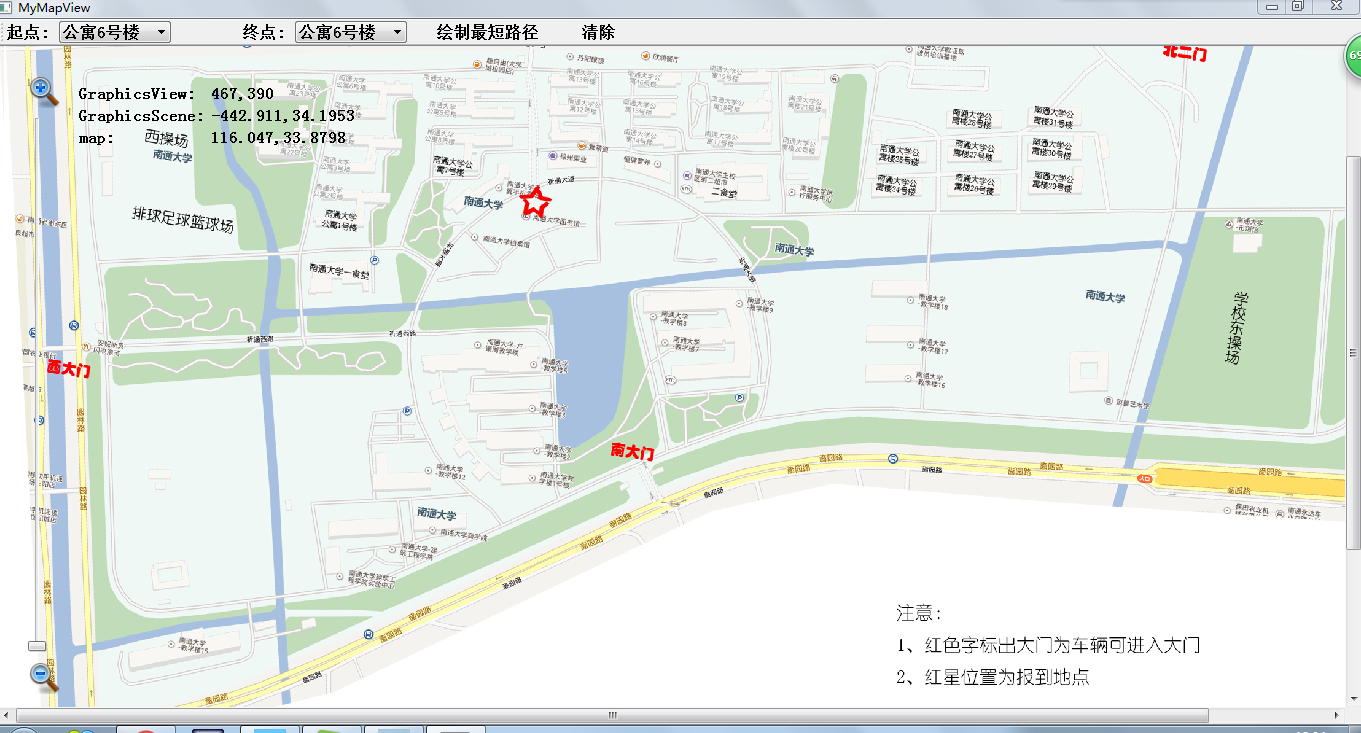
 //地图显示功能

 #ifndef MAPWIDGET_H

 #define MAPWIDGET_H

 #include <QGraphicsView>

 #include <QLabel>

 #include <QLineEdit>

 #include <QPushButton>

 #include <QMouseEvent>

 class MapWidget : public QGraphicsView

 {

     Q_OBJECT

 public:

     MapWidget();

     void readMap();                //读取地图信息

     QPointF mapToMap(QPointF);     //用于实现场景坐标系与地图坐标间的映射.以获得某点的经纬度

 public slots:

     void slotZoom(int);            //缩放信号

 protected:

     //完成地图的显示功能

     void drawBackground (QPainter *painter, const QRectF &rect);

     void mouseMoveEvent (QMouseEvent *event);

 private:

     QPixmap map;

     qreal zoom;

     QLabel *viewCoord;  //视图目前坐标(以窗口左上为原点)

     QLabel *sceneCoord; //场景目前坐标(以场景中心为原点)

     QLabel *mapCoord;   //地图目前坐标

     double x1, y1;

     double x2, y2;

 };

 #endif // MAPWIDGET_H
//mapwidget.cpp

#include "mapwidget.h"

#include <QSlider>         //滑动条

#include <QGridLayout>

#include <QFile>

#include <QTextStream>

#include <QGraphicsScene>

#include <math.h>

MapWidget::MapWidget()

{

    //读取地图信息--用于读取描述地图信息的文件(包括地图名及经纬度等信息)

    readMap ();

    zoom = ;

    int width = map.width ();

    int height = map.height ();

    //新建一个QGraphicsScene对象为主窗口连接一个场景

    QGraphicsScene *scene = new QGraphicsScene(this);

    //限定场景的显示区域为地图大小

    scene->setSceneRect (-width/, -height/, width, height);

    setScene (scene);

    /***

     * The background is cached(隐藏,缓存). This affects both custom backgrounds, and

     * backgrounds based on the backgroundBrush property. When this flag is enabled,

     * QGraphicsView will allocate one pixmap with the full size of the viewport

     */

    setCacheMode (CacheBackground);

    /***

     * 用于地图缩放的滑动条

     * 新建一个QSlider对象作为地图的缩放控制

     */

    QSlider *slider = new QSlider;

    //设置滚动条方向-垂直

    slider->setOrientation (Qt::Vertical);

    slider->setRange (, );        //设置地图缩放比例值范围为0~100

    slider->setTickInterval ();     //显示刻度间隔为10

    slider->setValue ();            //设置当前初始值为50

    // 将缩放控制条的valueChanged()信号与地图缩放slotZoom()槽函数相关联

    connect (slider, SIGNAL(valueChanged(int)), this, SLOT(slotZoom(int)));

    //缩放图标

    QLabel *zoominLabel = new QLabel;

    zoominLabel->setScaledContents (true);

    zoominLabel->setPixmap (QPixmap("zoomin.png"));

    QLabel *zoomoutLabel = new QLabel;

    zoomoutLabel->setScaledContents (true);

    zoomoutLabel->setPixmap (QPixmap("zoomout.png"));

    //坐标值显示区

    QLabel *label1 = new QLabel(tr("GraphicsView:"));

    viewCoord = new QLabel;

    QLabel *label2 = new QLabel(tr("GraphicsScene:"));

    sceneCoord = new QLabel;

    QLabel *label3 = new QLabel(tr("map:"));

    mapCoord = new QLabel;

    //坐标显示区布局

    QGridLayout *gridLayout = new QGridLayout;

    gridLayout->addWidget (label1, , );

    gridLayout->addWidget (viewCoord, , );

    gridLayout->addWidget (label2, , );

    gridLayout->addWidget (sceneCoord, , );

    gridLayout->addWidget (label3, , );

    gridLayout->addWidget (mapCoord, , );

    gridLayout->setSizeConstraint (QLayout::SetFixedSize);

    QFrame *coordFrame = new QFrame;

    coordFrame->setLayout (gridLayout);

    //缩放控制子布局

    QVBoxLayout *zoomLayout = new QVBoxLayout;

    zoomLayout->addWidget (zoominLabel);

    zoomLayout->addWidget (slider);

    zoomLayout->addWidget (zoomoutLabel);

    //坐标显示区布局

    QVBoxLayout *coordLayout = new QVBoxLayout;

    coordLayout->addWidget (coordFrame);

    coordLayout->addStretch ();

    //主布局

    QHBoxLayout *mainLayout = new QHBoxLayout;

    mainLayout->addLayout (zoomLayout);

    mainLayout->addLayout (coordLayout);

    mainLayout->addStretch ();          //平均分割

    mainLayout->setMargin ();         //设置对话框(或窗体)的边距为30

    mainLayout->setSpacing ();        //设定各个控件之间的间距为10

    setLayout (mainLayout);             //在场景中设置为布局

    setWindowTitle ("Map Widget");

    setMinimumSize (, );

}

//读取地图信息

void MapWidget::readMap ()

{

    QString mapName;

    //新建一个QFile对象,“map.txt"是描述地图信息的文本文件

    QFile mapFile("maps.txt");

    //以"只读"的方式打开此文件

    int ok = mapFile.open (QIODevice::ReadOnly);

    if (ok)                   //分别以读取地图的名称和四个经纬度信息

    {

        QTextStream ts(&mapFile);

        if (!ts.atEnd ()) {              //没有到末尾返回false

            ts >> mapName;               //储存字符串

            ts >> x1 >> y1 >> x2 >> y2;  //储存地图左上角和右下角的经纬度

        }

    }

    map.load (mapName);      //将地图读取至私有标量map中

}

//根据缩放滑动条的当前值,确定缩放的比例,调用scale()函数实现地图缩放--完成地图缩放功能slotZoom

void MapWidget::slotZoom (int value)

{

    qreal s;                  //缩放大小

    if (value > zoom) {       //放大

        s = pow (1.01, (value - zoom));

    }

    else {

        s = pow(/1.01, (zoom - value));

    }

    scale(s, s);

    zoom = value;            //当前放大值

}

//drawBackground()--以地图图片重绘场景的背景来实现地图显示

void MapWidget::drawBackground (QPainter *painter, const QRectF &rect)

{

    /***

     * The scene rectangle defines the extent of the scene, and in the view's case,

     * this means the area of the scene that you can navigate using the scroll bars.

     */

    painter->drawPixmap (int(sceneRect ().left ()) + , int(sceneRect ().top ()) - , map);

//    //Demo 在图片上绘线

//    QPen pen;

//    pen.setWidth (4);

//    pen.setColor (Qt::red);

//    painter->setPen (pen);

//    painter->setBrush (Qt::red);

//    painter->drawLine (100, 10, 100, 100);

}

//完成某点在各层坐标中的映射及显示

void MapWidget::mouseMoveEvent (QMouseEvent *event)

{

    //QGraphicesView 坐标

    QPoint viewPoint = event->pos ();   //鼠标事件位置

    viewCoord->setText (QString::number (viewPoint.x ()) + "," + QString::number (viewPoint.y ()));

    //QGraphiccsScene 坐标 -- 将视图坐标转换成场景坐标

    QPointF scenePoint = mapToScene (viewPoint);

    sceneCoord->setText (QString::number (scenePoint.x ()) + "," + QString::number (scenePoint.y ()));

    //地图坐标(经,纬度值)

    QPointF latLon = mapToMap (scenePoint);

    mapCoord->setText (QString::number (latLon.x ()) + "," + QString::number (latLon.y ()));

}

//完成从场景至地图坐标的转换mapToMap()

QPointF MapWidget::mapToMap (QPointF p)

{

    QPointF latLon;       //地图坐标

    qreal w = sceneRect ().width ();      //场景长度

    qreal h = sceneRect ().height ();     //场景高度

    qreal lon = y1 - ( (h/+p.y ()) * abs(y1-y2)/h );

    qreal lat = x1 + ( (w/+p.x ()) * abs(x1-x2)/w );

    latLon.setX (lat);

    latLon.setY (lon);

    return latLon;

}
 //mainwidget

 #ifndef MAINWINDOW_H

 #define MAINWINDOW_H

 #include <QMainWindow>

 #include "mapwidget.h"

 #include <QToolButton>

 #include <QLabel>

 #include <QComboBox>

 #include <QSpinBox>

 #include <QTextEdit>

 class MainWindow : public QMainWindow

 {

     Q_OBJECT

 public:

     MainWindow(QWidget *parent = );

     ~MainWindow();

     void createToolBar();

     void paintEvent (QPaintEvent *);

 public slots:

     void setStartStation();

     void setEndStation();

     void FindPath();

     void Clear();

 private:

     MapWidget *mapWidget;

     QLabel *startLabel;

     QLabel *endLabel;

     QComboBox *startComboBox;

     QComboBox *endComboBox;

     QToolButton *findPathBtn;

     QToolButton *clearBtn;

 };

 #endif // MAINWINDOW_H
 //布局实现-mainwindow.cpp

 #include "mainwindow.h"

 #include <QToolBar>

 MainWindow::MainWindow(QWidget *parent)

     : QMainWindow(parent)

 {

     mapWidget = new MapWidget;

     createToolBar ();  //实现一个工具栏

     setCentralWidget (mapWidget);

     setMinimumSize (, );  //设置最小尺寸

 }

 MainWindow::~MainWindow()

 {

 }

 void MainWindow::createToolBar ()

 {

     QToolBar *toolBar = addToolBar ("Tool");

     startLabel = new QLabel(tr("起点: "));

     startComboBox = new QComboBox;

     startComboBox->addItem (tr("公寓6号楼")); startComboBox->addItem (tr("公寓10号楼"));

     startComboBox->addItem (tr("公寓5号楼")); startComboBox->addItem (tr("公寓9号楼"));

     startComboBox->addItem (tr("公寓4号楼")); startComboBox->addItem (tr("公寓8号楼"));

     startComboBox->addItem (tr("公寓3号楼")); startComboBox->addItem (tr("公寓7号楼"));

     startComboBox->addItem (tr("公寓2号楼"));

     startComboBox->addItem (tr("公寓1号楼")); startComboBox->addItem (tr("图书馆"));

     startComboBox->addItem (tr("一食堂")); startComboBox->addItem (tr("西操场"));

     startComboBox->addItem (tr("公寓23号楼")); startComboBox->addItem (tr("公寓13号楼"));

     startComboBox->addItem (tr("公寓22号楼")); startComboBox->addItem (tr("公寓12号楼"));

     endLabel = new QLabel(tr("\t终点: "));

     endComboBox = new QComboBox;

     endComboBox->addItem (tr("公寓6号楼")); endComboBox->addItem (tr("公寓10号楼"));

     endComboBox->addItem (tr("公寓5号楼")); endComboBox->addItem (tr("公寓9号楼"));

     endComboBox->addItem (tr("公寓4号楼")); endComboBox->addItem (tr("公寓8号楼"));

     endComboBox->addItem (tr("公寓3号楼")); endComboBox->addItem (tr("公寓7号楼"));

     endComboBox->addItem (tr("公寓2号楼"));

     endComboBox->addItem (tr("公寓1号楼")); endComboBox->addItem (tr("图书馆"));

     endComboBox->addItem (tr("一食堂"));    endComboBox->addItem (tr("西操场"));

     endComboBox->addItem (tr("公寓23号楼"));endComboBox->addItem (tr("公寓13号楼"));

     endComboBox->addItem (tr("公寓22号楼"));endComboBox->addItem (tr("公寓12号楼"));

     connect (startComboBox, SIGNAL(activated(int)), this, SLOT(setStartStation()));

     connect (endComboBox, SIGNAL(activated(int)), this, SLOT(setEndStation()));

     findPathBtn = new QToolButton;

     findPathBtn->setText (tr("\t\t绘制最短路径"));

     connect (findPathBtn, SIGNAL(clicked(bool)), this, SLOT(FindPath()));

     clearBtn = new QToolButton;

     clearBtn->setText (tr("\t\t清除"));

     connect (clearBtn, SIGNAL(clicked(bool)), this, SLOT(Clear()));

     toolBar->addWidget (startLabel);

     toolBar->addWidget (startComboBox);

     toolBar->addWidget (endLabel);

     toolBar->addWidget (endComboBox);

     toolBar->addWidget (findPathBtn);

     toolBar->addWidget (clearBtn);

 }

 void MainWindow::setStartStation ()

 {

 }

 void MainWindow::setEndStation ()

 {

 }

 void MainWindow::FindPath ()

 {

 }

 void MainWindow::Clear ()

 {

 }

 void MainWindow::paintEvent (QPaintEvent *)

 {

 }
QT_地图导航的更多相关文章
- QT_地图导航 源码下载
https://github.com/douzujun/MyMapView 主要算法讲解: 1. 计算最短路径(dijkstra算法) Step1: (1)找到最短路径已经确定的顶点,从它已经确定的顶 ...
- 天津政府应急系统之GIS一张图(arcgis api for flex)讲解(四)地图导航控件模块
config.xml文件的配置如下: <widget left="10" top="50" config="widgets/Navigation ...
- iOS开发之百度地图导航
本篇主要讲述百度地图的导航功能: 第一步:在使用百度导航之前,我们需要在百度地图开放平台上下载导航的 SDK,共85.8M,网速不好的同学可提前准备好. 第二步:引入导航所需的系统包 将AudioTo ...
- iOS打开百度地图、高德地图导航
1.判断手机里是否已经安装了百度地图或者高德地图: BOOL hasBaiduMap = NO; BOOL hasGaodeMap = NO; if ([[UIApplication sharedAp ...
- iOS开发----调用地图导航
注意:本文章下的代码有个别变量未知,所以是不能直接跑通的,我也是转别人的 在IOS6.0系统后,兼容iOS5.0与iOS6.0地图导航,需要分两个步骤 #define SYSTEM_VERSION_L ...
- iOS 调用地图导航
在IOS6.0系统后,兼容iOS5.0与iOS6.0地图导航,需要分两个步骤 #define SYSTEM_VERSION_LESS_THAN(v) ([[[UIDevice currentDevic ...
- Windows phone 8 学习笔记(8) 定位地图导航(转)
Windows phone 8 已经不使用自家的bing地图,新地图控件可以指定制图模式.视图等.bing地图的定位误差比较大,在模拟器中测试新地图貌似比较理想.本节主要讲解下位置服务以及新地图控件的 ...
- IOS 手绘地图导航
手绘地图导航 第三方库 NAMapKit, 1)支持在手绘图上标记.缩放 2)支持在单张图片 3)支持瓦片小图片 思路 前提:美工已经切好手绘图,并告知我们当前的缩放级别. 1)确定好手绘图左上角点在 ...
- 实现百度地图导航Demo的语音播报功能
上文中实现了在本地导入百度地图导航Demo,那么在此基础上如何实现导航的语音播报呢? 一.为该应用申请语音播报(也叫注册) http://developer.baidu.com/map/index.p ...
随机推荐
- mysqlbinlog
一.描述 转换二进制日志为易读的文本格式或用于管道后恢复数据 二.用法 -d, --database=name 仅列出指定数据库的条目 --start-datetime=name 从指定时间开始读取事 ...
- 【总结】浅谈JavaScript中的接口
一.什么是接口 接口是面向对象JavaScript程序员的工具箱中最有用的工具之一.在设计模式中提出的可重用的面向对象设计的原则之一就是“针对接口编程而不是实现编程”,即我们所说的面向接口编程,这个概 ...
- DOM
DOM:Document Object Model 文档对象模型文档:html页面文档对象:页面中的元素文档对象模型:定义为了能够让程序(js)去操作页面中的元素DOM会把文档看作是一棵树docume ...
- Linux学习之让进程在后台可靠运行的方法详解
我们经常会碰到这样的问题,用 telnet/ ssh 登录了远程的 Linux 服务器http://www.maiziedu.com/course/592/,运行了一些耗时较长的任务, 结果却由于网络 ...
- java创建文件和目录
java创建文件和目录 2013-09-04 12:56 99933人阅读 评论(7) 收藏 举报 分类: JAVA基础(10) 版权声明:本文为博主原创文章,未经博主允许不得转载. 创建文件和目 ...
- nginx配置杂记
1.一个接口的形式要求是:IP+端口,并且通信协议类型是:https,如何做域名解析: ①设置一个端口.同时在防火墙中打开这个端口,重启防火墙: ②在服务器上/etc/nginx/conf.d的目录下 ...
- 360浏览器遇到文档模式是IE7的解决办法
这段时间遇到了360浏览器在加载java项目时,默认的文档模式是IE7,使得网页加载下拉框出现问题. 解决的方法是: 在显示的jsp页面加上 <meta http-equiv="X-U ...
- .NET 的 WebSocket 开发包比较(转)
.NET 的 WebSocket 开发包比较 编者按 本文出现在第三方产品评论部分中.在这一部分的文章只提供给会员,不允许工具供应商用来以任何方式和形式来促销或宣传产品.请会员报告任何垃圾信息或广告. ...
- [Machine Learning & Algorithm]CAML机器学习系列1:深入浅出ML之Regression家族
声明:本博客整理自博友@zhouyong计算广告与机器学习-技术共享平台,尊重原创,欢迎感兴趣的博友查看原文. 符号定义 这里定义<深入浅出ML>系列中涉及到的公式符号,如无特殊说明,符号 ...
- Android如何一进入一个activity就唤醒键盘
方法总结: 在AndroidManife.xml中对应的的Activity配置中加入以下配置项: android:windowSoftInputMode="stateVisible|adju ...