
邮件发送模型及其Python应用实例
SMTP(Simple Mail Transfer Protocol)
制定:
First:RFC 788 in 1981
Last:RFC 5321 in 2008
端口:
TCP 25(SMTP), TCP 465/587(SMTP_SSL)
功能:
用户客户端:
发送消息:SMTP
接收和管理消息:POP3、IMAP
邮件服务器:
发送和接收消息:SMTP
说明:
SMTP仅定义了消息传输格式(如消息发送者参数),而非消息内容(如消息头和消息体)。
邮件发送模型
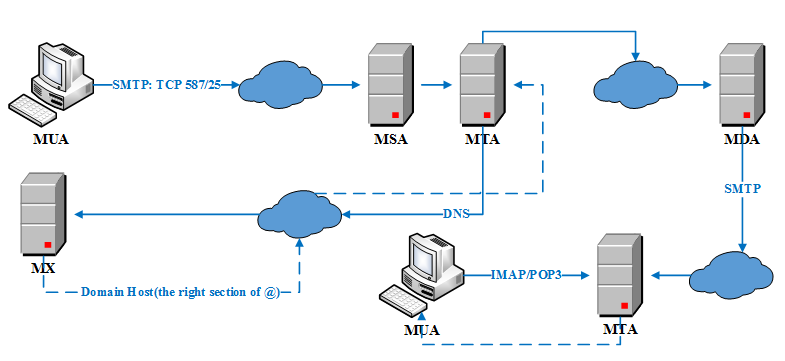
流程描述:
(1) 使用SMTP协议,通过MUA(Mail User Agent)提交邮件到MSA(Mail Submission Agent),然后MSA递送邮件到MTA(Mail Transfer Agent)[通常而言,MSA和MTA是同一邮件服务器上的两个不同例程,其也被称为SMTP服务器]。
(2) MTA通过DNS在MX(Mail Exchanger Record)上查询接收者的邮件服务器。
(3) MTA发送邮件到目标邮件服务器MTA,其间可能是两个MTA直接通信,或者经过多个SMTP服务器,最终到达MDA(Mail Delivery Agent)。
(4) MDA直接递送或者通过SMTP协议,将邮件递送到本地MTA。
(5) 终端应用程序通过IMAP/POP3协议接收和管理邮件。
SMTP协议
SMTP由3部分构成:
- MAIL:建立发送者地址。
- RCPT:建立接收者地址。
- DATA:标志邮件内容的开始。邮件内容由两部分构成:邮件头和以空行分割的邮件体。DATA是一组命令,服务器需要做两次回复:第一次回复表明其准备好接收邮件,第二次回复表明其接收/拒绝整个邮件。
一个简单的SMTP发送示例(主要为了说明SMTP的3个部分),如sender给receiver1和receiver2发送邮件:
S:表示SMTP服务器 C:表示SMTP客户端
客户端C建立TCP连接后,服务端S通过greeting建立会话(附带服务器的FQDN(Fully Qualified Domain Name)),客户端C通过HELLO响应会话(附带客户端的FQDN)。
# 建立会话

S: 220 smtp.example.com ESMTP Postfix

C: HELO client.example.org

S: 250 Hello client.example.org, I am glad to meet you

# 发送消息

C: MAIL FROM:<sender@example.org>

S: 250 Ok

C: RCPT TO:<receiver1@example.com>

S: 250 Ok

C: RCPT TO:<receiver2@example.com>

S: 250 Ok

C: DATA

S: 354 End data with <CR><LF>.<CR><LF>

C: From: "Sender Example" <sender@example.org>

C: To: "Receiver1 Example" <receiver1@example.com>

C: Cc: receiver2@example.com

C: Date: Tue, 15 January 2008 16:02:43 -0500

C: Subject: Test message

C:

C: Hello Receiver1.

C: This is a test message with 5 header fields and 4 lines in the message body.

C: Your friend,

C: Sender

C: .

S: 250 Ok: queued as 12345

C: QUIT

S: 221 Bye

{The server closes the connection}
Python邮件模块
python中邮件发送使用smtplib模块,其一般流程为:初始化连接->发送邮件->退出。其中包含的类有SMTP,SMTP_SSL,LMTP。如上SMTP中的会话示例在python中对应的部分如下:
C: HELO client.example.org --- SMTP.helo([hostname]): 使用HELO向SMTP服务器标识自己。

S: 250 Hello client.example.org, I am glad to meet you

 --- SMTP.verify(address):服务器用来验证地址的有效性,返回一个元组(250,相关地址)或者(>=400, 错误消息字符串)。

C: MAIL FROM:<sender@example.org> --- low-level methods: mail()

C: RCPT TO:<receiver1@example.com> --- low-level methods: rcpt()

C: DATA --- low-level methods: data()

C: QUIT --- SMTP.quit(): 终止会话,关闭连接。
Python Email Demos
 # -*- coding:utf-8 -*-

 from __future__ import print_function

 from __future__ import with_statement

 __author__ = 'xxx'

 __all__ = ['BTEmail']

 import smtplib

 import sys

 import os

 import time

 import mimetypes

 from email import encoders

 from email.header import Header

 from email.utils import parseaddr, formataddr

 from email.mime.text import MIMEText

 from email.mime.multipart import MIMEMultipart

 from email.mime.image import MIMEImage

 from email.mime.audio import MIMEAudio

 from email.mime.base import MIMEBase

 # ----- The following information should be in the configuration file.

 from_addr = 'xxx@sina.com'

 to_addrs = ['yyy@126.com',  'zzz@163.com']

 cc_addrs = ['xxx@sina.com', 'www@qq.com']

 bcc_addrs = []

 username = 'xxx@sina.com'

 password = '---'

 # ------------------------------------------------------------------------------------

 class BTEmail(object):

     def __init__(self, host='smtp.sina.com', port=465, username=None, password=None):

         self.host = host

         self.port = port

         self.username = username

         self.password = password

     @classmethod

     def _format_addr(cls, envolope_string):

         # parseaddr() only parses single address or string.

         (name, addr) = parseaddr(envolope_string)

         return formataddr((\

             Header(name, 'utf-8').encode(),\

             addr.encode('utf-8') if isinstance(addr, unicode) else addr))

     @classmethod

     def construct_msg(cls, contentfile, contenttype='html', charset='utf-8',
                  attach_flag=False, attachpath=None):

         with open(contentfile, 'rb') as fp:

             content = MIMEText(fp.read(), contenttype, charset)

         if not attach_flag:

             msg = content

         else:

             # Construct root container.

             msg = MIMEMultipart()

             # Attach mail contents to the container.

             msg.attach(content)

             # Attach attachments to the container.

             for filename in os.listdir(attachpath):

                 item = os.path.join(attachpath, filename)

                 if not os.path.isfile(item):

                     continue

                 #  Guess the content type based on the file's extension.

                 (ctype, encoding) = mimetypes.guess_type(item)

                 if ctype is None or encoding is not None:

                     ctype = 'application/octet-stream'

                 (maintype, subtype) = ctype.split('/', 1)

                 # Load  and encode attachments.

                 """

                 # Use MIMEBase class construct attachments.

                 with open(item, 'rb') as fp:

                     attachment = MIMEBase(_maintype=maintype, _subtype=subtype)

                     attachment.set_payload(fp.read())

                     encoders.encode_base64(attachment)

                 """

                 # Use concrete type class construct attachments.

                 if maintype == 'text':

                     with open(item, 'rb') as fp:

                         attachment = MIMEText(fp.read(), _subtype=subtype)

                 elif maintype == 'image':

                     with open(item, 'rb') as fp:

                         attachment = MIMEImage(fp.read(), _subtype=subtype)

                 elif maintype == 'audio':

                     with open(item, 'rb') as fp:

                         attachment = MIMEAudio(fp.read(), _subtype=subtype)

                 else:

                     with open(item, 'rb') as fp:

                         attachment = MIMEBase(_maintype=maintype, _subtype=subtype)

                         attachment.set_payload(fp.read())

                         encoders.encode_base64(attachment)

                 # Set attachment header.

                 attachment.add_header('Content-Disposition', 'attachment', filename=filename)

                 msg.attach(attachment)

         return msg

     @classmethod

     def make_envolope(cls, msg, from_addr, to_addrs, subject='A Simple SMTP Demo'):

         if msg:

             msg['From'] = cls._format_addr(u'BT<%s>' % from_addr)

             # msg['To'] should be a string, not a list.

             msg['To'] = ','.join(to_addrs)

             msg['Cc'] = ','.join(cc_addrs)

             msg['Bcc'] = ','.join(bcc_addrs)

             msg['Subject'] = Header(u'主题<%s>' % subject, 'utf-8').encode()

     def send_mail(self, from_addr, to_addrs, msg):

         smtp_server = smtplib.SMTP_SSL()

         try:

             #smtp_server.set_debuglevel(True)

             RECONNECT = 10      # Reconnect times.

             for i in xrange(RECONNECT):

                 try:

                     smtp_server.connect(self.host, self.port)

                 except smtplib.SMTPConnectError:

                     if i < RECONNECT:

                         print('Connecting to smtp server...')

                         time.sleep(6)

                         continue

                     else:

                         sys.exit('Can not connect to smtp server.')

                 except smtplib.SMTPServerDisconnected:

                     sys.exit('SMTP server is lost.')

                 else:

                     break

             try:

                 smtp_server.starttls()

             except smtplib.SMTPException:

                 print('SMTP server does not support the STARTTLS extension.')

             try:

                 smtp_server.login(username, password)

             except smtplib.SMTPAuthenticationError:

                 print('Username or Password is incorrect.')

             try:

                 refusal_dict = smtp_server.sendmail(from_addr,  to_addrs, msg.as_string())

             except smtplib.SMTPSenderRefused:

                 sys.exit('SMTP server does not accept the %s.' % from_addr)

             except smtplib.SMTPDataError:

                 sys.exit('SMTP server replied with an unexpected error code .')

             else:

                 if refusal_dict:

                     print('*****SMTP server rejects the following recipients:*****')

                     print(list(refusal_dict.items()))

                     print('*******************************************************')

         finally:

             smtp_server.quit()

 def main():

     # Send text/plain email.

     """

     email_obj = BTEmail(host='smtp.sina.com', port=465, username=username, password=password)

     msg = email_obj.construct_msg(r'content\mail.txt', 'plain', 'utf-8')

     email_obj.make_envolope(msg, from_addr, to_addrs, subject='This is a plain text mail.')

     email_obj.send_mail(from_addr, to_addrs + cc_addrs, msg)

     """

     # Send text/html email.

     """

     email_obj = BTEmail(host='smtp.sina.com', port=465, username=username, password=password)

     msg = email_obj.construct_msg(r'content\mail.html', 'html', 'utf-8')

     email_obj.make_envolope(msg, from_addr, to_addrs, subject='This is a html mail.')

     email_obj.send_mail(from_addr, to_addrs + cc_addrs, msg)

     """

     # Send email with attachments.

     email_obj = BTEmail(host='smtp.sina.com', port=465, username=username, password=password)

     msg = email_obj.construct_msg(r'content\mail.html', 'html', 'utf-8', attach_flag=True, attachpath=r'attachment')

     email_obj.make_envolope(msg, from_addr, to_addrs, subject='A html mail with attachments.')

     email_obj.send_mail(from_addr, to_addrs + cc_addrs, msg)

 if __name__ == '__main__':

     main()
邮件发送模型及其Python应用实例的更多相关文章
- python学习笔记(SMTP邮件发送)
想着给框架添加邮件发送功能.所以整理下python下邮件发送功能 首先python是支持邮件的发送.内置smtp库.支持发送纯文本.HTML及添加附件的邮件 之后是邮箱.像163.qq.新浪等邮箱默认 ...
- .NET开发邮件发送功能的全面教程(含邮件组件源码)
今天,给大家分享的是如何在.NET平台中开发“邮件发送”功能.在网上搜的到的各种资料一般都介绍的比较简单,那今天我想比较细的整理介绍下: 1) 邮件基础理论知识 2) ...
- .NET开发邮件发送功能
.NET开发邮件发送功能 今天,给大家分享的是如何在.NET平台中开发“邮件发送”功能.在网上搜的到的各种资料一般都介绍的比较简单,那今天我想比较细的整理介绍下: 1) 邮件基础理论知 ...
- python SMTP邮件发送(转载)
Python SMTP发送邮件 SMTP(Simple Mail Transfer Protocol)即简单邮件传输协议,它是一组用于由源地址到目的地址传送邮件的规则,由它来控制信件的中转方式. py ...
- Python 邮件发送
python发送各类邮件的主要方法 python中email模块使得处理邮件变得比较简单,今天着重学习了一下发送邮件的具体做法,这里写写自己的的心得,也请高手给些指点. 一.相关模块介绍 ...
- python实现邮件发送完整代码(带附件发送方式)
实例一:利用SMTP与EMAIL实现邮件发送,带附件(完整代码) __author__ = 'Administrator'#coding=gb2312 from email.Header import ...
- python实现邮件发送
实例补充: #**************************利用STMP自动发送邮件******************************import smtplibsmtp = smtp ...
- python初级实战-----关于邮件发送问题
python发邮件需要掌握两个模块的用法,smtplib和email,这俩模块是python自带的,只需import即可使用.smtplib模块主要负责发送邮件,email模块主要负责构造邮件. sm ...
- python学习笔记(SMTP邮件发送:带附件)
博主有段时间没有更新博客了 先整理一个之前整理过的SMTP邮件发送,这次是带附件的功能 #!/usr/bin/env python # -*- coding: utf_8 -*- from email ...
随机推荐
- 华为无线ap3010dn-agn刷成胖ap
刚买的华为ap3010dn-agn 版本为 v200R007C20SPC500 默认不带命令 ap-mode-switch [Huawei]dis version Huawei Versatile ...
- phpexcel表的一些设置
$objPHPExcel = new PHPExcel(); $objPHPExcel->setActiveSheetIndex(0); //set default styles$objPHPE ...
- 【转】ESFramework成熟的C#网络通信框架(跨平台)
原文地址:http://www.cnblogs.com/zhuweisky/archive/2010/08/12/1798211.html ESFramework网络通信框架是一套性能卓越.稳定可靠. ...
- WCF公开服务元数据方式
一般我们使用了scvutil命令自动生成了服务的客户端代理类: 例如:svcutil http://localhost:8000/?wsdl /o:FirstServiceClient.cs 命令中h ...
- Incorrect integer value: '' for column 'mid' at row 11366Incorrect integer value: '' for column 'mid' at row 1,自增字段为空,添加记录时出错
在本地机器做测试时,数据可以正常添加,但是将代码放置到服务器上时,提示:Incorrect integer value: '' for column 'mid' at row 11366Incorre ...
- java 重载和多态的区别
虚拟函数表是在编译期就建立了,各个虚拟函数这时被组织成了一个虚拟函数的入口地址的数组.而对象的隐藏成员--虚拟函数表指针是在运行期--也就是构造函数被调用时进行初始化的,这是实现多态的关键. http ...
- git团队协作流程
创建项目,在github上增加一个repository,在要提交的工程目录下打开git bash,执行git init 命令,用于初始化,可使用git status 查看git状态,然后使用git a ...
- Livereload介绍
Livereload可理解为即时刷新,在前端开发中,开发人员在编写或调试html/js/css代码后须要从编辑器切换到浏览器.再刷新浏览器才干看到页面变化,这样的十分频繁的操作在一定程度上影响了工作效 ...
- 安装inkscape for mac注意事项
今天为了安装inkscape for mac,搞了一下午.按以前的方法,先安最新的XQuartz,再安最新的inkscape,在运行inkscape前先打开XQuartz.但是发现不行了,inksca ...
- (译)Getting Started——1.3.4 Writing a Custom Class(编写自定义的类)
在开发IOS应用中,当你编写自定义的类时,你会发现很多的特殊场合.当你需要把自定义的行为和数据包装在一起时,自定义的类非常有用.在自定义的类中,你可以定义自己的存储.处理和显示数据的方法. 例如,I ...