
第一次通过CLR Profile解决内存占用过高的问题
炮哥:"嘿,哥们,忙啥呢,电脑卡成这逼样。"
勇哥:"在用CLR Profile工具分析下FlexiPrint的内存占用情况。"
炮哥:“哎哟,不错啊,玩高级的了。”
勇哥:“也没有啊,就是发现点击查询按钮查询数据时,如果数据量一大的话,内存上上升了好几个M,所以第一感觉就不太正常。正好以前也了解过CLR Profile,但一直没怎么具休的用过,这次正好拿来研究研究。”
炮哥:“Nice job,要向你学习,能够主动发现问题并研究解决方法。对了,有什么发现么?”
勇哥:“通过工具发现dgMain_CellFormatting方法占用内存过多。”
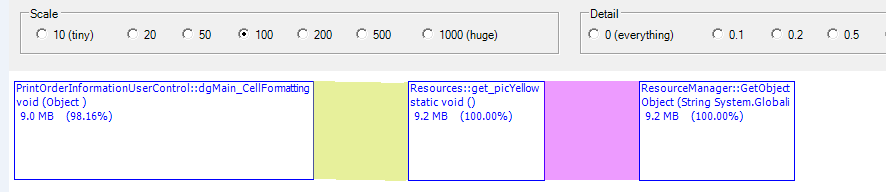
炮哥:“这个方法干嘛用的,要这么多的内存?”
勇哥:“其实做的事情很简单,根据每行订单的不同状态,显示不同的图标,以便让客户能够很直白的了解订单的状态。”
炮哥:“噢,是这样,那确实没什么,让我看下代码。”
namespace IPP_PCL.HomeViewUserControl

{

    public partial class PrintOrderInformationUserControl : UserControl, IHomePrintOrderInformationView

    {

        #region Field

        private readonly PrintCellLiteServiceClient _serviceClient = new PrintCellLiteServiceClient();

        #endregion

        #region Event Handler

        /// <summary>

        /// 此事件主要用于图片按钮的显示

        /// </summary>

        /// <param name="sender"></param>

        /// <param name="e"></param>

        private void dgMain_CellFormatting(object sender, DataGridViewCellFormattingEventArgs e)

        {

            if (dgMain.Columns[e.ColumnIndex].Name.Equals("dgMain_PrintIcon"))

            {

                int row = e.RowIndex;

                //获取展示图片按钮的单元格

                string status = dgMain.Rows[row].Cells["dgMain_statusKey"].Value.ToString();

                switch (status)

                {

                    case "Print in Progress":

                        string erpSoNumber = this.dgMain.Rows[row].Cells["dgMain_ErpSoNumber"].Value.ToString();

                        //从DB中查找erp_so_number的记录

                        IEnumerable<FileIndexModel> fileIndexes = _serviceClient.GetFileIndex(erpSoNumber);

                        //如果在FileIndex表中存在pro的记录

                        if (fileIndexes == null || !fileIndexes.Any()) { break; }

                        FileIndexModel fileIndex = fileIndexes.First();

                        if (FileStatus.PRINTED != fileIndex.PrintedStatus && FileStatus.PARTIAL_PRINTED != fileIndex.PrintedStatus)

                        {

                            e.Value = Properties.Resources.picYellow;

                        }

                        else

                        {

                            e.Value = Properties.Resources.picGreen;

                        }

                        break;

                    case "Printed":

                        e.Value = Properties.Resources.picGreen;

                        break;

                    case "Partial Printed":

                        e.Value = Properties.Resources.picGreen;

                        break;

                    default:

                        e.Value = Properties.Resources.picYellow;

                        break;

                }

            }

        }

        #endregion

    }

}
勇哥:“......”
炮哥:“很简单,写得很明白,这方法没什么问题吧,会不会搞错了。”
勇哥:“应该不会,通过CLR Profile分析发现,在这个方法中创建了非常多的对象。”
炮哥:“你是说BitMap对象?”
勇哥:“是的。”
炮哥:“噢,明白了,每次访问Properties.Resources.picGreen类似的属性时,都会创建一个新的对象。但其实图标就那么几类,完全可以先保存在内存中,要用时直接引用就行了。”
勇哥:“说得对,让我修改下代码 ,看看情况。”
炮哥:“让我看下你怎么修改的?”
勇哥:“......”
 namespace IPP_PCL.HomeViewUserControl

 {

     public partial class PrintOrderInformationUserControl : UserControl, IHomePrintOrderInformationView

     {

         #region Field

         private readonly PrintCellLiteServiceClient _serviceClient = new PrintCellLiteServiceClient();

         Bitmap picGreenBitMap = Properties.Resources.picGreen;

         Bitmap picYellowBitMap = Properties.Resources.picYellow;

         #endregion

         #region Ctor

         public PrintOrderInformationUserControl()

         {

             InitializeComponent();

         }

         #endregion

         #region Event Handler

         /// <summary>

         /// 此事件主要用于图片按钮的显示

         /// </summary>

         /// <param name="sender"></param>

         /// <param name="e"></param>

         private void dgMain_CellFormatting(object sender, DataGridViewCellFormattingEventArgs e)

         {

             if (dgMain.Columns[e.ColumnIndex].Name.Equals("dgMain_PrintIcon"))

             {

                 int row = e.RowIndex;

                 //获取展示图片按钮的单元格

                 string status = dgMain.Rows[row].Cells["dgMain_statusKey"].Value.ToString();

                 switch (status)

                 {

                     case "Print in Progress":

                         var proDt = dgMain.DataSource as DataTable;

                         if (proDt == null || proDt.Rows.Count == ) { break; }

                         string erpSoNumber = this.dgMain.Rows[row].Cells["dgMain_ErpSoNumber"].Value.ToString();

                         //从DB中查找erp_so_number的记录

                         IEnumerable<FileIndexModel> fileIndexes = _serviceClient.GetFileIndex(erpSoNumber);

                         //如果在FileIndex表中存在pro的记录

                         if (fileIndexes == null || !fileIndexes.Any()) { break; }

                         FileIndexModel fileIndex = fileIndexes.First();

                         if (FileStatus.PRINTED != fileIndex.PrintedStatus && FileStatus.PARTIAL_PRINTED != fileIndex.PrintedStatus)

                         {

                             e.Value = picYellowBitMap;

                         }

                         else

                         {

                             e.Value = picGreenBitMap;

                         }

                         break;

                     case "Printed":

                         e.Value = picGreenBitMap;

                         break;

                     case "Partial Printed":

                         e.Value = picGreenBitMap;

                         break;

                     default:

                         e.Value = picYellowBitMap;

                         break;

                 }

             }

         }

         #endregion

     }

 }
炮哥:“再用CLR Profile分析下修改后的内存情况。”
勇哥:“你看,内存直接从9.0M变为425kB。”
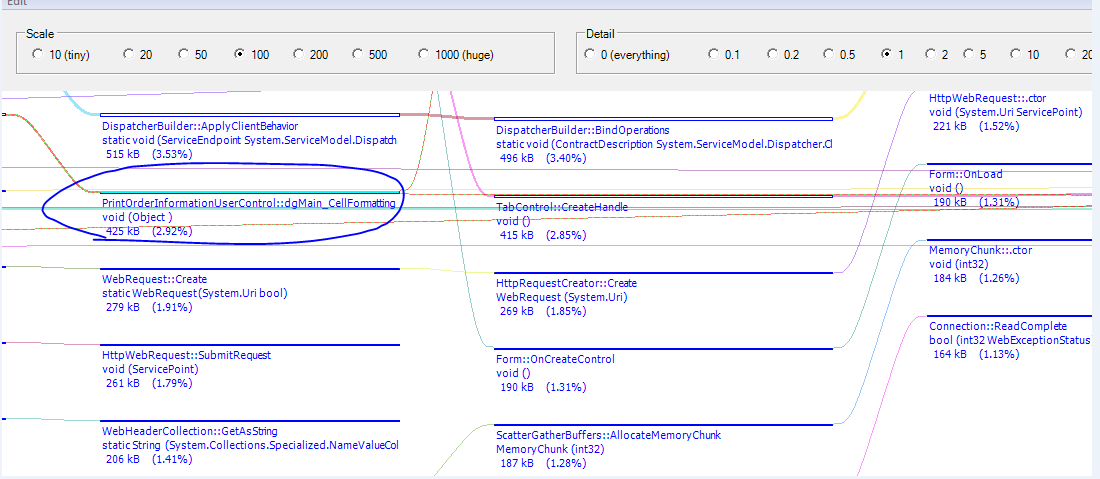
炮哥:“哈哈,看来问题已经解决了。”
勇哥:“今天我发现C#也有闭包的概念。”
炮哥:“闭包?什么玩意?”
勇哥:“我是在学习JS的时候发现有闭包这个概念,但是没想到C#也有这个。”
炮哥:“所以说当你视野放开时,你会发现更多的美好。”
勇哥:“不扯了,该下班了。噢,对了,昨晚看了一部电影<美丽人生>,有兴趣的话可以看下,很不错。”
第一次通过CLR Profile解决内存占用过高的问题的更多相关文章
- CLR Profile解决内存占用过高
CLR Profile解决内存占用过高的问题 炮哥:"嘿,哥们,忙啥呢,电脑卡成这逼样." 勇哥:"在用CLR Profile工具分析下FlexiPrint的内存占用情况 ...
- PHPExcel解决内存占用过大问题-dw 查找memoryCacheSize把1M改为2048M
http://blog.sina.com.cn/s/blog_4ec7952d0101fcrd.html PHPExcel解决内存占用过大问题-设置单元格对象缓存 PHPExcel是一个很强大的处理E ...
- Spring cloud开发内存占用过高解决方法
https://blog.csdn.net/wanhuiguizong/article/details/79289986 版权声明:本文为博主原创文章,转载请声明文章来源和原文链接. https:// ...
- PHPExcel解决内存占用过大问题-设置单元格对象缓存
PHPExcel解决内存占用过大问题-设置单元格对象缓存 PHPExcel是一个很强大的处理Excel的PHP开源类,但是很大的一个问题就是它占用内存太大,从1.7.3开始,它支持设置cell的缓存方 ...
- [转帖]Linux中buff/cache内存占用过高解决办法
Linux中buff/cache内存占用过高解决办法 https://www.cnblogs.com/rocky-AGE-24/p/7629500.html /proc/sys/vm/drop_cac ...
- 通过修改my.ini配置文件来解决MySQL 5.6 内存占用过高的问题
打开后台进程发现mysql占用的内存达到400+M. 修改一下my.ini这个配置文件的配置选项是可以限制MySQL5.6内存占用过高这一问题的,具体修改选项如下: performance_schem ...
- [2017-08-09]一则使用WinDbg工具调试iis进程调查内存占用过高的案例
最近遇到一个奇葩内存问题,跟了三四天,把Windbg玩熟了,所以打算分享下. 症状简介 我们团队的DEV开发环境只有一台4核16G的win2012r2. 这台服务器上装了SqlServer.TFS(项 ...
- 【转】一则使用WinDbg工具调试iis进程调查内存占用过高的案例
最近遇到一个奇葩内存问题,跟了三四天,把Windbg玩熟了,所以打算分享下. 症状简介 我们团队的DEV开发环境只有一台4核16G的win2012r2.这台服务器上装了SqlServer.TFS(项目 ...
- 一个神奇的bug:OOM?优雅终止线程?系统内存占用较高?
摘要:该项目是DAYU平台的数据开发(DLF),数据开发中一个重要的功能就是ETL(数据清洗).ETL由源端到目的端,中间的业务逻辑一般由用户自己编写的SQL模板实现,velocity是其中涉及的一种 ...
随机推荐
- SQL盲注
一.首先输入1和-1 查看输入正确和不正确两种情况 二.三种注入POC LOW等级 ... where user_id =$id 输入 真 and 假 = 假 (1)...where u ...
- 《TCP/IP详解 卷1:协议》第3章 IP:网际协议
3.1 引言 IP是TCP/IP协议族中最为核心的协议.所有的TCP.UDP.ICMP及IGMP数据都以IP数据报格式传输(见图1-4).许多刚开始接触TCP/IP的人对IP提供不可靠.无连接的数据报 ...
- telnet 批处理
**** 需要确认多台服务器端口是否打开,如果一个一个telnet会非常麻烦,通过百度,写了两个BAT,基本能做工作需要. ***start.bat start "" " ...
- java 获取目标时间到当前时间中间的月份和每月最大时间
话不多说自己上代码: Date firstDate = DateUtil.formate("2018-01-01", "yyyy-MM-dd"); Date c ...
- 友晶Altera Cyclone V GX Starter Kit开发板使用ADC-第一篇
1. 拿到板子在,做工很好,属于GX系列,GX应该是高速收发器 2. 去探究下GX是什么用途,大约有6个型号,这个板子是5CGXFX5,有77 LE逻辑单元,这个收发器不知道是什么?6个 3.125G ...
- jQuery tableExport导出 excel
上篇写的是jQuery 导出word,就试试导出excel.看见网上写的很乱,我这就把我写的整理下来,有部分来自网上capy 1. js文件的引用 <script type="te ...
- ajax跨域请求php
在众多站群中,不同功能的系统使用独立的一个域名,各系统之间存在相互调用的关系.使用js的XMLHttpRequest调用其他域名提示跨域权限不足.有些可能认为都同属于同一个顶级域名或者说域名一模一样怎 ...
- 解决Entity Framework查询匿名对象后的跨域访问的一种方式
在Entity Framework中,可以使用lambda表达式进行对数据的查询,而且可以将查询结果直接映射为对象或者对象列表,这极大的提高的开发速度,并且使数据层的数据更加方便处理和传递.但是很多时 ...
- dubbo入门(一)
1.简介 Dubbo由阿里巴巴开源,是一个分布式服务框架,致力于提供高性能和透明化的RPC(远程过程调用)远程服务调用方案,以及SOA服务治理方案.如果没有分布式的需求,Dbubbo是不需要的,其本质 ...
- HTML 常见的 DOCTYPE 声明
<!DOCTYPE> 声明必须是 HTML 文档的第一行,位于 <html> 标签之前. <!DOCTYPE> 声明不是 HTML 标签:它是指示 web 浏览器关 ...